1. บทนำ
This manual provides essential information for the safe and efficient operation of your Digi International WR21-L52A-DE1-TB Cellular Wireless Router. Please read this manual thoroughly before installation and use, and retain it for future reference. This device is designed to provide reliable cellular connectivity for various applications.
2. ข้อมูลด้านความปลอดภัย
- แหล่งจ่ายไฟ: Use only the power adapter supplied with the device. Using an incorrect adapter may damage the device and void the warranty.
- การระบายอากาศ : ตรวจสอบให้แน่ใจว่ามีการระบายอากาศที่เพียงพอรอบๆ เราเตอร์ อย่าปิดกั้นช่องระบายอากาศ
- สิ่งแวดล้อม: Avoid exposing the device to extreme temperatures, humidity, direct sunlight, or corrosive environments.
- การบริการ: อย่าพยายามเปิดหรือซ่อมแซมอุปกรณ์ด้วยตนเอง แนะนำให้ส่งช่างผู้ชำนาญเข้ารับบริการทั้งหมด
- เสาอากาศ: Ensure antennas are securely connected before powering on the device.
3. เนื้อหาบรรจุภัณฑ์
ตรวจสอบว่ามีรายการทั้งหมดอยู่ในแพ็คเกจ:
- Digi International WR21-L52A-DE1-TB Cellular Wireless Router
- อะแดปเตอร์แปลงไฟ
- Antennas (quantity may vary)
- สายเคเบิลอีเทอร์เน็ต
- คู่มือเริ่มต้นใช้งานฉบับย่อ (ถ้ามี)
หากมีรายการใดขาดหายหรือเสียหาย โปรดติดต่อผู้ขายของคุณทันที
4. สินค้าหมดview
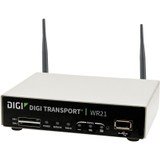
ภาพ: ด้านหน้า view of the Digi International WR21-L52A-DE1-TB Cellular Wireless Router. This image displays the compact form factor of the device, likely showing ports for antennas, power, and network connections.
The Digi International WR21-L52A-DE1-TB is a robust cellular wireless router designed for reliable and secure connectivity. It features multiple connectivity options and is suitable for various industrial and enterprise applications requiring remote access and data transfer over cellular networks.
5. การตั้งค่า
5.1. การติดตั้งซิมการ์ด
- ตรวจสอบให้แน่ใจว่าเราเตอร์ปิดอยู่และตัดการเชื่อมต่อจากแหล่งจ่ายไฟ
- Locate the SIM card slot(s) on the device. Refer to the device's physical markings for exact location.
- Insert the activated cellular SIM card into the slot with the gold contacts facing down and the notched corner oriented correctly. Push until it clicks into place.
- If applicable, secure the SIM card tray or cover.
5.2. การเชื่อมต่อเสาอากาศ
- Identify the cellular antenna ports (typically labeled 'MAIN' and 'DIV' or similar).
- Screw the provided cellular antennas onto the corresponding ports until finger-tight. Do not overtighten.
- วางตำแหน่งเสาอากาศเพื่อการรับสัญญาณที่เหมาะสมที่สุด
5.3. การเชื่อมต่อไฟฟ้า
- เสียบอะแดปเตอร์แปลงไฟเข้ากับพอร์ตจ่ายไฟของเราเตอร์
- เสียบอะแดปเตอร์จ่ายไฟเข้ากับเต้ารับไฟฟ้าที่เหมาะสม
- The router will power on automatically or may require pressing a power button. Observe the LED indicators for power status.
5.4. การเชื่อมต่อเครือข่าย (ทางเลือก)
- To connect a device via Ethernet, plug one end of an Ethernet cable into an available LAN port on the router.
- Plug the other end of the Ethernet cable into the network port of your computer or other network device.
6. คู่มือการใช้งาน
6.1. การเปิด/ปิดเครื่อง
- เปิดเครื่อง: Connect the power adapter. The device will typically power on automatically. Observe the power LED.
- หมดแรง: Disconnect the power adapter from the electrical outlet. For controlled shutdown, refer to the device's web interface or specific documentation for a software shutdown procedure if available.
6.2. การเข้าถึง Web อินเทอร์เฟซ
- Ensure your computer is connected to the router via Ethernet or Wi-Fi (if enabled).
- เปิด web เบราว์เซอร์ (เช่น Chrome, Firefox, Edge)
- Enter the router's default IP address (e.g., 192.168.1.1 or 192.168.0.1) into the address bar and press Enter. Refer to the Quick Start Guide or device label for the exact default IP address.
- Enter the default username and password when prompted. These are typically found on a label on the device or in the Quick Start Guide.
- Upon successful login, you will access the router's configuration interface.
6.3. การกำหนดค่าพื้นฐาน
ภายใน web อินเทอร์เฟซนี้ช่วยให้คุณสามารถกำหนดค่าการตั้งค่าต่างๆ ได้:
- Cellular Settings: Verify APN settings, signal strength, and connection status.
- การตั้งค่าเครือข่าย: Configure LAN IP address, DHCP server, and port forwarding.
- ความปลอดภัย: Change default login credentials, configure firewall rules, and VPN settings.
- อัพเดตเฟิร์มแวร์: Check for and apply firmware updates to ensure optimal performance and security.
7. การบำรุงรักษา
- การทำความสะอาด: ใช้ผ้านุ่มและแห้งเช็ดทำความสะอาดภายนอกเราเตอร์ ห้ามใช้น้ำยาทำความสะอาดหรือสเปรย์
- อัพเดตเฟิร์มแวร์: ตรวจสอบผู้ผลิตเป็นประจำ website for firmware updates. Keeping the firmware updated ensures the latest features, security patches, and performance improvements.
- สภาพแวดล้อม : Ensure the router is operating within its specified temperature and humidity ranges to prevent overheating or damage.
8 การแก้ไขปัญหา
8.1. No Cellular Connection
- Verify the SIM card is correctly inserted and activated with your cellular provider.
- Check antenna connections and ensure they are positioned for optimal signal.
- เข้าสู่ระบบ web interface to check cellular signal strength and connection status.
- รีสตาร์ทเราเตอร์
8.2. ไม่สามารถเข้าถึงได้ Web อินเทอร์เฟซ
- Ensure your computer is directly connected to the router via Ethernet.
- Verify your computer's IP address is in the same subnet as the router (e.g., if router is 192.168.1.1, computer should be 192.168.1.x).
- ลองล้างแคชเบราว์เซอร์ของคุณหรือใช้เบราว์เซอร์อื่น
- If you forgot the password, a factory reset might be necessary (refer to specific device documentation for this procedure, as it will erase all configurations).
8.3. ความเร็วการเชื่อมต่อช้า
- Check cellular signal strength in the web interface. Weak signal can lead to slow speeds.
- Ensure antennas are properly positioned and unobstructed.
- Verify your cellular data plan has not reached its data cap or is being throttled.
- Restart the router and connected devices.
9. ข้อมูลจำเพาะ
| คุณสมบัติ | คำอธิบาย |
|---|---|
| แบบอย่าง | WR21-L52A-DE1-TB |
| ยี่ห้อ | ดิจิ อินเตอร์เนชั่นแนล |
| โปรโตคอลการเชื่อมต่อ | เซลลูล่าร์ |
| เทคโนโลยีการเชื่อมต่อ | ยูเอสบี |
| วิธีการควบคุม | ระยะไกล |
| คุณสมบัติพิเศษ | ดับบลิวพีเอส |
| อุปกรณ์ที่รองรับ | เครื่องคอมพิวเตอร์ส่วนบุคคล |
| การใช้ที่แนะนำ | บ้าน |
| ยูพีซี | 747356312219 |
10. การรับประกันและการสนับสนุน
สำหรับข้อมูลการรับประกันโดยละเอียด โปรดดูบัตรรับประกันที่แนบมากับผลิตภัณฑ์ของคุณ หรือเยี่ยมชมเว็บไซต์อย่างเป็นทางการของ Digi International website. Technical support is available through the manufacturer's support channels. Please have your product model number (WR21-L52A-DE1-TB) and serial number ready when contacting support.