1. บทนำ
Thank you for choosing the JACK F4 Direct Drive Sewing Machine. This manual provides essential information for the safe and efficient operation, setup, and maintenance of your new sewing machine. Please read this manual thoroughly before using the machine to ensure proper function and longevity.

Figure 1: The JACK F4 Direct Drive Sewing Machine, showcasing its sleek design and integrated motor.
2. คำแนะนำด้านความปลอดภัย
ปฏิบัติตามข้อควรระวังด้านความปลอดภัยขั้นพื้นฐานเสมอเมื่อใช้เครื่องใช้ไฟฟ้า เพื่อลดความเสี่ยงต่อการเกิดไฟไหม้ ไฟฟ้าช็อต หรือการบาดเจ็บต่อบุคคล
- Ensure the machine is unplugged from the power outlet before cleaning, servicing, or when not in use.
- Keep fingers away from all moving parts, especially the needle, presser foot, and handwheel.
- Never operate the machine with the air openings blocked. Keep ventilation openings of the sewing machine and foot controller free from the accumulation of lint, dust, and loose cloth.
- ห้ามดำเนินการในบริเวณที่มีการใช้ผลิตภัณฑ์สเปรย์ หรือในบริเวณที่มีการส่งออกซิเจน
- ใช้เฉพาะอุปกรณ์เสริมที่ผู้ผลิตแนะนำเท่านั้น
- เครื่องใช้ไฟฟ้าตัวนี้ไม่ได้มีวัตถุประสงค์เพื่อให้บุคคล (รวมทั้งเด็ก) ที่มีความบกพร่องทางร่างกาย ทางประสาทสัมผัส หรือทางจิตใจ หรือขาดประสบการณ์และความรู้ ใช้งาน เว้นแต่จะมีการดูแลหรือคำแนะนำเกี่ยวกับการใช้เครื่องใช้ไฟฟ้าโดยบุคคลที่รับผิดชอบด้านความปลอดภัยของบุคคลดังกล่าว
3. การตั้งค่า
3.1 การแกะและการจัดวาง
Carefully remove the machine from its packaging. Place the machine on a stable, level surface with adequate lighting. Ensure there is enough space around the machine for comfortable operation and material handling.
3.2 การเชื่อมต่อสายไฟ
Connect the power cord to the machine's power input and then plug it into a suitable electrical outlet. The JACK F4 features a power-saving direct drive motor.

รูปที่ 2: ด้านข้าง view of the machine, showing the power cord connection point.
3.3 การติดตั้งเข็ม
Ensure the machine is turned off and unplugged. Loosen the needle clamp screw, insert the new needle with the flat side facing the back of the machine, and push it up as far as it will go. Tighten the needle clamp ขันสกรูให้แน่น
3.4 การพันด้ายและการใส่ด้ายลงในกระสวย
Follow the winding path indicated on the machine for the bobbin thread. Once wound, insert the bobbin into the bobbin case under the needle plate. Refer to the markings for correct thread tension and direction.

Figure 3: Close-up of the needle and bobbin area, crucial for threading and maintenance.
3.5 การร้อยด้ายเครื่องจักร
Raise the presser foot and needle to their highest positions. Follow the numbered threading path from the spool pin through the tension discs, take-up lever, and finally through the needle eye. Pull both upper and bobbin threads to the back under the presser foot.
4. คู่มือการใช้งาน
4.1 การเปิด/ปิดเครื่อง
Locate the power switch, typically on the side or front of the machine. Press to turn the machine on or off. The integrated LED light near the needle plate will illuminate when the machine is on.
การปรับความเร็ว 4.2
The JACK F4 features adjustable speed control. Use the control panel, usually with '+' and '-' buttons or a dial, to set your desired sewing speed. Start with a slower speed for beginners or intricate work.

Figure 4: The control panel and speed adjustment dial, allowing precise control over sewing speed.
4.3 Needle Position Adjusting/Locking Stitch
This machine allows for needle position adjustment and locking stitch functionality. Consult the control panel for specific buttons or settings to utilize these features, which enhance precision and finish.
4.4 Basic Stitching
Place your fabric under the presser foot. Lower the presser foot. Gently press the foot pedal to begin sewing. Guide the fabric smoothly, allowing the machine to feed it. To reverse stitch, use the reverse lever or button.

รูปที่ 5: รายละเอียด view of the needle and presser foot, showing the working area.
5. การบำรุงรักษา
การบำรุงรักษาอย่างสม่ำเสมอจะช่วยให้จักรเย็บผ้าของคุณมีอายุการใช้งานยาวนานและทำงานได้อย่างมีประสิทธิภาพสูงสุด
- การทำความสะอาด: Regularly clean lint and dust from the bobbin area, feed dogs, and tension discs using a small brush or vacuum cleaner. Always unplug the machine before cleaning.
- การหล่อลื่น: Refer to the machine's specific oiling points (if any) and lubricate with high-quality sewing machine oil as recommended.
- การเปลี่ยนเข็ม: Replace needles frequently, especially when working with new projects or if you notice skipped stitches or fabric damage. A dull or bent needle can cause significant issues.
- พื้นที่จัดเก็บ: When not in use, cover the machine to protect it from dust and store it in a dry place.
6 การแก้ไขปัญหา
ส่วนนี้จะกล่าวถึงปัญหาทั่วไปที่คุณอาจพบ สำหรับปัญหาที่ซับซ้อนมากขึ้น โปรดติดต่อฝ่ายสนับสนุนลูกค้า
| ปัญหา | สาเหตุที่เป็นไปได้ | สารละลาย |
|---|---|---|
| ข้ามตะเข็บ | เข็มไม่ถูกต้อง เข็มงอ การร้อยด้ายไม่ถูกวิธี | เปลี่ยนเข็ม ร้อยด้ายใหม่ ตรวจสอบให้แน่ใจว่าใช้เข็มชนิดที่ถูกต้องสำหรับเนื้อผ้า |
| ด้ายแตก | Incorrect tension, poor quality thread, burrs on needle plate. | ปรับความตึงของด้าย ใช้ด้ายคุณภาพดี ตรวจสอบดูว่ามีเสี้ยนหรือไม่ |
| เครื่องไม่สตาร์ท | Not plugged in, power switch off, safety mechanism engaged. | Check power connection, turn on switch, ensure presser foot is down. |
| เย็บไม่เท่ากัน | ความตึงไม่ถูกต้อง เข็มสึกหรอ การป้อนผ้าไม่สม่ำเสมอ | Adjust tension, replace needle, guide fabric evenly. |
7. ข้อมูลจำเพาะ
Key specifications and features of the JACK F4 Direct Drive Sewing Machine:
- ยี่ห้อ: แจ็ก
- แบบอย่าง: F4
- สี: สีฟ้า
- ประเภทมอเตอร์: Direct Drive Motor (Power Saving, Power Efficient)
- การควบคุมความเร็ว: ปรับความเร็วได้
- แสงสว่าง: LED Light Near Needle Plate
- Needle Features: Needle Position Adjusting/Locking Stitch
- ขนาดสินค้า : 9.8D x 25.4W x 21.7H เซนติเมตร
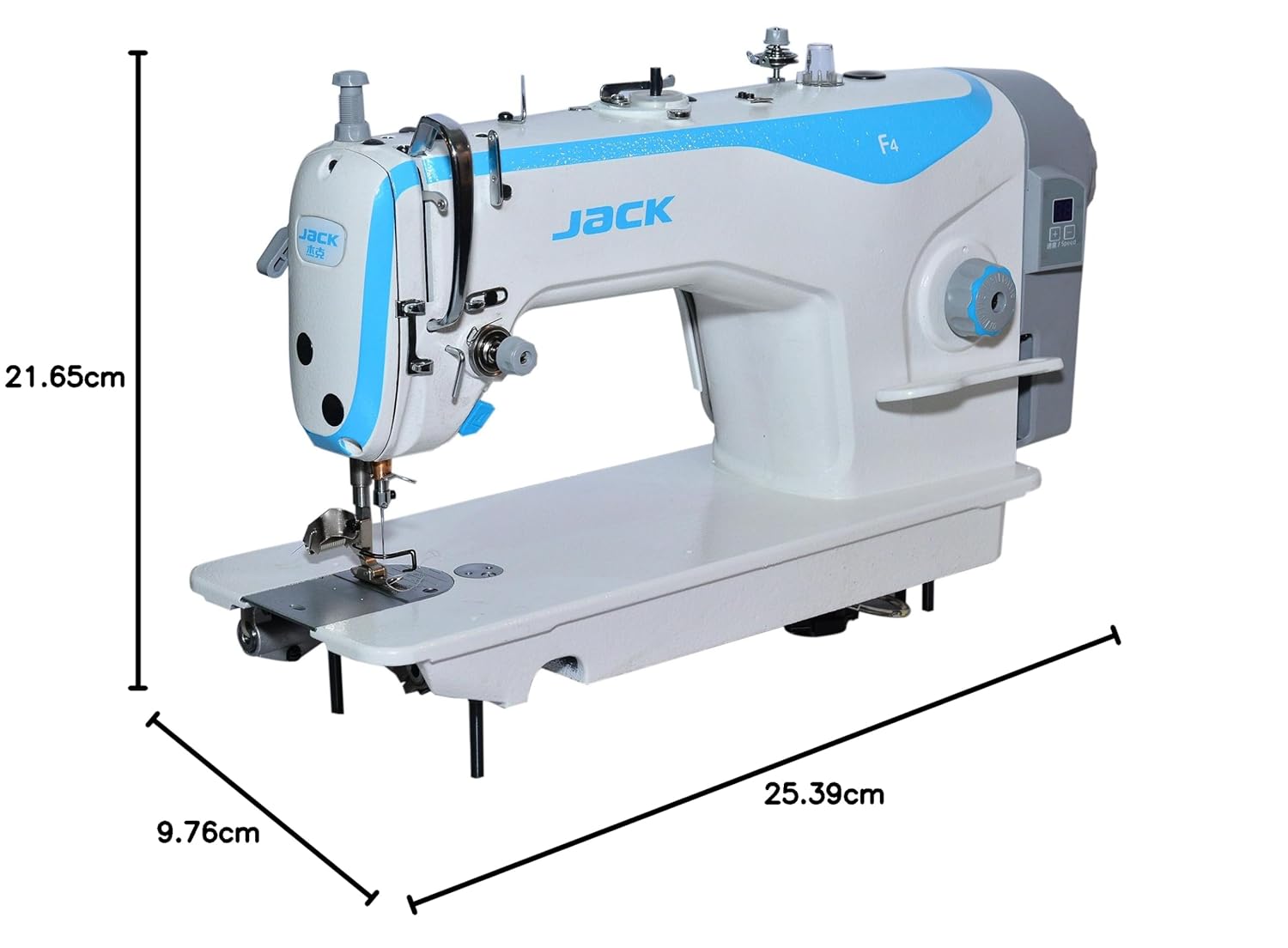
Figure 6: Product dimensions for the JACK F4 sewing machine.
8. การรับประกันและการสนับสนุน
The JACK F4 Direct Drive Sewing Machine comes with a รับประกัน 1 ปี นับจากวันที่ซื้อ การรับประกันนี้ครอบคลุมข้อบกพร่องจากการผลิตภายใต้การใช้งานปกติ โปรดเก็บหลักฐานการซื้อไว้เพื่อขอรับสิทธิ์การรับประกัน
For technical support, service, or warranty inquiries, please contact your authorized JACK dealer or the customer service department. Provide your machine's model number and a detailed description of the issue to facilitate faster assistance.


