การแนะนำ
This manual provides detailed instructions for the SKMEI 1219 Digital Watch. It covers essential information regarding the watch's features, setup, operation, maintenance, and troubleshooting. Please read this manual thoroughly to ensure proper use and to maximize the lifespan of your timepiece.

ด้านหน้า view of the SKMEI 1219 Digital Watch, showing the digital display and button layout.
ปุ่มฟังก์ชั่น
The SKMEI 1219 Digital Watch features four primary buttons for various functions. Refer to the diagram below for their locations and primary roles:
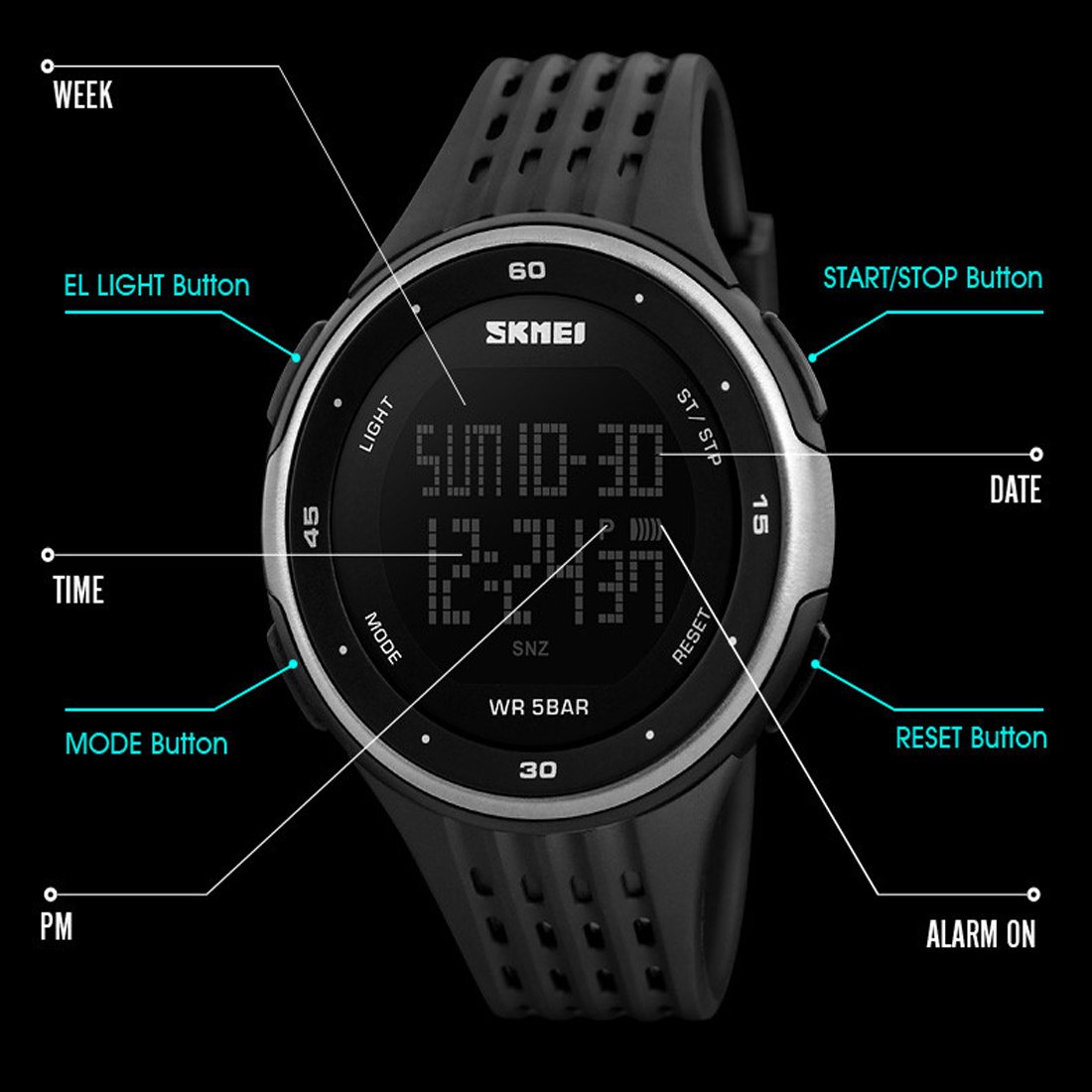
This diagram identifies the functions of each button and display area on the SKMEI 1219 Digital Watch, including LIGHT, MODE, START/STOP, RESET buttons, and display indicators for WEEK, DATE, TIME, PM, ALARM ON, and SNZ (Snooze).
- ปุ่มไฟ (ซ้ายบน): เปิดไฟแบ็คไลท์เพื่อเพิ่มทัศนวิสัยในสภาพแสงน้อย
- ปุ่มโหมด (ซ้ายล่าง): Cycles through different modes: Time Display, Stopwatch, and Alarm Setting.
- ปุ่ม START/STOP (ขวาบน): ใช้สำหรับเริ่มและหยุดนาฬิกาจับเวลา และปรับการตั้งค่าในโหมดต่างๆ
- ปุ่มรีเซ็ต (ล่างขวา): Used to reset the stopwatch, confirm settings, or clear values.
การตั้งค่า
การตั้งเวลาและวันที่
- จากโหมดแสดงเวลาปกติ ให้กดปุ่ม โหมด กดปุ่มสามครั้งเพื่อเข้าสู่โหมดตั้งเวลา ตัวเลขวินาทีจะเริ่มกะพริบ
- กดปุ่ม รีเซ็ต button to cycle through the setting options: Seconds → Hours → Minutes → Month → Date → Day of the Week.
- While a digit is flashing, use the เริ่ม/หยุด button to adjust the value. Hold the button to increase the value rapidly.
- เมื่อปรับการตั้งค่าทั้งหมดแล้ว ให้กดปุ่ม โหมด กดปุ่มเพื่อกลับไปแสดงเวลาตามปกติ
คำแนะนำการใช้งาน
การใช้นาฬิกาจับเวลา
- จากหน้าจอแสดงเวลาปกติ ให้กดปุ่ม โหมด กดปุ่มหนึ่งครั้งเพื่อเข้าสู่โหมดนาฬิกาจับเวลา หน้าจอจะแสดง '00:00:00'
- กดปุ่ม เริ่ม/หยุด ปุ่มสำหรับเริ่มจับเวลา
- กดปุ่ม เริ่ม/หยุด กดปุ่มอีกครั้งเพื่อหยุดนาฬิกาจับเวลาชั่วคราว
- ขณะที่หยุดชั่วคราว ให้กดปุ่ม รีเซ็ต กดปุ่มเพื่อรีเซ็ตนาฬิกาจับเวลาเป็น '00:00:00'
- กดปุ่ม โหมด ปุ่มสำหรับออกจากโหมดนาฬิกาจับเวลา
การตั้งค่าและการใช้นาฬิกาปลุก
- จากหน้าจอแสดงเวลาปกติ ให้กดปุ่ม โหมด กดปุ่มสองครั้งเพื่อเข้าสู่โหมดตั้งค่านาฬิกาปลุก ตัวเลขชั่วโมงจะกะพริบ
- กดปุ่ม เริ่ม/หยุด ปุ่มเพื่อปรับชั่วโมง
- กดปุ่ม รีเซ็ต กดปุ่มเพื่อเปลี่ยนไปใช้การตั้งค่านาที ตัวเลขนาทีจะกะพริบ
- กดปุ่ม เริ่ม/หยุด ปุ่มเพื่อปรับนาที
- กดปุ่ม โหมด กดปุ่มเพื่อออกจากโหมดตั้งค่านาฬิกาปลุก
- หากต้องการเปิด/ปิดนาฬิกาปลุก ในโหมดแสดงเวลาปกติ ให้กดปุ่มค้างไว้ รีเซ็ต ปุ่มแล้วกดปุ่ม เริ่ม/หยุด กดปุ่ม ไอคอนแจ้งเตือนจะปรากฏ/หายไปบนหน้าจอ
การใช้แบ็คไลท์
กดปุ่ม แสงสว่าง กดปุ่ม (ด้านบนซ้าย) เพื่อเปิดไฟหน้าจอเป็นเวลาไม่กี่วินาที คุณสมบัตินี้มีประโยชน์ในสภาพแวดล้อมที่มืด
การซ่อมบำรุง
การทำความสะอาดนาฬิกาของคุณ
ในการทำความสะอาดนาฬิกา ให้เช็ดเบาๆ ด้วยผ้าแห้งนุ่มๆ สำหรับคราบสกปรกที่ติดแน่น ให้ใช้ผ้าชุบน้ำหมาดๆ เช็ดเบาๆamp cloth can be used, followed by a dry cloth. Avoid using chemical cleaners, solvents, or abrasive materials, as these can damage the watch's finish and components.
ความต้านทานต่อน้ำ
This watch has a water resistance depth of 50 meters (5 ATM). This means it is suitable for everyday use and can withstand splashes, rain, and brief immersion in water. It is ไม่ recommended for swimming, diving, or prolonged water activities. Do not operate buttons while the watch is wet or submerged, as this can compromise the water seal.
การเปลี่ยนแบตเตอรี่
When the display becomes dim or functions become erratic, the battery may need replacement. Battery replacement should ideally be performed by a qualified watch technician to ensure the water resistance seal is properly maintained. Attempting to replace the battery yourself may void the warranty or damage the watch.

หลัง view of the SKMEI 1219 Digital Watch, highlighting the stainless steel case back and the secure buckle clasp on the plastic band.
การแก้ไขปัญหา
| ปัญหา | สาเหตุที่เป็นไปได้ | สารละลาย |
|---|---|---|
| จอแสดงผลว่างเปล่าหรือมืดลง | แบตเตอรี่ต่ำหรือหมด | เปลี่ยนแบตเตอรี่ ปรึกษาช่างซ่อมนาฬิกาผู้เชี่ยวชาญ |
| ปุ่มต่างๆ ไม่ตอบสนอง | นาฬิกาอาจอยู่ในโหมดล็อกหรือเกิดความผิดปกติภายใน | ลองกดปุ่มทั้งหมดให้แน่น หากปัญหายังคงอยู่ โปรดติดต่อฝ่ายสนับสนุน |
| เวลาไม่ถูกต้อง | Time was not set correctly or accidental adjustment. | Re-set the time and date following the 'Setting Time and Date' instructions. |
| มีน้ำอยู่ภายในนาฬิกา | Water resistance compromised due to button operation underwater or excessive depth. | นำนาฬิกาไปให้ช่างผู้เชี่ยวชาญตรวจสอบและซ่อมแซมโดยทันที เพื่อป้องกันความเสียหายเพิ่มเติม |
ข้อมูลจำเพาะ
- หมายเลขรุ่น: 1219
- ประเภทจอภาพ: ดิจิตอล
- ประเภทการเคลื่อนไหว: ควอตซ์
- วัสดุเคส: พลาสติก
- เส้นผ่านศูนย์กลางตัวเรือน: 50 มิลลิเมตร
- วัสดุหน้าปัดกระจก: แร่ธาตุ
- วัสดุสาย: พลาสติก
- แถบสี: สีดำ
- ประเภทตัวล็อค: หัวเข็มขัด
- ความลึกของการต้านทานน้ำ: 50 เมตร (5 ATM)
- ฟังก์ชั่น: Time, Date, Day, Alarm, Stopwatch, Backlight
- น้ำหนักสินค้า: 70 กรัม
- ผู้ผลิต: บริษัท กวางโจว สกเหมย วอทช์ จำกัด
ข้อมูลการรับประกัน
This SKMEI 1219 Digital Watch comes with a manufacturer's warranty. For specific details regarding the warranty period, coverage, and terms, please refer to the warranty card included with your purchase or contact the manufacturer directly. Keep your proof of purchase for warranty claims.
การสนับสนุนลูกค้า
If you encounter any issues not covered in this manual or require further assistance, please contact your retailer or the SKMEI customer support. You may find contact information on the product packaging or the official SKMEI webเว็บไซต์.


