1. บทนำ
The HP Ultra-Slim Z4000 Wireless Optical Mouse is designed for portability and comfort, offering reliable 2.4 GHz wireless connectivity. Its sleek, low-profile design and ergonomic shape provide a natural fit for your hand, making it an ideal accessory for notebooks and tablets. This manual provides detailed instructions for the setup, operation, and maintenance of your mouse.

Figure 1: HP Z4000 Wireless Mouse, demonstrating its slim and stylish design alongside a keyboard.
2. การตั้งค่า
2.1 เนื้อหาบรรจุภัณฑ์
ก่อนที่คุณจะเริ่มต้น โปรดตรวจสอบให้แน่ใจว่ามีรายการทั้งหมดอยู่ในแพ็คเกจ:
- HP Z4000 Wireless Mouse
- 2.4GHz Micro Receiver (USB dongle)
- แบตเตอรี่ขนาด AA 1 ก้อน
- โปสเตอร์เริ่มต้นอย่างรวดเร็ว
- หมายเหตุเกี่ยวกับผลิตภัณฑ์
- บัตรรับประกัน
2.2 การติดตั้งแบตเตอรี่
- ค้นหาช่องใส่แบตเตอรี่ที่ด้านล่างของเมาส์
- เลื่อนฝาแบตเตอรี่เปิดออก
- ใส่แบตเตอรี่ AA ที่ให้มา โดยตรวจสอบให้แน่ใจว่าขั้วถูกต้อง (+/-)
- ปิดฝาครอบแบตเตอรี่ให้แน่น

Figure 2: Underside of the mouse, showing the battery compartment (under the main cover), CONNECT button, and ON/OFF switch.
2.3 การเชื่อมต่อเครื่องรับ
- Locate the 2.4GHz Micro Receiver (USB dongle). This may be stored inside the mouse's battery compartment or included separately.
- Insert the USB receiver into an available USB port on your computer or tablet.
- เปิดเมาส์โดยใช้สวิตช์เปิด/ปิดที่อยู่ด้านล่าง
- คอมพิวเตอร์ของคุณควรตรวจจับและติดตั้งไดรเวอร์ที่จำเป็นโดยอัตโนมัติ เมาส์พร้อมใช้งานแล้ว
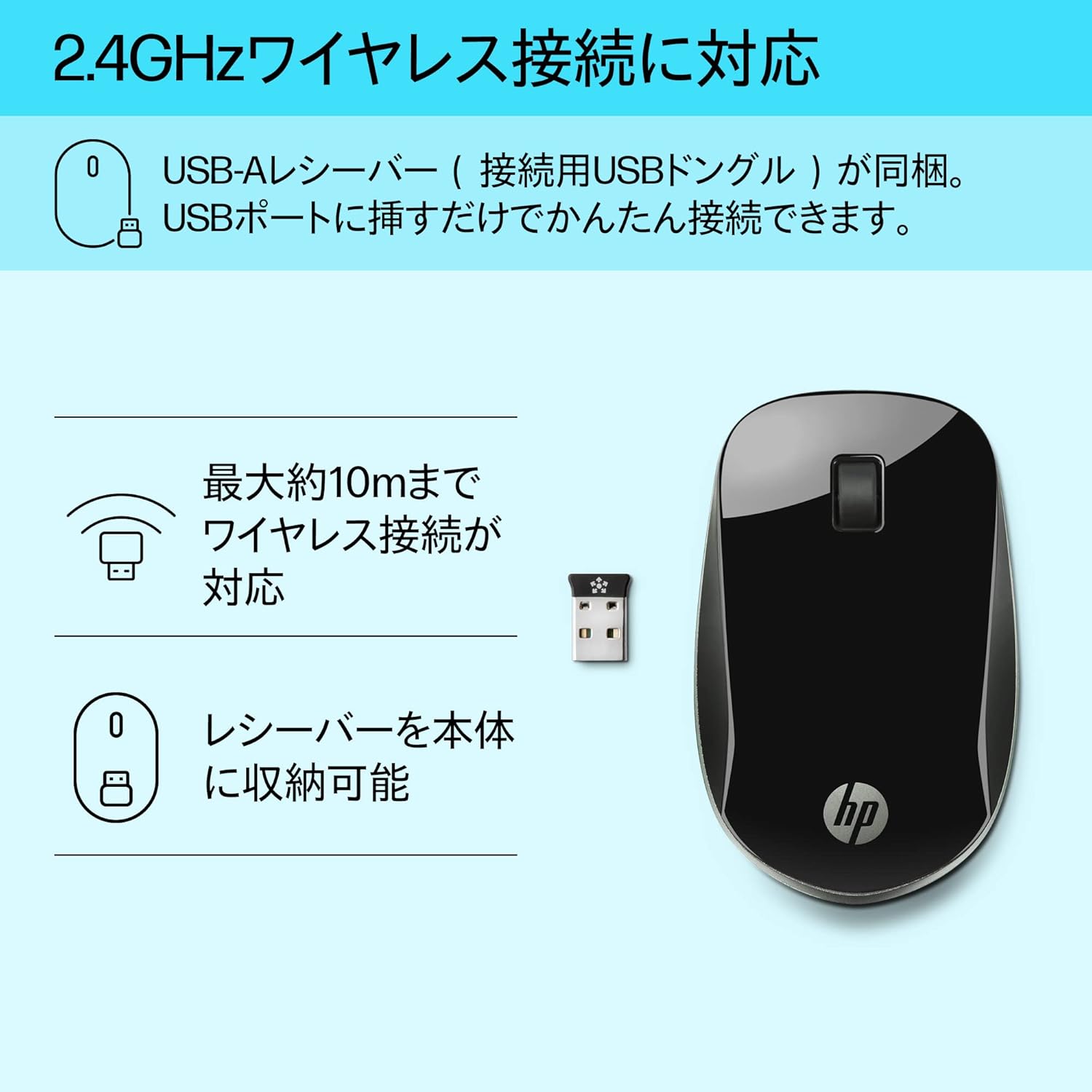
Figure 3: The HP Z4000 mouse and its 2.4GHz USB receiver, demonstrating the simple plug-and-play connection.
3. การใช้งานเมาส์
The HP Z4000 mouse features a standard three-button layout and a scroll wheel for intuitive navigation.
3.1 ฟังก์ชั่นพื้นฐาน
- คลิกซ้าย: ปุ่มหลักสำหรับเลือกรายการ เปิด fileและดำเนินการตามคำสั่ง
- คลิกขวา: ปุ่มรองสำหรับเข้าถึงเมนูบริบทและตัวเลือกเพิ่มเติม
- ล้อเลื่อน: เลื่อนขึ้นหรือลงเพื่อเลื่อนดูเอกสารต่างๆ และ web pages. The scroll wheel is also clickable for middle-click functionality (if supported by your operating system/application).

รูปที่ 4: ด้านบน view of the mouse, indicating the left click, right click, and rubber scroll wheel for easy operation.
3.2 หลักสรีรศาสตร์และการออกแบบ
The mouse features an arch-shaped, symmetrical design that comfortably fits both left and right hands. Its ultra-slim profile (less than 2.6 cm in height) promotes a natural hand and wrist position, reducing strain during extended use.
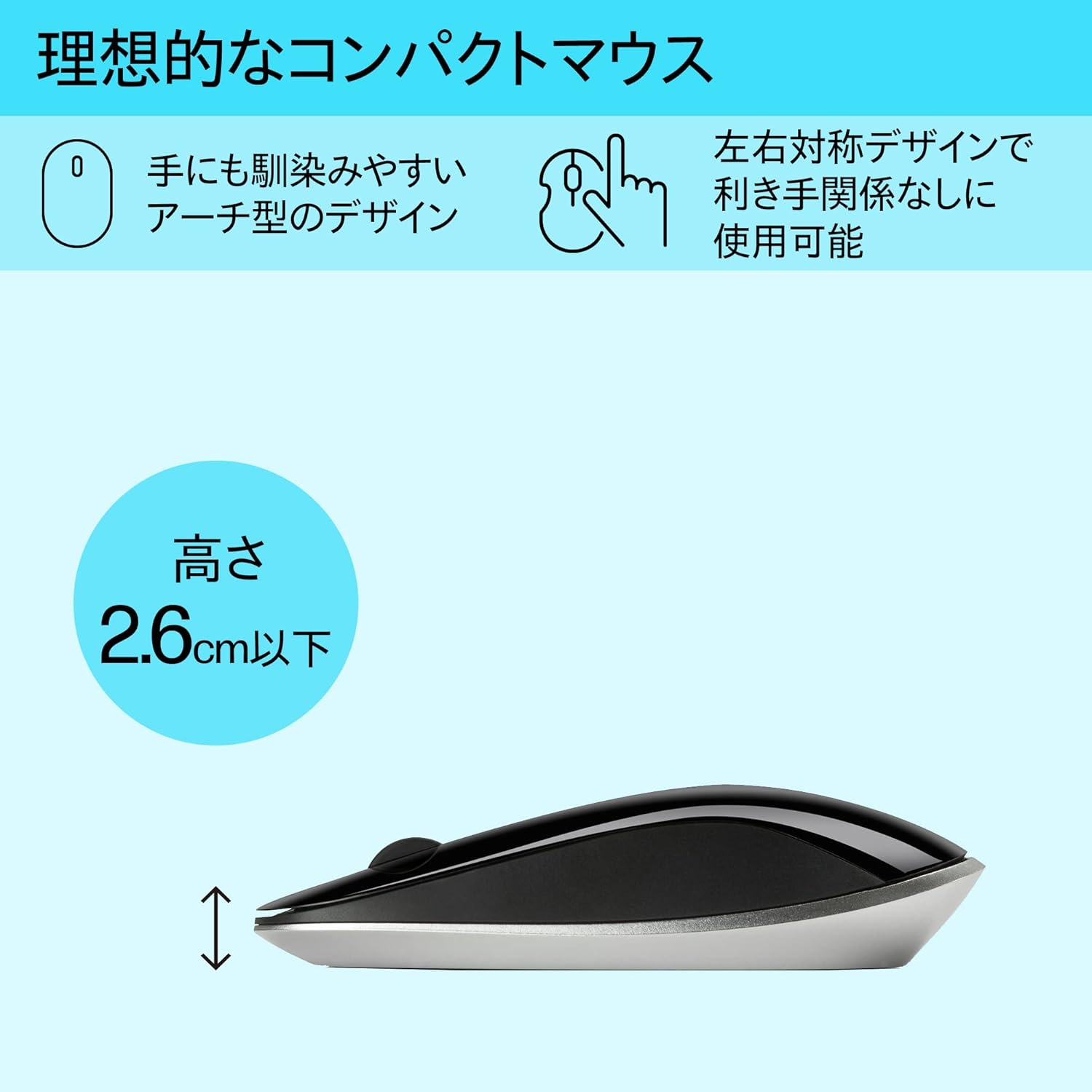
Figure 5: The ergonomic arch design and slim profile (under 2.6cm) of the HP Z4000 mouse, designed for comfortable use.
4. การบำรุงรักษา
4.1 การทำความสะอาดเมาส์
- ตรวจสอบให้แน่ใจว่าปิดเมาส์แล้วก่อนทำความสะอาด
- ใช้ผ้านุ่มไม่เป็นขุยค่อยๆ งampลงด้วยน้ำหรือน้ำยาทำความสะอาดอ่อนๆ
- เช็ดพื้นผิวของเมาส์เบาๆ หลีกเลี่ยงความชื้นมากเกินไป
- ห้ามใช้น้ำยาทำความสะอาดที่มีฤทธิ์กัดกร่อนหรือตัวทำละลาย
4.2 การเปลี่ยนแบตเตอรี่
The mouse uses one AA battery, with an average battery life of 12 months. When the mouse performance degrades or it stops responding, it's time to replace the battery.
- ปิดเมาส์โดยใช้สวิตช์เปิด/ปิด
- เปิดฝาช่องใส่แบตเตอรี่ที่อยู่ด้านล่างของเมาส์
- ถอดแบตเตอรี่ AA เก่าออก
- ใส่แบตเตอรี่ AA ใหม่ โดยสังเกตขั้วที่ถูกต้อง
- ปิดฝาครอบแบตเตอรี่
- เปิดใช้งานเมาส์อีกครั้ง
5 การแก้ไขปัญหา
5.1 เมาส์ไม่ตอบสนอง
- ตรวจสอบพลังงาน: ตรวจสอบให้แน่ใจว่าเมาส์เปิดอยู่
- ตรวจสอบแบตเตอรี่: เปลี่ยนแบตเตอรี่ AA หากแบตเตอรี่อ่อนหรือหมด
- ตรวจสอบเครื่องรับ: ตรวจสอบให้แน่ใจว่าตัวรับสัญญาณ USB เสียบเข้ากับพอร์ต USB ที่ใช้งานได้บนคอมพิวเตอร์ของคุณอย่างแน่นหนา ลองใช้พอร์ต USB อื่น
- สร้างการเชื่อมต่อใหม่: If your mouse has a "CONNECT" button (refer to Figure 2), press it and then press the connect button on the receiver (if applicable, or simply re-insert the receiver).
- ระยะทาง: Ensure the mouse is within the 10-meter (30ft) operating range of the receiver.
5.2 การเคลื่อนไหวของเคอร์เซอร์ที่ไม่แน่นอน
- พื้นผิว: ควรใช้เมาส์บนพื้นผิวที่สะอาด ไม่สะท้อนแสง และเรียบเสมอกัน หลีกเลี่ยงกระจกหรือพื้นผิวที่สะท้อนแสงสูง
- ความสะอาดของเซ็นเซอร์: Check the optical sensor on the underside of the mouse for any dust or debris and clean it gently with a soft cloth.
- การรบกวน: Move the mouse away from other wireless devices that might cause interference.
6. ข้อมูลจำเพาะ
| คุณสมบัติ | รายละเอียด |
|---|---|
| ยี่ห้อ | HP |
| หมายเลขรุ่น | H5N61AA |
| การเชื่อมต่อ | 2.4 GHz ไร้สาย (ตัวรับสัญญาณ USB) |
| การตรวจจับการเคลื่อนไหว | ออฟติคอล |
| จำนวนปุ่ม | 3 (ซ้าย, ขวา, คลิกล้อเลื่อน) |
| ขนาด (กxยxส) | 10.1 x 2.5 x 6.4 ซม. (ประมาณ 4 x 1 x 2.5 นิ้ว) |
| น้ำหนัก | 231 กรัม (ประมาณ 8.1 ออนซ์) |
| สี | สีดำ |
| ประเภทแบตเตอรี่ | 1 x AA แบตเตอรี่ (รวมอยู่ด้วย) |
| อายุการใช้งานแบตเตอรี่โดยเฉลี่ย | 12 เดือน |
| ระบบปฏิบัติการที่รองรับ | ลินุกซ์, วินโดวส์ 7, วินโดวส์ XP (และเวอร์ชันที่ใหม่กว่า) |
7. การรับประกันและการสนับสนุน
The HP Ultra-Slim Z4000 Wireless Optical Mouse comes with a การรับประกันจากผู้ผลิต 1 ปี ตั้งแต่วันที่ซื้อสินค้า
For warranty claims, technical support, or further assistance, please refer to the contact information provided in your product's warranty card or visit the official HP support webเว็บไซต์:
ฝ่ายสนับสนุนอย่างเป็นทางการของ HP
โปรดเก็บหลักฐานการซื้อไว้เพื่อใช้ยืนยันการรับประกัน