1. บทนำ
The Turtle Beach Stealth 700 is a premium wireless gaming headset designed for an immersive audio experience on PlayStation 5 and PlayStation 4 consoles. This manual provides essential information on setting up, operating, and maintaining your headset, ensuring optimal performance and longevity.

Figure 1: Turtle Beach Stealth 700 Wireless Gaming Headset
2. อะไรอยู่ในกล่อง
Upon unboxing your Turtle Beach Stealth 700 headset, please ensure all the following components are present:
- Turtle Beach Stealth 700 Wireless Gaming Headset
- เครื่องส่งสัญญาณ USB ไร้สาย
- สายชาร์จ USB-C
- คู่มือเริ่มต้นใช้งานฉบับย่อ / เอกสารประกอบ
วิดีโอ 1: ผลิตภัณฑ์อย่างเป็นทางการเสร็จสิ้นview and unboxing of the Turtle Beach Stealth 700 headset.
3. สินค้าหมดview
Familiarize yourself with the physical components and controls of your Stealth 700 headset.
3.1 ส่วนประกอบของชุดหูฟัง

Figure 2: User wearing the Stealth 700 headset, demonstrating its over-ear design.
- แถบคาดศีรษะปรับได้: Features a synthetic leather-wrapped headband for comfort.
- ฟองน้ำรองหูฟัง: Premium synthetic leather-wrapped ear cushions with ProSpecs glasses-friendly design to relieve pressure.
- 50mm Over-Ear Speakers: Deliver immersive surround sound and chat audio.
- High-Sensitivity Flip-Up Mic: Integrated microphone that mutes when flipped up.
3.2 การควบคุม
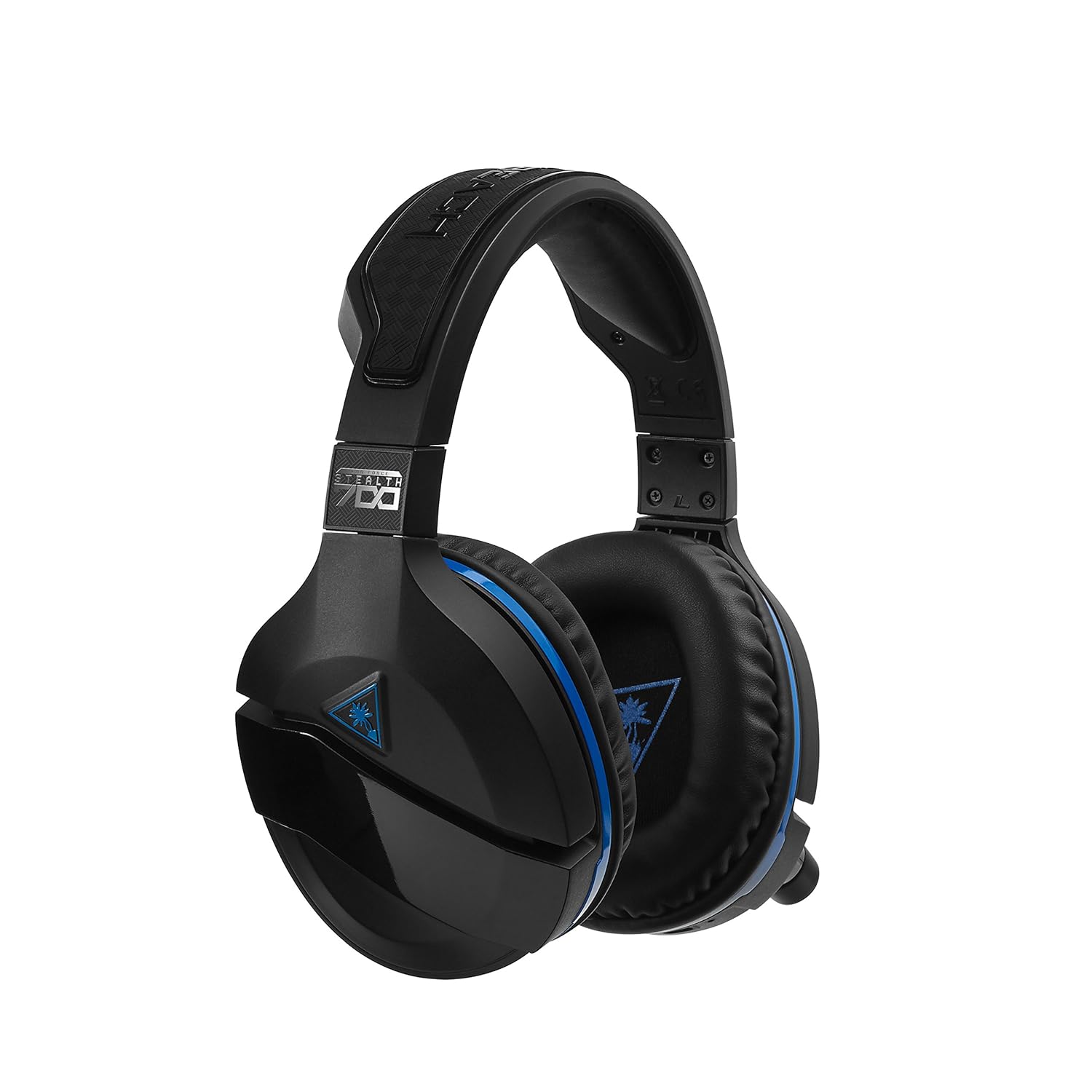
Figure 3: Right earcup controls and microphone in the down position.
- ปุ่มเปิด/ปิด: เปิด/ปิดชุดหูฟัง
- ปุ่มบลูทูธ: เริ่มการจับคู่บลูทูธ
- Game Volume Dial: Adjusts the overall game audio volume.
- Chat Volume Dial: Adjusts the chat audio volume independently.
- หน้าปัดตรวจสอบไมโครโฟน: Adjusts the level of your own voice heard in the headset.
- Superhuman Hearing Button: Activates/deactivates the Superhuman Hearing sound setting.
- ปุ่มโหมด: Cycles through DTS surround sound modes and audio presets.

Figure 4: Microphone in the flipped-up (muted) position.
4. คำแนะนำในการตั้งค่า
Follow these steps to set up your Turtle Beach Stealth 700 headset with your PlayStation console.
4.1 การชาร์จเริ่มต้น
- Connect the USB-C Charging Cable to the headset and a USB power source.
- Charge the headset fully before first use (approximately 5 hours). The LED indicator will change when fully charged.
4.2 Connecting to PlayStation (Wireless)
- Plug the Wireless USB Transmitter into an available USB port on your PlayStation console.
- Power on your Stealth 700 headset by pressing and holding the Power Button until the LED illuminates.
- The headset and transmitter should automatically pair. A solid LED on both indicates a successful connection.
- บน PlayStation ของคุณ ให้ไปที่ การตั้งค่า > อุปกรณ์ > อุปกรณ์เสียง.
- ชุด อุปกรณ์อินพุต ถึง ชุดหูฟัง USB (Turtle Beach Stealth 700).
- ชุด อุปกรณ์เอาท์พุต ถึง ชุดหูฟัง USB (Turtle Beach Stealth 700).
- ชุด เอาท์พุตไปยังหูฟัง ถึง เสียงทั้งหมด.
- Adjust your volume levels as desired.
4.3 Bluetooth Pairing (for Mobile Devices)
The Stealth 700 supports Bluetooth connectivity for calls, music, and the Turtle Beach Audio Hub app while gaming.
- With the headset powered on, press and hold the ปุ่มบลูทูธ until the headset announces "Bluetooth Pairing" and the LED flashes blue.
- On your mobile device, go to Bluetooth settings and select "Stealth 700" from the list of available devices.
- The headset will announce "Bluetooth Paired" when the connection is successful.
5. คู่มือการใช้งาน
5.1 การควบคุมเสียงพื้นฐาน
- ปริมาณเกม: Use the upper dial on the left earcup to adjust game audio.
- Chat Volume: Use the lower dial on the left earcup to adjust chat audio.
5.2 การใช้งานไมโครโฟน
- หากต้องการเปิดเสียง: Flip the microphone down.
- วิธีปิดเสียง: Flip the microphone up. The headset will provide an audible cue.
- Variable Mic Monitoring: Adjust the lower dial to control how much of your own voice you hear in the headset.
5.3 ระบบตัดเสียงรบกวนแบบแอคทีฟ (ANC)
The Stealth 700 features active noise-cancellation to minimize external distractions.
- To Activate/Deactivate: Press the Power Button briefly while the headset is on. The headset will announce the status.
5.4 Superhuman Hearing
This exclusive Turtle Beach sound setting enhances critical in-game sounds like footsteps and weapon reloads.
- To Activate/Deactivate: Press the dedicated Superhuman Hearing button on the left earcup.
5.5 Audio Presets and DTS Surround Sound
Cycle through different audio presets and DTS surround sound modes for an optimized listening experience.
- To Cycle: กดปุ่ม ปุ่มโหมด to switch between available presets (e.g., Bass Boost) and DTS Headphone:X 7.1 surround sound options.
6. Turtle Beach Audio Hub App
The Turtle Beach Audio Hub app (available for iOS and Android) allows you to customize various settings of your Stealth 700 headset via Bluetooth.
- ปรับระดับเสียงมอนิเตอร์ไมโครโฟน
- Select DTS surround sound modes.
- Choose from various audio presets, including Bass Boost.
- Enable/disable Dynamic Chat Boost.
- จัดการการเชื่อมต่อบลูทูธ
7. การบำรุงรักษา
การดูแลรักษาอย่างถูกวิธีจะช่วยให้หูฟังของคุณใช้งานได้ยาวนานและมีประสิทธิภาพดี
- การทำความสะอาด: ใช้แบบนุ่มๆamp cloth to clean the headset. Avoid harsh chemicals.
- พื้นที่จัดเก็บ: เก็บหูฟังไว้ในที่แห้งและเย็น หลีกเลี่ยงแสงแดดโดยตรงและอุณหภูมิที่สูงหรือต่ำเกินไป
- การดูแลแบตเตอรี่ เพื่ออายุการใช้งานแบตเตอรี่ที่ดีที่สุด ควรหลีกเลี่ยงการคายประจุแบตเตอรี่จนหมดบ่อยๆ ควรชาร์จแบตเตอรี่เป็นประจำ
8 การแก้ไขปัญหา
If you encounter issues with your Stealth 700 headset, try the following solutions:
8.1 No Audio / Disconnection
- ตรวจสอบให้แน่ใจว่าชุดหูฟังชาร์จเต็มและเปิดอยู่
- Verify the Wireless USB Transmitter is securely plugged into the console.
- Check PlayStation audio settings (Settings > Devices > Audio Devices) to ensure the headset is selected as input/output.
- Try re-pairing the headset and transmitter by powering both off and on.
8.2 ไมโครโฟนไม่ทำงาน
- Ensure the microphone is flipped down to unmute.
- Check PlayStation audio settings to confirm the headset is selected as the input device.
- Adjust the Mic Monitoring dial to ensure it's not set to zero.
- ถ้าเป็นไปได้ ให้ลองทดสอบไมโครโฟนกับแอปพลิเคชันหรืออุปกรณ์อื่นดู
8.3 ปัญหาการจับคู่บลูทูธ
- Ensure the headset is in Bluetooth pairing mode (LED flashing blue).
- Forget the "Stealth 700" device from your mobile device's Bluetooth settings and try pairing again.
- ตรวจสอบให้แน่ใจว่าไม่มีอุปกรณ์บลูทูธอื่นใดรบกวนการเชื่อมต่อ
9. ข้อมูลจำเพาะ
| คุณสมบัติ | รายละเอียด |
|---|---|
| หมายเลขรุ่น | ทีบีเอส-3770-01 |
| การเชื่อมต่อ | Wireless (USB Transmitter), Bluetooth |
| อุปกรณ์ที่รองรับ | เพลย์สเตชั่น 5, เพลย์สเตชั่น 4 |
| ประเภทไดร์เวอร์เสียง | ไดร์เวอร์แบบไดนามิก |
| ขนาดลำโพง | 50มม. |
| อายุการใช้งานแบตเตอรี่ | นานถึง 10 ชั่วโมง |
| เวลาในการชาร์จ | ประมาณ 5 ชั่วโมง |
| เวอร์ชันบลูทูธ | 5.0 |
| ช่วงบลูทูธ | 10 เมตร |
| คุณสมบัติพิเศษ | DTS Headphone:X 7.1 Surround Sound, Active Noise Cancellation, Superhuman Hearing, ProSpecs Glasses Friendly Design, Dynamic Chat Boost, Variable Mic Monitoring |
| วัสดุ | Faux Leather (ear cushions, headband) |
| น้ำหนักสินค้า | 1.6 ปอนด์ |
10. การรับประกันและการสนับสนุน
For detailed warranty information, product registration, and further technical support, please visit the official Turtle Beach webไซต์ที่ www.turtlebeach.com. You can also find FAQs and additional resources there.