1. บทนำ
This manual provides essential information for the installation and use of the Fermax 6565 Mounting Plate for Smile Monitors. This product is designed to facilitate the secure and proper mounting of Fermax Smile series monitors, ensuring a stable connection within your intercom system. Please read these instructions carefully before proceeding with installation.
2. สินค้าหมดview
The Fermax 6565 Mounting Plate is a white connector specifically designed for Fermax Smile VDS monitors. It serves as the interface between the monitor and the wall, providing the necessary electrical connections and physical support.
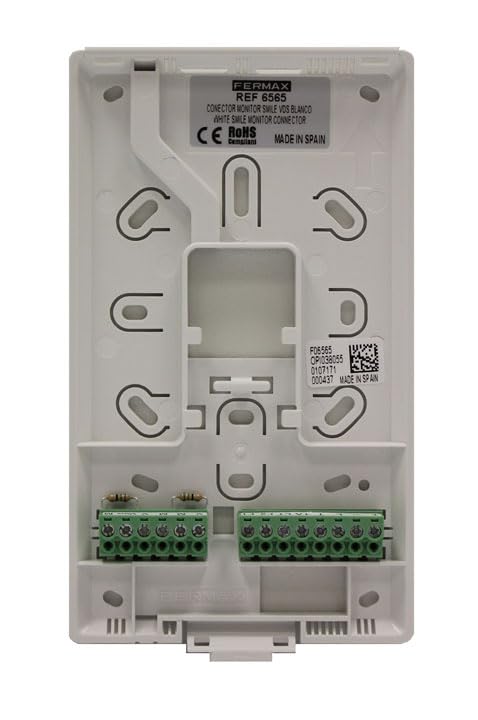
รูปที่ 1: ด้านหน้า view of the Fermax 6565 Mounting Plate. This image displays the white plastic mounting plate with various screw holes for wall attachment and monitor securing. Two green terminal blocks are visible at the bottom, providing connection points for wiring. A label near the top indicates "FERMAX REF 6565 CONECTOR MONITOR SMILE VDS BLANCO WHITE SMILE MONITOR CONNECTOR CE RoHS MADE IN SPAIN". A QR code and additional serial numbers are also present on a label on the right side.
คุณสมบัติหลัก:
- Designed for Fermax Smile VDS monitors.
- Provides secure mounting and electrical connection.
- การออกแบบที่กะทัดรัดและทนทาน
- สี: ขาว
3. การตั้งค่าและการติดตั้ง
Installation of the Fermax 6565 Mounting Plate requires basic electrical and DIY skills. It is recommended to consult a qualified electrician if you are unsure about any steps.
ข้อควรระวังเพื่อความปลอดภัย:
- ควรตัดกระแสไฟทุกครั้ง to the intercom system before beginning any installation work.
- ตรวจสอบให้แน่ใจว่าสายไฟทั้งหมดเป็นไปตามกฎและข้อบังคับด้านไฟฟ้าในท้องถิ่น
- อย่าให้ผลิตภัณฑ์สัมผัสกับความชื้นหรืออุณหภูมิที่สูงหรือต่ำเกินไป
ขั้นตอนการติดตั้ง:
- เตรียมพื้นที่ติดตั้ง: Choose a suitable location on the wall for the monitor, ensuring it is at an appropriate height and has access to the necessary wiring.
- ทำเครื่องหมายจุดเจาะ: Hold the mounting plate against the wall at the desired position. Use a pencil to mark the locations for the mounting screws through the designated holes on the plate.
- เจาะรู: Drill pilot holes at the marked points. Use appropriate drill bits and wall plugs (not included) suitable for your wall material (e.g., plasterboard, concrete).
- Mount the Plate: Secure the Fermax 6565 Mounting Plate to the wall using screws (not included) that are compatible with your wall plugs. Ensure the plate is level and firmly attached.
- การเชื่อมต่อสายไฟ: Route the intercom system's wiring through the opening in the mounting plate. Connect the wires to the green terminal blocks on the plate according to the wiring diagram provided with your Fermax Smile monitor. Pay close attention to polarity and correct terminal assignments (e.g., VDS bus, power, audio, video).
- เชื่อมต่อจอภาพ: Once wiring is complete and secure, carefully align the Fermax Smile monitor with the mounting plate. Gently push the monitor onto the plate until it clicks into place, ensuring all connections are firm.
- คืนค่าพลัง: Reconnect power to the intercom system and test the functionality of the monitor.
4. คู่มือการใช้งาน
The Fermax 6565 Mounting Plate is a passive component designed for physical mounting and electrical connection. It does not have any operational controls or functions itself. All operational aspects are managed through the connected Fermax Smile monitor and the overall intercom system.
5. การบำรุงรักษา
The Fermax 6565 Mounting Plate requires minimal maintenance. Periodically, you may:
- การทำความสะอาด: Wipe the surface of the plate with a soft, dry cloth to remove dust. Do not use abrasive cleaners or solvents.
- ตรวจสอบการเชื่อมต่อ: If you experience issues with your intercom system, ensure the monitor is securely seated on the mounting plate and that all wiring connections are tight.
6 การแก้ไขปัญหา
As a passive component, the mounting plate itself rarely causes issues. Most problems will stem from the monitor or the intercom system. However, consider the following if issues arise:
- จอภาพไม่เปิดใช้งาน:
- Check if power to the intercom system is restored.
- Ensure all wires are correctly connected to the terminal blocks on the mounting plate and are securely fastened.
- Verify that the Fermax Smile monitor is properly seated on the mounting plate.
- Loose Monitor:
- Ensure the mounting plate is firmly secured to the wall. Tighten screws if necessary.
- Verify the monitor is correctly engaged with the plate's locking mechanisms.
For further troubleshooting, refer to the user manual of your Fermax Smile monitor or contact Fermax customer support.
7. ข้อมูลจำเพาะ
| คุณลักษณะ | ค่า |
|---|---|
| ผู้ผลิต | เฟอร์แม็กซ์ |
| หมายเลขรุ่น | 8424299065656 |
| ขนาดสินค้า (กว้าง x ยาว x สูง) | 13.9 x 2.3 x 17.3 ซม. |
| น้ำหนักสินค้า | 23 กรัม |
| สี | สีขาว |
| จำนวนแพ็ค | 1 |
| ระบบหน่วย | เมตริก |
| ASIN | B019P37A8W |
| วันที่พร้อมใช้งานครั้งแรก | วันที่ 1 ธันวาคม 2016 |
8. อะไรอยู่ในกล่อง
- 1 x FERMAX Mounting Plate for Fermax Smile Monitors -CONNECTOR
Note: Mounting screws and wall plugs are not included and must be purchased separately, suitable for your specific wall type.
9. การรับประกันและการสนับสนุน
For information regarding product warranty, please refer to the documentation provided with your purchase or visit the official FERMAX website. For technical support or inquiries, please contact FERMAX customer service through their official channels.
FERMAX Official Webเว็บไซต์: www.fermax.com


