การแนะนำ
The TC Electronic T2 Reverb effects pedal provides a diverse range of reverb effects for guitar and other instruments. This manual details the pedal's features, setup procedures, operational guidelines, maintenance tips, troubleshooting steps, and technical specifications to ensure optimal performance.
สินค้าเกินview
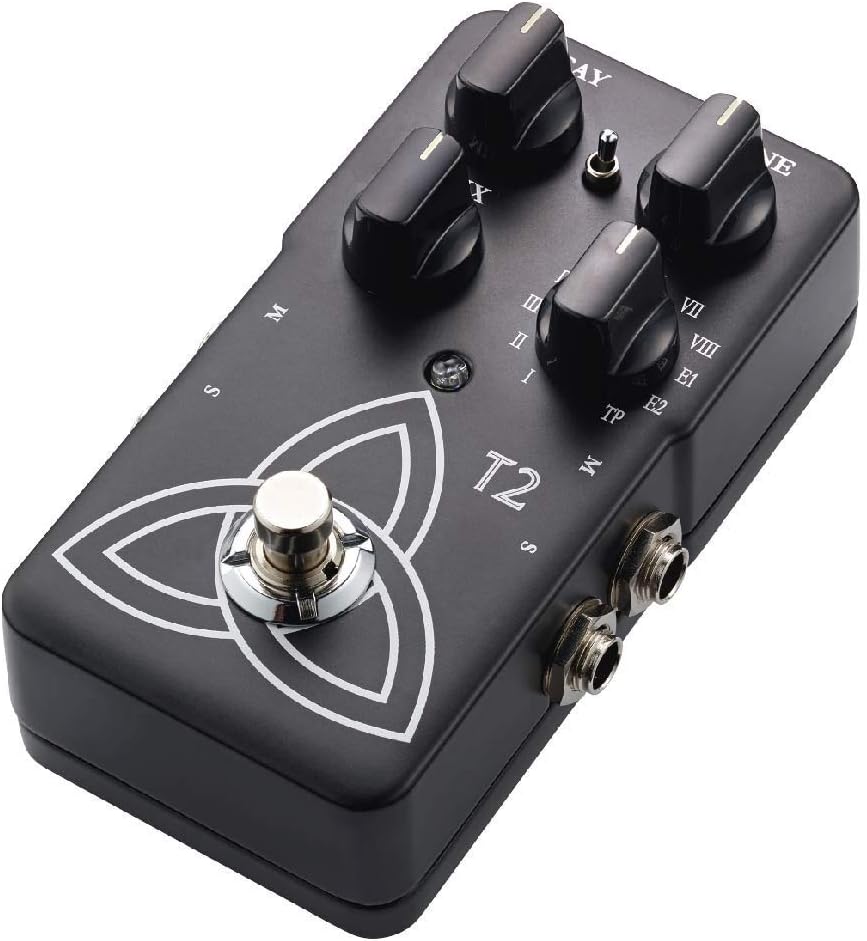
The T2 Reverb pedal features intuitive controls for shaping your sound and a robust design for reliable use. Familiarize yourself with the pedal's components:
- ปุ่ม DECAY: ควบคุมความยาวของเสียงสะท้อน
- ปุ่มปรับโทนเสียง: Adjusts the brightness or darkness of the reverb.
- ปุ่มผสม: Balances the ratio between the dry (unaffected) signal and the wet (effected) signal.
- Reverb Type Selector: A rotary switch to select from various reverb algorithms (I-VIII, E1, E2, TP).
- ฟุตสวิตช์: มีส่วนร่วมหรือข้ามเอฟเฟกต์
- แจ็คอินพุต/เอาต์พุต: For connecting your instrument and ampชีวิต.
- กำลังไฟเข้า: For connecting a 9V DC power supply.

การตั้งค่า
- การเชื่อมต่อไฟฟ้า: Connect a 9V DC power adapter (center negative, not included) to the power input jack. Alternatively, the pedal can be powered by a 9V battery (not included) by opening the battery compartment.
- การเชื่อมต่อเครื่องมือ: Connect your instrument (e.g., guitar) to the input jack on the right side of the pedal using a standard 1/4-inch instrument cable.
- Ampการเชื่อมต่อลิฟเวอร์: ต่อแจ็คเอาท์พุตทางด้านซ้ายของคันเหยียบเข้ากับ amplifier's input using a standard 1/4-inch instrument cable.
- Stereo Operation (Optional): For stereo output, connect the second output jack to a second amplifier or stereo input device.
ตรวจสอบให้แน่ใจว่าการเชื่อมต่อทั้งหมดปลอดภัยก่อนเปิดเครื่อง ampแอมป์และแป้นเหยียบ
คำแนะนำการใช้งาน
การทำงานพื้นฐาน
- เปิดเครื่อง: Once connected, press the footswitch to engage the effect. The LED indicator will illuminate. Press again to bypass the effect.
- Selecting Reverb Type: Rotate the Reverb Type Selector knob to choose from the available reverb algorithms (I through VIII, E1, E2). Each setting offers a distinct reverb character.
- Adjusting Reverb Parameters:
- ใช้ การผุพัง knob to control the duration of the reverb.
- ใช้ โทนเสียง knob to adjust the frequency content of the reverb, making it brighter or darker.
- ใช้ ผสม knob to blend the dry signal with the reverb effect. A higher setting increases the effect's prominence.
TonePrint Feature
The "TP" setting on the Reverb Type Selector activates the TonePrint feature. TonePrint allows you to upload custom-tuned reverb sounds created by artists or design your own using the TC Electronic TonePrint app. Connect your pedal to a computer via USB (cable not included) or beam TonePrints wirelessly from your smartphone to the pedal's pickup.
การซ่อมบำรุง
- การทำความสะอาด: ใช้ผ้าแห้งเนื้อนุ่มเช็ดทำความสะอาดด้านนอกของแป้นเหยียบ หลีกเลี่ยงการใช้สารทำความสะอาดที่มีฤทธิ์กัดกร่อนหรือตัวทำละลาย
- การเปลี่ยนแบตเตอรี่: If using battery power, replace the 9V battery when the LED indicator dims or the effect performance degrades. To replace, open the battery compartment on the underside of the pedal.
- พื้นที่จัดเก็บ: Store the pedal in a dry environment, away from extreme temperatures and direct sunlight, when not in use. Disconnect power and remove the battery if storing for extended periods.
การแก้ไขปัญหา
| ปัญหา | สาเหตุที่เป็นไปได้ | สารละลาย |
|---|---|---|
| ไม่มีเสียงหรือสัญญาณอ่อน | Incorrect cable connections, dead battery, faulty power supply, volume knobs on instrument/amp ปฏิเสธ | Check all cable connections. Replace battery or verify power supply. Ensure instrument and amplifier volumes are set appropriately. |
| เสียงรบกวนหรือเสียงฮัมที่ไม่พึงประสงค์ | Ground loop, faulty cables, interference from other electronics, improper power supply. | Use shielded cables. Try a different power outlet or isolated power supply. Move pedal away from other electronic devices. |
| Effect not engaging (LED off) | ไม่มีไฟเข้า สวิตช์เท้าเสีย | Verify power connection and battery status. If problem persists, contact support. |
| TonePrint not loading | Incorrect app usage, connection issues. | Ensure the TonePrint app is updated and the pedal is correctly connected (USB or beaming). Refer to the TonePrint app's instructions for detailed guidance. |
ข้อมูลจำเพาะ
- แบบอย่าง: T2
- น้ำหนักสินค้า: 1 ปอนด์ (ประมาณ 454 กรัม)
- ขนาดสินค้า : 4.61 x 2.48 x 2.91 นิ้ว (11.7 x 6.3 x 7.4 ซม.)
- แหล่งพลังงาน: อะแดปเตอร์แปลงไฟ 9V DC (ขั้วลบอยู่ตรงกลาง) หรือแบตเตอรี่ 9V
- เล่มที่tage: 9 โวลต์
- รูปแบบสัญญาณ: อนาล็อก
- อินเทอร์เฟซฮาร์ดแวร์: HP-HSC
การรับประกันและการสนับสนุน
TC Electronic products are covered by a limited warranty. For detailed warranty information, product support, or service inquiries, please visit the official TC Electronic webหรือติดต่อฝ่ายสนับสนุนลูกค้าโดยตรง โปรดเก็บหลักฐานการซื้อไว้เพื่อใช้ในการเคลมประกัน
เป็นทางการ Webเว็บไซต์: www.tceelectronic.com