1. บทนำ
This manual provides instructions for the proper use and care of your Belkin Right-Angled Aux/Auxiliary Cable. This cable is designed to connect audio devices with a 3.5mm jack, such as smartphones, MP3 players, and portable speakers, to car stereos, home stereo systems, or other compatible audio inputs. Its right-angle connector and flat design enhance durability and ease of use.
2. คุณสมบัติของผลิตภัณฑ์
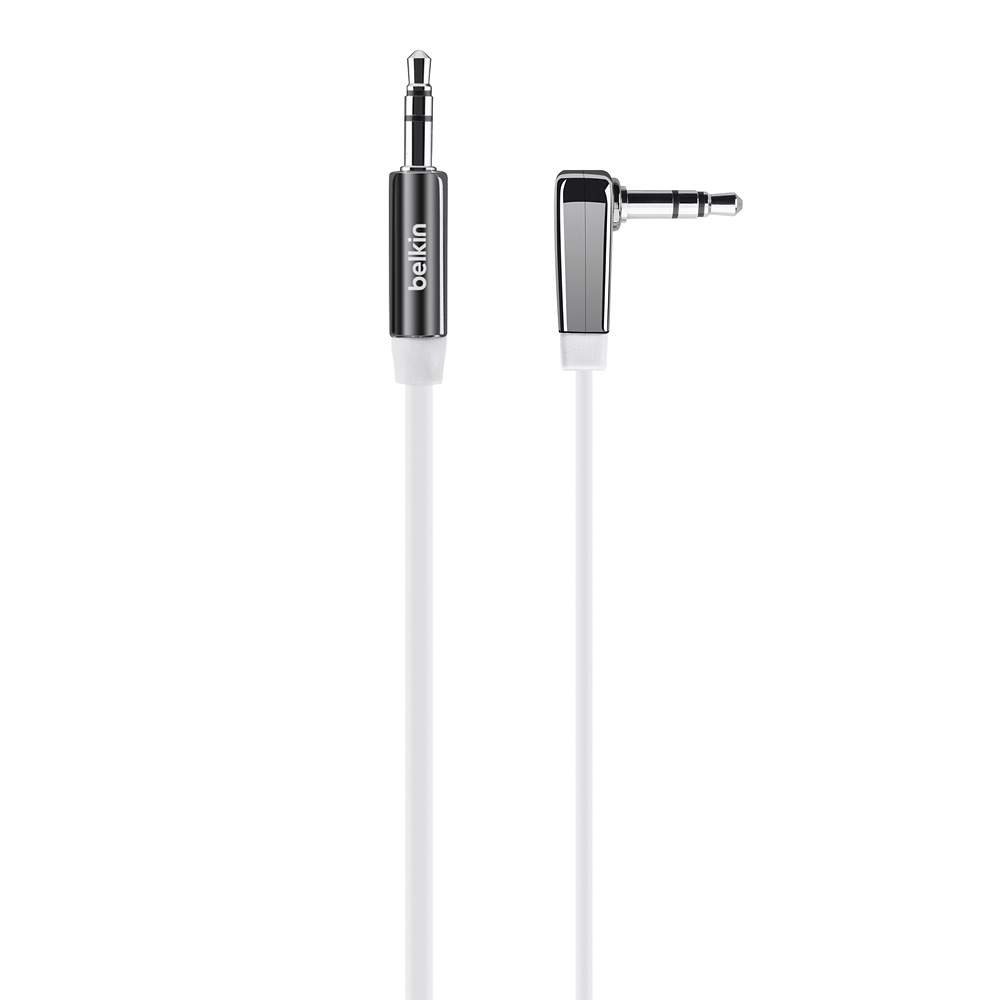
รูปที่ 1: Belkin Right-Angled Aux/Auxiliary Cable. This image shows the black, flat cable with its right-angled 3.5mm connector on one end and a straight 3.5mm connector on the other.
- Right-Angle 3.5mm Plug: Reduces stress on the cable and device port, allowing for a flush connection.
- การออกแบบเรียบ: Prevents tangles and makes storage easier.
- Chrome-Finished Plugs and Nickel-Plated Contacts: Ensures reliable connection and optimal audio signal transfer.
- ความยาว: 6 feet (approximately 1.8 meters) for flexible placement of connected devices.
- เข้ากันได้สากล: Works with any device featuring a standard 3.5mm audio jack.
3. การตั้งค่าและการเชื่อมต่อ
Connecting your Belkin Aux/Auxiliary Cable is a straightforward process. Ensure both devices you intend to connect are powered off before making connections, if possible, to prevent any potential audio pops or damage.
- ระบุพอร์ตเสียง: Locate the 3.5mm audio output jack on your source device (e.g., smartphone, tablet, MP3 player) and the 3.5mm audio input jack on your receiving device (e.g., car stereo, home speaker, sound card). These are typically labeled "AUX OUT," "HEADPHONE," or "LINE IN," "AUX IN" respectively.
- Connect Right-Angle End: Insert the right-angled 3.5mm connector of the cable into the audio output jack of your source device. The right-angle design is particularly useful for devices in tight spaces or where a straight connector might be prone to damage.
- Connect Straight End: Insert the straight 3.5mm connector of the cable into the audio input jack of your receiving device.
- การเชื่อมต่อที่ปลอดภัย: Ensure both connectors are fully inserted into their respective ports for a secure and stable audio connection.
4. การดำเนินการ
เมื่อเชื่อมต่อสายเคเบิลแล้ว ให้ทำตามขั้นตอนเหล่านี้เพื่อเริ่มเล่นเสียง:
- เปิดอุปกรณ์: Turn on both your audio source device and your receiving audio device.
- เลือกอินพุต: On your receiving audio device (e.g., car stereo, home stereo), select the correct audio input source. This is usually labeled "AUX," "LINE IN," or similar. Refer to your receiving device's manual if you are unsure.
- เริ่มการเล่น: Begin playing audio from your source device (e.g., music, podcast, audiobook).
- ปรับระดับเสียง: Adjust the volume on both your source device and your receiving device to a comfortable listening level. It is often recommended to set the source device's volume to about 75-80% and control the main volume from the receiving device.
5. การบำรุงรักษาและการดูแล
To ensure the longevity and optimal performance of your Belkin Aux/Auxiliary Cable, follow these maintenance guidelines:
- หลีกเลี่ยงการก้มตัวมากเกินไป: While the flat design helps prevent tangles, avoid sharp or excessive bends, especially near the connectors, as this can damage internal wiring.
- จัดเก็บอย่างถูกต้อง: When not in use, coil the cable loosely. The flat design makes it easy to store without tangling.
- รักษาความสะอาด: Periodically wipe the cable with a soft, dry cloth. If connectors appear dirty, gently clean them with a cotton swab lightly dampเช็ดทำความสะอาดด้วยไอโซโพรพิลแอลกอฮอล์ ตรวจสอบให้แน่ใจว่าแห้งสนิทก่อนใช้งาน
- จัดการด้วยความระมัดระวัง: Always grasp the plug itself when inserting or removing the cable, rather than pulling on the cable wire.
- สภาพแวดล้อม : Avoid exposing the cable to extreme temperatures, direct sunlight for prolonged periods, or excessive moisture.
6 การแก้ไขปัญหา
If you experience issues with your Belkin Aux/Auxiliary Cable, refer to the following common problems and solutions:
| ปัญหา | สาเหตุที่เป็นไปได้ | สารละลาย |
|---|---|---|
| ไม่มีเสียง |
|
|
| Poor Sound Quality (Static, Distortion) |
|
|
| Sound Only from One Channel |
|
|
7. ข้อมูลจำเพาะ
| คุณสมบัติ | รายละเอียด |
|---|---|
| ยี่ห้อ | เบลคิน |
| หมายเลขรุ่น | AV10128bt06 |
| ประเภทขั้วต่อ | 3.5มม. ถึง 3.5มม. |
| อุปกรณ์ที่รองรับ | Smartphone, Speaker, Car Stereo, Home Stereo |
| สี | สีดำ |
| เพศของตัวเชื่อมต่อ | ชายเป็นชาย |
| รูปร่างของสายเคเบิล | แบน |
| ความยาวสายเคเบิล | 6 ฟุต (ประมาณ 1.8 เมตร) |
| น้ำหนักสินค้า | 1.62 ออนซ์ (ประมาณ 46 กรัม) |
| ขนาดสินค้า | ขนาดบรรจุภัณฑ์ 1.07 x 4.04 x 6.13 นิ้ว |
| การใช้งานภายใน/ภายนอกอาคาร | ในร่ม, กลางแจ้ง |
8. การรับประกันและการสนับสนุน
For information regarding product warranty, technical support, or customer service, please visit the official Belkin webหรือติดต่อฝ่ายสนับสนุนลูกค้าโดยตรง โปรดเก็บใบเสร็จรับเงินไว้เป็นหลักฐานการซื้อสำหรับการเรียกร้องการรับประกันใดๆ
Belkin Official Webเว็บไซต์: www.belkin.com


