การแนะนำ
This manual provides instructions for the Vivanco RR 220 remote control, designed for compatibility with Samsung Smart TVs. Please read this manual thoroughly before using the device to ensure proper operation and to understand its features.
เนื้อหาแพ็คเกจ
- Vivanco RR 220 Remote Control
- คู่มือผู้ใช้เล่มนี้
หมายเหตุ: ไม่รวมแบตเตอรี่และต้องซื้อแยกต่างหาก
การตั้งค่า
1. การติดตั้งแบตเตอรี่
- ค้นหาช่องใส่แบตเตอรี่ที่ด้านหลังของรีโมทคอนโทรล
- เลื่อนฝาครอบแบตเตอรี่ลงหรือกดที่สลักและยกขึ้นเพื่อเปิด
- ใส่แบตเตอรี่ AAA สอง (2) ก้อน โดยตรวจสอบให้แน่ใจว่าขั้วบวก (+) และขั้วลบ (-) ตรงกับเครื่องหมายภายในช่องใส่แบตเตอรี่
- ใส่ฝาครอบแบตเตอรี่กลับเข้าไปโดยให้แน่ใจว่าล็อคเข้าที่อย่างแน่นหนา
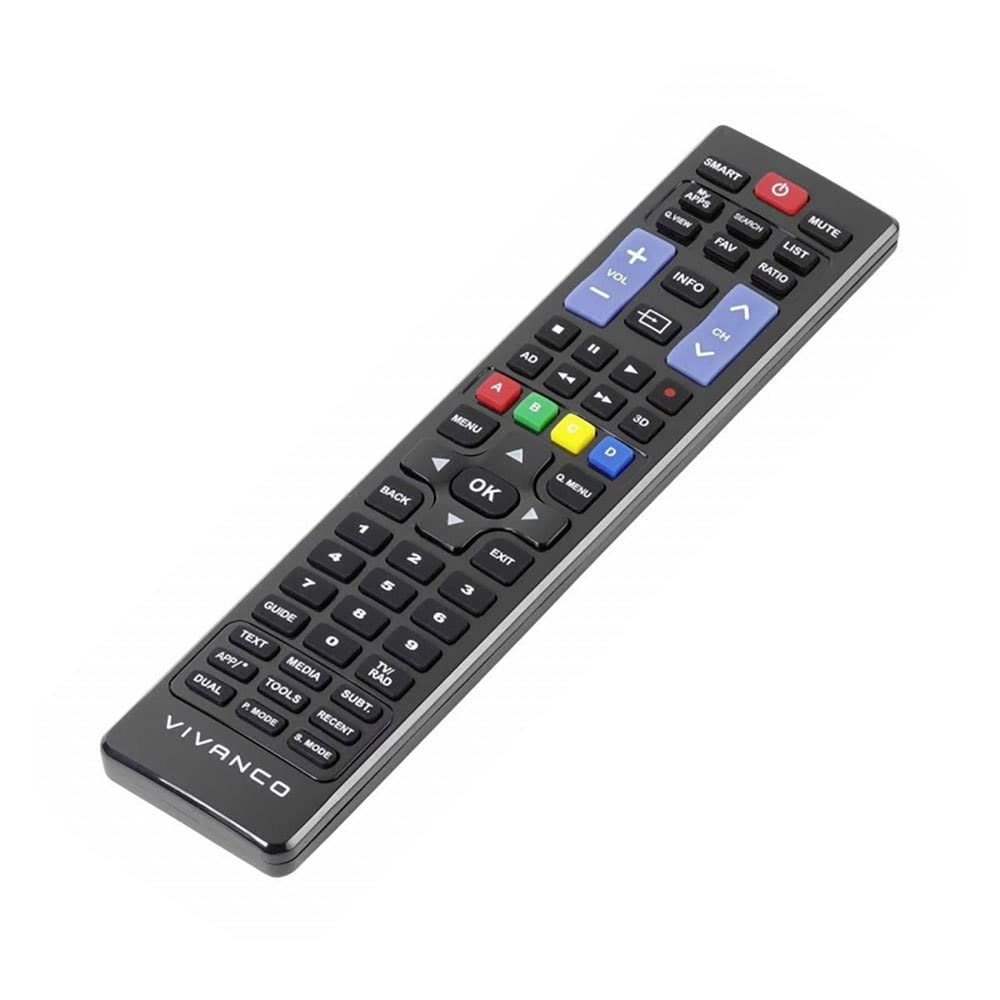
ภาพที่ 1: Vivanco RR 220 remote control. This image displays the front of the remote control, highlighting its 57 buttons and ergonomic design. The battery compartment is located on the reverse side.
2. การใช้งานครั้งแรก
The Vivanco RR 220 is pre-programmed for Samsung Smart TVs. No additional setup or pairing is typically required. Once batteries are installed, point the remote control towards your Samsung Smart TV and press the Power button to test functionality.
คำแนะนำการใช้งาน
The remote control features 57 buttons, providing comprehensive control over your Samsung Smart TV and compatible devices. Below are common button functions:
- ปุ่มเปิด/ปิด: เปิดหรือปิดทีวี
- ปุ่มตัวเลข (0-9): For direct channel selection or data input.
- เพิ่ม/ลดระดับเสียง: ปรับระดับเสียง
- ช่องขึ้น/ลง: เปลี่ยนช่องทีวี
- ปุ่มปิดเสียง: ปิดเสียงทีวี
- ปุ่มควบคุมทิศทาง (ขึ้น, ลง, ซ้าย, ขวา, Enter): ใช้สำหรับเลื่อนดูเมนูและเลือกตัวเลือกต่างๆ
- ปุ่มย้อนกลับ/กลับ: กลับไปที่หน้าจอหรือเมนูก่อนหน้า
- Smart Hub/Home Button: Accesses the Smart Hub or main menu of your Samsung Smart TV.
- ปุ่มที่มา/อินพุต: เลือกแหล่งสัญญาณอินพุต (HDMI, AV ฯลฯ)
- ปุ่มสี (แดง, เขียว, เหลือง, น้ำเงิน): For specific functions within certain applications or menus, as indicated on-screen.
- การควบคุมการเล่น (เล่น, หยุดชั่วคราว, หยุด, เดินหน้าเร็ว, ถอยหลัง): Controls media playback on compatible devices or apps.
For specific functions related to your TV model, refer to your Samsung TV's user manual.
การซ่อมบำรุง
การทำความสะอาดรีโมทคอนโทรล
- ใช้ผ้าแห้งนุ่มเช็ดทำความสะอาดพื้นผิวของรีโมทคอนโทรล
- สำหรับสิ่งสกปรกฝังแน่น ให้เช็ดออกเล็กน้อยampชุบน้ำหรือน้ำยาทำความสะอาดสูตรอ่อนโยนที่ไม่มีฤทธิ์กัดกร่อนบนผ้า
- ห้ามใช้สารเคมีรุนแรง ตัวทำละลาย หรือแผ่นขัดถู เพราะอาจทำให้พื้นผิวหรือชิ้นส่วนภายในของรีโมทเสียหายได้
- ตรวจสอบให้แน่ใจว่าไม่มีของเหลวเข้าไปในรีโมทคอนโทรลผ่านช่องว่างของปุ่มหรือช่องใส่แบตเตอรี่
การเปลี่ยนแบตเตอรี่
Replace batteries when the remote's response becomes sluggish or it stops functioning. Always replace both batteries simultaneously with new AAA alkaline batteries. Do not mix old and new batteries or different types of batteries.
การแก้ไขปัญหา
| ปัญหา | สาเหตุที่เป็นไปได้ | สารละลาย |
|---|---|---|
| รีโมทคอนโทรลไม่ทำงาน |
|
|
| ปุ่มบางปุ่มใช้งานไม่ได้ |
|
|
ข้อมูลจำเพาะ
- ยี่ห้อ: Vivanco
- ชื่อรุ่น : RR 220
- หมายเลขรุ่นสินค้า: 38016
- อุปกรณ์ที่รองรับ: Home cinema, DVD/Blu-ray player, Television (Samsung Smart TV compatible)
- เทคโนโลยีการเชื่อมต่อ: Wireless IR (Infrared)
- จำนวนปุ่ม: 57
- ประเภทแบตเตอรี่: แบตเตอรี่ AAA 2 ก้อน (แนะนำให้ใช้แบตเตอรี่อัลคาไลน์)
- รวมแบตเตอรี่: เลขที่
- ขนาดสินค้า : 18 x 4.8 x 2.3 ซม.
- น้ำหนักผลิตภัณฑ์: 80 กรัม
- ระยะสูงสุด: 15 เมตร
- คุณสมบัติพิเศษ: IPTV, DVB-T, HDTV compatibility


