การแนะนำ
The Logitech MK270 Wireless Keyboard and Mouse Combo provides a reliable and convenient wireless solution for your computing needs. This combo features a 2.4 GHz wireless connection, offering a range of up to 10 meters with minimal delays or dropouts. Designed for ease of use, it includes a full-size keyboard with media hotkeys and a compact, ambidextrous mouse. This manual provides instructions for setup, operation, maintenance, and troubleshooting to ensure optimal performance of your device.
มีอะไรอยู่ในกล่อง
เมื่อเปิดบรรจุภัณฑ์ ตรวจสอบว่ามีส่วนประกอบทั้งหมดอยู่ครบ:
- คีย์บอร์ดไร้สาย Logitech MK270
- เมาส์ไร้สาย Logitech
- ตัวรับสัญญาณนาโน USB
- แบตเตอรี่ AAA 2 ก้อน (สำหรับคีย์บอร์ด)
- แบตเตอรี่ AA 1 ก้อน (สำหรับเมาส์)


คำแนะนำการตั้งค่า
- ติดตั้งแบตเตอรี่: Open the battery compartments on the underside of both the keyboard and the mouse. Insert the included AAA batteries into the keyboard and the AA battery into the mouse, ensuring correct polarity (+/-).
- เชื่อมต่อตัวรับสัญญาณ USB: Locate an available USB port on your computer. Plug the tiny Logitech Nano Receiver into the USB port. The system should automatically detect the receiver and install necessary drivers.
- เปิดอุปกรณ์: Locate the ON/OFF switch on the top right of the keyboard and on the underside of the mouse. Slide both switches to the 'ON' position.
- ทดสอบการเชื่อมต่อ: Once powered on, the keyboard and mouse should be ready for use. Test by typing on the keyboard and moving the mouse cursor. If they do not respond, ensure the receiver is securely plugged in and the devices are powered on.
The Logitech MK270 is designed for plug-and-play simplicity and is compatible with Windows 10 or later, Windows 8, 7, Windows Vista, Windows XP, and Chrome OS. It is not Bluetooth compatible.
คำแนะนำการใช้งาน
คุณสมบัติของแป้นพิมพ์
- เค้าโครงขนาดเต็ม: The keyboard features a standard full-size layout with deep-profile, quiet keys for comfortable typing.
- Eight Hot Keys: Access frequently used functions instantly with the dedicated hotkeys located above the function row. These include controls for movies, music, internet, email, volume adjustment, and play/pause.
- สวิตช์เปิด/ปิด: Conserve battery life by using the ON/OFF switch located on the top right of the keyboard when not in use.


คุณสมบัติของเมาส์
- Compact and Ambidextrous Design: The mouse is designed for comfortable control, suitable for both left and right-handed users.
- การติดตามที่ราบรื่น: Provides responsive and accurate cursor control.
- 10m Wireless Range: Maintain a reliable connection up to 10 meters from your computer.
- การจัดเก็บเครื่องรับ: The USB Nano Receiver can be conveniently stored inside the mouse when not in use, making it ideal for portability.
- สวิตช์เปิด/ปิด: An ON/OFF switch on the underside of the mouse helps conserve battery power.


การซ่อมบำรุง
การจัดการแบตเตอรี่
The Logitech MK270 combo is designed for extended battery life:
- อายุการใช้งานแบตเตอรี่ของคีย์บอร์ด: Up to 36 months (3 years) with typical use.
- อายุการใช้งานแบตเตอรี่ของเมาส์: Up to 12 months with typical use.
Battery life may vary based on user and computing conditions. To maximize battery life, always use the ON/OFF switches on both the keyboard and mouse when not in use. The devices also feature an auto-sleep function to conserve power during periods of inactivity.

การทำความสะอาด
To clean your devices, use a soft, damp cloth. Avoid using harsh chemicals or abrasive cleaners, as these can damage the surfaces. Ensure devices are powered off before cleaning.
การแก้ไขปัญหา
- ไม่มีการตอบสนองจากคีย์บอร์ด/เมาส์:
- ตรวจสอบให้แน่ใจว่าทั้งแป้นพิมพ์และเมาส์เปิดใช้งานอยู่
- Check that the USB Nano Receiver is securely plugged into a working USB port on your computer.
- Replace the batteries in both the keyboard and mouse. Low batteries are a common cause of connectivity issues.
- ลองเสียบตัวรับสัญญาณ USB เข้ากับพอร์ต USB อื่น
- การเชื่อมต่อไม่ต่อเนื่องหรือล่าช้า:
- Move the keyboard and mouse closer to the USB receiver. The optimal range is up to 10 meters, but environmental factors (e.g., metal objects, other wireless devices) can reduce this.
- Avoid placing the receiver near other electrical devices that may cause interference (e.g., speakers, monitors, Wi-Fi routers).
- If using a USB hub, try connecting the receiver directly to a USB port on your computer.
- Hotkeys Not Working:
- ตรวจสอบให้แน่ใจว่าระบบปฏิบัติการของคุณเป็นเวอร์ชันล่าสุด
- While plug-and-play, some advanced functions or specific hotkey behaviors might benefit from Logitech's optional software, available on their official support webเว็บไซต์.
ข้อมูลจำเพาะ
| ยี่ห้อ | โลจิเทค |
| หมายเลขรุ่น | 920-004536 |
| เทคโนโลยีการเชื่อมต่อ | ไร้สาย (ความถี่วิทยุ 2.4 GHz) |
| ช่วงสาย | สูงถึง 10 เมตร (33 ฟุต) |
| อายุการใช้งานแบตเตอรี่ของคีย์บอร์ด | ไม่เกิน 36 เดือน (3 ปี) |
| อายุการใช้งานแบตเตอรี่ของเมาส์ | นานถึง 12 เดือน |
| ความเข้ากันได้ของระบบปฏิบัติการ | Windows 10, Windows 7, Windows 8, Windows Vista, Windows XP, Chrome OS |
| ขนาดของแป้นพิมพ์ (ยาวxกว้างxสูง) | 441 มม. x 149 มม. x 18 มม. (ประมาณ 17.36 x 5.87 x 0.71 นิ้ว) |
| น้ำหนักคีย์บอร์ด | 481 กรัม (ประมาณ 1.06 ปอนด์) |
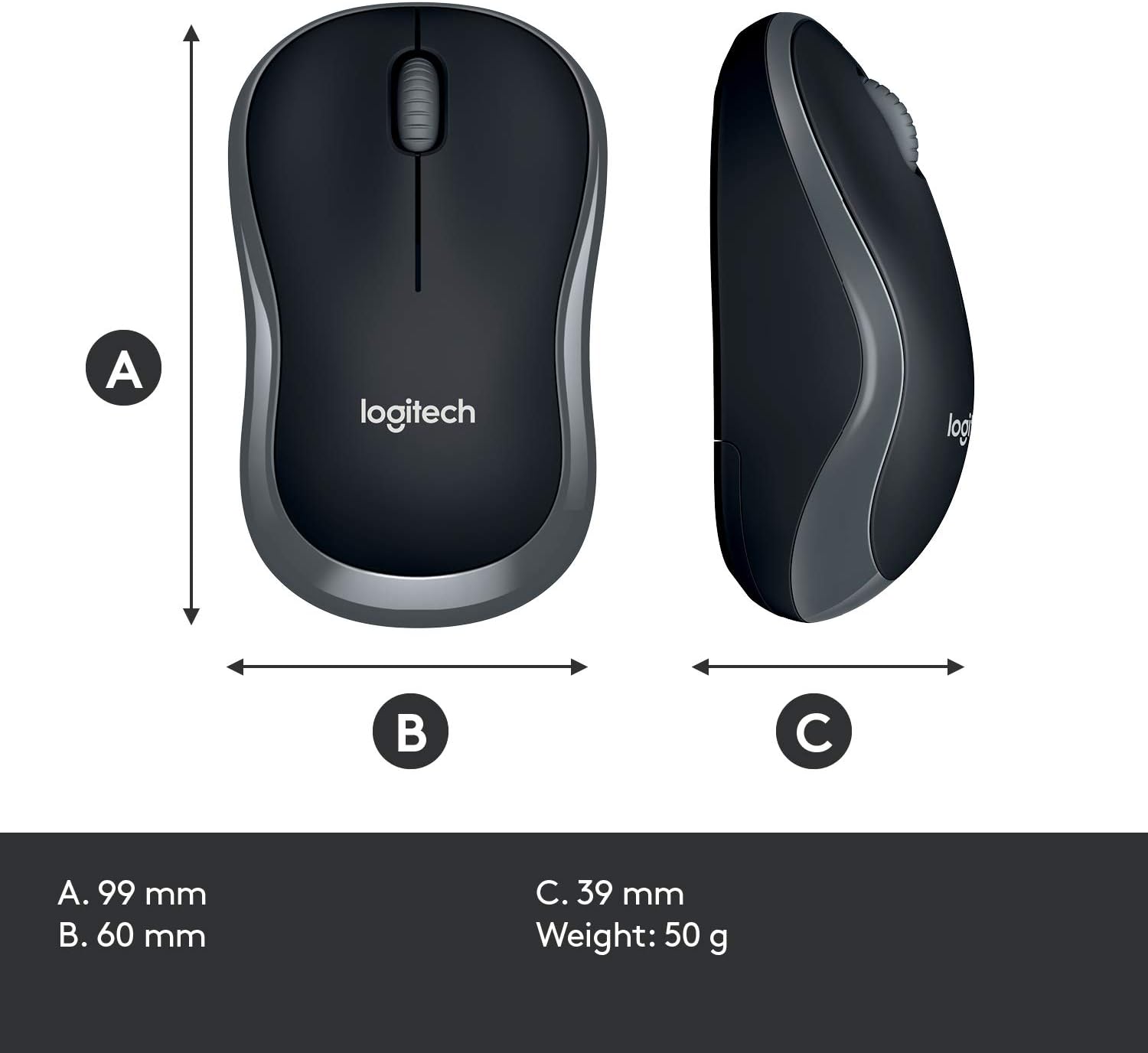
| ขนาดของเมาส์ (ยาวxกว้างxสูง) | 99 มม. x 60 มม. x 39 มม. (ประมาณ 3.90 x 2.36 x 1.54 นิ้ว) |
| น้ำหนักเมาส์ | 50 กรัม (ประมาณ 0.11 ปอนด์) |
| สี | สีดำ |

การรับประกันและการสนับสนุน
Warranty information for the Logitech MK270 Wireless Keyboard and Mouse Combo is typically provided with your product packaging or can be found on the official Logitech webเว็บไซต์นี้ โปรดดูรายละเอียดข้อกำหนดและเงื่อนไขการรับประกันเฉพาะเจาะจงได้จากแหล่งข้อมูลเหล่านี้
หากต้องการความช่วยเหลือเพิ่มเติม การสนับสนุนด้านเทคนิค หรือดาวน์โหลดไดรเวอร์และซอฟต์แวร์ล่าสุด โปรดไปที่ฝ่ายสนับสนุน Logitech อย่างเป็นทางการ webเว็บไซต์:


