การแนะนำ
This manual provides essential information for the safe and efficient operation of your Sony KDL-55W900A 55-Inch 3D Internet LED HDTV. Please read these instructions thoroughly before using the television and retain them for future reference.
The Sony KDL-55W900A features a 55-inch display with 1080p resolution, 240Hz refresh rate, 3D capabilities, and integrated internet connectivity. It incorporates X-Reality PRO for enhanced detail and a TRILUMINOS display for brilliant colors.

ภาพ: ด้านหน้า view of the Sony KDL-55W900A 55-Inch 3D Internet LED HDTV, showcasinด้วยการออกแบบและการแสดงผลที่เพรียวบาง
มีอะไรอยู่ในกล่อง
ตรวจสอบว่าโทรทัศน์ของคุณมีรายการทั้งหมดต่อไปนี้:
- Television Unit (Sony KDL-55W900A)
- รีโมทคอนโทรล
- แท่นวางทีวี
- สายไฟ
- Active 3D Glasses (quantity may vary, typically 4 pairs)
- AA Batteries (2 for remote control)
- Documentation (Quick Setup Guide, Safety Information)
การตั้งค่า
1. การติดตั้งขาตั้งทีวี
Place the TV screen face down on a soft, clean surface to prevent damage. Align the stand with the mounting holes on the bottom of the TV and secure it using the provided screws. Ensure the stand is firmly attached before proceeding.

ภาพ: Diagram showing the dimensions of the Sony KDL-55W900A TV, including width, height, and depth.

ภาพ: ด้านข้าง view of the Sony KDL-55W900A TV, highlighting its slim profile.
2. การเชื่อมต่ออุปกรณ์ต่อพ่วง
Connect your external devices such as Blu-ray players, gaming consoles, or cable/satellite boxes to the appropriate input ports (HDMI, USB, etc.) on the rear of the TV.
- ช่องต่อ HDMI: สำหรับเสียงและวิดีโอความคมชัดสูง
- ยูเอสบี: สำหรับเชื่อมต่ออุปกรณ์จัดเก็บข้อมูล USB
- อีเธอร์เน็ต: สำหรับการเชื่อมต่ออินเตอร์เน็ตแบบใช้สาย
- RF: สำหรับการเชื่อมต่อเสาอากาศหรือสายเคเบิล
3. การเชื่อมต่อไฟฟ้า
เสียบสายไฟเข้ากับช่องรับไฟของทีวี จากนั้นเสียบเข้ากับเต้ารับที่ผนัง
4. ตัวช่วยการตั้งค่าเริ่มต้น
Upon first power-on, the TV will guide you through an initial setup process. This includes language selection, time zone, channel scanning, and network configuration.

ภาพ: A person interacting with a tablet displaying a program guide, with the Sony TV visible in the background, demonstrating smart TV control.
คำแนะนำการใช้งาน
1. ฟังก์ชั่นพื้นฐานของทีวี
- พลัง: กดปุ่มเปิด/ปิดบนรีโมทหรือทีวีเพื่อเปิด/ปิดเครื่อง
- การเลือกอินพุต: Use the "Input" or "Source" button on the remote to switch between connected devices (HDMI 1, HDMI 2, TV, etc.).
- ปริมาณ: Adjust using the Volume Up/Down buttons.
- ช่อง: Change channels using the Channel Up/Down buttons or number pad.
2. Smart TV Features and Internet Connectivity
Your TV can connect to the internet via Wi-Fi or Ethernet. Access various online services and applications through the Smart TV interface.
- Navigate the Smart TV menu using the remote's directional pad.
- Select apps like Netflix, Hulu, or Amazon Prime Video for streaming content.
- ใช้แบบในตัว web browser for internet surfing.

ภาพ: A family enjoying content on the Sony TV, with a smartphone mirroring its display to the TV, illustrating connectivity features.
3. การตั้งค่าภาพและเสียง
Access the "Picture" and "Sound" menus to customize your viewประสบการณ์การฟังและการฟัง
- โหมดภาพ: Choose from Standard, Vivid, Cinema, Game, etc.
- ความสว่าง ความคมชัด สี: ปรับการตั้งค่าเหล่านี้ตามความต้องการของคุณ
- X-Reality PRO: This feature enhances detail and texture.
- จอแสดงผล TRILUMINOS: Provides a wider spectrum of colors.
- Motionflow XR 960: ปรับปรุงความชัดเจนของการเคลื่อนไหวสำหรับฉากที่เคลื่อนไหวรวดเร็ว

ภาพ: A split-screen comparison demonstrating the enhanced detail and clarity provided by X-Reality PRO technology on the Sony TV.
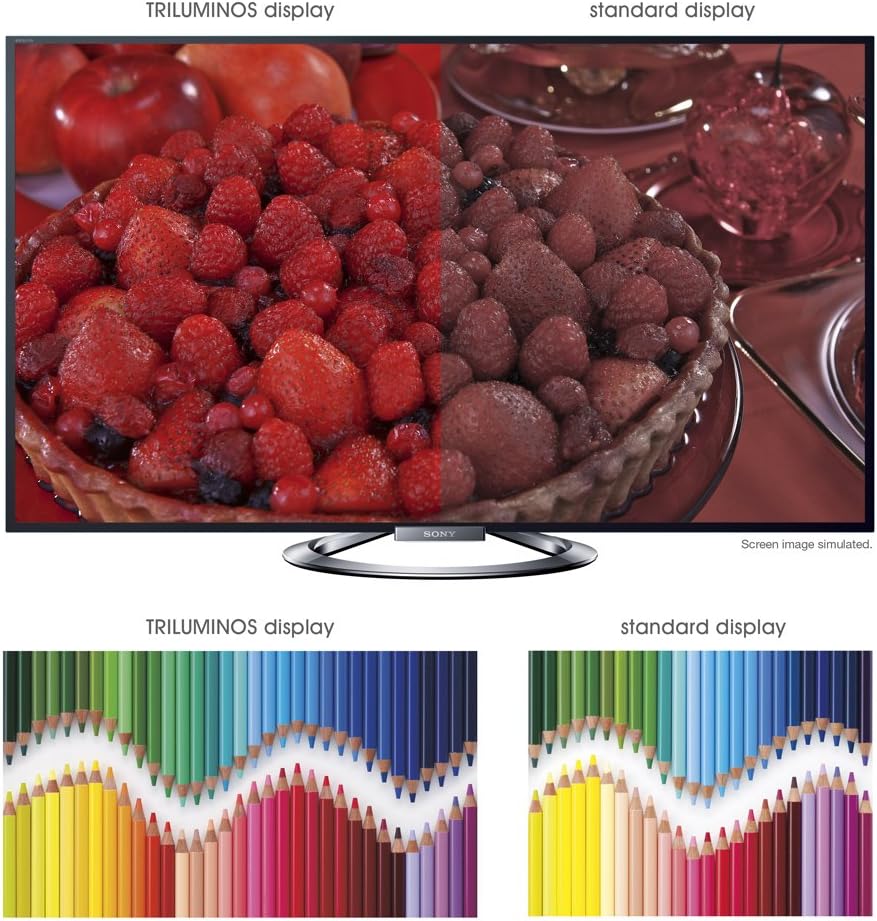
ภาพ: A split-screen comparison illustrating the vibrant and expanded color palette of the TRILUMINOS display versus a standard display.
4. 3 มิติ Viewกำลังทำ
To enjoy 3D content, ensure you have active 3D glasses and a 3D-compatible source (e.g., 3D Blu-ray player).
- Put on the active 3D glasses.
- Play 3D content from a connected source. The TV should automatically detect and switch to 3D mode.
- If 3D mode does not activate automatically, check the TV's picture settings for 3D options.
- Ensure 3D glasses are charged or have fresh batteries.
การซ่อมบำรุง
1. การทำความสะอาดทีวี
- หน้าจอ: เช็ดหน้าจอเบาๆ ด้วยผ้าไมโครไฟเบอร์ที่นุ่มและแห้ง สำหรับรอยฝังแน่น ให้เช็ดเบาๆampเทน้ำหรือน้ำยาทำความสะอาดหน้าจอชนิดพิเศษลงบนผ้า (อย่าฉีดลงบนหน้าจอโดยตรง)
- คณะรัฐมนตรี: เช็ดตู้ทีวีด้วยผ้าแห้งนุ่มๆ หลีกเลี่ยงการใช้สารทำความสะอาดที่มีฤทธิ์กัดกร่อน แว็กซ์ หรือตัวทำละลาย
- ควรถอดปลั๊กทีวีทุกครั้งก่อนทำความสะอาด
2. การอัปเดตซอฟต์แวร์
Periodically check for software updates to ensure optimal performance and access to the latest features.
- Navigate to the "Settings" menu on your TV.
- Look for "System Software Update" or similar options.
- Follow the on-screen instructions to download and install updates. Ensure the TV remains powered on during the update process.
3. 3D Glasses Care
- Clean lenses with a soft, dry cloth.
- Store glasses in a protective case when not in use.
- Replace batteries as needed (typically AA batteries).
การแก้ไขปัญหา
| ปัญหา | สาเหตุที่เป็นไปได้ / วิธีแก้ไข |
|---|---|
| ไม่มีไฟฟ้า |
|
| ไม่มีภาพ / หน้าจอดำ |
|
| ไม่มีเสียง |
|
| ปัญหาการเชื่อมต่อเครือข่าย |
|
| 3D Image is Blurry or Not Working |
|
If the problem persists after attempting these solutions, please refer to the support section for further assistance.
ข้อมูลจำเพาะ
| คุณสมบัติ | รายละเอียด |
|---|---|
| ยี่ห้อ | โซนี่ |
| หมายเลขรุ่น | KDL-55W900A |
| ขนาดหน้าจอ | 55 นิ้ว |
| เทคโนโลยีการแสดงผล | นำ |
| ปณิธาน | 1080p |
| อัตราการรีเฟรช | 240 Hz (Motionflow XR 960) |
| อัตราส่วนภาพ | 16:9 น. |
| คุณสมบัติพิเศษ | Flat, 3D Capable, Internet TV, X-Reality PRO, TRILUMINOS Display, Dynamic Edge LED Backlight |
| เทคโนโลยีการเชื่อมต่อ | อีเธอร์เน็ต, HDMI, RF, USB, Wi-Fi |
| ขนาดสินค้า (รวมขาตั้ง) | กว้าง 48.9 นิ้ว x สูง 29.9 นิ้ว x ลึก 11.8 นิ้ว |
| ขนาดสินค้า (ไม่รวมขาตั้ง) | กว้าง 48.9 นิ้ว x สูง 28.5 นิ้ว x ลึก 2.5 นิ้ว |
| น้ำหนักสินค้า | 48.5 ปอนด์ |
| แบตเตอรี่ที่จำเป็น | แบตเตอรี่ AA 2 ก้อน (สำหรับรีโมท) |
| วันที่พร้อมใช้งานครั้งแรก | 7 มกราคม 2013 |
ข้อมูลการรับประกัน
Your Sony KDL-55W900A television is covered by a limited warranty. The specific terms and duration of the warranty may vary by region and purchase date. Please refer to the warranty card included with your product or visit the official Sony support webเว็บไซต์สำหรับข้อมูลโดยละเอียดเกี่ยวกับการรับประกัน เงื่อนไขและข้อกำหนด
โปรดเก็บหลักฐานการซื้อ (ใบเสร็จรับเงิน) ไว้ เนื่องจากจำเป็นต้องใช้ในการเรียกร้องการรับประกันใดๆ
การสนับสนุนลูกค้า
For further assistance, technical support, or service inquiries regarding your Sony KDL-55W900A, please contact Sony customer support.
- การสนับสนุนทางออนไลน์: เยี่ยมชมฝ่ายสนับสนุนอย่างเป็นทางการของ Sony website for FAQs, troubleshooting guides, software downloads, and contact options.
- การสนับสนุนทางโทรศัพท์: Refer to the contact information provided in your product documentation or on the Sony support webเว็บไซต์สำหรับหมายเลขโทรศัพท์ภูมิภาค
When contacting support, please have your TV model number (KDL-55W900A) and serial number ready.