การแนะนำ
The Intermatic TN111RM40 is a mechanical 24-hour timer designed for controlling lamps and small appliances. This timer allows for up to two ON and two OFF events per day, making it suitable for automating various electrical devices, including landscape lighting systems. It features a 2-prong polarized outlet and a manual override function. The timer is housed in a 3R enclosure, indicating its suitability for outdoor use.
This manual provides instructions for the safe and effective operation of your Intermatic TN111RM40 timer.
ข้อมูลด้านความปลอดภัย
- อ่านคำแนะนำทั้งหมดก่อนใช้งาน
- ห้ามแช่น้ำ
- Ensure the timer is unplugged before making any adjustments or cleaning.
- Do not exceed the electrical ratings of the timer.
- This timer is designed for use with 2-prong polarized plugs only.
สินค้าเกินview
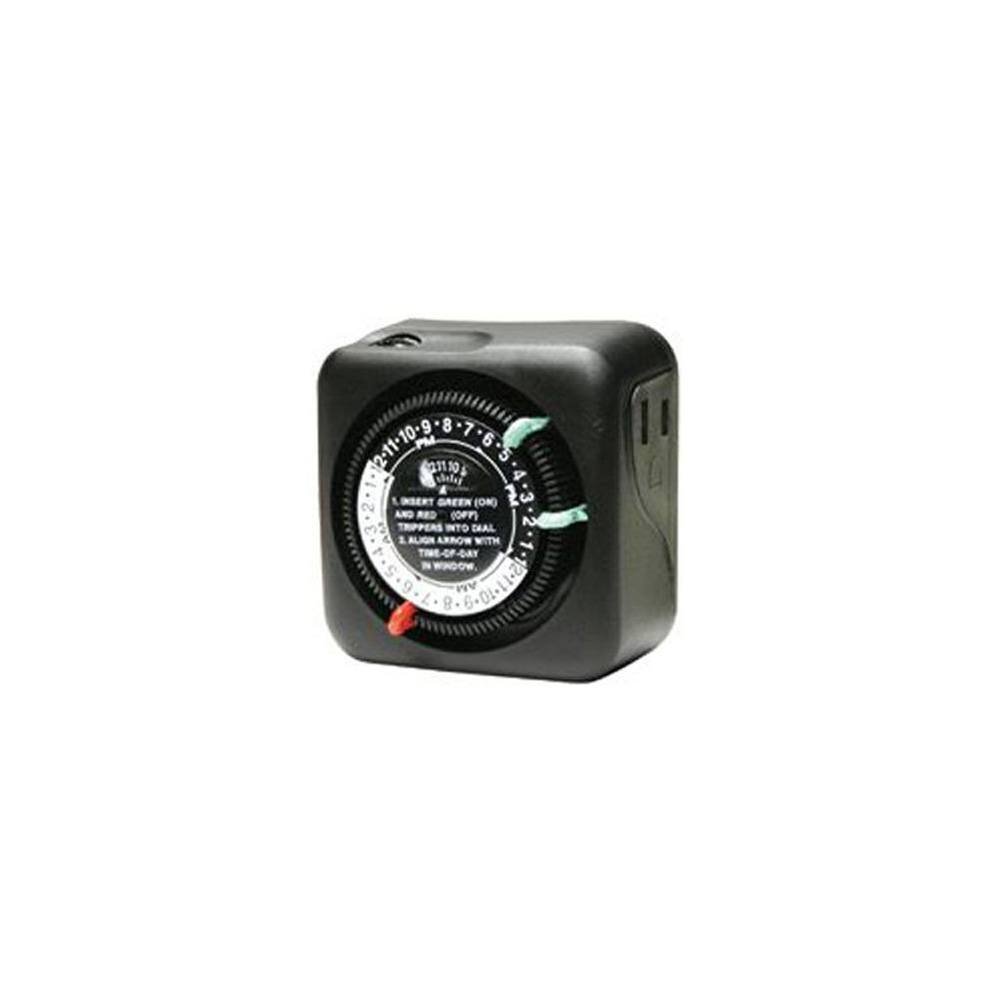
รูปที่ 1 : ด้านหน้า view of the Intermatic TN111RM40 timer, highlighting the 24-hour dial, green (ON) and red (OFF) trippers, and the time-of-day window. The image also shows the product dimensions: 3 inches deep, 4 inches wide, and 3 inches high.
The Intermatic TN111RM40 timer features a rotating 24-hour dial with markings for AM and PM. It includes removable trippers (pins) for setting ON and OFF times, a manual override switch, and a single 2-prong polarized outlet.
การตั้งค่า
- แกะตัวจับเวลา: นำตัวจับเวลาออกจากบรรจุภัณฑ์อย่างระมัดระวัง ตรวจสอบดูว่ามีส่วนใดเสียหายหรือไม่
- ระบุส่วนประกอบ: Locate the green (ON) trippers and red (OFF) trippers. These are small pins that insert into the dial.
- ตั้งเวลาปัจจุบัน:
- Rotate the entire dial clockwise until the current time aligns with the "TIME-OF-DAY" arrow in the window. Ensure to distinguish between AM and PM hours.
- Insert ON/OFF Trippers:
- Insert the green (ON) trippers into the dial at the desired times you want the connected appliance to turn ON.
- Insert the red (OFF) trippers into the dial at the desired times you want the connected appliance to turn OFF.
- The timer supports up to two ON and two OFF settings per 24-hour period.
- เสียบปลั๊กตัวตั้งเวลา: Plug the timer into a standard 2-prong wall outlet.
- เชื่อมต่ออุปกรณ์: เสียบปลั๊กลamp or small appliance into the 2-prong polarized outlet on the side of the timer. Ensure the appliance is switched to the ON position if it has its own power switch.
คำแนะนำการใช้งาน
Once set up, the timer will automatically turn your connected appliance ON and OFF according to the programmed times. The dial will continuously rotate clockwise, indicating the passage of time.
การควบคุมด้วยตนเอง
The Intermatic TN111RM40 includes a manual override feature. This allows you to temporarily turn the connected appliance ON or OFF without disturbing the programmed schedule.
- To manually turn the appliance ON or OFF, locate the manual override switch (often a small lever or button) on the timer.
- Toggle the switch to the desired position. The timer will resume its programmed schedule at the next ON or OFF event.
การซ่อมบำรุง
- การทำความสะอาด: ถอดปลั๊กตัวตั้งเวลาออกจากเต้ารับไฟฟ้าก่อนทำความสะอาด เช็ดภายนอกด้วยผ้าเนื้อนุ่มและแห้งamp ผ้า ห้ามใช้สารทำความสะอาดที่มีฤทธิ์กัดกร่อนหรือตัวทำละลาย
- พื้นที่จัดเก็บ: หากต้องเก็บรักษานาฬิกาจับเวลาไว้เป็นเวลานาน ควรตรวจสอบให้แน่ใจว่าสะอาดและแห้งสนิท เก็บไว้ในที่แห้งและเย็น หลีกเลี่ยงแสงแดดโดยตรง
- การตรวจสอบ: Periodically inspect the timer and its cord for any signs of wear or damage. If damage is found, discontinue use and replace the unit.
การแก้ไขปัญหา
| ปัญหา | สาเหตุที่เป็นไปได้ | สารละลาย |
|---|---|---|
| เครื่องใช้ไฟฟ้าไม่เปิด/ปิดตามเวลาที่ตั้งโปรแกรมไว้ |
|
|
| ปุ่มหมุนตั้งเวลาไม่หมุน |
|
|
ข้อมูลจำเพาะ
- แบบอย่าง: TN111RM40
- ยี่ห้อ: อินเตอร์แมติก
- พิมพ์: ตัวตั้งเวลาแบบกลไก 24 ชั่วโมง
- การตั้งค่า: Up to 2 ON/OFF events per day
- ประเภทเต้าเสียบ: 2-Prong Polarized
- เอกสารแนบ: 3R (Suitable for outdoor use)
- สี: สีดำ
- วัสดุ: พลาสติก
- ขนาดสินค้า : 3 นิ้ว (ความลึก) x 4 นิ้ว (ความกว้าง) x 3 นิ้ว (ความสูง)
- น้ำหนักสินค้า: 5.3 ออนซ์
- ยูพีซี: 702811361973
การรับประกันและการสนับสนุน
For warranty information or technical support, please refer to the official Intermatic webหรือติดต่อฝ่ายบริการลูกค้า เก็บใบเสร็จรับเงินไว้เพื่อใช้ในการเคลมประกัน
ฝ่ายบริการลูกค้าของ Intermatic: www.intermatic.com/support


