การแนะนำ
This manual provides essential information for the safe and effective use of your Sony Cyber-shot DSC-WX50 digital camera. Please read it thoroughly before operating the camera and retain it for future reference. The DSC-WX50 is a compact digital camera featuring a 16.2 MP Exmor R CMOS sensor, 5x optical zoom, and Full HD 1080/60i video recording capabilities.
มีอะไรอยู่ในกล่อง
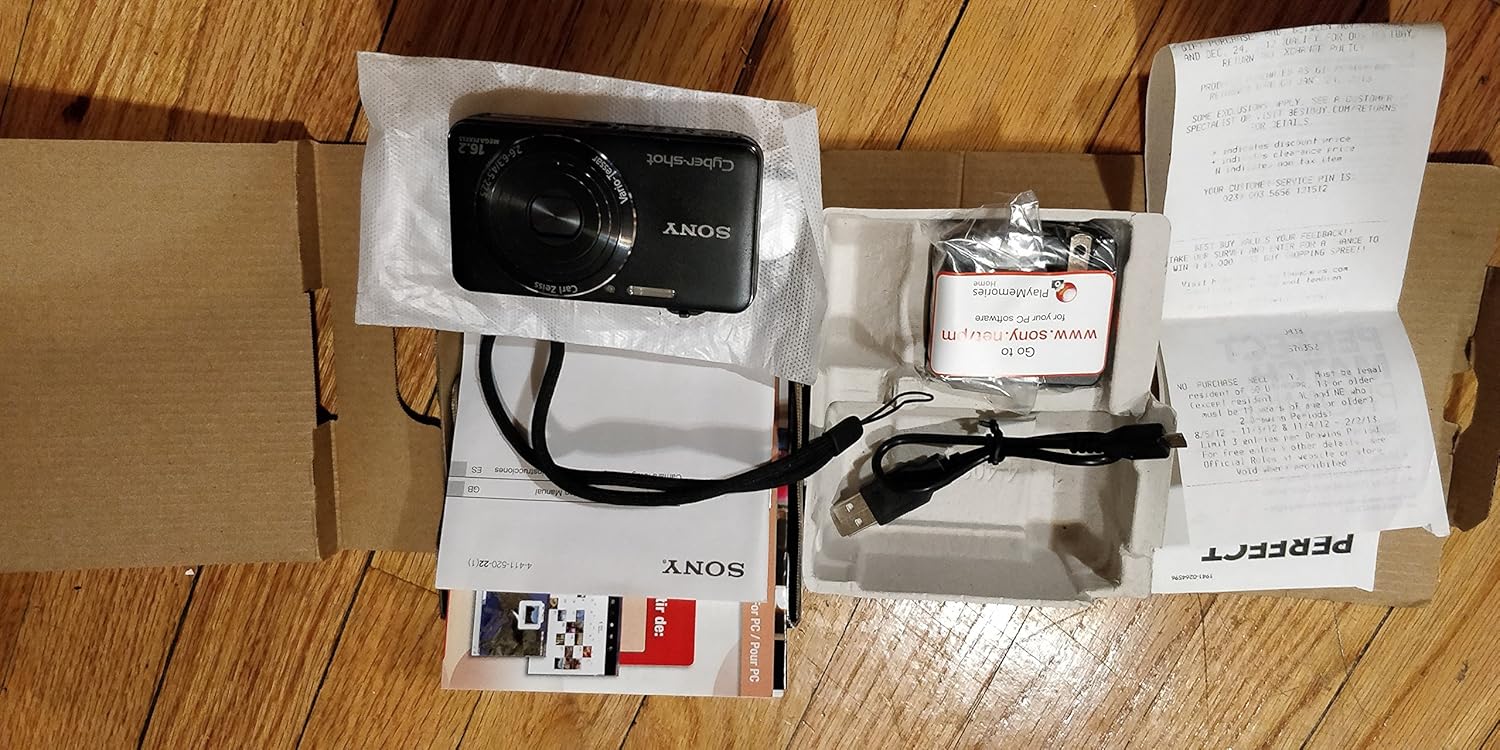
Carefully unpack your camera and ensure all items are present. The standard package contents include:
- Sony Cyber-shot DSC-WX50 Digital Camera
- แบตเตอรี่แบบชาร์จไฟได้
- อะแดปเตอร์ AC
- สายเชื่อมต่อ USB
- สายรัดข้อมือ
- Instruction Manuals and Documentation
- HDMI Cable (Built-in Media)

Image: All contents of the Sony Cyber-shot DSC-WX50 package, including the camera, cables, and documentation, laid out.

ภาพ: ภาพระยะใกล้ view of the included accessories, such as the charger and USB cable, within their packaging.
การตั้งค่า
1. การชาร์จแบตเตอรี่
Before first use, fully charge the supplied battery pack. Connect the camera to the AC adaptor using the USB cable, then plug the AC adaptor into a wall outlet. The charge lamp will light up during charging and turn off when complete.
2. การใส่แบตเตอรี่และการ์ดหน่วยความจำ
Open the battery/memory card cover on the bottom of the camera. Insert the charged battery pack firmly until it locks into place. Insert a compatible memory card (SD/SDHC/SDXC or Memory Stick Duo/Pro Duo/Pro-HG Duo) into the memory card slot until it clicks. Close the cover securely.

ภาพ: ด้านหน้า view of the Sony Cyber-shot DSC-WX50 camera, showing the lens and flash.
3. การตั้งค่าเริ่มต้น
When you turn on the camera for the first time, you will be prompted to set the date, time, and time zone. Follow the on-screen instructions to complete these settings.
การใช้งานกล้อง
เปิด/ปิดเครื่อง
กดปุ่ม พลัง ปุ่มสำหรับเปิดหรือปิดกล้อง เลนส์จะยืดออกเมื่อเปิดเครื่อง
Basic Still Image Shooting (Intelligent Auto Mode)
- เปิดกล้อง
- ตั้งค่าปุ่มหมุนโหมดเป็น อัตโนมัติอัจฉริยะ (ไอคอนกล้องสีเขียว)
- จัดองค์ประกอบภาพของคุณบนหน้าจอ LCD ขนาด 2.7 นิ้ว
- กดปุ่มชัตเตอร์ลงครึ่งหนึ่งเพื่อโฟกัส ตัวบ่งชี้โฟกัสจะเปลี่ยนเป็นสีเขียวเมื่อโฟกัสได้แล้ว
- กดปุ่มชัตเตอร์ลงจนสุดเพื่อถ่ายภาพ
ภาพ: ด้านหลัง view of the Sony Cyber-shot DSC-WX50, highlighting the 2.7-inch LCD screen and control buttons.
ฟังก์ชั่นซูม
Use the zoom lever around the shutter button to adjust the focal length. The camera features 5x optical zoom and Clear Image Zoom for enhanced magnification without significant quality loss.
Video Recording (Full HD 1080/60i)
To record movies, press the dedicated ภาพยนตร์ button. Press it again to stop recording. The camera supports Full HD 1080/60i video in AVCHD format, allowing for high-quality video capture with Optical SteadyShot Active Mode for reduced blur.
Special Shooting Modes and Features
- โหมดอัตโนมัติขั้นสูง: Automatically detects 33 scenes and optimizes settings for dynamic pictures with reduced noise and improved clarity.
- Intelligent Sweep Panorama HR: Capture wide panoramic images by sweeping the camera. The camera stitches multiple frames automatically.
- 3D Still Image & 3D Sweep Panorama: Create 3D images for viewing on compatible 3D displays.
- Picture Effect: Apply creative filters to your photos, such as Toy Camera, Pop Color, Partial Color, and more.
- การเบลอฉากหลัง: Blurs the background to emphasize your subject, similar to DSLR effects.
- โหมดผิวสัมผัสอ่อนโยน: Enhances portraits by reducing the appearance of blemishes and wrinkles.
- Face Detection & Smile Shutter: ตรวจจับใบหน้าอัตโนมัติและสามารถกดชัตเตอร์เมื่อตรวจพบรอยยิ้ม
- ฟังก์ชันป้องกันการกระพริบ: Helps prevent photos with subjects blinking by capturing multiple shots.
- แสงแฟลชธรรมชาติ: Corrects colors for more lifelike images when using flash.
- การตรวจจับการเคลื่อนไหว: Adjusts ISO and shutter speed to reduce blur in moving subjects.
- โหมดกวาดหลายมุม: Captures 15 images at different angles to create a 3D-like view on the camera's LCD when tilted.
การซ่อมบำรุง
การทำความสะอาดกล้อง
- ตัวกล้อง: เช็ดด้วยผ้านุ่มและแห้ง สำหรับคราบฝังแน่น ให้ใช้ผ้าเช็ดเบาๆampล้างด้วยน้ำหรือผงซักฟอกอ่อนๆ แล้วเช็ดให้แห้ง
- เลนส์: ใช้แปรงปัดเลนส์เพื่อกำจัดฝุ่น จากนั้นเช็ดเบาๆ ด้วยผ้าทำความสะอาดเลนส์ หลีกเลี่ยงการสัมผัสพื้นผิวเลนส์ด้วยนิ้วมือ
- หน้าจอ LCD: เช็ดเบาๆ ด้วยผ้าแห้งเนื้อนุ่ม หลีกเลี่ยงการกดหน้าจอแรงๆ
การดูแลแบตเตอรี่
เพื่อยืดอายุการใช้งานแบตเตอรี่ ควรหลีกเลี่ยงการวางไว้ในที่ที่มีอุณหภูมิสูงหรือต่ำเกินไป เก็บแบตเตอรี่ไว้ในที่แห้งและเย็นเมื่อไม่ได้ใช้งาน หากไม่ได้ใช้งานกล้องเป็นเวลานาน ควรถอดแบตเตอรี่ออก
Memory Card Care
Always format new memory cards in the camera before first use. Avoid removing the memory card while the camera is writing data (indicated by a flashing access lamp) to prevent data corruption.
การแก้ไขปัญหา
หากคุณพบปัญหาเกี่ยวกับกล้องของคุณ โปรดดูวิธีแก้ไขทั่วไปต่อไปนี้:
| ปัญหา | สารละลาย |
|---|---|
| กล้องไม่สามารถเปิดได้ |
|
| "Writing to Memory card was incomplete" error. |
|
| ภาพมีความเบลอ |
|
| แฟลชไม่ทำงาน |
|
For further assistance, please contact Sony customer support.
ข้อมูลจำเพาะ
| คุณสมบัติ | รายละเอียด |
|---|---|
| ความละเอียดของภาพนิ่งที่มีประสิทธิภาพ | 16.2 MP |
| เทคโนโลยีโฟโต้เซนเซอร์ | บีเอสไอ ซีมอส |
| ซูมออปติคอล | 5x |
| ซูมดิจิตอล | 20 เท่า |
| ขนาดหน้าจอ | 2.7 นิ้ว |
| ประเภทจอภาพ | จอแอลซีดี |
| ระบบป้องกันภาพสั่นไหว | ระบบกันสั่นแบบออปติคอล |
| ความละเอียดวิดีโอ | Full HD 1080p (1080/60i AVCHD) |
| รองรับ File รูปแบบ | JPEG (Exif 2.3), 3D: MPF, Video: MPEG-4, AVCHD |
| ความเข้ากันได้ของการ์ดหน่วยความจำ | SD/SDHC/SDXC, เมมโมรี่สติ๊กดูโอ/โปรดูโอ/โปรเอชจีดูโอ |
| การเชื่อมต่อ | HDMI, ยูเอสบี |
| ความยาวโฟกัสต่ำสุด | 25 มิลลิเมตร |
| ความยาวโฟกัสสูงสุด | 125 มิลลิเมตร |
| รูรับแสงสูงสุด | เอฟ/6.3 |
| ความเร็วชัตเตอร์ขั้นต่ำ | 4 วินาที |
| ความเร็วชัตเตอร์สูงสุด | 1/1600 วินาที |
| น้ำหนักสินค้า | 0.26 ปอนด์ |
การรับประกันและการสนับสนุน
สำหรับข้อมูลการรับประกันและการบริการลูกค้า โปรดดูเอกสารที่มาพร้อมกับผลิตภัณฑ์ของคุณ หรือเยี่ยมชมเว็บไซต์ฝ่ายสนับสนุนอย่างเป็นทางการของ Sony webไซต์นี้ โปรดเก็บหลักฐานการซื้อไว้เพื่อใช้ยืนยันการรับประกัน
ฝ่ายสนับสนุนอย่างเป็นทางการจากโซนี่: www.sony.com/electronics/support


