1. สินค้าหมดview
The Kodak EasyShare M320 is a compact digital camera designed for ease of use and high-quality imaging. It features a 9.2-megapixel resolution sensor, a 3x optical zoom lens, and a 2.7-inch color LCD screen for clear viewไอเอ็นจีและการนำทาง
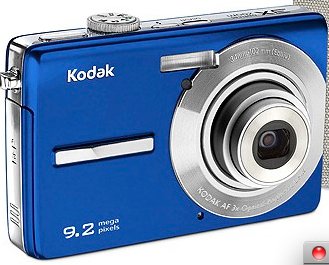
รูปที่ 1 : ด้านหน้า view of the Kodak EasyShare M320 Digital Camera, showcasing its compact design and blue casing.
คุณสมบัติหลัก:
- 9.2-megapixel resolution for detailed images.
- 3x optical zoom lens for capturing distant subjects.
- 2.7-inch color LCD screen for easy framing and review.
- Face detection technology for optimized portraits.
- Blur reduction for sharper photos.
- Kodak Perfect Touch technology for enhanced image quality.
- ISO settings up to 1600 for low-light conditions.
- HD picture capability.
- VGA video recording at 24 frames per second.
2. การตั้งค่าและการใช้งานครั้งแรก
Before using your Kodak EasyShare M320 camera, follow these steps to prepare it for operation.
2.1. การติดตั้งแบตเตอรี่
- หาฝาปิดช่องใส่แบตเตอรี่ที่ด้านล่างของกล้อง
- Slide the latch to open the compartment door.
- Insert the rechargeable battery, ensuring the correct polarity (+/-) as indicated inside the compartment.
- ปิดฝาช่องใส่แบตเตอรี่ให้สนิทจนได้ยินเสียงคลิก
2.2. การใส่การ์ดหน่วยความจำ
กล้องรองรับการ์ดหน่วยความจำ SD/SDHC (ไม่รวมอยู่ในชุด) จำเป็นต้องใช้การ์ดหน่วยความจำเพื่อจัดเก็บภาพถ่ายและวิดีโอ
- เปิดฝาช่องใส่การ์ดหน่วยความจำ ซึ่งโดยปกติจะอยู่ใกล้กับช่องใส่แบตเตอรี่
- Insert the SD/SDHC card with the metal contacts facing the front of the camera until it clicks into place.
- ปิดฝาปิดช่องเสียบการ์ดหน่วยความจำ
2.3. เปิดเครื่องครั้งแรก
- กดปุ่มเปิด/ปิดเพื่อเปิดกล้อง
- The first time you power on, you may be prompted to set the date, time, and language. Follow the on-screen instructions using the navigation buttons and the OK button.
3. การใช้งานกล้อง
This section covers basic operations for capturing photos and videos.
3.1.การถ่ายภาพ
- เปิดกล้อง
- Select the desired shooting mode (e.g., Auto, Scene modes) using the mode dial or menu.
- จัดกรอบภาพของคุณโดยใช้หน้าจอ LCD
- Press the Shutter button halfway down to focus. The focus indicator will illuminate when focus is achieved.
- Press the Shutter button all the way down to capture the photo.
3.2. บันทึกวิดีโอ
- เปิดกล้อง
- Switch to video recording mode (if available via a dedicated button or mode dial).
- Press the Record button to start recording. A red indicator or timer will appear on the screen.
- กดปุ่มบันทึกอีกครั้งเพื่อหยุดการบันทึก
3.3. เรื่องviewการลงภาพและวิดีโอ
- กดปุ่มเล่น (มักมีไอคอนรูปสามเหลี่ยม)
- Use the navigation buttons to scroll through your captured photos and videos.
- ถึง view a video, select it and press the OK button to start playback.
- Press the Playback button again or the Shutter button to return to shooting mode.
4. การบำรุงรักษาและการดูแล
การดูแลอย่างเหมาะสมจะช่วยให้กล้องของคุณมีอายุการใช้งานยาวนานและมีประสิทธิภาพเหมาะสมที่สุด
4.1. การทำความสะอาดกล้อง
- ตัวกล้อง: ใช้ผ้านุ่มและแห้งเช็ดตัวกล้อง สำหรับคราบสกปรกฝังแน่น ให้เช็ดเบาๆampen the cloth with water. Avoid harsh chemicals or solvents.
- เลนส์: ใช้แปรงปัดเลนส์หรือเครื่องเป่าลมเพื่อกำจัดฝุ่น สำหรับคราบสกปรก ให้ใช้ผ้าเช็ดเลนส์และน้ำยาทำความสะอาดเลนส์โดยเฉพาะ ห้ามสัมผัสพื้นผิวเลนส์ด้วยนิ้วมือ
- หน้าจอ LCD: เช็ดหน้าจอเบาๆ ด้วยผ้านุ่มที่ไม่เป็นขุย หลีกเลี่ยงการกดแรงเกินไป
4.2. การจัดเก็บ
- เก็บกล้องไว้ในที่แห้งและเย็น หลีกเลี่ยงแสงแดดโดยตรงและอุณหภูมิที่สูงหรือต่ำเกินไป
- หากจัดเก็บเป็นเวลานาน ควรถอดแบตเตอรี่ออกเพื่อป้องกันการรั่วไหล
- ใช้เคสใส่กล้องเพื่อป้องกันฝุ่นและรอยขีดข่วน
5 การแก้ไขปัญหา
โปรดดูหัวข้อนี้เพื่อดูวิธีแก้ไขปัญหาทั่วไปที่คุณอาจพบเจอ
| ปัญหา | สาเหตุที่เป็นไปได้ / วิธีแก้ไข |
|---|---|
| กล้องไม่สามารถเปิดได้ |
|
| ไม่สามารถถ่ายรูปได้ |
|
| รูปภาพมีความเบลอ |
|
| แฟลชไม่ทำงาน |
|
6. ข้อมูลจำเพาะ
Technical specifications for the Kodak EasyShare M320 Digital Camera.
| คุณสมบัติ | รายละเอียด |
|---|---|
| ชื่อรุ่น | อีซี่แชร์ M320 |
| สูงสุด Webความละเอียดของภาพลูกเบี้ยว | 9.2 MP |
| ซูมออปติคอล | 3x |
| ระบบป้องกันภาพสั่นไหว | ดิจิตอล, ออปติคัล |
| เทคโนโลยีโฟโต้เซนเซอร์ | ซีมอส |
| รองรับ File รูปแบบ | เจเพ็ก, ดิบ |
| อัตราส่วนภาพ | 16:9 น. |
| ขยาย ISO ขั้นต่ำ | 1600 |
| น้ำหนักสินค้า | 15.2 ออนซ์ |
| ขนาดแพ็คเกจ | 9 x 6.5 x 2.8 นิ้ว |
| ผู้ผลิต | โคดัก |
| วันที่พร้อมใช้งานครั้งแรก | 13 เมษายน 2010 |
7. การรับประกันและการสนับสนุน
For detailed warranty information, please refer to the warranty card included with your product at the time of purchase. Warranty terms and conditions may vary by region.
For technical support, service, or additional product information, please visit the official Kodak support webหรือติดต่อแผนกบริการลูกค้า ข้อมูลการติดต่อมักจะระบุไว้ในบรรจุภัณฑ์ของผลิตภัณฑ์หรือในเว็บไซต์ของผู้ผลิต webเว็บไซต์.
You can visit the KODAK Store for more information: ร้านค้า KODAK บน Amazon


