การแนะนำ
This manual provides detailed instructions for the proper use and maintenance of your Royal DM2070 Electronic Organizer. Please read this manual thoroughly before operating the device to ensure safe and efficient use. Keep this manual for future reference.
ข้อมูลด้านความปลอดภัย
- อย่าให้เครื่องสัมผัสกับอุณหภูมิที่สูงหรือต่ำเกินไป แสงแดดโดยตรง หรือความชื้นสูง
- หลีกเลี่ยงการทำอุปกรณ์หล่นหรือกระแทกอย่างรุนแรง
- อย่าพยายามถอดประกอบหรือซ่อมแซมอุปกรณ์ด้วยตนเอง แนะนำให้ส่งช่างผู้ชำนาญการไปรับบริการทั้งหมด
- เก็บอุปกรณ์ให้ห่างจากน้ำและของเหลวอื่นๆ
- โปรดใช้แบตเตอรี่ชนิดที่ระบุไว้เท่านั้นสำหรับการเปลี่ยน
เนื้อหาแพ็คเกจ
ตรวจสอบว่ามีรายการทั้งหมดอยู่ในแพ็คเกจของคุณ:
- Royal DM2070 Electronic Organizer
- Stylus (if applicable)
- คู่มือเริ่มต้นอย่างรวดเร็ว
- บัตรรับประกัน
การตั้งค่า
1. การติดตั้งแบตเตอรี่
The Royal DM2070 requires batteries for operation. Follow these steps to install them:
- ค้นหาฝาครอบช่องใส่แบตเตอรี่ที่ด้านหลังของอุปกรณ์
- เลื่อนหรือยกฝาขึ้นเพื่อเปิดช่อง
- Insert the required batteries, ensuring correct polarity (+ and -) as indicated inside the compartment.
- ใส่ฝาปิดช่องใส่แบตเตอรี่กลับเข้าที่อย่างแน่นหนา
2. การเปิดเครื่องและการตั้งค่าครั้งแรก
After installing batteries, power on your device and configure basic settings:
- กดปุ่มค้างไว้ พลัง กดปุ่มค้างไว้จนกว่าหน้าจอจะสว่างขึ้น
- The device may prompt you to set the date and time. Use the navigation buttons or stylus to enter the correct information.
- ยืนยันการตั้งค่าของคุณเพื่อทำการตั้งค่าเริ่มต้นให้เสร็จสมบูรณ์
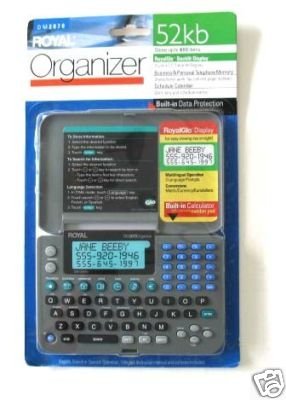
Image: Royal DM2070 Electronic Organizer. This image displays the device's front view, highlighting its screen and keypad, essential for navigation and data entry.
คำแนะนำการใช้งาน
1. การนำทาง
The DM2070 features a keypad and potentially a stylus for navigation. Use the arrow keys to move between menu options and press เข้า or a designated selection button to confirm.
2. Entering Data
To enter information such as contacts, appointments, or notes:
- Navigate to the desired application (e.g., 'Contacts', 'Calendar', 'Notes').
- Select 'New Entry' or a similar option.
- Use the alphanumeric keypad to input text. Some models may offer an on-screen keyboard via stylus.
- Save your entry before exiting the application.
3. การใช้แอปพลิเคชัน
The DM2070 includes various applications:
- ปฏิทิน: View daily, weekly, or monthly schedules. Add and edit appointments.
- ติดต่อเรา: Store names, phone numbers, addresses, and email information.
- หมายเหตุ: Create and manage text notes or memos.
- เครื่องคิดเลข: Perform basic arithmetic calculations.
- แปลงสกุลเงิน: Convert between different currencies (requires manual update of exchange rates on some models).
การซ่อมบำรุง
1. การทำความสะอาดอุปกรณ์
To keep your DM2070 in optimal condition:
- เช็ดหน้าจอแล้วคasing with a soft, dry, lint-free cloth.
- สำหรับรอยฝังแน่น ให้ลบออกเล็กน้อยampชุบผ้าให้เปียกหมาดๆ หลีกเลี่ยงสารเคมีรุนแรงหรือน้ำยาทำความสะอาดที่มีฤทธิ์กัดกร่อน
- ตรวจสอบให้แน่ใจว่าไม่มีความชื้นเข้าไปในช่องเปิดต่างๆ
2. การดูแลแบตเตอรี่
- ควรเปลี่ยนแบตเตอรี่ทันทีเมื่อไฟแสดงสถานะแบตเตอรี่ต่ำปรากฏขึ้น
- ถอดแบตเตอรี่ออกหากจะไม่ได้ใช้งานอุปกรณ์เป็นเวลานานเพื่อป้องกันการรั่วไหล
การแก้ไขปัญหา
If you encounter issues with your Royal DM2070, refer to the following common solutions:
| ปัญหา | สาเหตุที่เป็นไปได้ | สารละลาย |
|---|---|---|
| อุปกรณ์ไม่เปิดเครื่อง | แบตเตอรี่เสียหรือติดตั้งไม่ถูกต้อง | เปลี่ยนแบตเตอรี่ใหม่โดยตรวจสอบให้แน่ใจว่าใส่ขั้วถูกต้อง |
| หน้าจอว่างเปล่าหรือค้าง | ซอฟต์แวร์มีปัญหาหรือแบตเตอรี่อ่อน | Try a soft reset (refer to Quick Start Guide for specific button combination) or replace batteries. |
| Data loss. | Battery depletion or improper shutdown. | Ensure batteries are fresh. Always save data before powering off. |
| แป้นพิมพ์ไม่ตอบสนอง | Dust/debris under keys or internal issue. | Clean keypad gently. If problem persists, contact support. |
ข้อมูลจำเพาะ
Key technical specifications for the Royal DM2070 Electronic Organizer:
| คุณสมบัติ | รายละเอียด |
|---|---|
| ยี่ห้อ | รอยัล |
| หมายเลขรุ่น | ดีเอ็ม2070 |
| วัสดุคลุม | หนัง |
| รูปแบบ | ผู้จัดงาน |
| น้ำหนักสินค้า | 181 กรัม |
| ขนาดรายการ (LxWxH) | 24.4 x 14.5 x 1 เซนติเมตร |
| กลุ่มเป้าหมาย | ผู้ใหญ่ |
การรับประกันและการสนับสนุน
The Royal DM2070 Electronic Organizer comes with a standard manufacturer's warranty. Please refer to the warranty card included in your package for specific terms and conditions. For technical support, service, or inquiries, please contact Royal customer service through the contact information provided on the warranty card or the official Royal webเว็บไซต์.