การแนะนำ
This manual provides instructions for the setup, operation, and maintenance of your Logitech Wingman Force Joystick, model 963155-0403. This device is designed to enhance your PC gaming experience with force feedback technology and programmable controls.
เนื้อหาแพ็คเกจ
ตรวจสอบว่าแพ็คเกจของคุณมีรายการต่อไปนี้:
- Logitech Wingman Force Joystick
- อะแดปเตอร์แปลงไฟ
- USB Cable (integrated or separate)
- Software CD (if applicable, for WingMan Software)
- คู่มือการใช้งาน (เอกสารนี้)
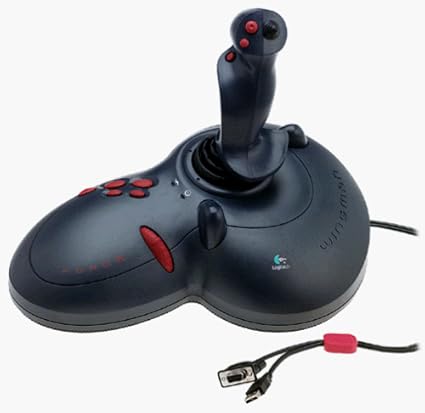
Figure 1: The Logitech Wingman Force Joystick packaging, showing the joystick and its features.
การตั้งค่า
- เชื่อมต่อพลังงาน: Plug the power adapter into the joystick and then into a standard electrical outlet.
- เชื่อมต่อกับพีซี: Connect the joystick's USB cable to an available USB port on your computer. The joystick also supports serial interfaces.
- ติดตั้งซอฟต์แวร์: Insert the WingMan Software CD (if provided) into your computer's CD-ROM drive and follow the on-screen instructions to install the drivers and WingMan Software. If no CD is provided, drivers may be automatically installed by your operating system or available for download from the Logitech support webเว็บไซต์.
- ข้อกำหนดของระบบ: Ensure your computer runs a compatible Windows operating system.
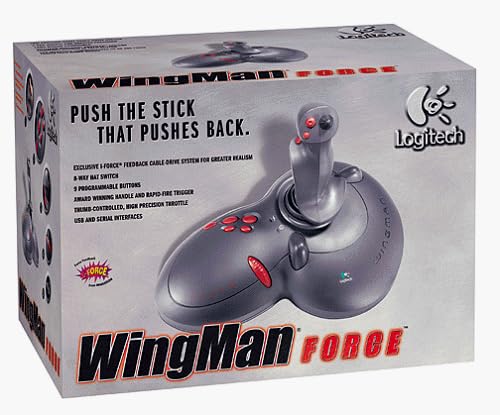
Figure 2: The Logitech Wingman Force Joystick, illustrating its ergonomic design and button layout.
คำแนะนำการใช้งาน
ควบคุมมากกว่าview
- Joystick Handle: Provides precise control for in-game movement.
- ปุ่มตั้งโปรแกรมได้ 9 ปุ่ม: Customize these buttons using the WingMan Software for various in-game actions.
- สวิตช์หมวก 8 ทิศทาง: Located on top of the joystick, this switch allows for quick camera views or directional commands.
- Thumb-Controlled Throttle: Adjust speed or thrust with the integrated throttle control.
Force Feedback Technology
The Wingman Force Joystick utilizes Logitech's exclusive I-Force force feedback technology with a cable-drive system. This system provides realistic tactile feedback, such as vibrations from impacts, recoil from weapons, and resistance during maneuvers, enhancing immersion in compatible games.
Using WingMan Software
The WingMan Software allows you to:
- Program the 9 buttons for specific game functions.
- สร้างและบันทึกโปรหลายรายการfileสำหรับเกมต่างๆ
- Adjust force feedback intensity settings.
- Calibrate the joystick for optimal performance.
Refer to the WingMan Software's help documentation for detailed instructions on customization and profile การจัดการ.
การซ่อมบำรุง
To ensure the longevity and optimal performance of your joystick:
- การทำความสะอาด: Use a soft, dry cloth to wipe the surface of the joystick. Avoid using abrasive cleaners or solvents.
- พื้นที่จัดเก็บ: Store the joystick in a clean, dry environment away from extreme temperatures and direct sunlight.
- การดูแลสายเคเบิล: Avoid bending or crimping the cables excessively.
การแก้ไขปัญหา
- Problem: Joystick not recognized by computer.
- สารละลาย:
- Ensure the USB cable is securely connected to both the joystick and the computer.
- ลองเชื่อมต่อกับพอร์ต USB อื่น
- Verify that the power adapter is properly connected and the joystick is receiving power.
- Reinstall the WingMan Software drivers.
- Problem: Inconsistent or absent force feedback.
- สารละลาย:
- Check the force feedback settings within the WingMan Software and ensure they are set to an appropriate level.
- Ensure the game you are playing supports force feedback and that it is enabled in the game's settings.
- Restart your computer and the game.
- ตรวจสอบว่าการเชื่อมต่อทั้งหมดปลอดภัย
- Problem: Buttons or controls are unresponsive.
- สารละลาย:
- Calibrate the joystick using the WingMan Software.
- Ensure the joystick drivers are up to date.
- Test the joystick in a different game or application to determine if the issue is game-specific.
ข้อมูลจำเพาะ
| คุณสมบัติ | รายละเอียด |
|---|---|
| หมายเลขรุ่น | 963155-0403 |
| ยี่ห้อ | โลจิเทค |
| ประเภทตัวควบคุม | จอยสติ๊ก |
| เทคโนโลยีการเชื่อมต่อ | ยูเอสบี, ซีเรียล |
| อุปกรณ์ที่รองรับ | พีซี Windows |
| ขนาดสินค้า | 13.5 x 9.63 x 9.25 นิ้ว |
| น้ำหนักสินค้า | 4.14 ปอนด์ |
| แรงตอบรับ | I-Force feedback cable-drive system |
| ปุ่ม | ปุ่มตั้งโปรแกรมได้ 9 ปุ่ม |
| สวิตช์หมวก | สวิตช์หมวก 8 ทิศทาง |
| คันเร่ง | Thumb-controlled, high precision throttle |
การรับประกันและการสนับสนุน
สำหรับข้อมูลการรับประกันและการสนับสนุนทางเทคนิค โปรดดูเอกสารที่มาพร้อมกับผลิตภัณฑ์ของคุณ หรือเยี่ยมชมเว็บไซต์ฝ่ายสนับสนุนอย่างเป็นทางการของ Logitech webไซต์ โดยทั่วไปคุณจะพบไดรเวอร์ คำถามที่พบบ่อย และข้อมูลติดต่อฝ่ายบริการลูกค้าได้ที่นั่น
ฝ่ายสนับสนุนของ Logitech Webเว็บไซต์: www.logitech.com/support


