


Шӯрои рушди ABX00087 UNO R4 WiFi
Cricket Shot Recognition using Arduino UNO R4 WiFi + ADXL345 + Edge
Импулс
This document provides a complete workflow for building a cricket shot recognition system using Arduino UNO R4 WiFi with an ADXL345 accelerometer and Edge Impulse Studio. The project involves collecting accelerometer data, training a machine learning model, and deploying the trained model back to the Arduino for real-time shot classification.
Cricket shots considered in this project:
– Cover Drive
– Straight Drive
– Pull Shot
Қадами 1: Талаботи сахтафзор
– Arduino UNO R4 WiFi
– ADXL345 Accelerometer (I2C)
– Jumper wires
– Breadboard (optional)
- Сими USB Type-C
Қадами 2: Талаботи нармафзор
– Arduino IDE (latest)
– Edge Impulse Studio account (free)
– Edge Impulse CLI tools (Node.js required)
– Adafruit ADXL345 library
Step 3: Wiring the ADXL345
Connect the ADXL345 sensor to the Arduino UNO R4 WiFi as follows:
VCC → 3.3V
GND → GND
SDA → SDA (A4)
SCL → SCL (A5)
CS → 3.3V (optional, for I2C mode)
SDO → floating or GND
Step 4: Make IDE Sensor Ready
Чӣ тавр китобхонаҳои сенсориро дар Arduino IDE насб кардан мумкин аст?
Arduino IDE-ро кушоед
Open Tools → Manage Libraries… and install: Adafruit ADXL345 Unified Adafruit Unified Sensor
(If you have LSM6DSO or MPU6050 instead: install SparkFun LSM6DSO , Adafruit LSM6DS or MPU6050 accordingly.)
Step 5: Arduino Sketch for Data Collection
Upload this sketch to your Arduino UNO R4 WiFi. It streams accelerometer data in CSV format (x,y,z) at ~18 Hz for Edge Impulse.
#дарбар мегирад
#include <Adafruit_ADXL345_U.h>
Adafruit_ADXL345_Unified accel =
Adafruit_ADXL345_Unified(12345);
насби бекор () {
Serial.begin(115200);
if (!accel.begin()) {
Serial.println(“No ADXL345 detected”);
дар ҳоле ки (1);
}
accel.setRange(ADXL345_RANGE_4_G);
}
ҳалқаи ботил () {
sensors_event_t e;
accel.getEvent(&e);
Serial.print (e.acceleration.x);
Serial.print(“,”);
Serial.print(e.acceleration.y);
Serial.print(“,”);
Serial.println(e.acceleration.z);delay(55); // ~18 Hz
}
Set Up Edge Impulse

Step 6: Connecting to Edge Impulse
- Close Arduino Serial Monitor.
- Run the command: edge-impulse-data-forwarder –frequency 18
- Enter axis names: accX, accY, accZ
- Name your device: Arduino-Cricket-Board
- Confirm connection in Edge Impulse Studio under ‘Devices’.


Қадами 7: Ҷамъоварии маълумот
In Edge Impulse Studio → Data acquisition:
– Device: Arduino-Cricket-Board
– Sensor: Accelerometer (3 axes)
— Сample length: 2000 ms (2 seconds)
– Басомад: 18 Гц
Record at least 40 samples per class:
– Cover Drive
– Straight Drive
– Pull Shot Collect Data Examples
Сарпӯши Drive
Device: Arduino-Cricket-Board
Label: Cover Drive
Sensor: Sensor with 3 axes (accX, accY, accZ)
Sample length: 10000ms
Фосила: 18 Гц
Example Raw Data:
accX -0.32
accY 9.61
accZ -0.12
Straight Drive
Device: Arduino-Cricket-Board
Label: Straight Drive
Sensor: Sensor with 3 axes (accX, accY, accZ)
Sample length: 10000ms
Фосила: 18 Гц
Example Raw Data:
accX 1.24
accY 8.93
accZ -0.42
Pull Shot
Device: Arduino-Cricket-Board
Label: Pull Shot
Sensor: Sensor with 3 axes (accX, accY, accZ)
Sample length:10000 ms
Фосила: 18 Гц
Example Raw Data:
accX 2.01
accY 7.84
accZ -0.63 
Step 8: Impulse Design
Open Create impulse:
Блоки вуруд: Маълумоти силсилаи вақт (3 меҳвар).
Window size: 1000 ms Window increase (stride): 200 ms Enable: Axes, Magnitude (optional), frequency 18.
Processing block: Spectral analysis (a.k.a. Spectral Features for motion). Window size: 1000 ms Window increase (stride): 200 ms Enable: Axes, Magnitude (optional), keep all defaults first.
Блоки омӯзишӣ: тасниф (Керас).
Захираи импулсро клик кунед. 
Generate features:
Ба таҳлили спектралӣ гузаред, Параметрҳоро Захира кунед ва пас Хусусиятҳоро барои маҷмӯи омӯзиш тавлид кунед.

Train a small model
Go to Classifier (Keras) and use a compact config like:
Neural network: 1–2 dense layers (e.g., 60 → 30), ReLU
Epochs: 40–60
Learning rate: 0.001–0.005
Batch size: 32
Data split: 80/20 (train/test)
Save and train the data
Evaluate and Check Model testing with the holdout set.
Inspect the confusion matrix; if circle and up overlap, collect more diverse data or tweak
Spectral parameters (window size / noise floor).
Step 9: Deployment to Arduino
Go to Deployment:
Choose Arduino library (C++ library also works).
Барои кам кардани андозаи модели EON Compiler (агар дастрас бошад) -ро фаъол созед. 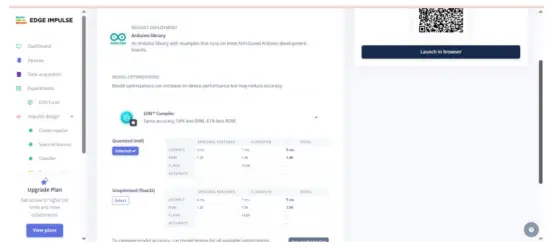 Download the .zip, then in Arduino IDE: Sketch → Include Library → Add .ZIP Library… This adds examples монанди буфери статикӣ ва Continuous зери File → Мисamples →
Your Project Name – Edge Impulse. Inference sketch for Arduino UNO EK R4 WiFi + ADXL345.
Step 10: Arduino Inference Sketch
#дарбар мегирад
#include <Adafruit_ADXL345_Unified.h>
#include <your_project_inference.h> // Replace with Edge Impulse header
Adafruit_ADXL345_Unified accel =
Adafruit_ADXL345_Unified(12345);
static bool debug_nn = false;
насби бекор () {
Serial.begin(115200);
while (!Serial) {}
if (!accel.begin()) {
Serial.println(“ERROR: ADXL345 not detected”);
дар ҳоле ки (1);
}
accel.setRange(ADXL345_RANGE_4_G);
}
ҳалқаи ботил () {
float buffer[EI_CLASSIFIER_DSP_INPUT_FRAME_SIZE] = {0};
for (size_t ix = 0; ix < EI_CLASSIFIER_DSP_INPUT_FRAME_SIZE; ix +=
3) {
uint64_t next_tick = micros() + (EI_CLASSIFIER_INTERVAL_MS *
1000);
sensors_event_t e;
accel.getEvent(&e);
buffer[ix + 0] = e.acceleration.x;
buffer[ix + 1] = e.acceleration.y;
buffer[ix + 2] = e.acceleration.z;
int32_t wait = (int32_t)(next_tick – micros());
if (wait > 0) delayMicroseconds(wait);
}
signal_t signal;
int err = numpy::signal_from_buffer(buffer,
EI_CLASSIFIER_DSP_INPUT_FRAME_SIZE, &signal);
if (err != 0) return;
ei_impulse_result_t result = {0};
EI_IMPULSE_ERROR res = run_classifier(&signal, &result,
debug_nn);
if (res != EI_IMPULSE_OK) return;
for (size_t ix = 0; ix < EI_CLASSIFIER_LABEL_COUNT; ix++) {
ei_printf(“%s: %.3f “, result.classification[ix].label,
result.classification[ix].value);
}
#if EI_CLASSIFIER_HAS_ANOMALY == 1
ei_printf(“anomaly: %.3f”, result.anomaly);
#endif
ei_printf(“\n”);
}
Натиҷаи мисampле:
 Маслиҳатҳо:
EI_CLASSIFIER_INTERVAL_MS-ро бо басомади интиқолдиҳандаи маълумот ҳамоҳанг нигоҳ доред (масалан, 100 Гц → 10 мс). Китобхонаи Edge Impulse ин доимиро аз импулси шумо ба таври худкор муқаррар мекунад.
Агар шумо хоҳед, ки ошкоркунии доимӣ (равзанаи лағжиш), аз Continous ex оғоз кунедample ба китобхонаи EI дохил карда шудааст ва мубодила дар хондани ADXL345.
We will be adding video tutorials soon; till then, stay tuned – https://www.youtube.com/@RobuInlabs
And If you still have some doubts, you can check out this video by Edged Impulse: https://www.youtube.com/watch?v=FseGCn-oBA0&t=468s
Ҳуҷҷатҳо / Сарчашмаҳо
 |
Arduino ABX00087 UNO R4 WiFi Development Board [pdf] Дастури корбар R4 WiFi, ADXL345, ABX00087 UNO R4 WiFi Development Board, ABX00087, UNO R4 WiFi Development Board, WiFi Development Board, Development Board, Board |