పరిచయం
This manual provides essential information for setting up, operating, maintaining, and troubleshooting your Samsung Galaxy A07 4G smartphone (Model SM-A075/DS). Please read this manual thoroughly to ensure proper use and to maximize the device's features.
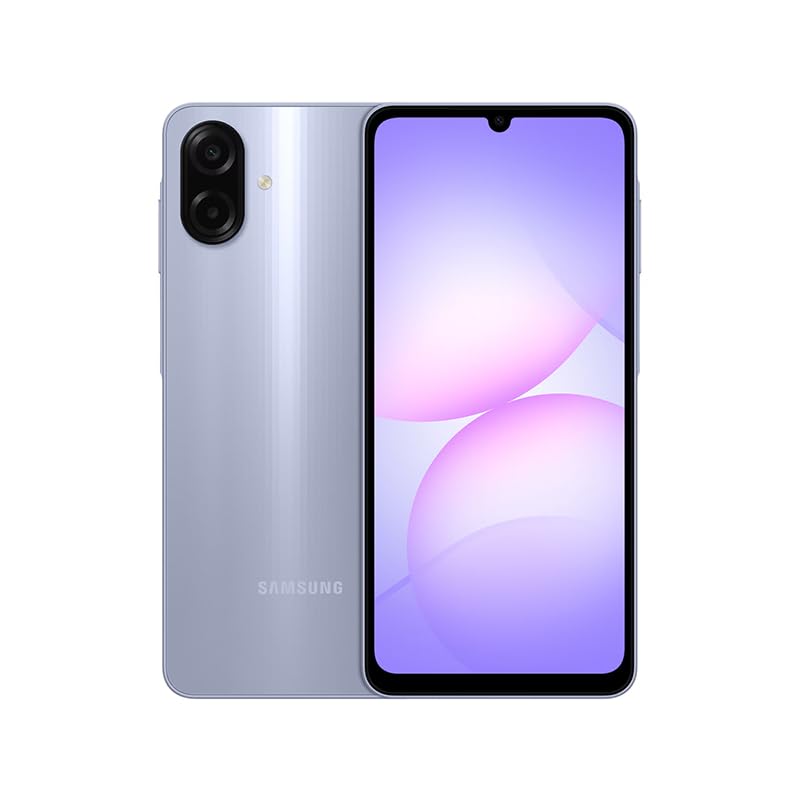
Figure 1: Samsung Galaxy A07 4G Front View
1. సెటప్
1.1 అన్బాక్సింగ్ మరియు ప్రారంభ తనిఖీ
Carefully remove all items from the packaging. Verify that all components are present. The box should contain the Samsung Galaxy A07 4G smartphone and a USB Cable. A charger is not included.

Figure 2: Device in packaging
1.2 Inserting SIM Card(s) and MicroSD Card
- పరికరం పక్కన SIM ట్రేని గుర్తించండి.
- Use the provided SIM ejector tool (if included, otherwise a small paperclip) to open the SIM tray.
- Carefully place your SIM card(s) and/or MicroSD card into the designated slots on the tray. This device supports Dual SIM and MicroSD up to 1TB.
- Gently push the SIM tray back into the device until it is flush.

మూర్తి 3: వైపు view SIM ట్రే స్థానంతో
1.3 ప్రారంభ పవర్ ఆన్ మరియు కాన్ఫిగరేషన్
- Samsung లోగో కనిపించే వరకు పవర్ బటన్ను (వైపున ఉంది) నొక్కి పట్టుకోండి.
- భాష ఎంపిక, Wi-Fi కనెక్షన్, Google ఖాతా సెటప్ మరియు భద్రతా సెట్టింగ్లతో సహా ప్రారంభ సెటప్ను పూర్తి చేయడానికి ఆన్-స్క్రీన్ ప్రాంప్ట్లను అనుసరించండి.
2. ఆపరేటింగ్ సూచనలు
2.1 డిస్ప్లే మరియు నావిగేషన్
The Samsung Galaxy A07 features a 6.7-inch PLS LCD display with a 90 Hz refresh rate for smooth visuals.
- స్పర్శ సంజ్ఞలు: ఎంచుకోవడానికి నొక్కండి, స్క్రోల్ చేయడానికి స్వైప్ చేయండి, జూమ్ చేయడానికి పించ్ చేయండి.
- హోమ్ స్క్రీన్: విడ్జెట్లు మరియు యాప్ షార్ట్కట్లతో అనుకూలీకరించండి.
- నోటిఫికేషన్ ప్యానెల్: త్వరిత సెట్టింగ్లు మరియు నోటిఫికేషన్లను యాక్సెస్ చేయడానికి స్క్రీన్ పై నుండి క్రిందికి స్వైప్ చేయండి.
2.2 కెమెరా వినియోగం
The device is equipped with a 50 MP Pro-Grade main camera and an 8 MP front camera.
- మీ హోమ్ స్క్రీన్ లేదా యాప్ డ్రాయర్ నుండి కెమెరా అప్లికేషన్ను తెరవండి.
- మీకు కావలసిన మోడ్ను ఎంచుకోండి (ఫోటో, వీడియో, పోర్ట్రెయిట్, మొదలైనవి).
- చిత్రాన్ని క్యాప్చర్ చేయడానికి లేదా వీడియో రికార్డింగ్ను ప్రారంభించడానికి/ఆపడానికి షట్టర్ బటన్ను నొక్కండి.
- మాగ్నిఫికేషన్ను సర్దుబాటు చేయడానికి స్క్రీన్పై జూమ్ నియంత్రణలను ఉపయోగించండి.
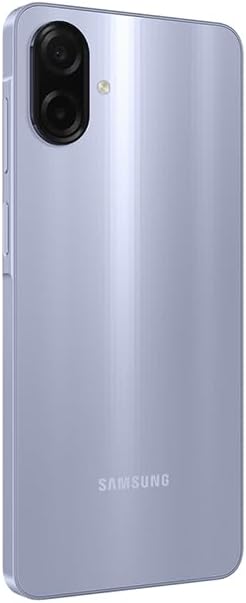
Figure 4: Rear Camera System
2.3 కనెక్టివిటీ
- Wi-Fi: Connect to wireless networks via Settings > Connections > Wi-Fi. Supports 802.11a/b/g/n/ac 2.4GHz+5GHz.
- బ్లూటూత్: సెట్టింగ్లు > కనెక్షన్లు > బ్లూటూత్ ద్వారా ఇతర బ్లూటూత్ పరికరాలతో జత చేయండి.
- మొబైల్ డేటా: Ensure your SIM card is active for 4G LTE connectivity. Compatible with T-Mobile, Mint, Tello, and Global GSM networks.
- GPS: Location services are supported via GPS, Glonass, Beidou, Galileo, QZSS.
3. నిర్వహణ
3.1 సాఫ్ట్వేర్ నవీకరణలు
Regularly check for and install software updates to ensure optimal performance, security, and access to new features. Your device is designed to receive 6 major OS upgrades and 6 years of security updates.
- Go to Settings > Software update > Download and install.
3.2 మీ పరికరాన్ని శుభ్రపరచడం
To clean your device, use a soft, lint-free cloth. Avoid abrasive materials or harsh chemicals. The device has an IP54 rating, providing protection against dust and water splashes.
- Wipe the screen and back panel gently.
- పరికరాన్ని నీటిలో ముంచవద్దు.
3.3 బ్యాటరీ సంరక్షణ
The device is equipped with a 5000 mAh battery. To prolong battery life:
- తీవ్రమైన ఉష్ణోగ్రతలను నివారించండి.
- ఛార్జింగ్ కోసం అందించిన USB కేబుల్ని ఉపయోగించండి.
- బ్యాటరీ తరచుగా పూర్తిగా ఖాళీ అవ్వనివ్వకండి.
4. ట్రబుల్షూటింగ్
4.1 పరికరం ఆన్ కావడం లేదు
- బ్యాటరీ ఛార్జ్ అయ్యిందని నిర్ధారించుకోండి. పరికరాన్ని కనీసం 10 నిమిషాల పాటు ఛార్జర్కి కనెక్ట్ చేయండి.
- బలవంతంగా రీస్టార్ట్ చేయడానికి పవర్ బటన్ను 10-15 సెకన్ల పాటు నొక్కి పట్టుకోండి.
4.2 నెట్వర్క్ కనెక్టివిటీ సమస్యలు
- మీ సిమ్ కార్డ్ సరిగ్గా చొప్పించబడిందో లేదో తనిఖీ చేయండి.
- Verify that mobile data is enabled in Settings > Connections > Data usage.
- పరికరాన్ని పునఃప్రారంభించండి.
- Ensure your device is compatible with your carrier's network (T-Mobile, Mint, Tello, Global GSM).
4.3 యాప్లు క్రాష్ కావడం లేదా స్తంభించిపోవడం
- యాప్ను మూసివేసి తిరిగి తెరవండి.
- Clear the app's cache (Settings > Apps > [App Name] > Storage > Clear cache).
- మీ పరికరం యొక్క సాఫ్ట్వేర్ తాజాగా ఉందని నిర్ధారించుకోండి.
5. స్పెసిఫికేషన్లు
| ఫీచర్ | వివరాలు |
|---|---|
| మోడల్ పేరు | Samsung Galaxy A07 4G (SM-A075/DS) |
| ప్రదర్శించు | 6.7 inches PLS LCD, 720 x 1600 (HD+), 90 Hz Refresh Rate |
| ప్రాసెసర్ | ఆక్టా-కోర్ (2x2.2 GHz కార్టెక్స్-A76 & 6x2.0 GHz కార్టెక్స్-A55) |
| RAM | 4 GB |
| నిల్వ | 64 GB (మైక్రో SD ద్వారా 1TB వరకు విస్తరించుకోవచ్చు) |
| వెనుక కెమెరా | 50 MP (wide, PDAF), 2 MP (depth) |
| ఫ్రంట్ కెమెరా | 8 MP (వెడల్పు) |
| బ్యాటరీ | 5000 mAh |
| ఆపరేటింగ్ సిస్టమ్ | ఆండ్రాయిడ్ |
| కనెక్టివిటీ | 4G LTE, Wi-Fi 802.11a/b/g/n/ac (2.4GHz+5GHz), Bluetooth, GPS, Glonass, Beidou, Galileo, QZSS |
| ఓడరేవులు | USB Type-C, 3.5mm Stereo Earjack |
| కొలతలు | Approx. 2 x 2 x 2 inches (Product Dimensions), 7.6 mm thickness |
| బరువు | 9.2 ఔన్సులు |
| మన్నిక | IP54 దుమ్ము మరియు నీటి రక్షణ |
| పెట్టెలో చేర్చబడింది | USB Cable (Charger NOT Included) |
6. వారంటీ & సపోర్ట్
6.1 వారంటీ సమాచారం
This Samsung Galaxy A07 4G (Model SM-A075/DS) is a Latin American Version and comes with a 1 సంవత్సరాల వారంటీ valid in South, Central, Latin America, and the Caribbean. Please ensure your device model is SM-A075/DS for local warranty coverage in Latin America.
For warranty claims or service, please contact Samsung customer support in your region. Proof of purchase may be required.
6.2 కస్టమర్ మద్దతు
మరిన్ని సహాయం, సాంకేతిక మద్దతు లేదా సేవా కేంద్రాలను కనుగొనడానికి, దయచేసి అధికారిక Samsung మద్దతును సందర్శించండి. website for your region or refer to the contact information provided in your product packaging.


