1. పరిచయం
Thank you for choosing the Olvy A10 Cordless Stick Vacuum Cleaner with Mop Function. This appliance is designed for efficient cleaning of various floor types, offering both vacuuming and mopping capabilities. Please read this manual thoroughly before use to ensure proper operation, maintenance, and safety.
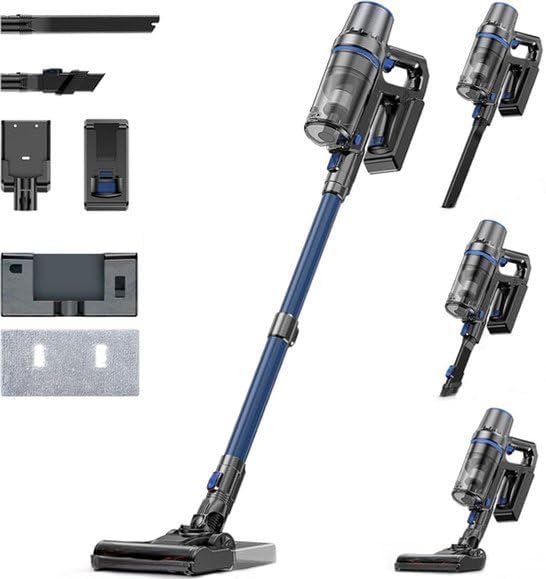
Image: The Olvy A10 Cordless Stick Vacuum Cleaner in its full assembly, alongside various attachments and the wall mount.
2. భద్రతా సూచనలు
అగ్ని ప్రమాదం, విద్యుత్ షాక్ లేదా గాయం ప్రమాదాన్ని తగ్గించడానికి, విద్యుత్ ఉపకరణాన్ని ఉపయోగిస్తున్నప్పుడు ఎల్లప్పుడూ ప్రాథమిక భద్రతా జాగ్రత్తలను అనుసరించండి.
- ఉపకరణాన్ని ఉపయోగించే ముందు అన్ని సూచనలను చదవండి.
- ఆరుబయట లేదా తడి ఉపరితలాలపై ఉపయోగించవద్దు.
- బొమ్మలాగా వాడుకోవడానికి అనుమతించవద్దు. పిల్లలు లేదా సమీపంలో ఉపయోగించినప్పుడు దగ్గరగా శ్రద్ధ అవసరం.
- ఈ మాన్యువల్లో వివరించిన విధంగా మాత్రమే ఉపయోగించండి. తయారీదారు సిఫార్సు చేసిన జోడింపులను మాత్రమే ఉపయోగించండి.
- దెబ్బతిన్న త్రాడు లేదా ప్లగ్తో ఉపయోగించవద్దు. ఉపకరణం సరిగ్గా పని చేయకపోతే, పడిపోయినా, దెబ్బతిన్నా, బయట వదిలేసినా లేదా నీటిలో పడేసినా, దానిని సర్వీస్ సెంటర్కు తిరిగి ఇవ్వండి.
- త్రాడుతో లాగడం లేదా తీసుకెళ్లడం చేయవద్దు, త్రాడును హ్యాండిల్గా ఉపయోగించవద్దు, త్రాడుపై తలుపును మూసివేయండి లేదా పదునైన అంచులు లేదా మూలల చుట్టూ త్రాడును లాగండి. త్రాడుపై ఉపకరణాన్ని నడపవద్దు. వేడిచేసిన ఉపరితలాల నుండి త్రాడును దూరంగా ఉంచండి.
- త్రాడుపై లాగడం ద్వారా అన్ప్లగ్ చేయవద్దు. అన్ప్లగ్ చేయడానికి, ప్లగ్ని పట్టుకోండి, త్రాడు కాదు.
- తడి చేతులతో ప్లగ్ లేదా ఉపకరణాన్ని నిర్వహించవద్దు.
- ఓపెనింగ్స్లో ఏ వస్తువును ఉంచవద్దు. ఏ ఓపెనింగ్ బ్లాక్ చేయబడినా ఉపయోగించవద్దు; దుమ్ము, మెత్తటి, వెంట్రుకలు మరియు గాలి ప్రవాహాన్ని తగ్గించే ఏదైనా లేకుండా ఉంచండి.
- జుట్టు, వదులుగా ఉండే దుస్తులు, వేళ్లు మరియు శరీరంలోని అన్ని భాగాలను ఓపెనింగ్స్ మరియు కదిలే భాగాలకు దూరంగా ఉంచండి.
- అన్ప్లగ్ చేయడానికి ముందు అన్ని నియంత్రణలను ఆఫ్ చేయండి.
- మెట్లపై శుభ్రం చేసేటప్పుడు అదనపు జాగ్రత్తలు తీసుకోండి.
- గ్యాసోలిన్ వంటి మండే లేదా మండే ద్రవాలను తీయడానికి లేదా అవి ఉండే ప్రాంతాల్లో ఉపయోగించవద్దు.
- సిగరెట్లు, అగ్గిపుల్లలు లేదా వేడి బూడిద వంటి కాలుతున్న లేదా ధూమపానం చేసే ఏదైనా తీసుకోవద్దు.
- డస్ట్ కప్ మరియు/లేదా ఫిల్టర్లు లేకుండా ఉపయోగించవద్దు.
- అనుకోకుండా ప్రారంభించడాన్ని నిరోధించండి. బ్యాటరీ ప్యాక్కి కనెక్ట్ చేయడానికి, తీయడానికి లేదా ఉపకరణాన్ని తీసుకెళ్లడానికి ముందు స్విచ్ ఆఫ్లో ఉందని నిర్ధారించుకోండి.
- తయారీదారు పేర్కొన్న ఛార్జర్తో మాత్రమే రీఛార్జ్ చేయండి. ఒక రకమైన బ్యాటరీ ప్యాక్కు సరిపోయే ఛార్జర్ను మరొక బ్యాటరీ ప్యాక్తో ఉపయోగించినప్పుడు అగ్ని ప్రమాదాన్ని సృష్టించవచ్చు.
- దుర్వినియోగ పరిస్థితులలో, బ్యాటరీ నుండి ద్రవాన్ని బయటకు తీయవచ్చు; పరిచయాన్ని నివారించండి. అనుకోకుండా పరిచయం ఏర్పడితే, నీటితో ఫ్లష్ చేయండి. ద్రవం కళ్లను సంప్రదించినట్లయితే, అదనంగా వైద్య సహాయం తీసుకోండి. బ్యాటరీ నుండి విడుదలయ్యే ద్రవం చికాకు లేదా కాలిన గాయాలకు కారణం కావచ్చు.
3. ప్యాకేజీ విషయాలు
ప్యాకేజీలో అన్ని భాగాలు ఉన్నాయని నిర్ధారించుకోండి:
- ప్రధాన యూనిట్ (హ్యాండ్హెల్డ్ వాక్యూమ్)
- సర్దుబాటు పొడిగింపు ట్యూబ్
- ఫ్లోర్ బ్రష్ హెడ్
- తొలగించగల బ్యాటరీ
- Water Tank (for mopping)
- మోప్ ప్యాడ్
- 2-ఇన్-1 బ్రష్ సాధనం
- చీలిక సాధనం
- వాల్ మౌంట్ బ్రాకెట్
- పవర్ అడాప్టర్
- Replacement HEPA Filter (2x)
- వినియోగదారు మాన్యువల్

Image: A visual representation of all components included with the Olvy A10 Cordless Stick Vacuum Cleaner.
4. ఉత్పత్తి ముగిసిందిview
The Olvy A10 features a powerful 350W motor providing up to 35,000 Pa suction, an integrated mop function, and a multi-stage HEPA filtration system. It includes an intelligent LED display for monitoring status and an auto-mode for adaptive cleaning.
ముఖ్య లక్షణాలు:
- శక్తివంతమైన చూషణ: 350W motor with 35,000 Pa for deep cleaning on various surfaces.
- 2-ఇన్-1 ఫంక్షనాలిటీ: Seamlessly switch between vacuuming and mopping.
- ఇంటెలిజెంట్ LED డిస్ప్లే: Provides real-time information on battery level, suction mode, and dust concentration.
- ఆటో మోడ్: Automatically adjusts suction power based on detected dirt levels.
- HEPA 13 Filtration: Captures 99.99% of fine particles, suitable for allergy sufferers.
- లాంగ్ రన్ టైమ్: Up to 60 minutes on a single charge with a 2200 mAh removable battery.
- Lightweight and Versatile: Easy to maneuver and convert into a handheld vacuum for various cleaning tasks.

Image: Close-up of the intelligent LED display showing battery indicator, low power warning, auto mode, dust concentration, and control panel.

Image: The LED display indicating 'Auto-mode' and the current power level during operation.
5. సెటప్ మరియు అసెంబ్లీ
5.1 ప్రారంభ ఛార్జింగ్
Before first use, fully charge the battery. The battery takes approximately 4-5 hours to fully charge.
- Remove the battery from the main unit by pressing the release button.
- పవర్ అడాప్టర్ను బ్యాటరీపై ఉన్న ఛార్జింగ్ పోర్ట్కు కనెక్ట్ చేయండి.
- Plug the adapter into a power outlet. The battery indicator on the LED display will show charging status.
- పూర్తిగా ఛార్జ్ అయిన తర్వాత, అడాప్టర్ను డిస్కనెక్ట్ చేయండి.

Image: The removable battery unit, highlighting its 2200 mAh capacity, 4-5 hour charging time, and up to 60 minutes run time.
5.2 వాక్యూమ్ క్లీనర్ను అసెంబుల్ చేయడం
- బ్యాటరీని అటాచ్ చేయండి: Slide the charged battery into the main unit until it clicks into place.
- ఎక్స్టెన్షన్ ట్యూబ్ను అటాచ్ చేయండి: Connect the adjustable extension tube to the main unit. Ensure it clicks securely.
- ఫ్లోర్ బ్రష్ను అటాచ్ చేయండి: Connect the floor brush head to the other end of the extension tube.
- వాల్ మౌంట్ను ఇన్స్టాల్ చేయండి (ఐచ్ఛికం): వాల్ మౌంట్ కోసం తగిన ప్రదేశాన్ని ఎంచుకోండి. అందించిన స్క్రూలు మరియు యాంకర్లను ఉపయోగించి దానిని గోడకు బిగించండి. ఇది అనుకూలమైన నిల్వ మరియు ఛార్జింగ్ కోసం అనుమతిస్తుంది.
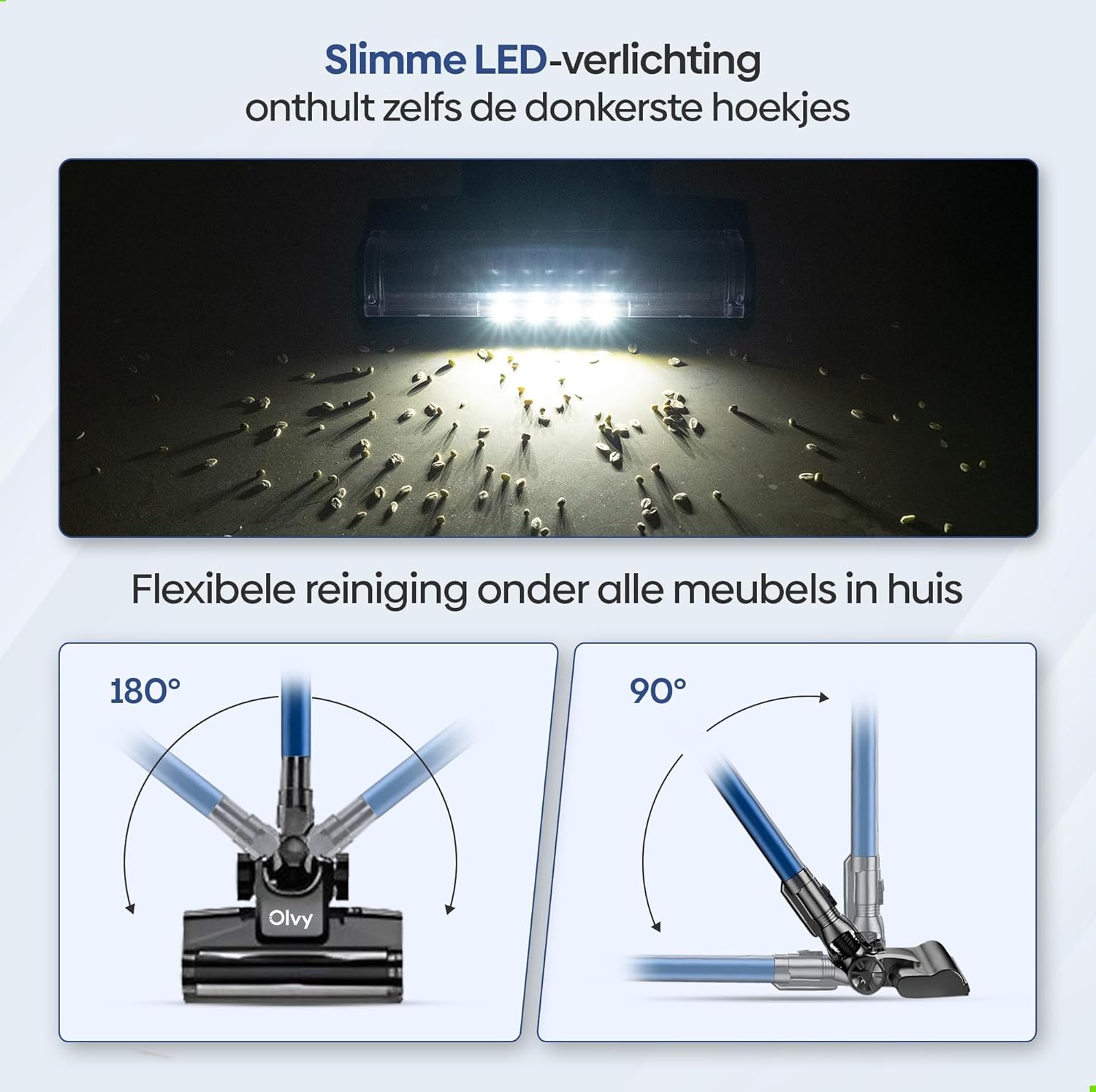
Image: The vacuum cleaner demonstrating both wall-mounted storage and self-standing capability.
6. ఆపరేటింగ్ సూచనలు
6.1 ప్రాథమిక ఆపరేషన్
- పవర్ ఆన్/ఆఫ్: వాక్యూమ్ క్లీనర్ను ఆన్ లేదా ఆఫ్ చేయడానికి ప్రధాన యూనిట్లోని పవర్ బటన్ను నొక్కండి.
- చూషణ శక్తిని సర్దుబాటు చేయండి: The vacuum offers 5 suction levels. Use the control panel on the LED display to cycle through the power modes (Low, Normal, High, Turbo).
- ఆటో మోడ్: Activate the intelligent auto mode for automatic suction adjustment based on dirt detection. The LED display will show 'Auto' when this mode is active.
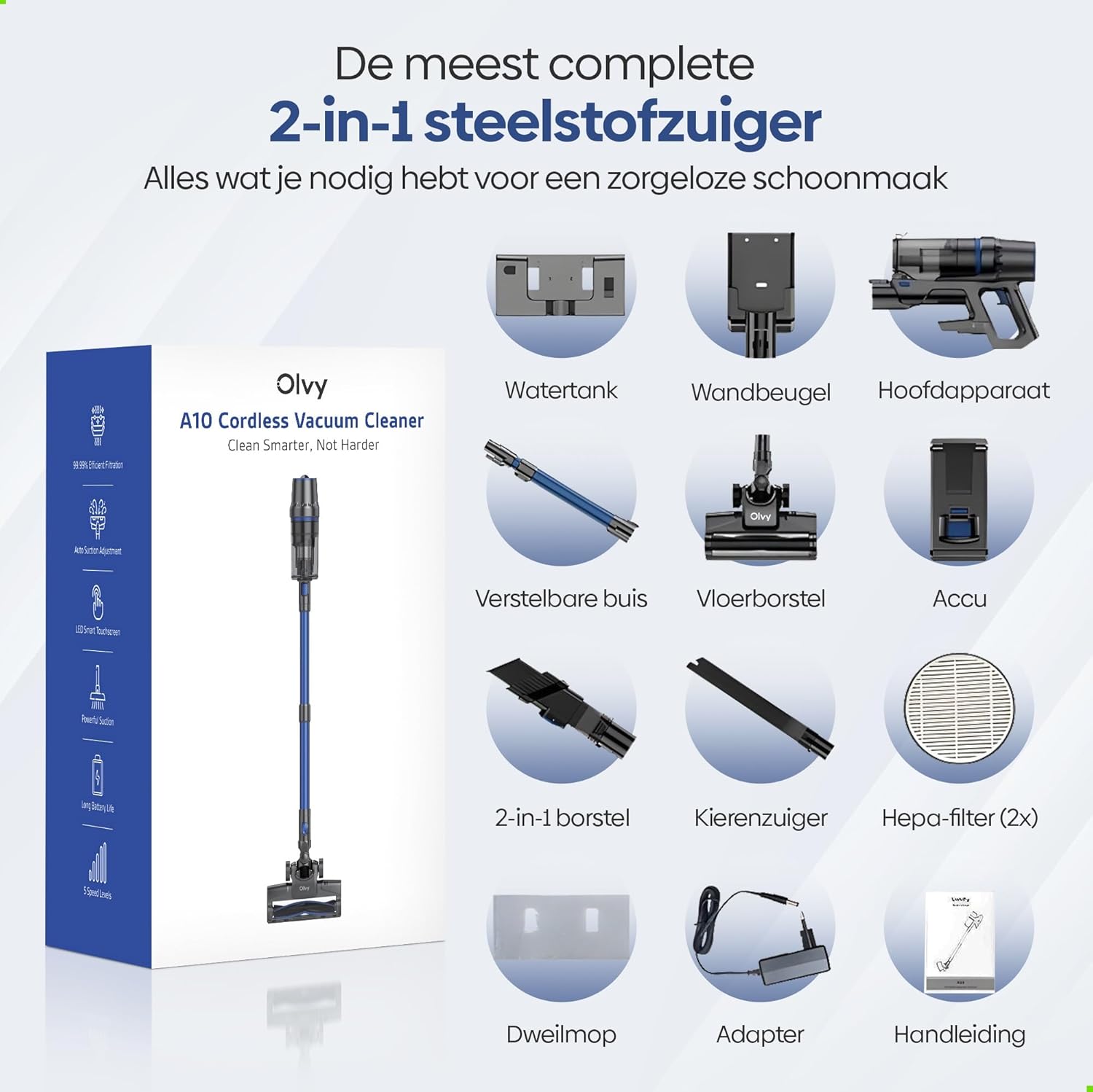
Image: The vacuum cleaner demonstrating its 4 suction levels (Low, Normal, High, Turbo) and intelligent auto mode, which adapts to dirt levels.
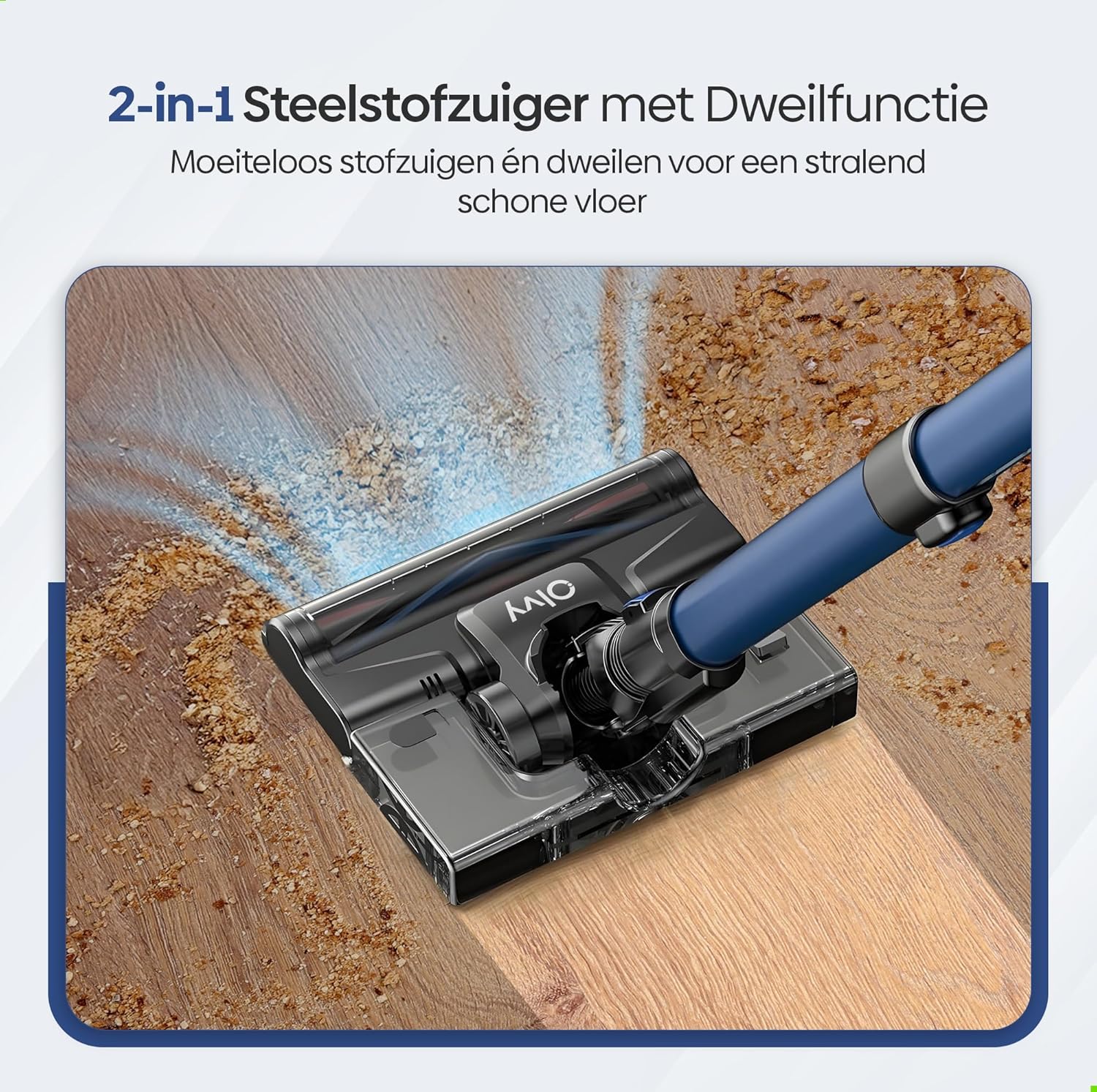
Image: A user operating the Olvy A10, showcasing its powerful 350W motor and 35,000 Pa suction for effective cleaning of various debris like hair, dust, crumbs, and sand.
6.2 మాప్ ఫంక్షన్ను ఉపయోగించడం
The integrated mop function allows for simultaneous vacuuming and wet cleaning of hard floors.
- వాటర్ ట్యాంక్ నింపండి: Detach the water tank from the floor brush head. Fill it with clean water. Do not use corrosive liquids or detergents that may damage the tank or floor.
- మాప్ ప్యాడ్ అటాచ్ చేయండి: Securely attach the mop pad to the bottom of the water tank.
- Reattach Water Tank: Reinstall the filled water tank onto the floor brush head.
- Begin Mopping: Operate the vacuum cleaner as usual. The mop pad will dampen the floor as you vacuum, providing a streak-free clean.

చిత్రం: వివరణాత్మక view of the 2-in-1 stick vacuum with mop function, showing water being dispensed for simultaneous vacuuming and mopping on a hard floor.

Image: The mop function of the Olvy A10 actively cleaning a hard floor, demonstrating its effectiveness in removing dirt and leaving a clean surface.
6.3 అటాచ్మెంట్లను ఉపయోగించడం
- 2-ఇన్-1 బ్రష్ టూల్: Ideal for cleaning upholstery, curtains, and delicate surfaces.
- చీలిక సాధనం: ఇరుకైన ప్రదేశాలు, మూలలు మరియు అంచులను చేరుకోవడానికి సరైనది.
- To use, detach the extension tube and connect the desired attachment directly to the main unit.

Image: The Olvy A10 being used in different configurations, including as a stick vacuum for floors, a handheld for high areas, and for cleaning under furniture.

Image: The vacuum's LED lighting revealing hidden dust particles on the floor, and diagrams illustrating its 180° and 90° flexible head rotation for cleaning under furniture.
7. నిర్వహణ
Regular maintenance ensures optimal performance and extends the lifespan of your Olvy A10 vacuum cleaner.
7.1 చెత్తబుట్టను ఖాళీ చేయడం
Empty the dustbin regularly, especially when the 'Dust Concn' indicator on the LED display shows high concentration.
- వాక్యూమ్ ఆపివేయబడిందని నిర్ధారించుకోండి.
- ప్రధాన యూనిట్ నుండి దానిని వేరు చేయడానికి డస్ట్బిన్ విడుదల బటన్ను నొక్కండి.
- Hold the dustbin over a trash can and press the bottom release latch to open the lid and empty the contents.
- మూత మూసివేసి, డస్ట్బిన్ను ప్రధాన యూనిట్కు తిరిగి అటాచ్ చేయండి.

Image: The dustbin being emptied with a single click, demonstrating its large 0.8L capacity.

Image: A user washing the dustbin under running water, illustrating the washable components for easy cleaning.
7.2 ఫిల్టర్లను శుభ్రపరచడం
The Olvy A10 uses a multi-stage filtration system, including an HEPA filter, which should be cleaned regularly.
- డస్ట్బిన్ను తొలగించండి.
- Twist and pull out the filter assembly (HEPA filter, dust filter, stainless steel filter).
- Tap off loose dirt from each filter component.
- Rinse the filters under cold running water. Do not use hot water or detergents.
- తిరిగి అమర్చే ముందు అన్ని ఫిల్టర్ భాగాలను కనీసం 24 గంటలు గాలిలో పూర్తిగా ఆరనివ్వండి. తడి ఫిల్టర్లతో వాక్యూమ్ను ఉపయోగించవద్దు.
- Reassemble the filters and place them back into the dustbin, then reattach the dustbin to the main unit.

Image: A cutaway diagram illustrating the multi-stage HEPA filtration system, including the dustbin filter, stainless steel filter, dust filter, HEPA air filter, and air outlet filter.
7.3 బ్రష్ రోల్ శుభ్రపరచడం
చిక్కుబడ్డ జుట్టు లేదా చెత్త కోసం బ్రష్ రోల్ను క్రమానుగతంగా తనిఖీ చేయండి.
- వాక్యూమ్ క్లీనర్ను ఆపివేయండి.
- Press the release tab on the side of the floor brush head to remove the brush roll cover.
- బ్రష్ రోల్ను ఎత్తండి.
- చిక్కుబడ్డ వెంట్రుకలు లేదా నారలను కత్తిరించి తొలగించడానికి కత్తెర లేదా శుభ్రపరిచే సాధనాన్ని ఉపయోగించండి.
- బ్రష్ రోల్ను తిరిగి చొప్పించి కవర్ను భద్రపరచండి.
7.4 మాప్ ప్యాడ్ శుభ్రపరచడం
After each use of the mop function, remove and clean the mop pad.
- Detach the mop pad from the water tank.
- Rinse the mop pad under running water or machine wash it with mild detergent.
- Allow the mop pad to air dry completely before storing or reusing.
8. ట్రబుల్షూటింగ్
If you encounter any issues with your Olvy A10, refer to the following common problems and solutions:
| సమస్య | సాధ్యమైన కారణం | పరిష్కారం |
|---|---|---|
| వాక్యూమ్ ఆన్ చేయదు | బ్యాటరీ ఛార్జ్ చేయబడలేదు లేదా సరిగ్గా ఇన్స్టాల్ చేయబడలేదు. | Charge the battery fully. Ensure the battery is securely clicked into the main unit. |
| తక్కువ చూషణ శక్తి | Dustbin is full. Filters are clogged. Brush roll is tangled. Obstruction in the nozzle or tube. | Empty the dustbin. Clean all filters thoroughly and ensure they are dry. Remove any hair or debris from the brush roll. Check for and remove any blockages. |
| బ్రష్ రోల్ స్పిన్నింగ్ కాదు | Brush roll is tangled or jammed. | Turn off the vacuum. Remove the brush roll and clear any obstructions. |
| Mop function not working | Water tank is empty or not properly installed. Mop pad is dry. | Fill the water tank. Ensure the water tank is securely attached to the floor brush. Dampen the mop pad slightly before use if needed. |
| చిన్న రన్ టైమ్ | Battery not fully charged. Using high suction mode continuously. Battery degradation. | Ensure battery is fully charged. Use lower suction modes for longer run time. If battery life significantly decreases, consider replacing the battery. |
9. స్పెసిఫికేషన్లు
| ఫీచర్ | స్పెసిఫికేషన్ |
|---|---|
| బ్రాండ్ | Olvy |
| మోడల్ సంఖ్య | A10 |
| రంగు | నలుపు |
| ఉత్పత్తి కొలతలు | 32 x 19 x 32 సెం.మీ |
| బరువు | 5 కిలోలు |
| మోటార్ పవర్ | 350W |
| చూషణ శక్తి | 35,000 Pa వరకు |
| స్పీడ్ల సంఖ్య | 5 (including Auto Mode) |
| శబ్దం స్థాయి | 55 డెసిబెల్స్ |
| రన్ టైమ్ | Up to 1 hour (60 minutes) |
| బ్యాటరీ కెపాసిటీ | 2200 mAh |
| ఛార్జింగ్ సమయం | 4-5 గంటలు |
| ఫిల్టర్ రకం | HEPA 13 (Washable) |
| డస్ట్బిన్ కెపాసిటీ | 0.8L |
| శక్తి మూలం | బ్యాటరీ |
| సిఫార్సు చేయబడిన ఉపరితలాలు | All floors (carpets, hard floors) |
| ప్రత్యేక లక్షణాలు | 2-in-1 Vacuum & Mop, LED Display, Auto Mode, Pet-friendly, Lightweight |
10. వారంటీ మరియు మద్దతు
Olvy products are manufactured to high-quality standards. For warranty information, technical support, or service inquiries, please refer to the contact information provided with your purchase documentation or visit the official Olvy webవారంటీ క్లెయిమ్ల కోసం దయచేసి మీ కొనుగోలు రుజువును మీ వద్ద ఉంచుకోండి.


