1. పరిచయం
This manual provides essential information for the safe and efficient operation of your Philips Evnia 24M2N3200L 24-inch Gaming Monitor. Please read this manual thoroughly before using the product and retain it for future reference.
2. భద్రతా సమాచారం
మానిటర్ దెబ్బతినకుండా నిరోధించడానికి మరియు వినియోగదారు భద్రతను నిర్ధారించడానికి క్రింది భద్రతా జాగ్రత్తలను గమనించండి:
- మానిటర్ను వర్షం లేదా తేమకు గురి చేయవద్దు.
- మానిటర్ తెరవవద్దు casing; అన్ని సర్వీసింగ్లను అర్హత కలిగిన సిబ్బందికి సూచించండి.
- మానిటర్ చుట్టూ సరైన వెంటిలేషన్ ఉండేలా చూసుకోండి.
- మానిటర్తో పాటు సరఫరా చేయబడిన పవర్ అడాప్టర్ను మాత్రమే ఉపయోగించండి.
- పవర్ కార్డ్పై భారీ వస్తువులను ఉంచడం మానుకోండి.
- స్క్రీన్ను మృదువైన, మెత్తటి బట్టతో శుభ్రం చేయండి. స్క్రీన్పై నేరుగా లిక్విడ్ క్లీనర్లను ఉపయోగించవద్దు.
3. ప్యాకేజీ విషయాలు
ప్యాకేజీలో అన్ని అంశాలు ఉన్నాయని నిర్ధారించుకోండి:
- Philips Evnia 24M2N3200L Monitor
- మానిటర్ స్టాండ్ (బేస్ మరియు మెడ)
- పవర్ కేబుల్
- HDMI కేబుల్
- డిస్ప్లేపోర్ట్ కేబుల్
- వినియోగదారు మాన్యువల్ (ఈ పత్రం)

Image: The retail packaging box for the Philips Evnia 24M2N3200L monitor, showing the product name and design awards.
4. సెటప్
4.1. స్టాండ్ అసెంబ్లీ
- గీతలు పడకుండా ఉండటానికి మానిటర్ ముఖాన్ని మృదువైన, శుభ్రమైన ఉపరితలంపై ఉంచండి.
- స్టాండ్ మెడను మానిటర్ యొక్క VESA మౌంటు ప్రాంతానికి అటాచ్ చేయండి. అందించినట్లయితే స్క్రూలతో భద్రపరచండి.
- Attach the stand base to the bottom of the stand neck. Tighten the thumb screw or screws until secure.

చిత్రం: వెనుక view of the monitor showing the attached stand and the VESA mounting area.
4.2. కంప్యూటర్కు కనెక్ట్ చేస్తోంది
మానిటర్ HDMI మరియు DisplayPort కనెక్షన్లకు మద్దతు ఇస్తుంది.
- పవర్ కనెక్షన్: పవర్ కేబుల్ను మానిటర్ యొక్క పవర్ ఇన్పుట్కు మరియు తరువాత పవర్ అవుట్లెట్కు కనెక్ట్ చేయండి.
- వీడియో కనెక్షన్:
- HDMI కోసం: HDMI కేబుల్ యొక్క ఒక చివరను మానిటర్ యొక్క HDMI పోర్ట్కు మరియు మరొక చివరను మీ కంప్యూటర్ యొక్క HDMI అవుట్పుట్కు కనెక్ట్ చేయండి.
- డిస్ప్లేపోర్ట్ కోసం: డిస్ప్లేపోర్ట్ కేబుల్ యొక్క ఒక చివరను మానిటర్ యొక్క డిస్ప్లేపోర్ట్కు మరియు మరొక చివరను మీ కంప్యూటర్ యొక్క డిస్ప్లేపోర్ట్ అవుట్పుట్కు కనెక్ట్ చేయండి.
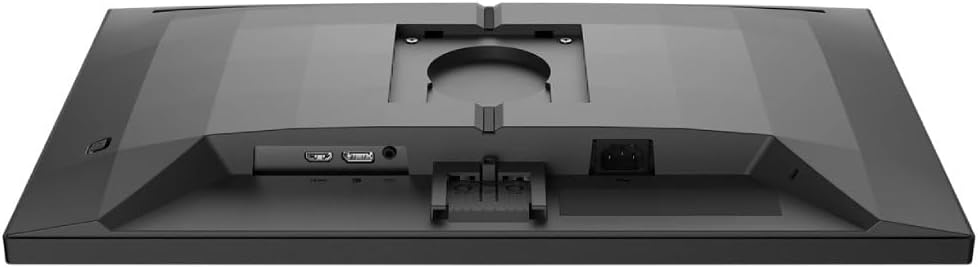
చిత్రం: వివరణాత్మకం view of the monitor's rear panel, showing the HDMI, DisplayPort, and power input ports.
5. మానిటర్ను నిర్వహించడం
5.1. పవర్ ఆన్/ఆఫ్
Press the power button, usually located on the bottom right or rear of the monitor, to turn it on or off. The power LED will indicate the monitor's status.
5.2. ఆన్-స్క్రీన్ డిస్ప్లే (OSD) మెనూ
The OSD menu allows you to adjust various monitor settings. Use the joystick or buttons (refer to your monitor's specific layout) to navigate and select options.
- చిత్రం: ప్రకాశం, కాంట్రాస్ట్, షార్ప్నెస్ మరియు గామాను సర్దుబాటు చేయండి.
- రంగు: రంగు ఉష్ణోగ్రత, sRGB మోడ్ లేదా వినియోగదారు నిర్వచించిన రంగు సెట్టింగ్లను ఎంచుకోండి.
- ఆడియో: Control volume if the monitor has built-in speakers or an audio output.
- ఇన్పుట్: Manually select the input source (HDMI, DisplayPort).
- గేమింగ్: Access specific gaming features like SmartImage Game, Low Input Lag, and Adaptive Sync settings.
- OSD సెట్టింగ్లు: OSD భాష, పారదర్శకత మరియు గడువు ముగింపును సర్దుబాటు చేయండి.

Image: The Philips Evnia 24M2N3200L monitor showcasing a high-quality image from a video game, highlighting its display capabilities.
6. నిర్వహణ
6.1. మానిటర్ శుభ్రపరచడం
- శుభ్రపరిచే ముందు మానిటర్ను ఎల్లప్పుడూ అన్ప్లగ్ చేయండి.
- Use a soft, clean, lint-free cloth to gently wipe the screen.
- మొండి గుర్తులకు, తేలికగా dampనీటితో లేదా తేలికపాటి, రాపిడి లేని స్క్రీన్ క్లీనర్తో వస్త్రాన్ని తుడవండి. స్క్రీన్పై నేరుగా ద్రవాలను పిచికారీ చేయవద్దు.
- మానిటర్ శుభ్రం చేయండి casinగ్రా. మృదువైన, పొడి వస్త్రంతో.
6.2. నిల్వ
మానిటర్ను ఎక్కువ కాలం నిల్వ ఉంచినట్లయితే, అన్ని కేబుల్లను డిస్కనెక్ట్ చేసి, దుమ్ము మరియు భౌతిక నష్టం నుండి రక్షించడానికి దాని అసలు ప్యాకేజింగ్లో ప్యాక్ చేయండి. చల్లని, పొడి ప్రదేశంలో నిల్వ చేయండి.
7. ట్రబుల్షూటింగ్
మీ మానిటర్తో మీకు సమస్యలు ఎదురైతే, ఈ క్రింది సాధారణ సమస్యలు మరియు పరిష్కారాలను చూడండి:
| సమస్య | సాధ్యమైన కారణం | పరిష్కారం |
|---|---|---|
| తెరపై చిత్రం లేదు | Power cable disconnected, video cable loose, incorrect input source. | Check power and video cable connections. Select correct input source via OSD. |
| చిత్రం మినుకుమినుకుమంటోంది | Loose video cable, graphics card issue, refresh rate mismatch. | Ensure video cable is secure. Update graphics drivers. Adjust refresh rate in OS settings. |
| రంగులు తప్పు | Incorrect color settings, faulty cable. | Reset color settings in OSD. Try a different video cable. |
| మానిటర్ ఆన్ అవ్వడం లేదు | పవర్ లేదు, పవర్ అడాప్టర్ తప్పు. | Check power outlet and cable. Ensure power adapter is functioning. |
8. స్పెసిఫికేషన్లు
| ఫీచర్ | వివరాలు |
|---|---|
| మోడల్ సంఖ్య | 24M2N3200L |
| స్క్రీన్ పరిమాణం | 24 అంగుళాలు |
| ప్యానెల్ రకం | IPS |
| రిజల్యూషన్ | 1920 x 1080 (పూర్తి HD) |
| కారక నిష్పత్తి | 16:9 |
| రిఫ్రెష్ రేట్ | 180Hz |
| ప్రతిస్పందన సమయం | 0.5ms (MPRT) |
| కనెక్టివిటీ | 1x HDMI, 1x డిస్ప్లేపోర్ట్ |
| శక్తి మూలం | విద్యుత్ శక్తి |
| ఉత్పత్తి కొలతలు (స్టాండ్తో) | 19.5 x 54 x 43.3 సెం.మీ (లోతు x వెడల్పు x ఎత్తు) |
| ఉత్పత్తి బరువు (స్టాండ్తో) | 4.96 కిలోలు |
| తయారీదారు | ఫిలిప్స్ |
9. వారంటీ మరియు మద్దతు
వారంటీ సమాచారం మరియు సాంకేతిక మద్దతు కోసం, దయచేసి మీ ప్యాకేజీలో చేర్చబడిన వారంటీ కార్డును చూడండి లేదా అధికారిక ఫిలిప్స్ మద్దతును సందర్శించండి. webవారంటీ క్లెయిమ్ల కోసం కొనుగోలు రుజువుగా మీ కొనుగోలు రసీదును ఉంచండి.
ఆన్లైన్ మద్దతు: www.philips.com/support