1. పరిచయం
This manual provides essential information for the safe and efficient operation of your Xiaomi Toaster BHR8811EU. Please read these instructions carefully before first use and retain them for future reference. This 2-slice toaster features 6 browning settings, a defrost function, and a removable crumb tray for easy cleaning.
2. భద్రతా సూచనలు
- Always ensure the toaster is placed on a stable, heat-resistant surface, away from flammable materials.
- వేడి ఉపరితలాలను తాకవద్దు. హ్యాండిల్స్ లేదా నాబ్లను ఉపయోగించండి.
- Unplug the toaster from the outlet when not in use and before cleaning. Allow it to cool completely before handling or cleaning.
- విద్యుత్ ప్రమాదాల నుండి రక్షించడానికి, త్రాడు, ప్లగ్ లేదా టోస్టర్ను నీటిలో లేదా ఇతర ద్రవాలలో ముంచవద్దు.
- Do not insert oversized foods, metal foil packages, or utensils into the toaster as this may create a fire or electric shock hazard.
- త్రాడు లేదా ప్లగ్ దెబ్బతిన్నట్లయితే, లేదా ఉపకరణం పనిచేయకపోయినా లేదా ఏదైనా విధంగా దెబ్బతిన్నా టోస్టర్ను ఆపరేట్ చేయవద్దు.
- ఉపయోగంలో ఉన్నప్పుడు టోస్టర్ను ఎట్టిపరిస్థితుల్లోనూ ఉంచవద్దు.
- Do not use abrasive cleaners or sharp objects to clean the toaster.
- ఈ ఉపకరణం గృహ వినియోగం కోసం మాత్రమే.
3. ఉత్పత్తి భాగాలు

చిత్రం 1: ముందు view of the Xiaomi Toaster BHR8811EU. This image displays the control panel with the browning control knob, defrost button, and cancel button, along with the bread slots.
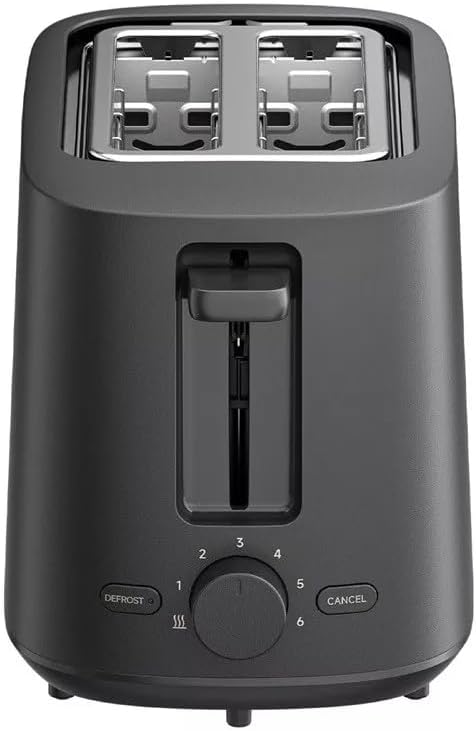
చిత్రం 2: టాప్ view of the Xiaomi Toaster BHR8811EU. This image highlights the two wide bread slots designed to accommodate various bread types.

చిత్రం 3: వైపు view of the Xiaomi Toaster BHR8811EU. This image shows the side of the toaster, featuring the pull-out handle for the removable crumb tray at the bottom.
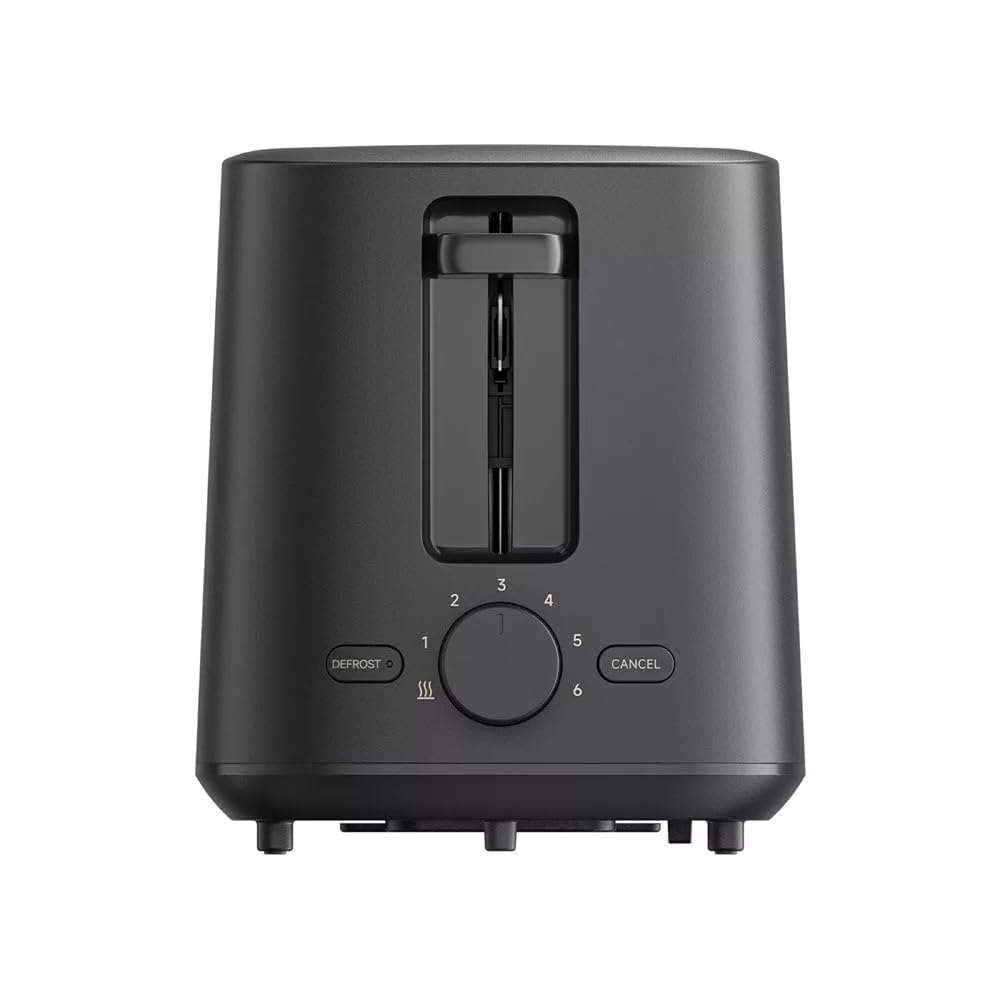
చిత్రం 4: వెనుక view of the Xiaomi Toaster BHR8811EU. This image displays the back of the appliance, featuring the Xiaomi brand logo.
- బ్రెడ్ స్లాట్లు: Two wide slots for bread slices.
- టోస్టింగ్ లివర్: Lowers bread into the slots and initiates the toasting cycle.
- బ్రౌనింగ్ కంట్రోల్ నాబ్: Adjusts the desired level of browning from 1 (lightest) to 6 (darkest).
- డీఫ్రాస్ట్ బటన్: Activates the defrost function for frozen bread.
- రద్దు బటన్: ఎప్పుడైనా టోస్టింగ్ సైకిల్ను ఆపివేస్తుంది.
- తొలగించగల చిన్న ముక్క ట్రే: సులభంగా శుభ్రం చేయడానికి ముక్కలను సేకరిస్తుంది.
4. సెటప్
- అన్ప్యాకింగ్: టోస్టర్ మరియు అన్ని ప్యాకేజింగ్ సామాగ్రిని జాగ్రత్తగా తొలగించండి. అన్ని భాగాలు ఉన్నాయని మరియు దెబ్బతినకుండా చూసుకోండి.
- ప్లేస్మెంట్: Place the toaster on a flat, stable, and heat-resistant surface. Ensure there is adequate space around the toaster for ventilation.
- మొదటి ఉపయోగం: Before toasting bread for the first time, operate the toaster without bread for a few cycles at the highest browning setting. This will burn off any manufacturing residues and eliminate initial odors. A slight smell or smoke is normal during this process. Ensure the area is well-ventilated.
5. ఆపరేటింగ్ సూచనలు
- పవర్ కనెక్ట్ చేయండి: Plug the power cord into a suitable 220-240V, 60Hz electrical outlet.
- బ్రెడ్ చొప్పించండి: Place one or two slices of bread into the bread slots. The toaster features automatic bread centering for even toasting.
- బ్రౌనింగ్ స్థాయిని ఎంచుకోండి: Turn the browning control knob to your desired setting, from 1 (lightest) to 6 (darkest).
- టోస్టింగ్ ప్రారంభించండి: Press the toasting lever down until it locks into place. The indicator light will illuminate, and the toasting cycle will begin.
- Defrost Function (for frozen bread): If toasting frozen bread, insert the bread, select your desired browning level, press the toasting lever down, and then press the డిఫ్రాస్ట్ బటన్. డీఫ్రాస్ట్ ఇండికేటర్ లైట్ వెలుగుతుంది.
- ఫంక్షన్ రద్దు: ఎప్పుడైనా టోస్టింగ్ సైకిల్ ఆపడానికి, రద్దు చేయి button. The bread will automatically pop up.
- పూర్తి: Once the selected browning cycle is complete, the bread will automatically pop up, and the toaster will switch off.
6. నిర్వహణ మరియు శుభ్రపరచడం
క్రమం తప్పకుండా శుభ్రపరచడం వల్ల మీ టోస్టర్ యొక్క పనితీరు ఉత్తమంగా ఉంటుంది మరియు దాని జీవితకాలం పెరుగుతుంది.
- ఎల్లప్పుడూ అన్ప్లగ్ చేయండి: Before cleaning, always unplug the toaster from the power outlet and allow it to cool completely.
- శుభ్రమైన చిన్న ముక్క ట్రే: Pull out the removable crumb tray from the bottom of the toaster. Dispose of accumulated crumbs. Wipe the tray with a damp cloth and dry thoroughly before reinserting it. Ensure the crumb tray is fully inserted before using the toaster.
- బాహ్య క్లీనింగ్: టోస్టర్ యొక్క బాహ్య భాగాన్ని మృదువైన, d శుభ్రముపరచుతో తుడవండి.amp cloth. Do not use abrasive cleaners, metal scouring pads, or harsh chemicals, as these can damage the surface.
- ఇంటీరియర్ క్లీనింగ్: Do not attempt to clean the inside of the toaster with any tools or objects. If bread becomes jammed, unplug the toaster and carefully remove the bread after it has cooled.
7. ట్రబుల్షూటింగ్
- టోస్టర్ ఆన్ అవ్వదు: Ensure the power cord is securely plugged into a working outlet. Check if the toasting lever is fully pressed down and locked.
- Bread is unevenly toasted: Ensure bread slices are not too thick or irregularly shaped. The automatic centering mechanism works best with standard bread slices.
- Smoke or burning smell: This can occur if crumbs accumulate in the toaster or if food is jammed. Immediately press the రద్దు చేయి button, unplug the toaster, and allow it to cool. Clean the crumb tray and remove any jammed food.
- బ్రెడ్ పాప్ అప్ అవ్వదు: నొక్కండి రద్దు చేయి button. If the bread still does not pop up, unplug the toaster and carefully remove the bread once it has cooled.
8. స్పెసిఫికేషన్లు
| బ్రాండ్ | Xiaomi |
| మోడల్ సంఖ్య | BHR8811EU |
| రంగు | నలుపు |
| పవర్ / వాట్tage | 930 వాట్స్ |
| వాల్యూమ్tage | 220-240 వోల్ట్లు |
| ఫ్రీక్వెన్సీ | 60 Hz |
| మెటీరియల్ | మెటల్, అల్యూమినియం |
| స్లాట్ల సంఖ్య | 2 |
| ప్రత్యేక లక్షణాలు | Defrost function, 6 browning settings, Removable crumb tray, Automatic bread centering |
| ఉత్పత్తి కొలతలు (D x W x H) | 15 సెం.మీ x 28 సెం.మీ x 26 సెం.మీ (సుమారుగా) |
| వస్తువు బరువు | 1.7 కిలోలు |
9. వారంటీ మరియు మద్దతు
Your Xiaomi Toaster BHR8811EU is covered by a manufacturer's warranty. Please refer to the warranty card included with your purchase for specific terms and conditions, including warranty duration and coverage details. For technical support, service, or inquiries, please visit the official Xiaomi website or contact their customer service department in your region. Keep your proof of purchase for warranty claims.


