1. ఉత్పత్తి ముగిసిందిview
The DBPOWER DJS90 Portable Car Jump Starter is a versatile device designed to provide emergency jump-starting for vehicles, act as a portable power bank, and offer essential lighting functions. It features a high peak current of 1600A and an 18000mAh battery capacity, capable of starting various 12V vehicles.

Figure 1: DBPOWER DJS90 Portable Car Jump Starter and included accessories.
ముఖ్య లక్షణాలు:
- Vehicle Jump Starting: 1600A peak current for 12V vehicles (up to 7.5L gas / 5.5L diesel engines).
- పోర్టబుల్ పవర్ బ్యాంక్: 18000mAh capacity with 2 USB outputs for charging smartphones, tablets, and other devices.
- అత్యవసర LED లైట్: Features stable, strobe, and SOS signal modes.
- భద్రతా రక్షణలు: Heavy-duty smart clamps with low/high voltage, over-temperature, short-circuit, reverse polarity, and jump starter time-out protection.
- మన్నిక: Operates in temperatures from -4°F to 140°F.
2. ప్యాకేజీ విషయాలు
మీ ప్యాకేజీలో అన్ని అంశాలు ఉన్నాయని ధృవీకరించండి:

Figure 2: What's in the Box - DBPOWER DJS90 Jump Starter and accessories.
- 1x DBPOWER DJS90 Jump Starter Unit
- 1x Intelligent Jumper Clamps
- 1x USB Line (Charging Cable)
- 1x వినియోగదారు మాన్యువల్
- 1x Hard Shell Storage Case
3. సెటప్ మరియు ఛార్జింగ్
Before initial use, fully charge the jump starter. It is recommended to recharge the device after each use to maintain optimal battery life.
జంప్ స్టార్టర్ను ఛార్జ్ చేస్తోంది:
- Locate the USB input port on the jump starter.
- Connect the provided USB charging cable to the input port.
- Plug the other end of the USB cable into a suitable USB power adapter (not included) or a car's USB port.
- The LED display will indicate the charging progress. Ensure the device is fully charged before storing or using for jump-starting.
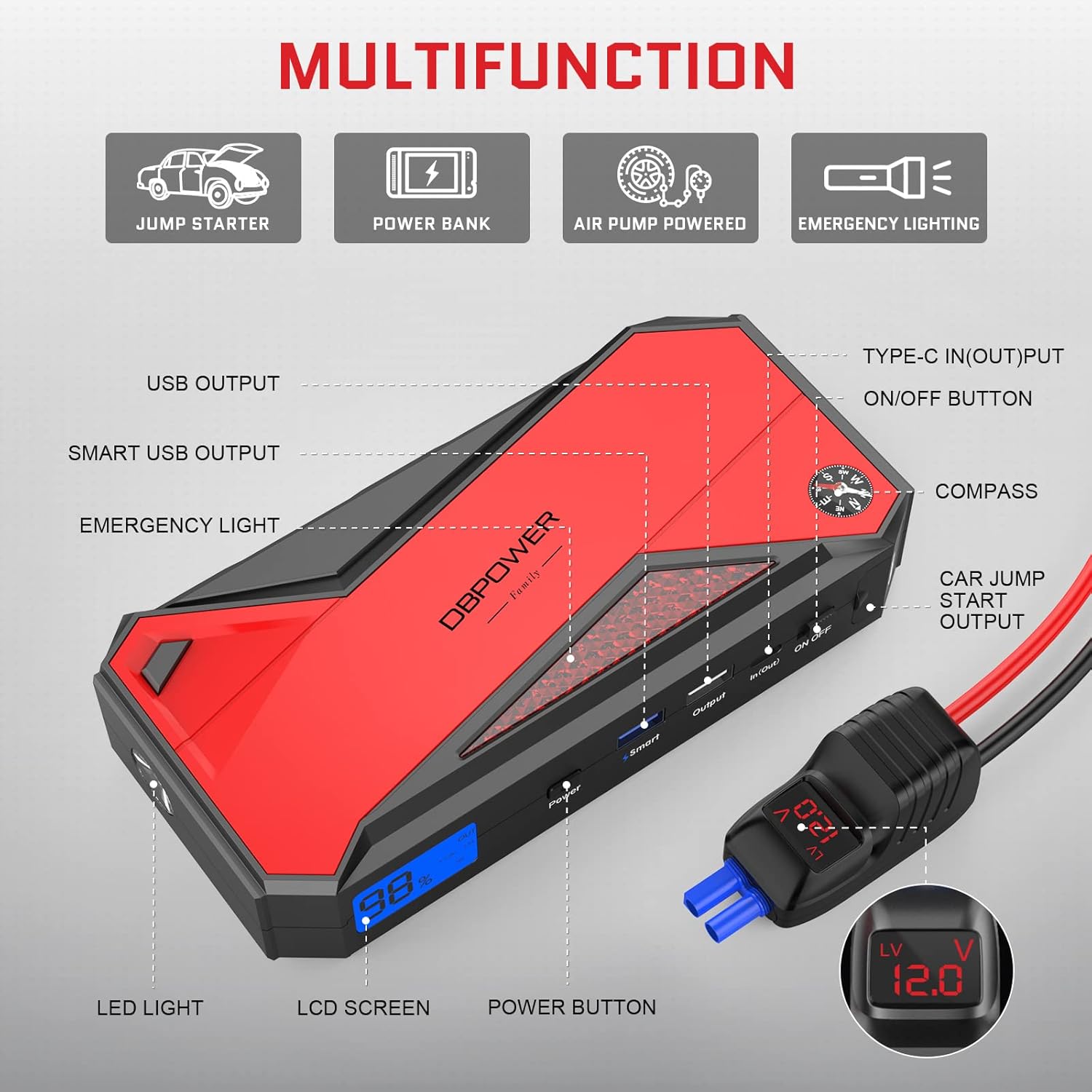
Figure 3: Multifunction ports on the DBPOWER DJS90.
4. ఆపరేటింగ్ సూచనలు: వాహనాన్ని జంప్ స్టార్ట్ చేయడం
Always ensure the jump starter is at least 50% charged before attempting to jump-start a vehicle.
దశల వారీ గైడ్:
- వాహనాన్ని సిద్ధం చేయండి: Turn off the vehicle's ignition and all accessories. Engage the parking brake.
- Connect Jumper Cables to Jump Starter: Open the protective flap on the jump starter and firmly insert the blue end of the intelligent jumper clamps into the car jump start output port.
- Cl ని కనెక్ట్ చేయండిamps to Battery: Attach the red (positive, +) clamp to the positive terminal of the vehicle's battery. Attach the black (negative, -) clamp to the negative terminal of the vehicle's battery. Ensure a secure connection.
- సూచిక కాంతిని తనిఖీ చేయండి: The indicator light on the intelligent jumper clamps should turn solid green, indicating a safe and ready connection. If it flashes or shows a different color, refer to the troubleshooting section.
- వాహనాన్ని ప్రారంభించండి: Enter your vehicle and start the engine. If the vehicle does not start immediately, wait 30 seconds before trying again. Do not attempt more than 3 consecutive starts.
- Clని తీసివేయండిamps: Once the vehicle starts, immediately remove the black (negative) clamp from the vehicle battery, followed by the red (positive) clamp. Then, disconnect the jumper clampజంప్ స్టార్టర్ నుండి లు.

Figure 4: Instructions to Start Your Vehicle.
Video 1: Demonstration of using a portable jump starter to start a vehicle. This video illustrates the process of connecting the jump starter to a car battery and successfully starting the engine, highlighting the ease of use and independence from roadside assistance.
5. Operating Instructions: Power Bank & LED Light
పవర్ బ్యాంక్గా ఉపయోగించడం:
The DJS90 can charge various electronic devices via its USB output ports.
- Connect your device's USB charging cable to one of the jump starter's USB output ports.
- జంప్ స్టార్టర్ మీ పరికరాన్ని స్వయంచాలకంగా ఛార్జ్ చేయడం ప్రారంభిస్తుంది.
- The 18000mAh capacity can provide multiple charges for smartphones, tablets, and other small electronics.

Figure 5: Power Bank Capabilities.
LED లైట్ ఉపయోగించడం:
The built-in LED light offers multiple modes for different situations.
- Locate the power button for the LED light (often integrated with the main power button or a dedicated light button).
- Press and hold the button to turn on the stable light mode.
- Press the button again to cycle through strobe mode, SOS signal mode, and then off.

Figure 6: Four Lighting Modes.
6. భద్రతా లక్షణాలు
The DBPOWER DJS90 is equipped with intelligent jumper clamps that provide multiple safety protections:
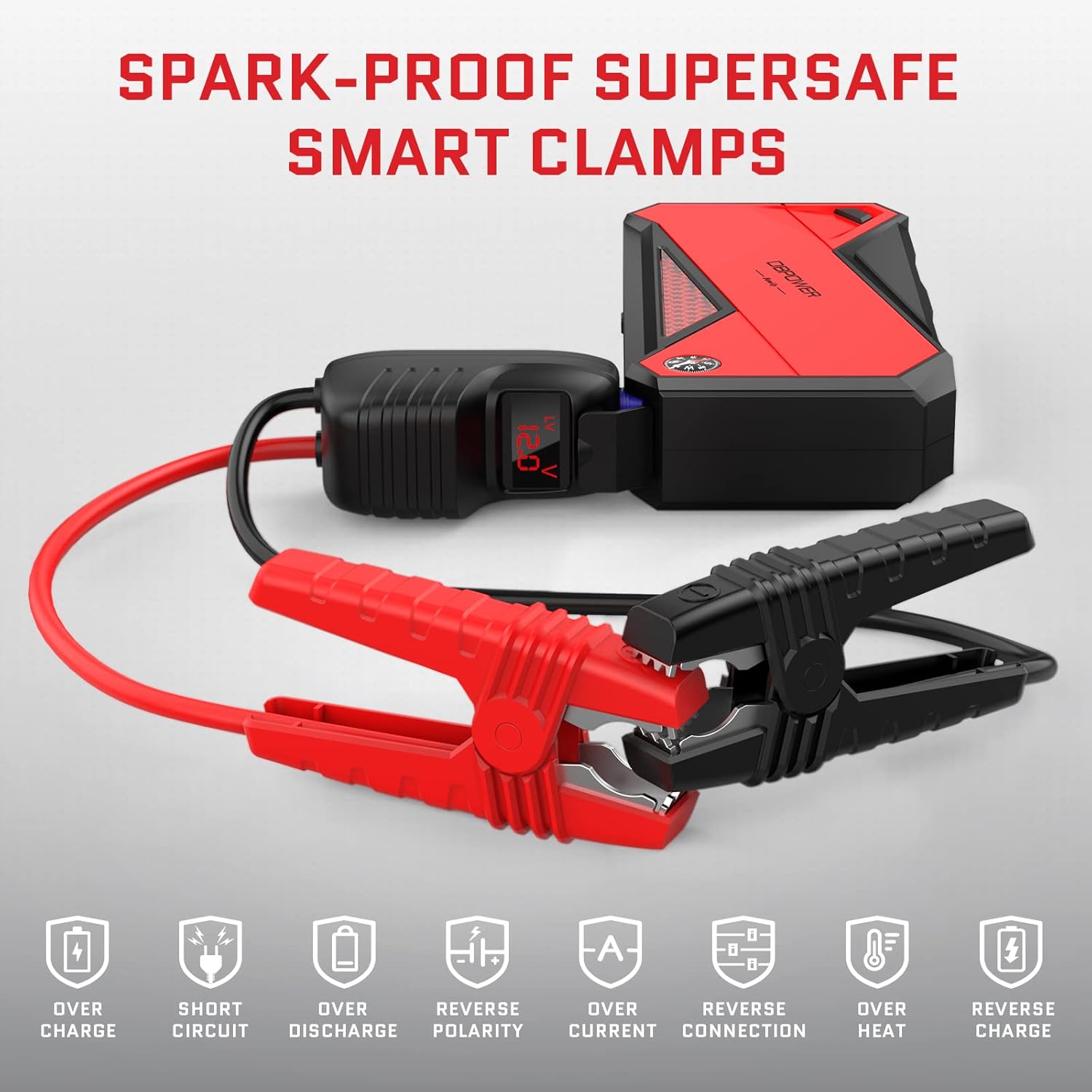
Figure 7: Smart Clamps Safety Protections.
- తక్కువ/అధిక వాల్యూమ్tagఇ రక్షణ: Prevents damage from incorrect voltagఇ స్థాయిలు.
- అధిక ఉష్ణోగ్రత రక్షణ: Shuts down if the device gets too hot.
- షార్ట్-సర్క్యూట్ రక్షణ: ప్రమాదవశాత్తు షార్ట్ సర్క్యూట్ల వల్ల జరిగే నష్టాన్ని నివారిస్తుంది.
- రివర్స్ ధ్రువణత రక్షణ: Alerts and prevents operation if clampలు తప్పుగా కనెక్ట్ చేయబడ్డాయి.
- Jump Starter Time-Out Protection: Automatically shuts off after a period of inactivity to conserve power.
7. నిర్వహణ
- క్రమం తప్పకుండా రీఛార్జ్ చేయండి: For optimal performance and longevity, fully recharge the jump starter after each use and at least every three months if stored.
- నిల్వ: Store the device in its hard shell case in a cool, dry place, away from direct sunlight and extreme temperatures.
- శుభ్రపరచడం: Wipe the unit and clamps with a dry, soft cloth. Do not use harsh chemicals or abrasive materials.
8. ట్రబుల్షూటింగ్
- వాహనం స్టార్ట్ అవ్వకపోవడం: cl నిర్ధారించుకోండిamps are securely connected to the correct battery terminals. Check the jump starter's battery level. If the intelligent clamps' indicator light is not solid green, refer to the manual for specific error codes or try reconnecting.
- Jump Starter Not Charging: Verify the charging cable and adapter are working correctly. Ensure the charging port on the jump starter is clean and free of debris.
- LED లైట్ పనిచేయదు: Check if the jump starter is powered on. Press and hold the light button to activate.
9. స్పెసిఫికేషన్లు
| ఫీచర్ | స్పెసిఫికేషన్ |
|---|---|
| మోడల్ సంఖ్య | DJS90 |
| పీక్ అవుట్పుట్ కరెంట్ | 1600 Amps |
| బ్యాటరీ కెపాసిటీ | 18000mAh |
| ఇంజిన్ అనుకూలత | Up to 7.5L Gas / 5.5L Diesel (12V) |
| ఆపరేటింగ్ ఉష్ణోగ్రత | -4°F నుండి 140°F (-20°C నుండి 60°C) |
| USB అవుట్పుట్ | 2 USB outputs (details may vary, refer to unit) |
| వస్తువు బరువు | 2.83 పౌండ్లు |
| ప్యాకేజీ కొలతలు | 9.84 x 5.24 x 4.49 అంగుళాలు |
10. వారంటీ మరియు మద్దతు
DBPOWER is committed to ensuring customer satisfaction. If you have any questions or require assistance with your product, please do not hesitate to contact our customer support team. We aim to respond to all inquiries within 24 hours.
For support, please visit the official DBPOWER webసైట్ లేదా మీ ఉత్పత్తి ప్యాకేజింగ్లో అందించిన సంప్రదింపు సమాచారాన్ని చూడండి.


