పరిచయం
This manual provides instructions for the Trust 25025 AZERTY Wireless Keyboard and Mouse Set. This comfortable wireless set features silent keys and buttons, and is constructed using 85% recycled materials. It is designed for ease of use and long-lasting performance.
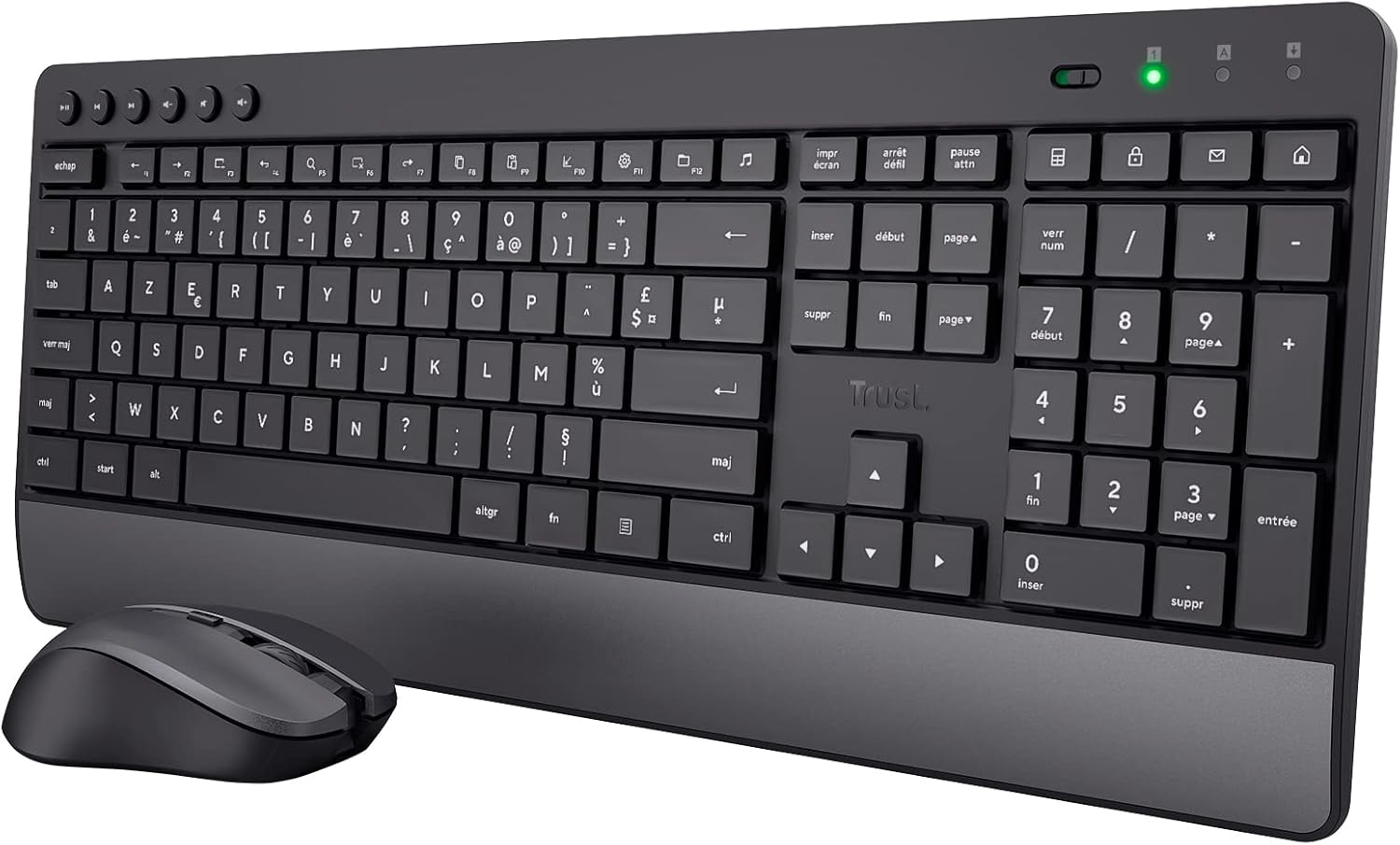
Image: The Trust 25025 AZERTY Wireless Keyboard and Mouse Set, featuring a full-size keyboard with a wrist rest and a compact mouse.
ప్యాకేజీ విషయాలు
- Trust 25025 AZERTY Wireless Keyboard
- వైర్లెస్ మౌస్ని నమ్మండి
- USB మైక్రో రిసీవర్
- 3 x AA బ్యాటరీలు (ముందే ఇన్స్టాల్ చేయబడ్డాయి లేదా విడిగా చేర్చబడ్డాయి)
- వినియోగదారు మాన్యువల్ (ఈ పత్రం)
సెటప్
1. బ్యాటరీ ఇన్స్టాలేషన్
The keyboard requires 2 AA batteries and the mouse requires 1 AA battery. These are typically included. If not, or if replacing, ensure correct polarity.
- కీబోర్డ్ మరియు మౌస్ దిగువన బ్యాటరీ కంపార్ట్మెంట్లను గుర్తించండి.
- బ్యాటరీ కవర్లను తెరవండి.
- Insert the AA batteries, matching the + and - indicators.
- బ్యాటరీ కవర్లను సురక్షితంగా మూసివేయండి.
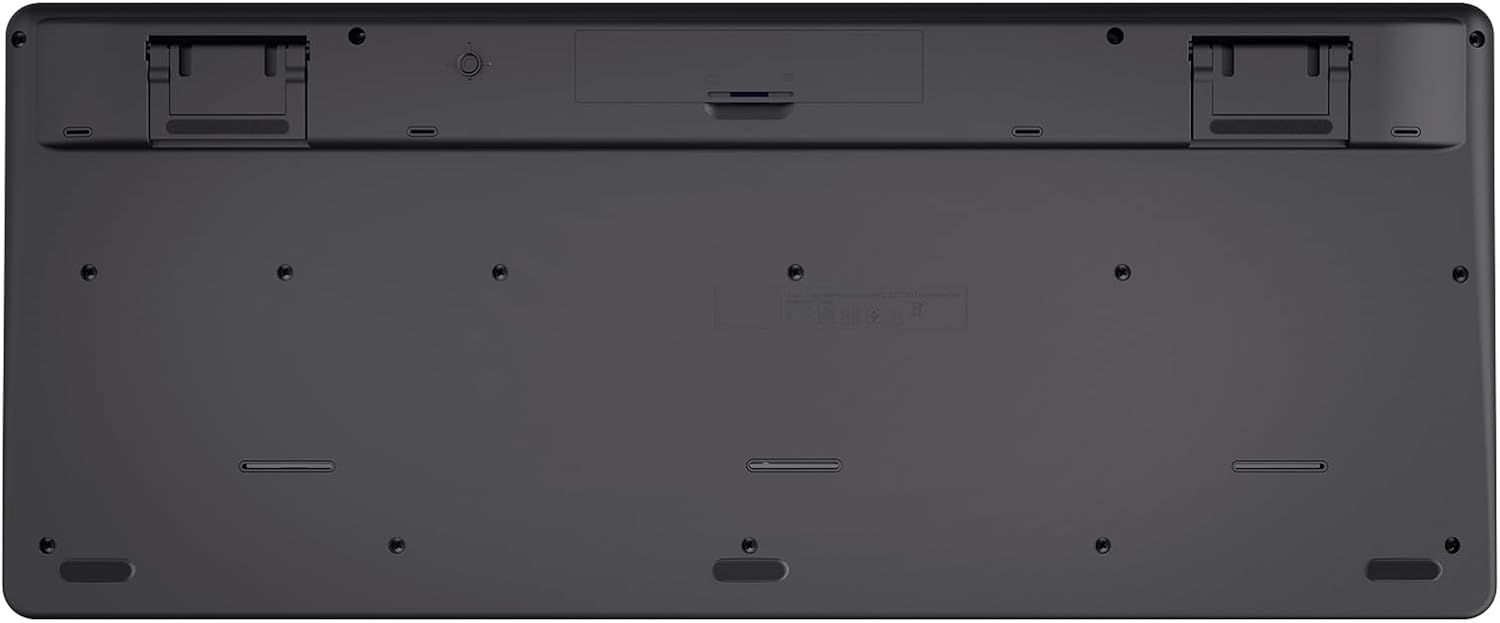
Image: The underside of the Trust 25025 keyboard, showing the battery compartment and the storage slot for the USB micro receiver.
2. Connecting the USB Micro Receiver
The keyboard and mouse connect wirelessly to your computer via a single USB micro receiver.
- Locate the USB micro receiver, usually stored in the mouse's battery compartment or a dedicated slot on the keyboard's underside.
- Plug the USB micro receiver into an available USB port on your computer (PC or Mac).
- Your computer should automatically detect and install the necessary drivers. This is a plug-and-play device, requiring no additional software installation.

Image: An icon representing 'Plug & Play' functionality, indicating easy setup without additional drivers.
3. పవర్ చేయడం
Ensure the keyboard and mouse are switched on. The mouse typically has an on/off switch on its underside. The keyboard may have an indicator light to show it's active.
ఆపరేటింగ్ సూచనలు
కీబోర్డ్ ఫీచర్లు
- AZERTY లేఅవుట్: Standard French keyboard layout for comfortable typing.
- నిశ్శబ్ద కీలు: Designed for quiet operation, reducing typing noise.
- ఇంటిగ్రేటెడ్ రిస్ట్ రెస్ట్: Provides ergonomic support during extended use.
- మల్టీమీడియా కీలు: Dedicated keys for quick access to media controls (play, pause, volume, etc.).
- స్పిల్-రెసిస్టెంట్ డిజైన్: Helps protect against accidental liquid spills.
- సుదీర్ఘ బ్యాటరీ జీవితం: Up to 48 months of battery life under typical usage conditions.

చిత్రం: పై నుండి క్రిందికి view of the Trust 25025 keyboard and mouse, highlighting the AZERTY layout and multimedia keys.
మౌస్ ఫీచర్లు
- నిశ్శబ్ద బటన్లు: Reduces click noise for a quieter working environment.
- సర్దుబాటు చేయగల DPI: Cycle through 1000, 1400, and 1800 DPI settings for precise cursor control. Use the DPI button located near the scroll wheel to change sensitivity.
- సవ్యసాచి డిజైన్: Suitable for both left-handed and right-handed users.
- సుదీర్ఘ బ్యాటరీ జీవితం: Up to 12 months of battery life under typical usage conditions.

చిత్రం: క్లోజప్ view of the Trust wireless mouse, showing its ergonomic shape and the DPI adjustment button.
నిర్వహణ
క్లీనింగ్
- కీబోర్డ్ మరియు మౌస్ ఉపరితలాలను శుభ్రం చేయడానికి మృదువైన, పొడి వస్త్రాన్ని ఉపయోగించండి.
- మొండి ధూళికి, కొద్దిగా dampen గుడ్డను నీటితో లేదా తేలికపాటి శుభ్రపరిచే ద్రావణంతో తుడవండి. కఠినమైన రసాయనాలను నివారించండి.
- పరికరాలను నీటిలో ముంచవద్దు.
బ్యాటరీ భర్తీ
When the battery indicator light (if present) illuminates or performance degrades, replace the batteries.
- Turn off the mouse using its power switch.
- Open the battery compartments on both devices.
- పాత బ్యాటరీలను తీసివేసి, స్థానిక నిబంధనల ప్రకారం వాటిని పారవేయండి.
- సరైన ధ్రువణతను నిర్ధారించుకుంటూ కొత్త AA బ్యాటరీలను చొప్పించండి.
- Close the battery covers.
ట్రబుల్షూటింగ్
No Response from Keyboard or Mouse
- బ్యాటరీలను తనిఖీ చేయండి: బ్యాటరీలు సరిగ్గా ఇన్స్టాల్ చేయబడ్డాయని మరియు అవి అయిపోకుండా చూసుకోండి. అవసరమైతే భర్తీ చేయండి.
- పవర్ స్విచ్: Verify that the mouse (and keyboard, if applicable) is switched ON.
- USB రిసీవర్: Ensure the USB micro receiver is securely plugged into a working USB port on your computer. Try a different USB port.
- దూరం: Make sure the keyboard and mouse are within the operational range of the USB receiver (typically up to 10 meters).
- జోక్యం: Move the devices away from other wireless devices or large metal objects that might cause interference.
మౌస్ కర్సర్ దూకుతుంది లేదా అస్థిరంగా ఉంది
- ఉపరితలం: మౌస్ను శుభ్రమైన, ప్రతిబింబించని ఉపరితలంపై ఉపయోగించండి. మౌస్ ప్యాడ్ సిఫార్సు చేయబడింది.
- DPI సెట్టింగ్: Adjust the DPI setting using the button on the mouse to find a comfortable sensitivity.
- బ్యాటరీలు: Low battery power can affect mouse performance. Replace batteries if needed.
స్పెసిఫికేషన్లు
| ఫీచర్ | వివరాలు |
|---|---|
| బ్రాండ్ | నమ్మండి |
| మోడల్ సంఖ్య | 25025 |
| సిరీస్ | Trezo |
| రంగు | నలుపు |
| కనెక్టివిటీ టెక్నాలజీ | రేడియో ఫ్రీక్వెన్సీ (వైర్లెస్) |
| కీబోర్డ్ లేఅవుట్ | అజర్టీ |
| మౌస్ DPI సెట్టింగ్లు | 1000, 1400, 1800 |
| కీబోర్డ్ బ్యాటరీ లైఫ్ | 48 నెలల వరకు |
| మౌస్ బ్యాటరీ లైఫ్ | 12 నెలల వరకు |
| బ్యాటరీలు అవసరం | 3 x AA (చేర్చబడింది) |
| ఉత్పత్తి కొలతలు | 18.2 x 43.6 x 4.4 సెం.మీ |
| వస్తువు బరువు | 752 గ్రా |
| హార్డ్వేర్ ప్లాట్ఫారమ్ | మాక్, పిసి |
| ఆపరేటింగ్ సిస్టమ్ అనుకూలత | విండోస్, మాక్ ఓఎస్, క్రోమ్ ఓఎస్ |
| ప్రత్యేక లక్షణాలు | 85% recycled plastic, long battery life, silent typing and clicks, wrist rest, single USB adapter for mouse and keyboard |
| అనుకూల పరికరాలు | ల్యాప్టాప్, PC |

Image: An icon indicating compatibility with multiple devices, including laptops and PCs.
వారంటీ మరియు మద్దతు
వారంటీ సమాచారం మరియు సాంకేతిక మద్దతు కోసం, దయచేసి అధికారిక ట్రస్ట్ను చూడండి. webసైట్ లేదా వారి కస్టమర్ సర్వీస్ను నేరుగా సంప్రదించండి. నిర్దిష్ట వారంటీ కాలాలు మరియు మద్దతు ఛానెల్లకు సంబంధించిన వివరాలు సాధారణంగా ఉత్పత్తి ప్యాకేజింగ్తో లేదా తయారీదారు యొక్క webసైట్.


