పరిచయం
This manual provides instructions for the setup, operation, and maintenance of your Xidehuy MP3 Player. Please read this manual thoroughly before using the device to ensure proper function and longevity.
ముఖ్యమైన గమనిక: This MP3 player does not support iTunes synchronization and is not an Apple iPod device.
ప్యాకేజీ విషయాలు
ప్యాకేజీలో అన్ని అంశాలు ఉన్నాయని నిర్ధారించుకోండి:
- 1 x Xidehuy MP3/MP4 Player
- 1 x 32GB మెమరీ కార్డ్ (ముందే ఇన్స్టాల్ చేయబడినది లేదా వేరుగా ఉంటుంది)
- 1 x HiFi Bass Earphone
- 1 x USB కేబుల్
- 1 x యూజర్ మాన్యువల్ (ఈ పత్రం)
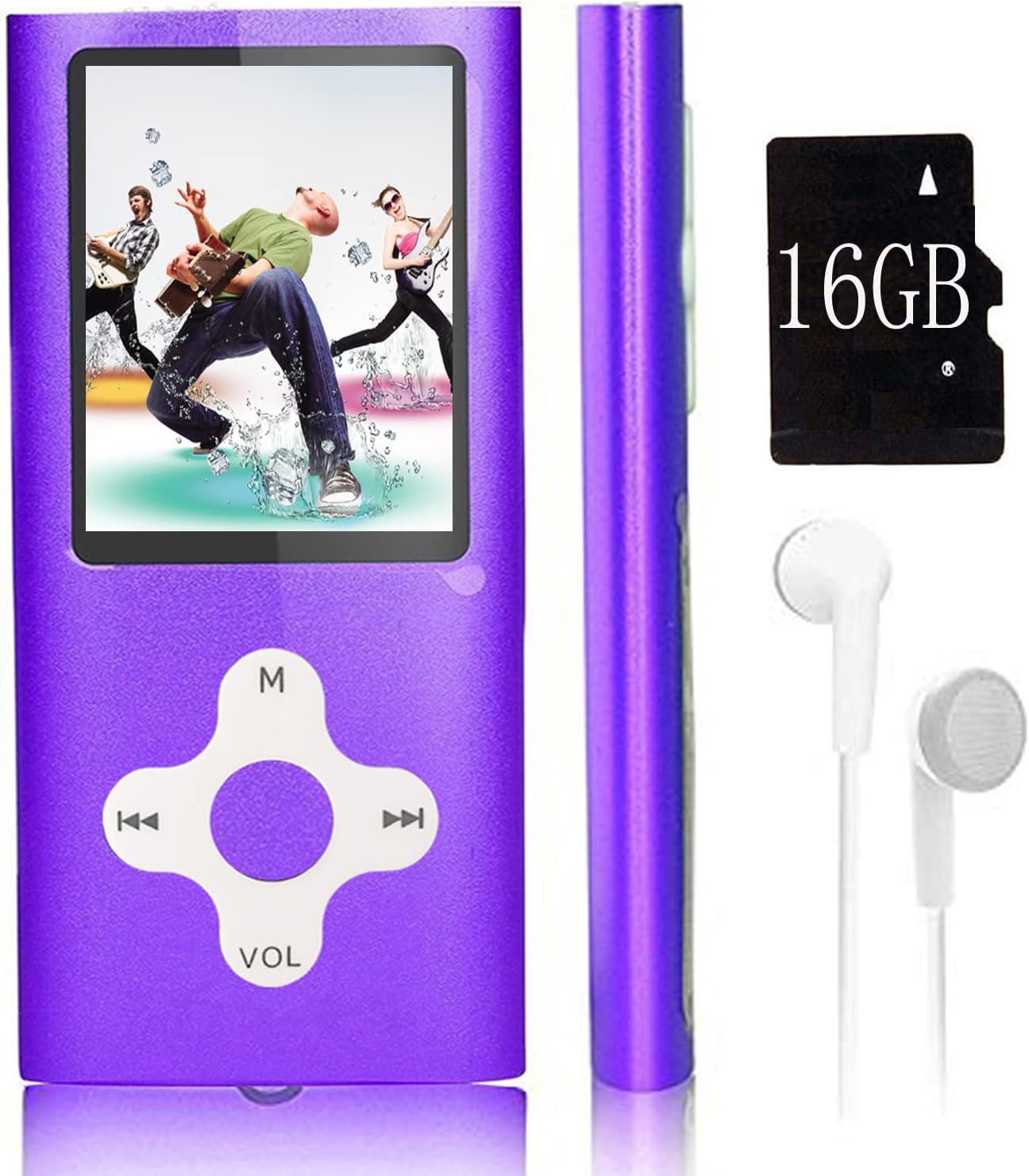
Image: The Xidehuy MP3 Player in violet, shown with a memory card (note: product includes 32GB, image shows 16GB) and white earphones. The player features a 1.8-inch LCD screen and circular navigation buttons.
ఉత్పత్తి ముగిసిందిview
నియంత్రణలు మరియు పోర్టులు
The MP3 player features a 1.8-inch LCD screen and a circular control pad. The control pad typically includes:
- M (Menu/Mode): Accesses menus or changes modes.
- Play/Pause/Confirm: Central button for playback control and selection.
- మునుపటి/రివైండ్: Navigates to the previous track or rewinds.
- తదుపరి/ఫాస్ట్ ఫార్వర్డ్: Navigates to the next track or fast forwards.
- VOL (వాల్యూమ్): వాల్యూమ్ స్థాయిని సర్దుబాటు చేస్తుంది.
Side ports typically include a Mini USB port for charging and data transfer, and a 3.5mm audio jack for earphones.
సెటప్
1. పరికరాన్ని ఛార్జ్ చేస్తోంది
- Connect the provided USB cable to the MP3 player's Mini USB port.
- Connect the other end of the USB cable to a computer's USB port or a compatible USB wall adapter (not included).
- The device will begin charging. It is recommended to turn on the player before charging.
- పూర్తిగా ఛార్జ్ కావడానికి సాధారణంగా దాదాపు 1 గంట పడుతుంది.
2. కంప్యూటర్కు కనెక్ట్ చేయడం మరియు బదిలీ చేయడం Files
- Ensure the MP3 player is powered on.
- Connect the MP3 player to your computer using the USB cable.
- The player will appear as an external storage device (e.g., a removable disk) on your computer.
- Open the device folder. You can drag and drop music files (MP3), video files (AMV), photo files (JPEG), or e-book files (TXT) directly into the player's storage.
- ఒకసారి fileలు బదిలీ చేయబడిన తర్వాత, USB కేబుల్ను డిస్కనెక్ట్ చేసే ముందు పరికరాన్ని మీ కంప్యూటర్ నుండి సురక్షితంగా బయటకు తీయండి.
ఆపరేటింగ్ సూచనలు
పవర్ ఆన్/ఆఫ్
- To power on, press and hold the Power button (usually on the side or top) until the screen illuminates.
- పవర్ ఆఫ్ చేయడానికి, పరికరం షట్ డౌన్ అయ్యే వరకు పవర్ బటన్ను నొక్కి పట్టుకోండి.
స్క్రీన్ లాక్/అన్లాక్
- Press the dedicated lock/unlock button (if available) or a specific combination (refer to on-screen prompts) to lock or unlock the screen and controls.
ప్రాథమిక నావిగేషన్
- Use the directional buttons on the control pad to navigate through menus.
- Press the central Play/Pause/Confirm button to select an option.
- Press the 'M' (Menu) button to go back to the previous menu or access main menu options.
మ్యూజిక్ ప్లేబ్యాక్
- ప్రధాన మెనూ నుండి, "సంగీతం" ఎంచుకోండి.
- Browse your music fileలు లేదా ఫోల్డర్లు.
- ప్లేబ్యాక్ ప్రారంభించడానికి పాటను ఎంచుకోండి.
- Use the Play/Pause button to pause or resume.
- ట్రాక్లను దాటవేయడానికి మునుపటి/తదుపరి బటన్లను ఉపయోగించండి.
- Adjust volume using the VOL buttons.
- Playback modes include Normal, Repeat Once, Repeat All, and Random. These can usually be accessed via the 'M' button during playback.
వీడియో ప్లేబ్యాక్
The player supports AMV video format.
- ప్రధాన మెనూ నుండి, "వీడియో" ఎంచుకోండి.
- Browse and select an AMV video file ఆడటానికి.
- Use the control buttons for playback control.
FM రేడియో
- ఇయర్ఫోన్లు యాంటెన్నాగా పనిచేస్తున్నప్పుడు అవి కనెక్ట్ అయ్యాయని నిర్ధారించుకోండి.
- ప్రధాన మెనూ నుండి, "FM రేడియో" ఎంచుకోండి.
- స్టేషన్ల కోసం ఆటో-స్కాన్ చేయడానికి లేదా మాన్యువల్గా ట్యూన్ చేయడానికి మెను ఎంపికలను ఉపయోగించండి.
వాయిస్ రికార్డింగ్
- From the main menu, select "Voice Record".
- Press the Play/Pause button to start recording.
- రికార్డింగ్ను ఆపివేసి సేవ్ చేయడానికి దాన్ని మళ్ళీ నొక్కండి.
ఇ-బుక్ రీడర్
The player supports TXT format e-books.
- From the main menu, select "E-Book".
- Browse and select a TXT file చదవడానికి.
- Use the directional buttons to scroll through pages.
ఫోటో Viewer
The player supports JPEG format photos.
- From the main menu, select "Photo Viewer".
- Browse and select a JPEG image to view.
- Use the directional buttons to navigate between images.
నిర్వహణ
- పరికరాన్ని పొడిగా ఉంచండి. తేమ అంతర్గత సర్క్యూట్లను దెబ్బతీస్తుంది.
- తీవ్రమైన ఉష్ణోగ్రతలను నివారించండి. అధిక ఉష్ణోగ్రతలు ఎలక్ట్రానిక్ పరికరాల జీవితకాలాన్ని తగ్గిస్తాయి.
- పరికరాన్ని వదలకండి లేదా బలమైన ప్రభావాలకు గురి చేయవద్దు.
- Clean the screen and body with a soft, dry cloth. Do not use harsh chemicals or cleaning solvents.
- ఉపయోగంలో లేనప్పుడు పరికరాన్ని శుభ్రమైన, దుమ్ము లేని వాతావరణంలో నిల్వ చేయండి.
ట్రబుల్షూటింగ్
| సమస్య | పరిష్కారం |
|---|---|
| పరికరం పవర్ ఆన్ చేయదు. | పరికరం పూర్తిగా ఛార్జ్ అయ్యిందని నిర్ధారించుకోండి. పవర్ సోర్స్కి కనెక్ట్ చేసి, మళ్లీ ప్రయత్నించండి. |
| బదిలీ చేయలేరు fileపరికరానికి లు. | Verify the USB cable is securely connected. Ensure the device is recognized by the computer. Try a different USB port or cable. |
| Music/Video fileలు ఆడవు. | ఉంటే తనిఖీ చేయండి file format is supported (MP3 for music, AMV for video). Ensure fileలు అవినీతికి గురికావు. |
| FM Radio not working. | Ensure earphones are properly plugged in, as they function as the antenna. |
| స్క్రీన్ స్పందించడం లేదు లేదా స్తంభించిపోయింది. | Perform a soft reset by pressing and holding the Power button for 10-15 seconds until the device restarts. If a reset button is available (small pinhole), use a thin object to press it. |
స్పెసిఫికేషన్లు
- స్క్రీన్ పరిమాణం: 1.8 inches High Resolution Real Color LCD
- అంతర్గత మెమరీ: 32 GB (with included memory card)
- విస్తరించదగిన మెమరీ: Supports up to 64 GB MicroSD card
- బ్యాటరీ: అంతర్నిర్మిత Li-ion బ్యాటరీ
- ఛార్జింగ్ సమయం: సుమారు 1 గంట
- ఆడే సమయం: సుమారు 5-7 గంటలు
- మద్దతు ఉన్న ఆడియో ఫార్మాట్లు: MP3, FLAC
- మద్దతు ఉన్న వీడియో ఫార్మాట్లు: AMV
- మద్దతు ఉన్న ఫోటో ఆకృతులు: JPEG
- Supported E-Book Formats: TXT
- కనెక్టివిటీ: మినీ USB 2.0
- ప్రత్యేక లక్షణాలు: FM Radio, Voice Recorder, E-Book Reader, Photo Viewer
- భాషలు: Simplified Chinese, English, Traditional Chinese, Japanese, Korean, Italian, etc.
- కొలతలు: 10.49 x 5.41 x 3.71 సెం.మీ
- బరువు: Approximately 68 g (package not included)
వారంటీ మరియు మద్దతు
This Xidehuy MP3 Player comes with a ఒక సంవత్సరం తయారీదారు వారంటీ కొనుగోలు చేసిన తేదీ నుండి.
For any concerns regarding after-sale support, technical assistance, or warranty claims, please contact Xidehuy customer service through your purchase platform or the contact information provided with your product documentation.


