1. పరిచయం
The Wintact WT550 is a non-contact infrared thermometer designed for measuring surface temperatures. It provides quick and accurate readings across a wide temperature range, making it suitable for various applications such as cooking, HVAC, automotive, and industrial use. This manual provides detailed instructions for the proper setup, operation, and maintenance of your device.

Image: The Wintact WT550 Infrared Thermometer, shown with included AAA batteries.
2. భద్రతా సమాచారం
WARNING: This infrared thermometer is not intended for medical use and should not be used to measure human body temperature. It will not provide accurate readings for medical diagnosis.
- Do not point the laser directly at eyes or indirectly off reflective surfaces.
- పరికరాన్ని పిల్లలకు దూరంగా ఉంచండి.
- Do not use the device in environments with explosive gas, vapor, or dust.
- పరికరాన్ని తీవ్రమైన ఉష్ణోగ్రతలు, తేమ లేదా ప్రత్యక్ష సూర్యకాంతికి బహిర్గతం చేయకుండా ఉండండి.
- పరికరాన్ని నీటిలో ముంచవద్దు.
- Use only the specified battery type (AAA) and ensure correct polarity during installation.

Image: Visual warning indicating the thermometer is not for body temperature measurement.
3. ప్యాకేజీ విషయాలు
ప్యాకేజీని తెరిచినప్పుడు, దయచేసి కింది అంశాలన్నీ చేర్చబడ్డాయో లేదో తనిఖీ చేయండి:
- 1x Wintact WT550 Infrared Thermometer
- 2x AAA Batteries (1.5V)
- 1x English User Manual

Image: Depiction of the Wintact WT550 thermometer, batteries, and instruction manual as included in the box.
4. ఉత్పత్తి లక్షణాలు మరియు భాగాలు
The Wintact WT550 Infrared Thermometer is equipped with several features to enhance its functionality and ease of use:
- నాన్-కాంటాక్ట్ కొలత: Safely measure surface temperatures from a distance.
- ఉష్ణోగ్రత పరిధి: Measures from -58℉ to 1022℉ (-50℃ to 550℃).
- అధిక ఖచ్చితత్వం: Provides readings with an error of only ±1.5℃ (2.7℉).
- Distance-to-Spot Ratio (D:S): A 12:1 ratio ensures accurate measurement from 14.17 inches (36 centimeters) away.
- సర్దుబాటు చేయగల ఎమిసివిటీ: User-adjustable from 0.1 to 1.0 for improved accuracy on various surfaces.
- Switchable Units: Easily switch between Celsius (℃) and Fahrenheit (℉).
- డేటా హోల్డ్: Freezes the last measured temperature on the display.
- ఉష్ణోగ్రత అలారాలు: High and Low temperature alarms can be set to alert the user when temperatures exceed or fall below preset limits.
- బహుళ కొలత మోడ్లు: Includes Maximum (MAX), Minimum (MIN), Difference (DIF), and Average (AVG) temperature display modes.
- బ్యాక్లిట్ డిస్ప్లే: తక్కువ కాంతి పరిస్థితుల్లో కూడా చదవగలిగేలా చేస్తుంది.
- ఆటో-ఆఫ్ ఫంక్షన్: Automatically powers off after 20 seconds of inactivity to conserve battery life.
- తక్కువ బ్యాటరీ సూచిక: Alerts the user when batteries need replacement.
- ఎర్గోనామిక్ గ్రిప్: Designed for comfortable and secure handling.

చిత్రం: పైగాview of the thermometer's versatile design, highlighting features like data hold, temperature alarm, auto-off, ℃/℉ switch, multiple modes, and low battery indicator.

Image: The thermometer's display illustrating the Maximum, Minimum, Average, and Difference temperature measurement modes.

Image: The thermometer in use, demonstrating the High Temperature Alarm (HAL) and Low Temperature Alarm (LAL) features.

చిత్రం: క్లోజప్ view of the thermometer's non-slip ergonomic grip, designed for comfortable handling.
5. సెటప్
5.1 బ్యాటరీ ఇన్స్టాలేషన్
- థర్మామీటర్ హ్యాండిల్పై బ్యాటరీ కంపార్ట్మెంట్ను గుర్తించండి.
- బ్యాటరీ కంపార్ట్మెంట్ కవర్ తెరవండి.
- Insert two (2) AAA 1.5V batteries, ensuring correct polarity (+/-) as indicated inside the compartment.
- బ్యాటరీ కంపార్ట్మెంట్ కవర్ను సురక్షితంగా మూసివేయండి.
పరికరం ఇప్పుడు ఉపయోగం కోసం సిద్ధంగా ఉంది.

Image: The battery compartment of the thermometer, showing the location for AAA batteries.
6. ఆపరేటింగ్ సూచనలు
6.1 కొలత తీసుకోవడం
- Point the thermometer at the surface you wish to measure.
- Pull and hold the trigger. The temperature reading will appear on the display.
- Release the trigger to hold the reading on the display (Data Hold function). The device will automatically power off after 20 seconds of inactivity.

Image: The thermometer in use, demonstrating instant and accurate temperature measurement of a pizza in an oven.
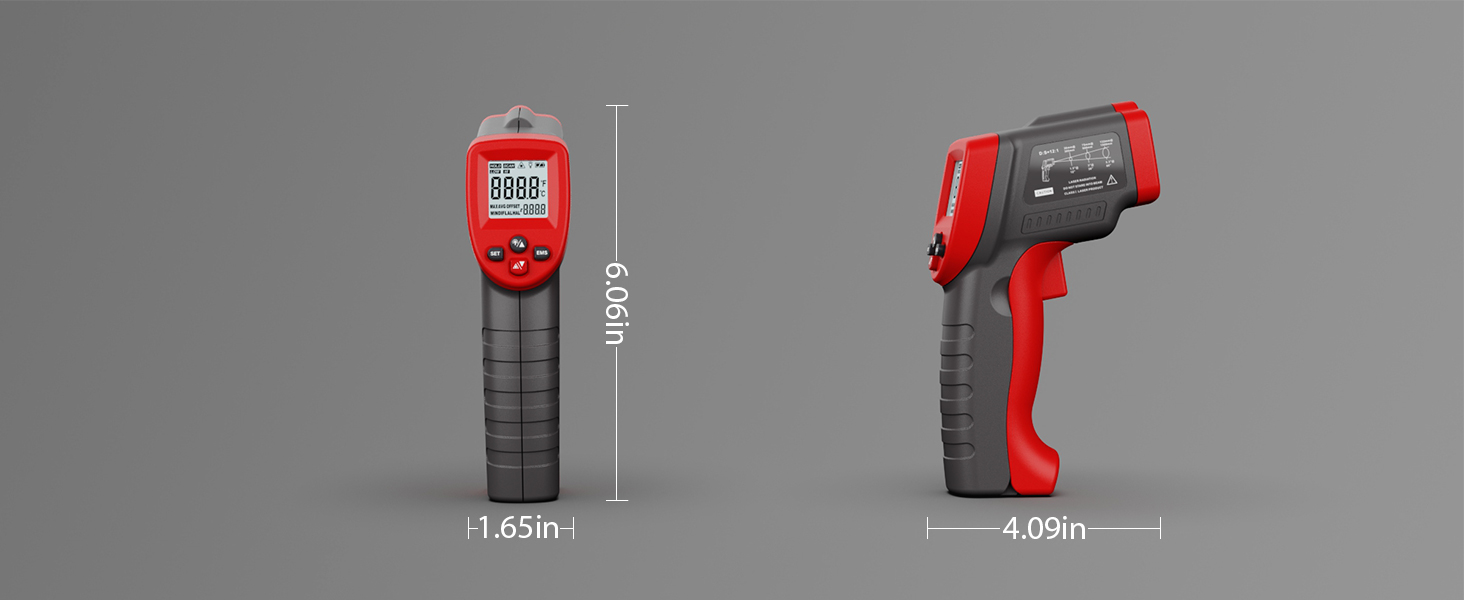
Image: The thermometer performing remote measurement on an HVAC vent, illustrating its non-contact capability.
6.2 Switching Temperature Units (℃/℉)
Press the ℃/℉ button on the device to toggle between Celsius and Fahrenheit temperature scales.
6.3 Understanding Distance-to-Spot Ratio (D:S)
The WT550 has a D:S ratio of 12:1. This means that at a distance of 12 inches from the target, the measurement spot diameter will be approximately 1 inch. To ensure accurate readings, position the thermometer at an appropriate distance from the target, ensuring the target fills the measurement spot.

Image: A diagram illustrating the 12:1 Distance-to-Spot ratio, showing how the measurement area expands with distance.
6.4 ఎమిసివిటీని సర్దుబాటు చేయడం
Emissivity (ε) is the ability of a material to emit energy by radiation. Different materials have different emissivity values. For accurate measurements, adjust the emissivity setting on your thermometer to match the material being measured. The WT550 allows adjustment from 0.1 to 1.0.
- Press the "EMS" button to enter emissivity adjustment mode.
- Use the Up/Down buttons to change the emissivity value.
- Refer to a standard emissivity table for common materials to find the appropriate setting.

Image: A user adjusting the emissivity setting on the thermometer while consulting an emissivity table for accurate readings.
6.5 Special Measurement Considerations
- Measuring Shiny Surfaces: Highly reflective surfaces can cause inaccurate readings. To measure, place a piece of non-reflective tape (with a known emissivity, e.g., 0.95) over the surface, allow time for the tape to reach the surface temperature, and then measure the tape.
- Avoiding Steam/Dust: Do not measure through steam, dust, or smoke, as these can interfere with accurate readings.

Image: A visual guide showing the correct and incorrect ways to use the thermometer when steam is present, emphasizing the need to avoid measuring through steam.

Image: The thermometer measuring a fish tank, demonstrating the use of non-reflective tape on glass for accurate temperature readings.
7. నిర్వహణ
7.1 శుభ్రపరచడం
To clean the thermometer, wipe the casinప్రకటనతో గ్రాamp cloth. Do not use abrasive cleaners or solvents. Keep the lens clean and free of dust or debris, as this can affect accuracy.
7.2 బ్యాటరీ భర్తీ
When the low battery indicator appears on the display, replace the batteries as described in the "Battery Installation" section (5.1).
7.3 నిల్వ
Store the device in a cool, dry place when not in use. Remove batteries if storing for extended periods to prevent leakage.
8. ట్రబుల్షూటింగ్
| సమస్య | సాధ్యమైన కారణం | పరిష్కారం |
|---|---|---|
| ఏ డిస్ప్లే/పరికరం ఆన్ అవ్వదు | డెడ్ లేదా తప్పుగా ఇన్స్టాల్ చేయబడిన బ్యాటరీలు | బ్యాటరీలను మార్చండి లేదా సరైన ధ్రువణతను నిర్ధారించుకోండి. |
| సరికాని రీడింగ్లు | Incorrect emissivity setting, dirty lens, steam/dust interference, target too small or too far | Adjust emissivity, clean lens, avoid interference, ensure target fills measurement spot. |
| లేజర్ పనిచేయదు | Laser function disabled, low battery | Check settings to enable laser, replace batteries. |
If issues persist, please contact Wintact customer service for further assistance.
9. స్పెసిఫికేషన్లు
| పరామితి | విలువ |
|---|---|
| మోడల్ | WT550 |
| ఉష్ణోగ్రత పరిధి | -58℉ నుండి 1022℉ (-50℃ నుండి 550℃) |
| ఖచ్చితత్వం | ±1.5℃ (2.7℉) |
| దూరం-నుండి-స్థాన నిష్పత్తి (D:S) | 12:1 |
| ఏమిస్సివిటి | సర్దుబాటు 0.1 నుండి 1.0 వరకు |
| ప్రతిస్పందన సమయం | 0.5 సెకన్లు |
| విద్యుత్ సరఫరా | 2 x 1.5V AAA బ్యాటరీలు |
| ఆటో-ఆఫ్ | 20 సెకన్లు (సుమారు) |
| ప్రత్యేక లక్షణాలు | High & Low Temperature Alarm, Data Hold, Max/Min/Dif/Avg Modes, Backlit Display, Low Battery Indication |
| ధృవపత్రాలు | CE, FCC, RoHS |
10. వారంటీ మరియు మద్దతు
The Wintact WT550 Infrared Thermometer comes with a 1 సంవత్సరాల వారంటీ కొనుగోలు చేసిన తేదీ నుండి. ఈ వారంటీ సాధారణ ఉపయోగంలో మెటీరియల్స్ మరియు పనితనంలో లోపాలను కవర్ చేస్తుంది.
For technical support, troubleshooting assistance, or warranty claims, please contact Wintact customer service. Refer to the contact information provided on the product packaging or the official Wintact website for 24/7 customer service.


