పరిచయం
ధన్యవాదాలు, ధన్యవాదాలు.asing the Manta SPK204FM Portable Bluetooth Speaker. This manual provides important information regarding the setup, operation, and maintenance of your device. Please read it thoroughly before use to ensure optimal performance and safety.
భద్రతా సమాచారం
- స్పీకర్ను తీవ్రమైన ఉష్ణోగ్రతలు, తేమ లేదా ప్రత్యక్ష సూర్యకాంతికి గురిచేయవద్దు.
- స్పీకర్ను వదలివేయడం లేదా బలమైన ప్రభావాలకు గురిచేయడం మానుకోండి.
- స్పీకర్ను మీరే విడదీయవద్దు లేదా రిపేర్ చేయడానికి ప్రయత్నించవద్దు. అన్ని సర్వీసింగ్లను అర్హత కలిగిన సిబ్బందికి సూచించండి.
- స్పీకర్ను నీరు మరియు ఇతర ద్రవాలకు దూరంగా ఉంచండి.
- అందించిన ఛార్జింగ్ కేబుల్ మరియు అడాప్టర్ను మాత్రమే ఉపయోగించండి.
- స్పీకర్ను ఆపరేట్ చేసేటప్పుడు సరైన వెంటిలేషన్ ఉండేలా చూసుకోండి.
ప్యాకేజీ విషయాలు
దయచేసి ఈ క్రింది అంశాల కోసం పెట్టెను ఎంచుకోండి:
- 1 x Manta SPK204FM Portable Bluetooth Speaker
- 1 x USB ఛార్జింగ్ కేబుల్
- 1 x 3.5 mm Jack Audio Cable (AUX cable)
- 1 x క్యారీ స్ట్రాప్
- 1 x యూజర్ మాన్యువల్ (ఈ పత్రం)

Image: The Manta SPK204FM speaker shown with its accessories: a USB charging cable, a 3.5mm audio jack cable, and a black carry strap.
ఉత్పత్తి ముగిసిందిview
The Manta SPK204FM is a versatile portable speaker designed for robust audio performance. It features a cylindrical design with integrated handles and a carry strap for easy portability. The control panel and input ports are located on one end of the speaker.
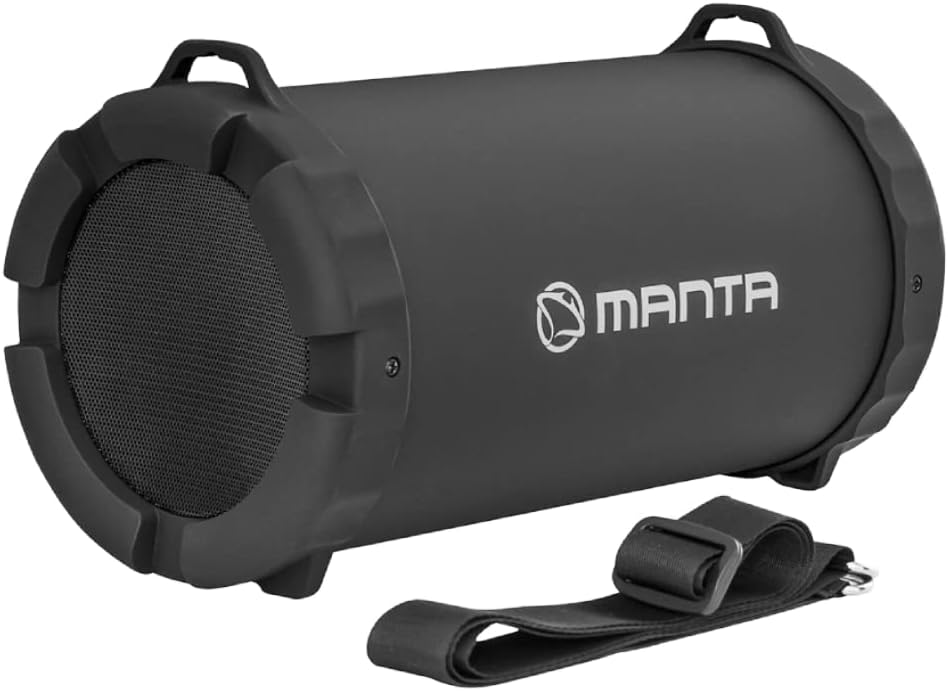
చిత్రం: ముందు భాగం view of the Manta SPK204FM portable Bluetooth speaker, showcasing its cylindrical shape, speaker grille, and the Manta logo.

చిత్రం: వివరణాత్మక view of the Manta SPK204FM speaker's end panel, displaying the DC 5V charging port, USB port, Micro SD card slot, AUX input, Bluetooth indicator, power switch, and control buttons (Mode, Previous, Play/Pause, Next).
ముఖ్య భాగాలు:
- స్పీకర్ గ్రిల్: Protects the internal speaker drivers.
- నియంత్రణ ప్యానెల్: Contains buttons for mode selection, playback control, and volume.
- ఇన్పుట్ పోర్ట్లు: USB, Micro SD card slot, AUX input.
- DC 5V ఛార్జింగ్ పోర్ట్: USB ఛార్జింగ్ కేబుల్ను కనెక్ట్ చేయడానికి.
- పవర్ స్విచ్: On/Off toggle.
- Carry Handles/Strap Mounts: For attaching the included carry strap.
సెటప్
స్పీకర్పై ఛార్జింగ్:
- Connect the small end of the USB charging cable to the DC 5V port on the speaker.
- USB కేబుల్ యొక్క పెద్ద చివరను USB పవర్ అడాప్టర్ (చేర్చబడలేదు) లేదా కంప్యూటర్ యొక్క USB పోర్ట్కి కనెక్ట్ చేయండి.
- The charging indicator light will illuminate. Once fully charged, the light may change color or turn off (refer to specific indicator behavior for your model).
- A full charge typically takes several hours. The speaker offers approximately 10 hours of playback at 50% volume.

Image: An illustration depicting the Manta SPK204FM speaker with an overlay of a charging battery icon, indicating its power status or charging capability.
ఆపరేటింగ్ సూచనలు
పవర్ ఆన్/ఆఫ్:
- To turn on the speaker, slide the "ON/OFF" switch to the "ON" position.
- To turn off the speaker, slide the "ON/OFF" switch to the "OFF" position.
మోడ్ ఎంపిక:
Press the "M" (Mode) button on the control panel to switch between different modes: Bluetooth, FM Radio, USB, Micro SD, and AUX input.
బ్లూటూత్ పెయిరింగ్:
- Turn on the speaker. It will automatically enter Bluetooth pairing mode, indicated by a flashing Bluetooth light or an audible prompt.
- మీ స్మార్ట్ఫోన్, టాబ్లెట్ లేదా ఇతర బ్లూటూత్-ప్రారంభించబడిన పరికరంలో బ్లూటూత్ను ప్రారంభించండి.
- కోసం వెతకండి "SPK204FM" in the list of available Bluetooth devices.
- Select "SPK204FM" to connect. Once connected, you will hear an audible confirmation, and the Bluetooth indicator light will become solid.
- The effective range for Bluetooth connection is approximately 10 meters.

Image: The Manta SPK204FM speaker with an illuminated Bluetooth 5.0 chip icon, highlighting its advanced Bluetooth connectivity.
FM రేడియో ఆపరేషన్:
- FM రేడియో మోడ్కి మారడానికి "M" (మోడ్) బటన్ను నొక్కండి.
- అందుబాటులో ఉన్న FM స్టేషన్లను స్వయంచాలకంగా స్కాన్ చేసి సేవ్ చేయడానికి "ప్లే/పాజ్" బటన్ను నొక్కి పట్టుకోండి.
- "మునుపటి" ని ఉపయోగించండి (◀◀ మాగ్నిఫికేషన్) మరియు "తదుపరి" (▶▶) సేవ్ చేసిన స్టేషన్ల మధ్య నావిగేట్ చేయడానికి బటన్లు.

Image: A hand interacting with the control panel of the Manta SPK204FM speaker, with an FM radio icon above, indicating the radio function.
USB / మైక్రో SD ప్లేబ్యాక్:
- Insert a USB flash drive or a Micro SD card into the corresponding slot on the speaker.
- The speaker will automatically switch to USB or Micro SD mode and begin playing audio files. If not, press the "M" (Mode) button to select the correct mode.
- ప్లేబ్యాక్ను పాజ్ చేయడానికి లేదా తిరిగి ప్రారంభించడానికి "ప్లే/పాజ్" బటన్ను ఉపయోగించండి.
- "మునుపటి" ని ఉపయోగించండి (◀◀ మాగ్నిఫికేషన్) మరియు "తదుపరి" (▶▶) buttons for track navigation.

Image: A graphic illustrating the Manta SPK204FM speaker's compatibility with Micro SD cards, USB drives, and AUX input, represented by their respective icons.
AUX ఇన్పుట్:
- Connect one end of the 3.5 mm audio jack cable to the AUX input port on the speaker.
- కేబుల్ యొక్క మరొక చివరను మీ బాహ్య పరికరం (ఉదా. MP3 ప్లేయర్, ల్యాప్టాప్) యొక్క ఆడియో అవుట్పుట్ జాక్కి కనెక్ట్ చేయండి.
- The speaker will automatically switch to AUX mode. If not, press the "M" (Mode) button to select AUX mode.
- మీ కనెక్ట్ చేయబడిన బాహ్య పరికరం నుండి నేరుగా ప్లేబ్యాక్ మరియు వాల్యూమ్ను నియంత్రించండి.
వాల్యూమ్ నియంత్రణ:
Volume is typically controlled by pressing and holding the "Previous" (◀◀ మాగ్నిఫికేషన్) button to decrease volume and the "Next" (▶▶) button to increase volume. Some models may also allow volume control from the connected Bluetooth device.
నిర్వహణ
- శుభ్రపరచడం: స్పీకర్ బాహ్య భాగాన్ని శుభ్రం చేయడానికి మృదువైన, పొడి వస్త్రాన్ని ఉపయోగించండి. రాపిడి క్లీనర్లను లేదా ద్రావకాలను ఉపయోగించవద్దు.
- నిల్వ: ఎక్కువసేపు ఉపయోగంలో లేనప్పుడు, స్పీకర్ను చల్లని, పొడి ప్రదేశంలో, ప్రత్యక్ష సూర్యకాంతి మరియు తీవ్రమైన ఉష్ణోగ్రతలకు దూరంగా నిల్వ చేయండి.
- బ్యాటరీ సంరక్షణ: బ్యాటరీ జీవితకాలాన్ని పొడిగించడానికి, బ్యాటరీని తరచుగా పూర్తిగా డిశ్చార్జ్ చేయకుండా ఉండండి. ఉపయోగంలో లేనప్పటికీ, స్పీకర్ను క్రమం తప్పకుండా ఛార్జ్ చేయండి.
ట్రబుల్షూటింగ్
| సమస్య | సాధ్యమైన కారణం | పరిష్కారం |
|---|---|---|
| శక్తి లేదు | బ్యాటరీ క్షీణించింది. | స్పీకర్ను పూర్తిగా ఛార్జ్ చేయండి. |
| శబ్దం లేదు | వాల్యూమ్ చాలా తక్కువగా ఉంది లేదా మ్యూట్ చేయబడింది. తప్పు మోడ్ ఎంచుకోబడింది. పరికరం సరిగ్గా కనెక్ట్ కాలేదు. | Increase volume on speaker and connected device. Press "M" to select correct mode. Re-pair Bluetooth or re-connect AUX cable. |
| బ్లూటూత్ కనెక్షన్ అస్థిరంగా ఉంది | పరికరం పరిధిలో లేదు. జోక్యం. | Move the connected device closer to the speaker (within 10m). Avoid obstacles between devices. |
| FM radio not tuning stations | Weak signal. Auto-scan not performed. | Ensure the speaker is in an area with good FM reception. Press and hold the "Play/Pause" button to perform an auto-scan. |
స్పెసిఫికేషన్లు
| ఫీచర్ | వివరాలు |
|---|---|
| మోడల్ పేరు | SPK204FM |
| బ్రాండ్ | మంట |
| కనెక్టివిటీ టెక్నాలజీ | Bluetooth V2.1, Auxiliary (3.5mm Jack), USB, Micro SD |
| స్పీకర్ అవుట్పుట్ పవర్ | 15 వాట్స్ |
| ఆడియో అవుట్పుట్ మోడ్ | స్టీరియో |
| స్పీకర్ రకం | Woofer, Subwoofer (integrated) |
| ఉత్పత్తి కొలతలు | 25 x 13 x 14.5 సెం.మీ |
| ఉత్పత్తి బరువు | 1.3 కిలోలు |
| బ్యాటరీ లైఫ్ | సుమారు 10 గంటలు (50% వాల్యూమ్ వద్ద) |
| FM రేడియో | అంతర్నిర్మిత |

Image: A diagram of the Manta SPK204FM speaker with its dimensions clearly marked: length 255mm, height 145mm, and width 130mm.
వారంటీ మరియు మద్దతు
For warranty information and technical support, please refer to the warranty card included with your purchase or visit the official Manta webసైట్. ఏవైనా వారంటీ క్లెయిమ్ల కోసం మీ కొనుగోలు రుజువును ఉంచుకోండి.
If you encounter issues not covered in this manual, please contact Manta customer service for assistance.


