1. Utangulizi na Bidhaa Zaidiview
The zaMel ETERO RWS-211C/12V/N is a wireless surface-mounted radio switch designed for controlling up to four electrical devices. Its robust IP56 rating ensures protection against jet water, making it suitable for outdoor installations. This device offers a reliable control solution for various applications such as garage doors, pumps, lamps, and more, with an impressive outdoor range of up to 300 meters.
Utilizing Keeloq® coding technology from Microchip Technology USA, the RWS-211C/12V/N ensures secure and interference-free bidirectional transmission. Each transmission is dynamically re-encrypted, providing enhanced safety. Operating at a frequency of 433.92 MHz with low transmission power (<5mW), this radio switch does not require state approval.
2. Sifa Muhimu
- Wireless surface-mounted switch for outdoor installation (IP56 rated).
- Controls up to 4 independent electrical devices.
- Extended outdoor range of up to 300 meters.
- Bidirectional, coded, and interference-free Keeloq® transmission.
- Maximum connection power: 2000 W.
- Load on one channel: 16 A / 250 V AC 4000 VA / AC1.
- Kiwango cha joto cha kufanya kazi: -20 ° C hadi +35 ° C.
- Requires 12 V operating voltage.
3. Product Components and Visuals

Kielelezo cha 3.1: Zaidiview of the zaMel RWS-211C/12V/N Radio Switch system, showing the main receiver unit, detachable antenna, and the four-button remote control. The receiver unit features four output indicators (K1-K4) and a 12V AC/DC power indicator.
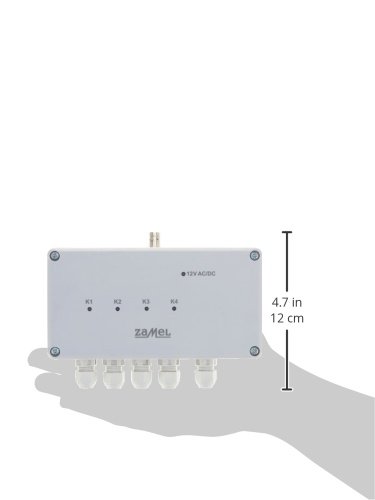
Kielelezo cha 3.2: The zaMel RWS-211C/12V/N receiver unit shown held in a hand, illustrating its compact size and dimensions (approximately 4.7 inches or 12 cm in length). This view highlights the four cable glands at the bottom for secure wiring connections.

Kielelezo cha 3.3: Mbele ya moja kwa moja view of the zaMel RWS-211C/12V/N receiver unit and its accompanying remote control. This perspective clearly shows the "zaMel" branding on both devices, the four indicator LEDs (K1-K4) on the receiver, and the numbered buttons (1-4) on the remote.
4. Kuweka na Kuweka
Before beginning installation, ensure all power sources are disconnected to prevent electrical shock. It is recommended that installation be performed by a qualified electrician.
4.1 Mounting the Receiver Unit
- Choose a suitable outdoor location for the receiver unit, ensuring it is within range of the devices to be controlled and the remote control. The IP56 rating allows for outdoor exposure.
- Secure the receiver unit to a flat, stable surface using appropriate screws through the mounting holes located at the corners of the casing.
- Attach the provided antenna to the designated connector on the receiver unit. Ensure it is securely fastened for optimal signal reception.
4.2 Viunganisho vya Wiring
The RWS-211C/12V/N requires a 12V AC/DC operating voltage. Use the cable glands at the bottom of the unit for secure and waterproof cable entry.
- Ugavi wa Nguvu: Connect a stable 12V AC/DC power supply to the designated terminals inside the receiver unit. Observe correct polarity if using DC.
- Viunganisho vya Kifaa: Connect the electrical devices (e.g., garage door opener, lamp, pump) to the respective output channels (K1, K2, K3, K4) within the receiver. Each channel can handle a load of up to 16 A / 250 V AC (4000 VA). Refer to the internal wiring diagram for specific terminal assignments.
- Hakikisha miunganisho yote imebana na imewekewa joto vizuri.
4.3 Kuoanisha Kidhibiti cha Mbali
The remote control typically comes pre-paired, but if re-pairing is necessary or if you are adding new remotes, follow the manufacturer's specific pairing procedure, which usually involves a button sequence on the receiver unit and the remote.
5. Maagizo ya Uendeshaji
Once installed and powered, the zaMel RWS-211C/12V/N is ready for operation using the provided remote control.
- The remote control features four numbered buttons (1, 2, 3, 4), each corresponding to one of the four output channels (K1, K2, K3, K4) on the receiver unit.
- Pressing a button on the remote will toggle the state of the corresponding output channel on the receiver. For example, if channel K1 is connected to a lamp, pressing button '1' on the remote will turn the lamp ON, and pressing it again will turn it OFF.
- The indicator LEDs (K1-K4) on the receiver unit will illuminate when their respective channels are active.
- Hakikisha kuwa kidhibiti cha mbali kina betri mpya kwa utendakazi bora.
6. Matengenezo
The zaMel RWS-211C/12V/N is designed for durability and requires minimal maintenance.
- Kusafisha: Periodically wipe the exterior of the receiver unit and remote control with a soft, damp kitambaa. Usitumie visafishaji vya abrasive au vimumunyisho.
- Viunganisho: Occasionally check all wired connections to ensure they remain secure and free from corrosion, especially in outdoor environments.
- Ubadilishaji wa Betri: Replace the remote control battery when its range decreases or it becomes unresponsive. Refer to the remote's specific instructions for battery type and replacement procedure.
- Antena: Ensure the antenna remains upright and unobstructed for best signal performance.
7. Utatuzi wa shida
| Tatizo | Sababu inayowezekana | Suluhisho |
|---|---|---|
| Device does not respond to remote. |
|
|
| Kiwango cha uendeshaji kilichopunguzwa. |
|
|
| Receiver LEDs not illuminating. |
|
|
8. Maelezo ya kiufundi
| Vipimo vya Bidhaa | 5.5 x 8.2 x 15.7cm; 560g |
| Nambari ya Mfano wa Kipengee | RWS-211C/12V/N |
| Hali ya Uendeshaji | WASHA ZIMA |
| Ukadiriaji wa Sasa | 16 Amps |
| Uendeshaji Voltage | 12V AC / DC |
| Aina ya Mawasiliano | Kawaida Fungua |
| Aina ya kiunganishi | Klammer |
| Maximum Connection Power | 2000 W |
| Load per Channel | 16 A / 250 V AC 4000 VA / AC1 |
| Kiwango cha Joto la Uendeshaji | -20°C hadi +35°C |
| Masafa ya Usambazaji | 433.92 MHz |
| Ukadiriaji wa Ulinzi | IP56 |
9. Udhamini na Msaada
For information regarding product warranty, please refer to the documentation included with your purchase or visit the official zaMel webtovuti. Sheria na masharti ya udhamini yanaweza kutofautiana kulingana na eneo.
Should you encounter any issues or require technical assistance, please contact zaMel customer support. Contact details are typically available on the manufacturer's webtovuti au katika ufungaji wa bidhaa.


