Introduktion
The ACASIS 10-in-1 USB C Hub with NVMe Enclosure is a versatile multiport adapter designed to expand the connectivity and storage capabilities of your USB-C enabled devices. This manual provides detailed instructions for setup, operation, and maintenance to ensure optimal performance.
Paketets innehåll
- 10-in-1 USB C Hub with SSD Enclosure
- Typ-C-kabel
- Silikonskydd
- Thermal Pad
- Gummi Grommet
- Användarmanual
Produkt överview
The ACASIS 10-in-1 hub integrates multiple essential ports and an M.2 SSD enclosure into a compact device. It supports various operating systems including Windows, Mac OS, Linux, and Chromebook OS.
Nyckelfunktioner:
- M.2 NVMe/SATA SSD Enclosure: Compatible with M.2 NVMe and SATA SSDs (2230, 2242, 2260, 2280 sizes) up to 8TB storage, offering up to 1000MB/s transfer speeds.
- HDMI-utgång: Supports 4K@60Hz external display.
- Gigabit-Ethernet: Provides stable 1000Mbps network connectivity.
- USB-portar: Includes 1x USB 3.1 (10Gbps), 1x USB 3.0 (5Gbps), and 1x Type-C 3.1 (10Gbps) data transfer port.
- Power Delivery (PD): Up to 100W fast charging for your host device.
- Kortläsare: Dedicated SD and Micro SD (TF) card slots.
- Ljudport: 3.5mm audio and microphone 2-in-1 jack.

Figur 1: Överview of the ACASIS 10-in-1 USB C Hub with all ports labeled, including HDMI 4K60Hz, Gigabit Ethernet, M.2 NVMe/SATA SSD slot, TF/SD Card readers, 3.5mm Audio, Type-C 3.1 (10Gbps), USB 3.1 (10Gbps), USB 3.0 (5Gbps), PD 100W, and PC Type-C host connection.
Video 1: ACASIS: Swappable Hi-Speed SSD Storage & 10-In-1 Hub. This video showcases the key features of the ACASIS hub, including its SSD enclosure, various ports, and compact design.
Inställning
M.2 SSD Installation (Tool-Free)
- Detach the Lid: Slide the lid of the SSD enclosure through the groove to open it.
- Applicera termisk kudde: Stick the thermal pad onto the top of your M.2 SSD.
- Sätt i SSD:n: At a 45-degree angle, slide your SSD into the slot until it is fully seated and aligned with the edge.
- Säker SSD: Fix the SSD with the provided rubber grommet.
- Reattach Lid: Slide the lid back onto the SSD enclosure until it clicks into place.
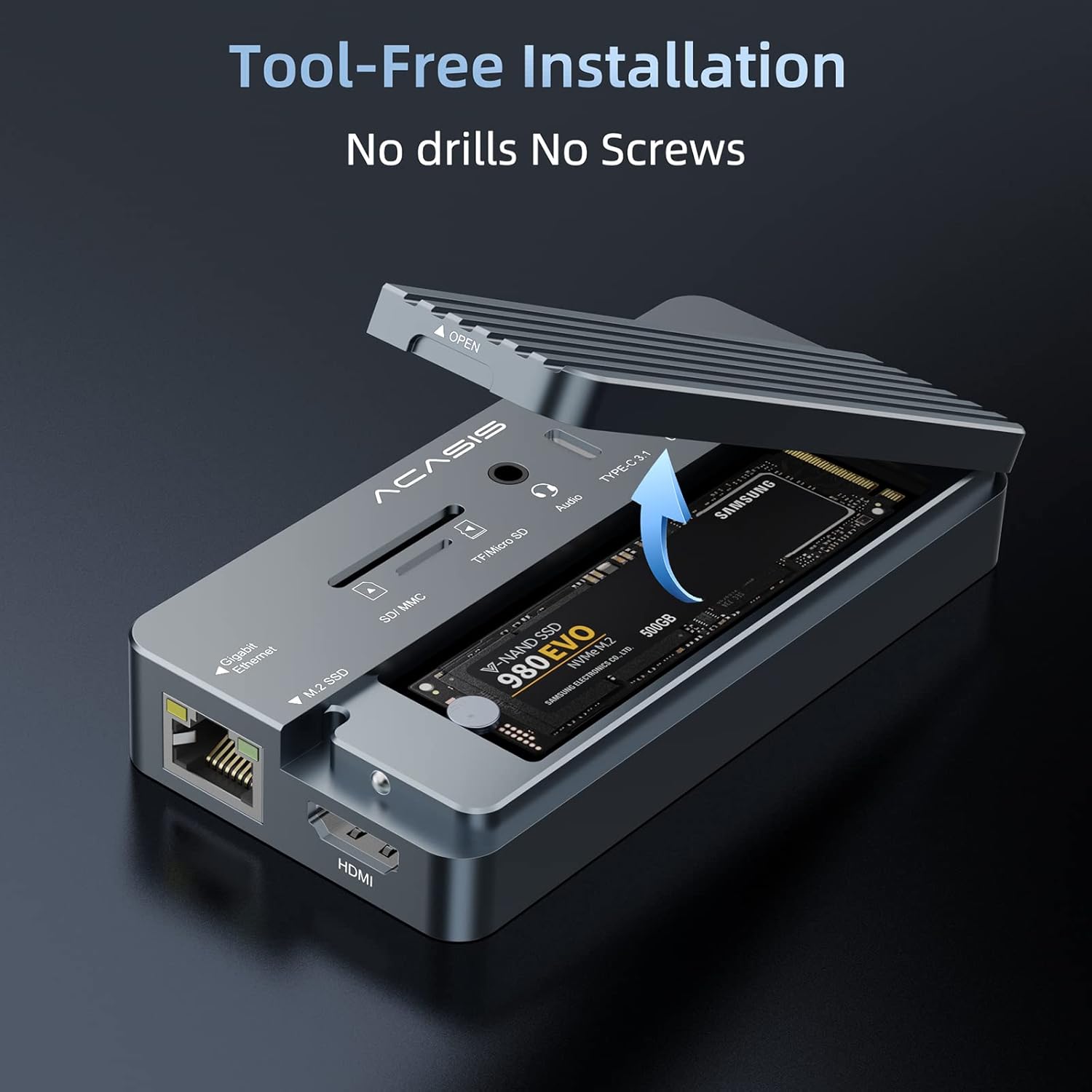
Figure 2: Step-by-step guide for installing an M.2 SSD into the enclosure, highlighting the groove for lid removal, thermal pad application, SSD insertion, and securing with a rubber grommet.
Connecting to Your Host Device
- Connect the "PC" USB-C port of the hub to your computer (laptop, Mac, iPad, etc.) using the accessory USB-C to C data cable.
- For large power consumption devices connected to the hub (e.g., multiple external hard drives, high-power SSDs), please plug a power adapter (up to 100W Max) into the "PD" port. This ensures stable operation and prevents instability. A phone/laptop charger can be used for this purpose.
- For HDMI functionality, ensure your laptop's USB-C 3.1 Gen 2 / USB-C 3.2 / Thunderbolt 3 port supports DisplayPort Alt Mode.

Figure 3: The ACASIS hub connected to a laptop, demonstrating its use as a central docking station for multiple peripherals and an external display.
Bruksanvisning
Använda portarna
- USB Ports (USB 3.1, USB 3.0, Type-C 3.1): Connect your USB peripherals such as keyboards, mice, printers, and external drives. Ensure proper port selection for optimal speed (10Gbps for USB 3.1/Type-C 3.1, 5Gbps for USB 3.0).
- HDMI-port: Connect an HDMI cable from the hub to an external monitor or TV for 4K@60Hz video output.
- Gigabit Ethernet-port: Connect an Ethernet cable for a stable and fast wired network connection (up to 1000Mbps).
- SD/TF-kortplatser: Insert SD or Micro SD cards to read and transfer data. The hub supports simultaneous reading of both card types.
- 3.5 mm ljudport: Connect headphones, speakers, or a microphone.
Dataöverföring
The integrated M.2 SSD enclosure and USB 3.1 ports offer high-speed data transfer. For example, 10GB files can be transferred in approximately 10 seconds with compatible SSDs and host connections.

Figure 4: The ACASIS hub illustrating its high-speed data transfer capabilities, reaching up to 10Gbps.
Kraftleverans
The PD port supports up to 100W power delivery, allowing you to charge your laptop or other compatible devices while using the hub. This is crucial when connecting multiple power-hungry peripherals.

Figure 5: The ACASIS hub connected to a laptop and a 100W power adapter, demonstrating its Power Delivery feature.
Kompatibilitet
The ACASIS 10-in-1 USB C Hub is widely compatible with various operating systems and devices:
- Windows 10 och senare
- Mac OS 10.3 och senare
- Linux
- Chromebook OS
- Android

Figure 6: The ACASIS hub demonstrating universal compatibility with various operating systems and devices.
Underhåll
- Keep the device in a dry environment and avoid exposure to extreme temperatures.
- Clean the exterior with a soft, dry cloth. Avoid liquid cleaners.
- When transporting, use the provided silicone cover to protect the hub from scratches and impacts.
Felsökning
- Unstable Operation/SSD Issues: If the hub or connected SSDs operate unstably, ensure an external power adapter (up to 100W) is plugged into the "PD" port. High-power consumption devices may require additional power.
- HDMI-skärmen fungerar inte: Kontrollera att din bärbara dators USB-C-port stöder DisplayPort Alt-läge.
- SSD-disken känns inte igen: Ensure the SSD is correctly installed and seated in the enclosure. Check if the SSD is properly formatted for your operating system.
- Långsam dataöverföring: Ensure you are using USB 3.1/Type-C 3.1 compatible ports and cables for maximum speed. Older USB standards will result in slower transfers.
- Överhettning: Aluminium casing is designed for heat dissipation. Ensure the thermal pad is correctly installed on the SSD. If overheating persists, reduce the load or ensure adequate ventilation.
Video 2: ACASIS 10-IN-1 USB HUB with SSD Enclosure. This video provides a quick overview of the product's features and demonstrates its compact design and various ports, which can be helpful for visual troubleshooting.
Specifikationer
| Produktnamn | 10-in-1 USB C Hub with SSD Enclosure |
| Modell nr. | AC-CM073 |
| Värdgränssnitt | Typ-C |
| Material | Aluminiumlegering |
| Produktens mått | 0.75 cm L x 4.41 cm B x 2.2 cm H (113 x 56 x 19 mm) |
| Objektets vikt | 5.1 uns (145 gram) |
| SSD:er som stöds | NVMe (M Key), SATA (B/B&M Key) | Sizes: 22*30/22*42/22*60/22*80mm |
| System som stöds | Windows 10, Linux, Mac OS 10.3 or higher |
| Totalt antal USB-portar | 5 (including Type-C data port) |
| Totalt antal HDMI-portar | 1 |
| Wattage (PD) | 100W Max |
Garanti & Support
ACASIS offers a 365-day money-back guarantee for this product. For any inquiries, technical assistance, or support, please contact ACASIS customer service:
- E-post: support@acasis.com
- Webplats: www.acasis.com


