Bubuka
This manual provides comprehensive instructions for the installation, operation, and maintenance of your Generic Smart Key Lock Box K5 TT. This device offers a secure and convenient solution for key storage and access management, featuring multiple unlocking methods and smart home compatibility. Please read this manual thoroughly before using the product to ensure proper function and safety.
Produk Leuwihview
Fitur konci
- Kasaluyuan Smart Home: Integrates with Tuya for remote control and monitoring.
- Muka konci sidik: Secure access via unique fingerprint recognition.
- Bahan awét: Constructed from high-quality zinc alloy for longevity.
- Konéktipitas nirkabel: WIFI and Bluetooth for remote access and control.
- Kontrol Aplikasi: Manage security settings directly from your smartphone.
- Pamakéan serbaguna: Suitable for various door types and mounting scenarios.
Komponén
The Smart Key Lock Box K5 TT includes the main lock unit and a rainproof cover. Key components are labeled below:
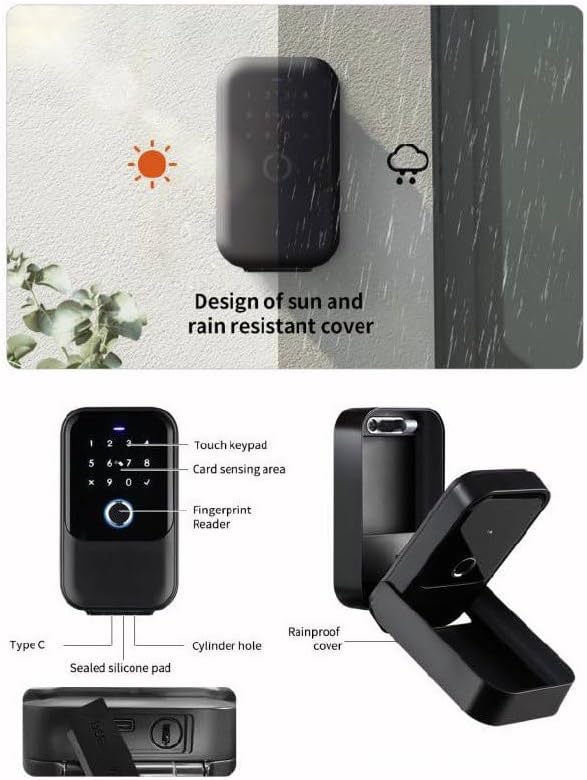
Hiji ngabeledug view highlighting key components such as the touch keypad, card sensing area, fingerprint reader, Type-C port, cylinder hole, sealed silicone pad, and rainproof cover. Also depicts its sun and rain resistant design.

Hareupeun view of the Smart Key Lock Box, showing the digital keypad, fingerprint sensor, and sleek black design.
spésifikasi
| Fitur | Rincian |
|---|---|
| merek | Generik |
| Nomer modél | Sklb-2024 |
| Tipe Konci | Toko maot |
| Bahan | Séng Alloy |
| Ukuran barang (L x W x H) | 4.5 x 2 x 5.5 inci |
| Item Beurat | 4.5 pon |
| Fitur husus | Pangenal sidik |
| Tipe Controller | App |
| Protokol konektipitas | Bluetooth |
| Tipe rengse | Layar rampa éléktronik |
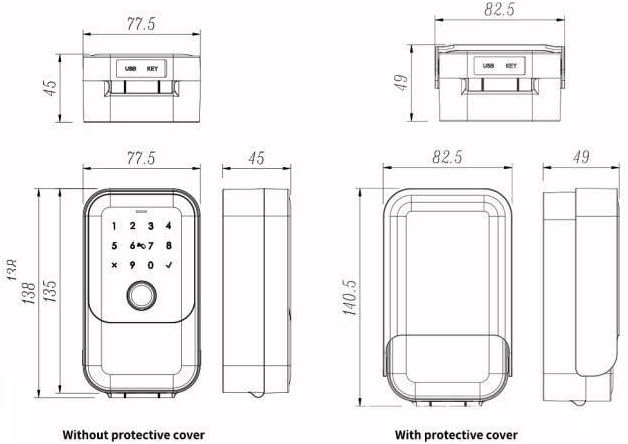
Detailed technical drawing illustrating the dimensions of the Smart Key Lock Box, both with and without its protective cover, in millimeters.
Disetél
1. Pamasangan
The Smart Key Lock Box can be installed in various locations to suit your needs. Common installation methods include:
- Gantung: Securely hang the lock box on a door handle or fence.
- Dipasang dina témbok: Permanently mount the lock box to a wall using appropriate hardware (not included).
Ensure the chosen location is secure and provides adequate protection from extreme weather conditions, although the device features a sun and rain resistant cover.

Visual examples of the Smart Key Lock Box installed by hanging on a door handle, hanging on a fence, and mounted on a wall.
2. Ngundeur Aplikasi sareng Masangkeun
- Download the designated smart lock application (e.g., Tuya Smart or TTlock App) from your smartphone's app store.
- Jieun akun tur asup.
- Follow the in-app instructions to add your Smart Key Lock Box. This typically involves enabling Bluetooth on your phone and pressing a pairing button on the lock box.
- Once paired, you can manage users, generate codes, and monitor access logs through the app.
Parentah Operasi
The Smart Key Lock Box K5 TT offers multiple methods for unlocking:

Visual representation of the five available unlocking methods: fingerprint recognition, RFID card, digital password, physical emergency key, and control via the smartphone application.
1. Muka konci sidik
- Register your fingerprint(s) through the smartphone application.
- To unlock, place your registered finger on the fingerprint reader located on the front panel.
- The lock will emit an audible signal and unlock if the fingerprint is recognized.
2. Digital Code (Password) Unlocking
- Set up a digital password (PIN code) using the smartphone application.
- To unlock, enter your PIN code on the touchscreen keypad and press the checkmark (✓) button.
- The lock will unlock if the code is correct.
3. Muka konci Kartu RFID
- Register compatible RFID cards through the smartphone application.
- To unlock, present a registered RFID card to the card sensing area on the lock box.
- The lock will unlock upon successful card recognition.
4. App Unlocking (Bluetooth/WIFI)
- Ensure your smartphone is connected to the lock box via Bluetooth or WIFI (if a gateway is used).
- Open the smart lock application and select the unlock function for your device.
- The lock box will unlock remotely.
5. Emergency Key Unlocking
- In case of battery depletion or electronic malfunction, a physical emergency key can be used.
- Locate the keyhole (typically concealed) and insert the emergency key to manually unlock the box.
Pangropéa
Ngagantian batré
The Smart Key Lock Box is powered by batteries (type not specified in product details, refer to packaging for exact type). When the battery level is low, the lock will typically provide a low battery warning via the app or an indicator light. Replace batteries promptly to avoid being locked out.
- Access the battery compartment (usually located on the interior side of the lock box).
- Remove old batteries and insert new ones, ensuring correct polarity.
- Tutup kompartemen batré anu aman.
beberesih
Clean the exterior of the lock box with a soft, damp cloth. Avoid using abrasive cleaners, solvents, or harsh chemicals, as these can damage the finish and electronic components. Keep the fingerprint sensor and keypad free from dirt and moisture for optimal performance.
Pamérésan masalah
- Konci henteu ngabales: Check battery levels and replace if necessary. Ensure the lock box is within Bluetooth range of your phone or connected to a WIFI gateway.
- Sidik henteu dikenal: Pastikeun ramo anjeun beresih jeung garing. Ngadaptarkeun deui sidik anjeun upami masalah tetep aya.
- Digital code not working: Verify the code entered is correct. Ensure the keypad is clean and free from obstructions.
- Masalah konektipitas aplikasi: Restart the app and your phone's Bluetooth. Check your internet connection if using a WIFI gateway.
- Lock box not opening: If all electronic methods fail, use the emergency physical key.
Garansi sareng Rojongan
Kanggo inpormasi garansi, dukungan téknis, atanapi patarosan jasa, mangga tingal dokuméntasi anu disayogikeun sareng pameseran anjeun atanapi langsung ngahubungi penjual. Simpen bukti pameseran anjeun pikeun klaim garansi.


