Bubuka
Thank you for choosing the Generic Automatic Sprinkler Controller. This device is designed to simplify your watering tasks, ensuring your garden, lawn, or plants receive optimal hydration. Featuring an intuitive LCD display, flexible operating modes, and rain sensing technology, this controller offers efficient and convenient irrigation management.
Émbaran Kasalametan
- Ensure the controller is installed securely to prevent accidental detachment.
- Do not submerge the device in water. It is designed to be weather-resistant, not submersible.
- Use only AAA batteries. Do not mix old and new batteries or different battery types.
- Jauhkeun tina jangkauan barudak.
- Disconnect from the water source during freezing temperatures to prevent damage.
Eusi pakét
Pastikeun yén sadaya komponén aya:
- 1x Automatic Sprinkler Controller
- 1x Manual Pamaké (dokumén ieu)
- (Batteries not included - requires 2x AAA batteries)
Produk Leuwihview
The sprinkler controller features a clear LCD display and five control buttons for easy programming. It includes a built-in water filter/strainer to prevent debris buildup.

Gambar: Hareupeun view of the Automatic Sprinkler Controller, highlighting the LCD screen and the five control buttons below it. The device is black with a brass-colored connector at the top.

Gambar: A lengkep view of the controller's LCD display, showing current time (13:00), start time (06:02), and end time (06:08) settings. Various icons for mode, frequency, and battery level are visible.
Disetél
1. Pamasangan batré
- Panggihan kompartemen batréna di tukangeun controller.
- Buka panutup kompartemen.
- Pasangkeun 2 batré AAA anyar, pastikeun polaritasna bener (+/-).
- Tutup panutup kompartemen batré aman.
2. Sambungan selang
- Attach the top connector of the sprinkler controller to your outdoor faucet. Hand-tighten only.
- Connect your garden hose or drip irrigation system to the bottom outlet of the controller. Hand-tighten only.
- Pastikeun sadaya sambungan aman pikeun nyegah bocor.

Gambar: The automatic sprinkler controller connected to a standard outdoor faucet at the top and a garden hose at the bottom, demonstrating proper installation.

Gambar: The sprinkler controller shown installed on a silver faucet, with a green background suggesting a garden or lawn setting.
Parentah Operasi
1. LCD Témbongkeun Interface
The 2.1-inch LCD display shows current time, watering schedule, battery status, and other settings. Icons indicate the active mode and functions.
2. Fungsi Tombol
- Left Button (Water Drop Icon): Manual watering / Rain Delay activation.
- Middle Left Button (Gear Icon): Settings / Program adjustment.
- Middle Right Button (M/Clock Icon): Mode selection (Manual/Automatic) / Time setting.
- Right Plus Button (+): Increase value / Navigate forward.
- Right Minus Button (-): Decrease value / Navigate backward.
3. Nyetél Waktos Ayeuna
- Pencét éta M/Clock tombol nepi ka tampilan waktos flash.
- Ngagunakeun éta + jeung - tombol pikeun nyaluyukeun jam.
- Pencét M/Clock deui pikeun pindah ka menit, teras saluyukeun jeung + jeung -.
- Pencét M/Clock pikeun mastikeun sareng kaluar tina setélan waktos.
4. Programming Automatic Watering Schedule
This controller allows customization of start time, watering duration, and frequency.
- Pencét éta Gear button to enter programming mode. The display will show options for Start Time, Duration, and Frequency.
- Paké + jeung - to adjust the flashing value (e.g., hour for Start Time).
- Pencét éta Gear button to move to the next setting (e.g., minutes for Start Time, then Duration, then Frequency).
- Waktos ngamimitian: Set the desired time for watering to begin.
- Lilana: Set how long the watering cycle will last (e.g., minutes).
- Frékuénsi: Set how often watering occurs (e.g., every X hours or days).
- Sakali sadaya setelan disaluyukeun, pencét tombol Gear button repeatedly until the display returns to the main screen, saving your program.
5. Manual Watering Mode
To initiate watering outside of the programmed schedule:
- Pencét éta Cai Ciciren kancing.
- Paké + jeung - to set the desired manual watering duration.
- Pencét éta Cai Ciciren button again to start manual watering. The display will show a countdown.
- To stop manual watering prematurely, press the Cai Ciciren tombol deui.
6. Fungsi Reureuh Hujan
The rain delay function temporarily pauses your watering schedule to conserve water during rainy periods.
- While on the main screen, press and hold the Cai Ciciren tombol pikeun sababaraha detik.
- The display will show options for rain delay duration (e.g., 24h, 48h, 72h).
- Paké + jeung - to select the desired delay period.
- Pencét éta Cai Ciciren button to confirm. The schedule will resume automatically after the delay.
- To cancel rain delay, press and hold the Cai Ciciren button again until the delay icon disappears.
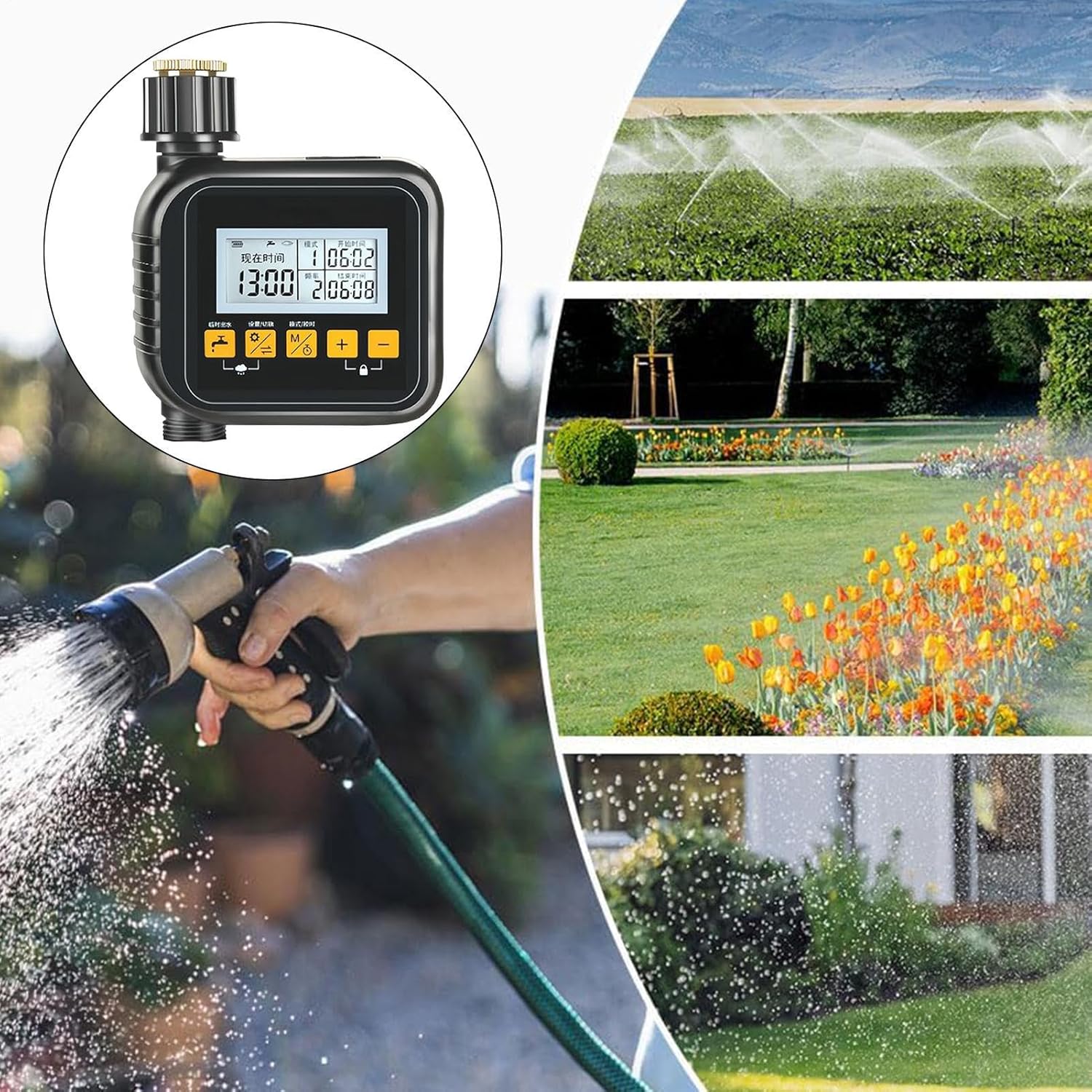
Gambar: A collage showing the sprinkler controller in the foreground, with background images depicting different watering methods like overhead sprinklers, garden beds being watered, and a person using a hose nozzle, illustrating its versatile application.
Pangropéa
- beberesih: Periodically wipe the controller with a damp lawon. Ulah make cleaners abrasive.
- Pangropéa saringan: The built-in water filter/strainer should be checked and cleaned regularly to prevent debris buildup and ensure proper water flow. Unscrew the inlet connection, remove the filter, rinse it under running water, and reinsert.
- Ngagantian batré: Replace batteries when the low battery indicator appears on the LCD. Remove old batteries promptly to prevent leakage.
- Panyimpenan usum salju: Before the first frost, disconnect the controller from the faucet and hose. Remove batteries and store the unit indoors in a dry, frost-free location.
Pamérésan masalah
| Masalah | Mungkin Cukang lantaranana | Solusi |
|---|---|---|
| Controller teu hurung. | Batré paéh atawa salah dipasang. | Ganti batré ku batré AAA anyar, mastikeun polaritasna bener. |
| Cai teu ngalir. | Faucet is off; filter is clogged; low battery; incorrect programming. | Ensure faucet is fully open. Clean the water filter. Replace batteries. Check programming for start times and duration. |
| Bocor tina sambungan. | Loose connections; worn washer. | Tighten connections by hand. Check and replace rubber washers if damaged. |
| Watering schedule not activating. | Incorrect time setting; program not saved; rain delay active. | Verify current time and programmed schedule. Ensure program is saved. Check if rain delay is active and cancel if necessary. |
spésifikasi
- model: SQ7S7FA9SDPOAO6C
- Bahan produk: ABS + Copper
- Ukuran produk: Approximately 15cm x 12cm x 6cm (5.91 x 4.72 x 2.36 inches)
- Beurat barang: Kira-kira 350g (13.6 ons)
- tampilan: 2.1 inci LCD
- Sumber Daya: 2x batré AAA (teu kaasup)
- Modeu Operasi: Manual, Automatic, Rain Delay

Gambar: A diagram illustrating the physical dimensions of the sprinkler controller: 15cm (5.90 inches) in height, 12cm (4.72 inches) in width, and 6cm (2.36 inches) in depth.
Garansi sareng Rojongan
This product is manufactured by Generic. For specific warranty information or technical support, please refer to the retailer's return policy or contact the seller directly through your purchase platform. Keep your purchase receipt for warranty claims.