Bubuka
Thank you for choosing the Generic Dual-Headset Wireless Earbuds. This manual provides comprehensive instructions to help you set up, operate, maintain, and troubleshoot your new earbuds, ensuring an optimal audio experience. Please read this manual carefully before use and retain it for future reference.
Produk Leuwihview
The J40 Dual-Headset Wireless Earbuds are designed for versatile use, offering high-quality audio and convenient features. Key features include:
- Konektipitas Bluetooth Nirkabel: Enjoy freedom with advanced Bluetooth for seamless operation.
- Kontrol Toél: Kontrol toél intuitif pikeun ngatur audio sareng telepon.
- Deep Bass & Crystal-Clear Sound: Immersive audio with powerful bass and a high-quality condenser microphone for clear calls.
- Kasaluyuan Universal: Compatible with iPhone, Android, and all Bluetooth-enabled devices.
- Batré Awét: Rechargeable Lithium-Polymer battery with USB-C fast charging for extended playtime.
- Kasus ngecas tampilan LED: The charging case features an LED display to show battery status.
- Isolasi Sora: Designed to provide an immersive listening experience.
- Henteu tahan cai: Please note these earbuds are not waterproof.
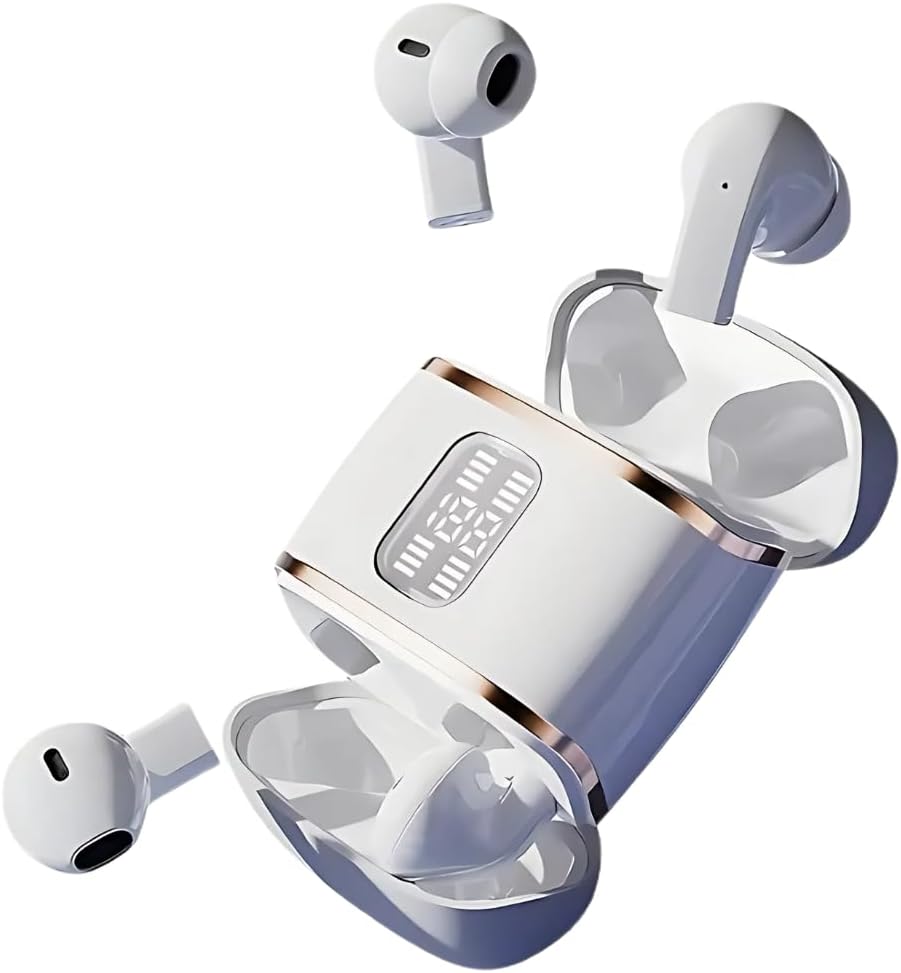
Figure 1: The J40 Dual-Headset Wireless Earbuds with their charging case, showcasing the LED display on the case.

Figure 2: A couple wearing the J40 earbuds, highlighting their design for shared listening experiences.

Figure 3: The J40 earbuds and charging case, emphasizing the strong endurance of up to 40 hours of listening time.
Disetél
1. Ngecas Earbuds jeung Case
Before first use, fully charge the earbuds and the charging case. Connect the provided USB-C cable to the charging port on the case and a power source. The LED display on the case will indicate the charging status. Ensure both earbuds are placed correctly in the case for them to charge.
2. Papasangan Bluetooth
- Pastikeun earbud parantos dicas sareng dicabut tina wadah ngecas. Éta bakal otomatis lebet kana modeu pairing.
- Dina alat Anjeun (smartphone, tablet, jsb), aktipkeun Bluetooth.
- Milarian pikeun "Dobles J40" or "J40" in the list of available Bluetooth devices.
- Pilih nami alat anu bade disambungkeun. Saatos nyambung, anjeun bakal ngadangu sora konfirmasi.
For detailed app-based setup and binding, refer to the AI User Manual steps shown below:

Figure 4: Step-by-step guide for using the AI app, including QR code scanning, headset pairing, and device binding. Note: One code binds one headset and cannot be changed.
Parentah Operasi
Toél Kontrol
The J40 earbuds feature intuitive touch controls on each earbud. Specific functions may vary slightly based on your device and app settings, but common controls include:
- Puter / Reureuh: Ketok tunggal dina boh earbud.
- Lagu salajengna: Ketok dua kali dina earbud katuhu.
- Lagu Sateuacanna: Ketok dua kali dina earbud kénca.
- Ngajawab / mungkas Telepon: Ketok tunggal dina boh earbud.
- Nolak Telepon: Pencét lila dina boh earbud.
- Aktipkeun Asisten Sora: Ketok tilu kali dina boh earbud.
AI Dialogue Mode
The earbuds support an AI Dialogue Mode, enhancing communication and interaction. This feature is particularly useful for high-definition calls and real-time translation functionalities when used with the dedicated app.

Figure 5: A user experiencing high-definition calls with the J40 earbuds, similar to face-to-face chat quality.

Figure 6: Individuals engaging in conversation, demonstrating the use of AI Dialogue Mode for enhanced communication.
The J40 earbuds are versatile for various scenarios:

Figure 7: Depiction of the earbuds' utility in multiple scenarios, including overseas travel, work, learning, and sports.
Pangropéa
- beberesih: Regularly clean the earbuds and charging case with a soft, dry, lint-free cloth. Do not use abrasive cleaners or immerse them in water.
- Perawatan batré: To prolong battery life, avoid fully discharging the earbuds and case frequently. Store them with some charge if not used for extended periods.
- Panyimpenan: Simpen earbud dina wadah ngecas nalika henteu dianggo pikeun ngajaga tina lebu sareng karusakan. Simpen di tempat anu tiis, garing, sareng jauh tina suhu anu ekstrim.
- Tahan cai: These earbuds are NOT waterproof. Avoid exposure to water, sweat, or high humidity.
Pamérésan masalah
| Masalah | Mungkin Cukang lantaranana | Solusi |
|---|---|---|
| Earbuds teu dipasangkeun | Batré lemah; di luar jangkauan; teu dina modeu pasangan; tos dipasangkeun ka alat anu sanés. | Charge earbuds; ensure device Bluetooth is on and within range; put earbuds back in case and remove to re-enter pairing mode; disconnect from other devices. |
| Teu aya sora atanapi volume handap | Volume too low on device; earbuds not properly seated; connection issue. | Increase device volume; ensure earbuds are securely in ears; re-pair earbuds. |
| Kasus ngecas teu ngecas | Masalah kabel; masalah sumber daya; port ngecas kotor. | Try a different USB-C cable; try a different power adapter/port; clean charging port gently. |
| sambungan intermittent | Interference; distance from device; obstacles. | Move closer to your device; avoid strong electromagnetic interference; ensure no large obstacles between earbuds and device. |
spésifikasi
| Ngaran modél | Dobles J40 |
| Nomer Modél Item | J40 |
| Téhnologi konektipitas | Nirkabel (Bluetooth) |
| Panempatan Ceuli | Dina Ceuli |
| Faktor Bentuk | Dina Ceuli |
| Tipe Kontrol | App Control / Touch Control |
| Kontrol bising | Pembatalan Noise aktip |
| Bahan | palastik |
| Warna | Bodas |
| Tingkat Résistansi Cai | Henteu Tahan Cai |
| Komponén Kaasup | Kabel (USB-C) |
| Produsén | NEW SENYANG |
| ASIN | B0F1DXCK86 |

Figure 8: Internal components of the earbud, illustrating the high rebound ring diaphragm for enhanced sound.

Figure 9: Visual representation of audio dynamic compensation, designed to restore 99% of the on-site listening sense.
Garansi & Rojongan
For warranty information and technical support, please refer to the product packaging or contact the manufacturer directly. Keep your purchase receipt as proof of purchase.


