1. Bubuka
Thank you for choosing the DEVAISE Ergonomic Mesh Office Chair with Footrest, Model ABGY015. This manual provides essential information for the safe assembly, operation, and maintenance of your new office chair. Designed for comfort and support, this chair features an ergonomic backrest, adjustable headrest, lumbar support, and a retractable footrest to enhance your work or relaxation experience.

Image 1.1: The DEVAISE Ergonomic Mesh Office Chair with Footrest, showcasing desain jeung fitur na.
2. Émbaran Kasalametan
- Baca sagala parentah taliti saméméh assembly sarta pamakéan.
- Ensure all components are securely fastened before using the chair.
- Ulah nangtung dina korsi atawa make eta salaku stool hambalan.
- Ulah ngaleuwihan kapasitas beurat maksimum 300 pon.
- Tetep barudak jeung pets jauh ti korsi salila assembly.
- Ulah nepi ka korsi kakeunaan sinar panonpoé langsung atawa suhu anu ekstrim pikeun nyegah degradasi bahan.
- Anggo dina permukaan anu rata pikeun nyegah tibalik.
3. Eusi Paket
Punten parios yén sadaya bagian aya sateuacan ngamimitian ngarakit. Lamun aya bagian nu leungit atawa ruksak, kontak rojongan customer.
- Majelis mundur
- Seat Cushion with Armrests and Footrest
- Headrest
- Base Star
- Gas Lift Cylinder (SGS Class 4)
- Roda (5 buah)
- Mékanisme Plate
- Pakét Perangkat Keras (sekrup, ring, konci Allen)
- Instruksi Manual
4. Parentah Majelis
Assembly typically takes approximately 20 minutes. Follow these steps carefully.
Hambalan 1: Nyusun Base
- Selapkeun lima roda kana liang di tungtung unggal suku dasar béntang. Pencét pageuh dugi ka ngaklik kana tempatna.
- Selapkeun tabung pengangkat gas kana liang tengah dasar béntang.

Image 4.1: The assembled chair base with casters.

Image 4.2: The SGS Class 4 Gas Lift cylinder.
Step 2: Attach the Mechanism Plate to the Seat Cushion
- Align the mechanism plate with the pre-drilled holes on the underside of the seat cushion.
- Secure the mechanism plate using the provided screws and Allen wrench. Ensure the front of the mechanism faces the front of the seat.
Step 3: Attach the Backrest to the Seat Cushion
- Align the backrest with the mounting brackets on the seat cushion.
- Secure the backrest using the designated screws.
Step 4: Attach the Headrest
- Slide the headrest into the designated slot at the top of the backrest.
- Adjust to your preferred height and angle.
Step 5: Connect the Seat Assembly to the Base
- Sacara saksama tempatkeun korsi sareng sandaran anu parantos dirakit kana silinder pengangkat gas, pastikeun korsi éta aya di tengah sareng stabil.
- Apply downward pressure to secure the connection.
Once assembled, test all functions and adjustments to ensure proper operation.
5. Parentah Operasi
Your DEVAISE office chair offers multiple adjustments for personalized comfort.
5.1. Pangaluyuan Jangkungna Korsi
To adjust the chair height, locate the lifting handle under the right side of the seat. Pull the handle up while seated to lower the chair, or pull it up while standing to raise the chair. Release the handle at the desired height.
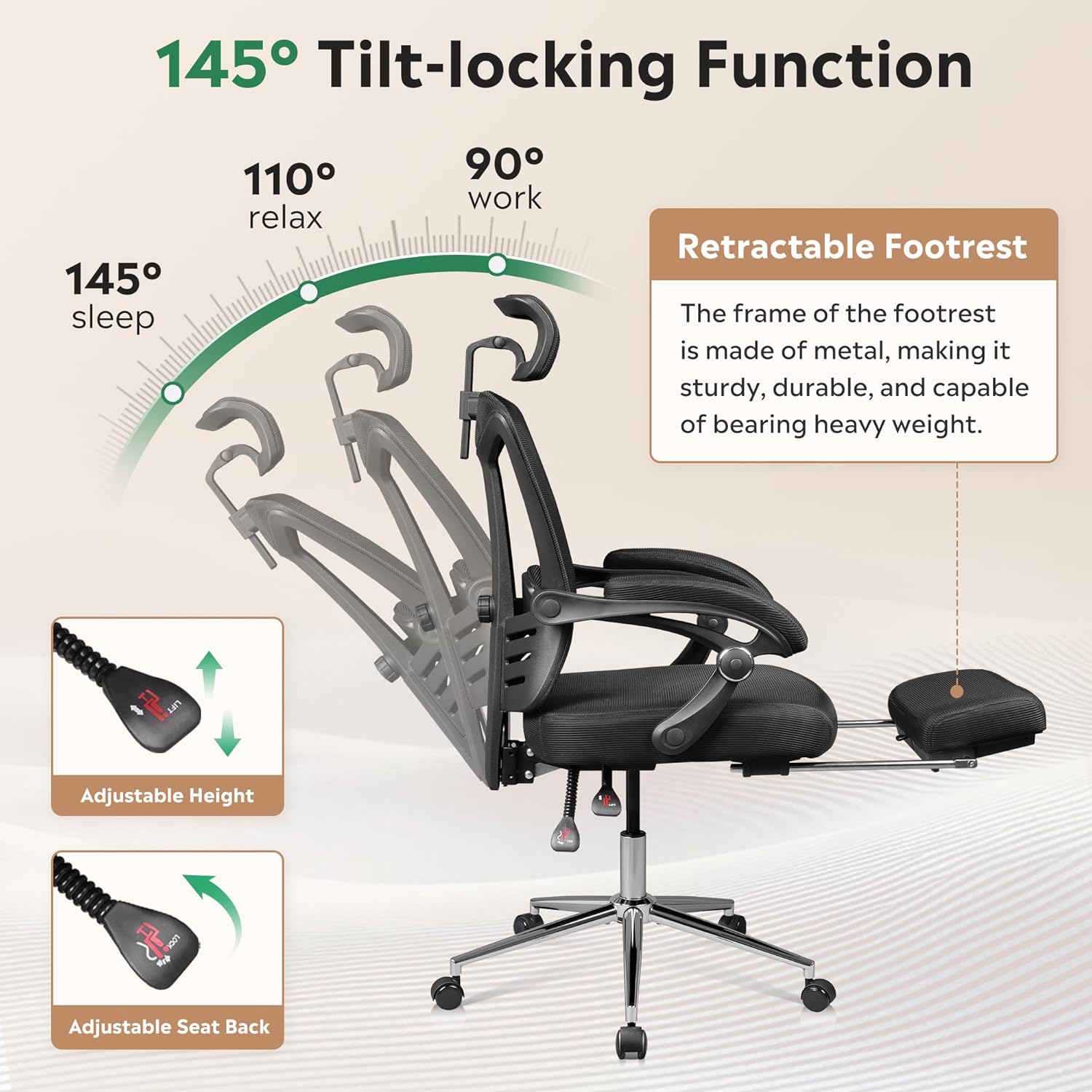
Image 5.1: Illustration of the adjustable height and tilt-locking functions.
5.2. Backrest Recline and Tilt-Lock Function
The backrest can recline and lock at any angle within 145°. To recline, pull the tilt handle (usually located next to the height adjustment lever) outwards. Lean back to the desired angle, then push the handle inwards to lock the position. To unlock and return to an upright position, pull the handle outwards again and lean forward slightly.
5.3. Headrest adjustable
The headrest can be adjusted vertically by pulling it up or pushing it down (up to 3.7 inches). It can also rotate 45° to provide optimal neck support. Adjust it to align with the curve of your neck.

Image 5.2: Visual guide for adjusting the headrest's height and rotation.
5.4. Rojongan Lumbar adjustable
The chair features adjustable lumbar support to help maintain proper spinal alignment. Locate the adjustment knob or lever on the backrest and rotate or slide it to increase or decrease the lumbar curve to suit your preference.
5.5. Sandaran Suku anu Tiasa Ditarik
For relaxation, pull out the footrest located under the seat. Extend it fully and place your legs on it. When not in use, push it back under the seat until it is fully retracted.
6. Pangropéa
- beberesih: Ngusap bersih nganggo iklanamp cloth. Avoid harsh chemicals or abrasive cleaners that may damage the mesh or other materials.
- Pamariksaan: Périodik pariksa sagala screws na bolts pikeun mastikeun aranjeunna kedap. Kencangkeun deui upami diperyogikeun.
- Casters: Keep casters free of debris (hair, dust) to ensure smooth movement and prevent floor scratches.
- Angkat Gas: Ulah nyobian ngabongkar tabung pengangkat gas.
7. Cara ngungkulan
| Masalah | Mungkin Cukang lantaranana | Solusi |
|---|---|---|
| Korsi teu nyaluyukeun jangkungna | Gas lift not engaged or faulty | Ensure the lifting handle is fully pulled. If the issue persists, contact customer support. |
| Korsi ngahuleng | Loose screws or uneven assembly | Check and tighten all assembly screws. Ensure the chair is on a level surface. |
| Kastor teu ngagulung lancar | Runtah dina roda atanapi roda anu ruksak | Clean any hair or debris from the casters. Replace damaged casters if necessary. |
| Sandaran teu bisa diuk atawa dikonci | Tilt mechanism locked or faulty | Ensure the tilt handle is pulled outwards to unlock. If still not functioning, contact support. |
8. Spésifikasi
- merek: DEVAISE
- Ngaran modél: Korsi Méja Kantor Imah ABGY015
- warna: Hideung
- Ukuran produk: 23.2 "D x 24" W x 48" H
- Maksimum Beurat rekomendasi: 300 pon
- Gaya Balik: Punggung Padat (Mesh)
- Jero korsi: 19.9 inci
- Bahan eusian: Foam (28D high-density)
- Angkat Gas: SGS Class 4
- Posisi Reclining: Up to 145° with tilt-lock
- Beurat barang: 36.6 pon
- Waktu Majelis: Kurang leuwih 20 menit

Gambar 8.1: Diménsi produk anu lengkep.
9. Garansi jeung Rojongan
This DEVAISE office chair is backed by a garansi dua taun ti tanggal beuli. Garansi ieu nyertakeun cacad manufaktur sareng cacad bahan dina panggunaan normal.
For warranty claims, missing parts, or any other inquiries, please contact DEVAISE customer support. Have your purchase receipt and model number (ABGY015) ready when contacting support.
You can find more information and contact details on the official DEVAISE websitus atawa ngaliwatan portal layanan palanggan pangecér anjeun.