1. Bubuka
Thank you for choosing the DEVAISE 48 Inch Electric Standing Desk. This manual provides detailed instructions for assembly, operation, and maintenance to ensure optimal performance and longevity of your desk. This ergonomic sit-stand desk is designed to enhance your home or office workspace with adjustable height settings, memory presets, and a stable structure.
2. Émbaran Kasalametan penting
- Pastikeun yén sadaya komponén dipasang sacara aman sateuacan dianggo.
- Ulah ngabebanan méja sacara kaleuleuwihi. Kapasitas beurat maksimum nyaéta 180 lbs.
- Jauhkeun barudak sareng piaraan tina méja nalika ngatur jangkungna.
- The desk features an anti-collision system. If the desk encounters an obstacle during adjustment, it will move back approximately 1 inch to prevent damage or injury.
- Fitur konci anak sayogi pikeun kaamanan tambahan.
- Paké ngan adaptor kakuatan disadiakeun.
3. Eusi Paket
Please verify that all parts are present before beginning assembly. Refer to the assembly instructions for a complete list of components and hardware.

Image: All components of the DEVAISE Electric Standing Desk laid out for assembly, including desktop panels, leg frames, motor, control panel, and hardware.
4. Parentah Majelis
Setting up your DEVAISE Electric Standing Desk is designed to be straightforward with pre-drilled screw holes and clear instructions. A detailed installation video is also available for visual guidance.
4.1. Pituduh Pidéo Perakitan
Video: A comprehensive guide demonstrating the step-by-step assembly process of the DEVAISE Electric Standing Desk.
4.2. Lengkah-demi-Lengkah Majelis
- Assemble the Leg Frames: Attach the crossbar to the two leg columns using the provided screws. Ensure all connections are secure.

Gambar: Ngabeledug view showing the main components of the desk frame and desktop for quick installation.
- Pasangkeun Kaki: Secure the feet to the bottom of each leg column using the appropriate screws.
- Install the Drive Rod: Insert the drive rod into the motor mechanism and connect it to the opposite leg column. This rod synchronizes the movement of both legs.
- Assemble the Desktop: If your desktop comes in multiple pieces, align them using the wooden dowels and secure them with the connecting plates and screws.
- Mount the Frame to the Desktop: Carefully place the assembled frame onto the underside of the desktop, aligning the pre-drilled holes. Secure the frame to the desktop using the provided screws.
- Connect the Control Panel and Power: Attach the LED touchscreen control panel to the designated area under the desktop. Connect the motor cables and power adapter to the control box. Use the provided cable management clips to organize wires.
- Insert Cable Grommets: Place the cable grommets into the pre-drilled holes on the desktop for cable organization.
- Pasangkeun Kait Headphone: Secure the headphone hook to the side of the desk using the provided screws.
5. Parentah Operasi
5.1. adjustment jangkungna
The DEVAISE Electric Standing Desk features a smooth and quiet tri-motor system for height adjustments. The desk can be adjusted from 28.35 inches to 46.45 inches.
- Ngagunakeun éta Ka luhur (▲) jeung Turun (▼) arrow buttons on the LED touchscreen to manually adjust the desk height.
- Jangkungna ayeuna bakal ditingalikeun dina layar LED.
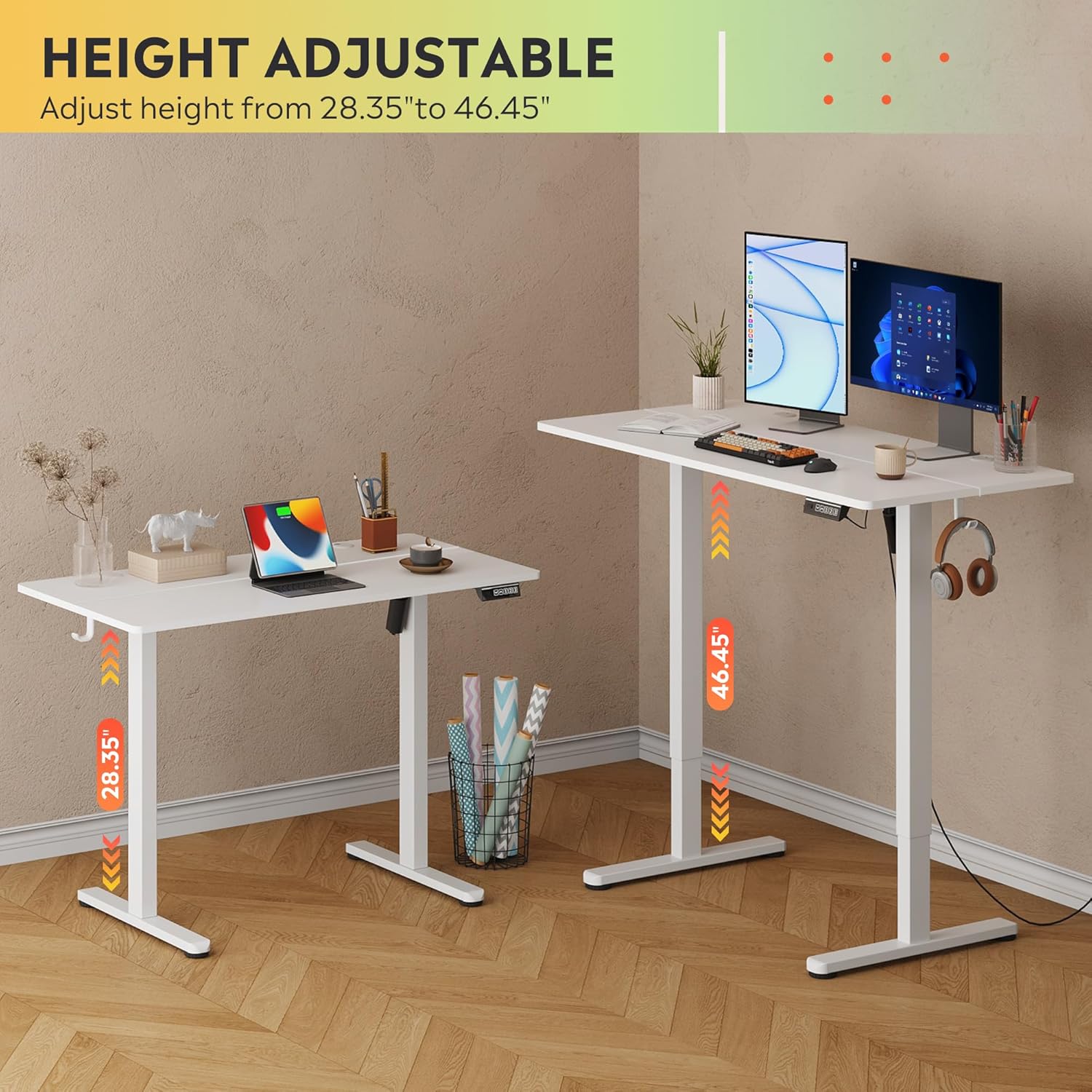
Image: The DEVAISE Electric Standing Desk illustrating its adjustable height range from 28.35 inches to 46.45 inches.
5.2. Preset Mémori
The control panel allows you to save up to three personalized height settings for quick recall.
- Pikeun nyimpen prasetél: Atur méja kana jangkungna anu dipikahoyong. Pencét tombol 'S' tombol, teras pencét salah sahiji tombol angka (1, 2, atawa 3) within 3 seconds. The height is now saved to that number.
- Pikeun ngelingan Preset: Kantun pencét tombol angka anu saluyu (1, 2, atawa 3). Méja bakal otomatis pindah ka jangkungna anu disimpen.
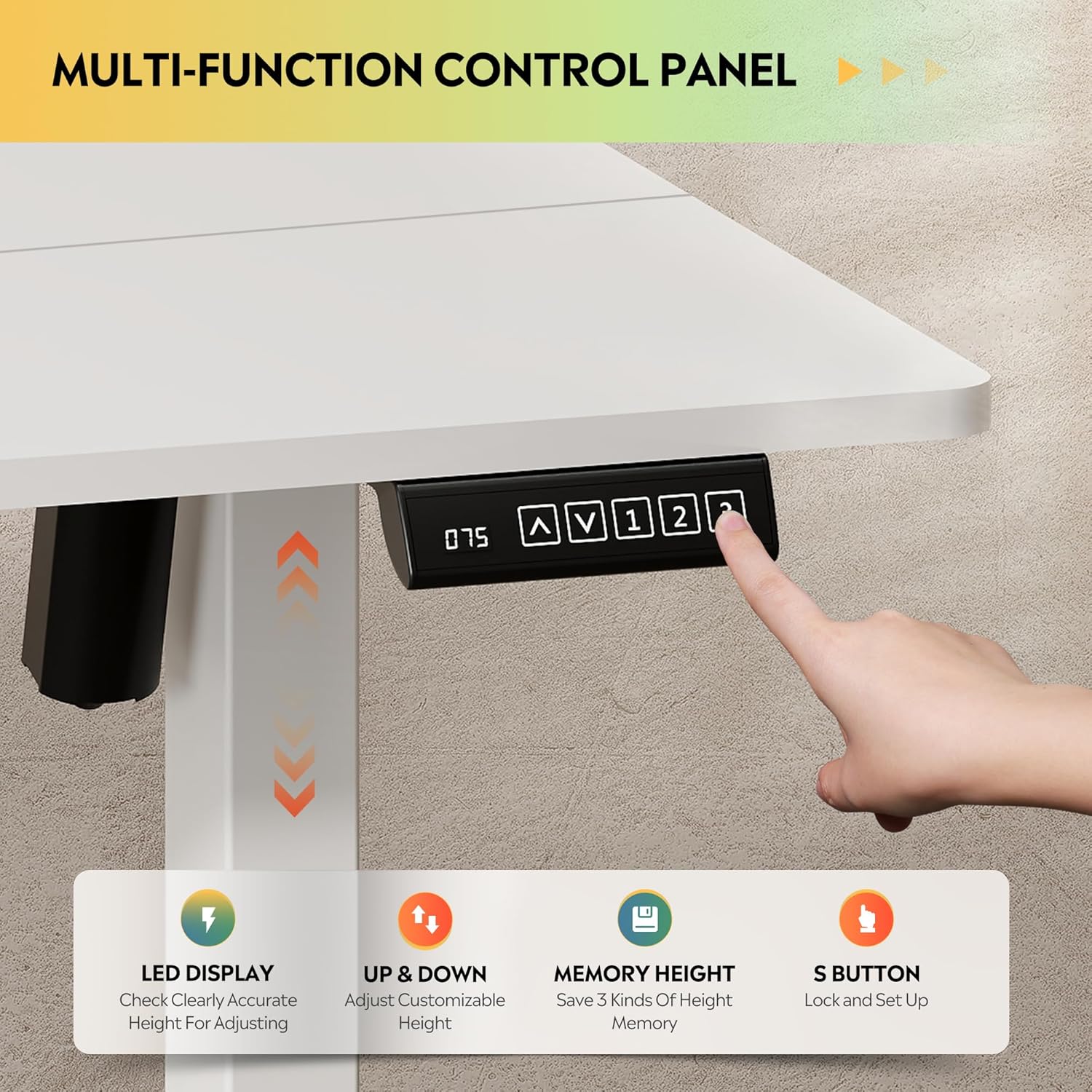
Gambar: Deukeut view of the LED touchscreen control panel, highlighting the up/down arrows, memory preset buttons (1, 2, 3), and the 'S' button for saving settings.
5.3. Sistem Anti-Tabrakan
For safety, the desk is equipped with an anti-collision feature. If the desk encounters an obstruction during movement, it will automatically reverse its direction by approximately 1 inch to prevent damage or injury.
6. Fitur konci
- Stabilitas Batu-Padet: Heavy-duty solid steel frame with aerospace-grade connectors, tested for 100,000 cycles. Designed to eliminate wobble even at full height.
- Optimal Workspace: 48x24 inch desktop accommodates multiple monitors and accessories, with a 28-inch ergonomic depth to prevent shoulder fatigue.
- Premium & Safe Material: Eco-engineered thickened desktop made of FSC-Certified wood, with 78% lower VOC emissions. Supports up to 180 lbs.
- Quiet & Smooth Operation: Tri-motor system ensures whisper-quiet (<50dB) height transitions.
- Kontrol pinter: LED touchscreen with 3 memory presets for one-tap height recall.
- Pamasangan Tanpa Repot: Less labeled parts, pre-drilled screw holes, and detailed instructions for quick setup.
- Kait Headphone: Conveniently located hook for headphones or bags.
Video: Hiji leuwihview of the DEVAISE Electric Standing Desk highlighting its features and benefits in a home office setting.
7. Spésifikasi
| Atribut | Rincian |
|---|---|
| merek | DEVAISE |
| Nomer modél | ASJZ022 |
| Dimensi produk | 23.62 "D x 47.24" W x 28.34" H |
| Warna | Bodas |
| Tipe Bahan Top | Kayu direkayasa |
| Bahan Dasar | Beusi |
| Rekomendasi beurat maksimum | 180 pon |
| Jangkungna Minimum | 28.35 inci |
| Jangkungna maksimum | 46.45 inci |
| Fitur husus | Adjustable Height, Electric, Ergonomic, LED Touchscreen |
| Komponén Kaasup | Headphone Hook |
8. Pangropéa
- Pariksa sadaya sekrup sareng sambungan sacara rutin pikeun mastikeun éta tetep pageuh.
- Bersihkeun permukaan méja nganggo kaén anu lemes,amp lawon. Hindarkeun bahan kimia kasar anu tiasa ngarusak finish.
- Jaga motor sareng komponén listrik bébas tina lebu sareng kalembaban.
9. Cara ngungkulan
Upami anjeun ngalaman masalah sareng méja anjeun, mangga tingali solusi umum ieu:
- Meja teu obah: Check all power connections and ensure the power adapter is securely plugged into a working outlet.
- Gerakan anu teu rata: Ensure the desk is placed on a flat, level surface. Check that all leg components are correctly assembled and tightened.
- Error code on LED display: Refer to the specific error codes in the full product manual (if provided separately) or contact customer support.
- Anti-collision system activating frequently: Pastikeun teu aya halangan di luhur atanapi di handap méja nalika nyaluyukeun jangkungna.
10. Garansi jeung Rojongan
DEVAISE offers a limited warranty on this product. For any questions regarding assembly, product selection, or warranty claims, please feel free to contact our U.S.-based product support team.
Contact information can typically be found on the product packaging or the official DEVAISE websitus.