Bubuka
The HY300 Plus HD Projector is a portable, versatile home theater device designed for an immersive viewing experience. Featuring Android 11, Wifi6 connectivity, and a 180-degree rotatable design, it offers flexibility in projection. This manual provides essential information for setting up, operating, and maintaining your projector.
Key features include native 1280x720P resolution with support for 4K video decoding, 300 ANSI lumens brightness, electric focusing, and automatic keystone correction. Its compact size and long LED light source life make it suitable for various indoor and outdoor uses.
Naon dina Box
Punten parios eusi bungkusan produk anjeun pikeun mastikeun yén sadaya barang aya:
- HY300 Plus HD Projector
- Kadali jauh
- Kabel listrik
- Panutup alat
- Manual pangguna (dokumén ieu)

Figure 1: Product Packaging and Accessories. This image displays the HY300 Plus projector alongside its box, power charger, remote control, and user manual, indicating all included components.
Produk Leuwihview
Familiarize yourself with the main components and features of your HY300 Plus HD Projector.

Gambar 2: Hareupeun view of the HY300 Plus HD Projector. This image shows the projector's cylindrical body, front lens, and integrated stand.

Gambar 3: Tukangeun view of the HY300 Plus HD Projector. This image highlights the projector's ventilation grilles and input/output ports, including HDMI and USB.
Disetél
1. Placement and Orientation
The HY300 Plus projector features a 180-degree rotatable design, allowing you to project onto walls, ceilings, or any desired surface. Position the projector on a stable, flat surface within the recommended projection distance of 1.2 to 4 meters for a screen size of 40 to 130 inches.
Video 1: HY300 Plus 180-degree rotation and mounting options. This video demonstrates the projector's flexible 180-degree rotation feature and shows how to attach it to a tripod or ceiling mount using the 1/4 inch screw hole.
2. Sambungan Daya
Connect the provided power cord to the projector's power input port and then plug it into a standard electrical outlet (AC90-260V/50-60MHZ, 110-220V).
3. Daya Awal Hurung
Press the power button on the projector or the remote control to turn on the device. The projector will boot up, displaying the Android 11 interface.
4. adjustment fokus
The projector features electric focusing. Use the remote control to adjust the focus until the projected image is clear and sharp.
Video 2: Electric focus demonstration. This video illustrates how the electric focus feature works, showing the image sharpening on the screen as the focus is adjusted.
5. Koréksi Keystone
The projector supports auto horizontal keystone correction and manual trapezoidal correction. This feature automatically or manually adjusts the image to ensure a perfectly rectangular projection, even if the projector is placed at an angle.
Figure 4: Automatic Keystone Correction. This image demonstrates how the projector automatically corrects a distorted image to achieve a perfectly square projection.
6. Pilihan Pamasangan
The HY300 Plus includes a built-in 1/4 inch screw hole at the bottom, allowing for versatile mounting options such as projector brackets, digital camera brackets, or ceiling mounts. This provides flexibility beyond tabletop placement.

Figure 5: Versatile Mounting Options. This image illustrates different ways to position the projector, including on a table, on a stand, and mounted to a wall or ceiling using the integrated screw hole.
Parentah Operasi
1. Antarbeungeut Android 11
Your projector runs on Android 11, providing access to over 4,000 applications, including popular streaming services like Netflix, YouTube, and Amazon Prime. Navigate the interface using the remote control.
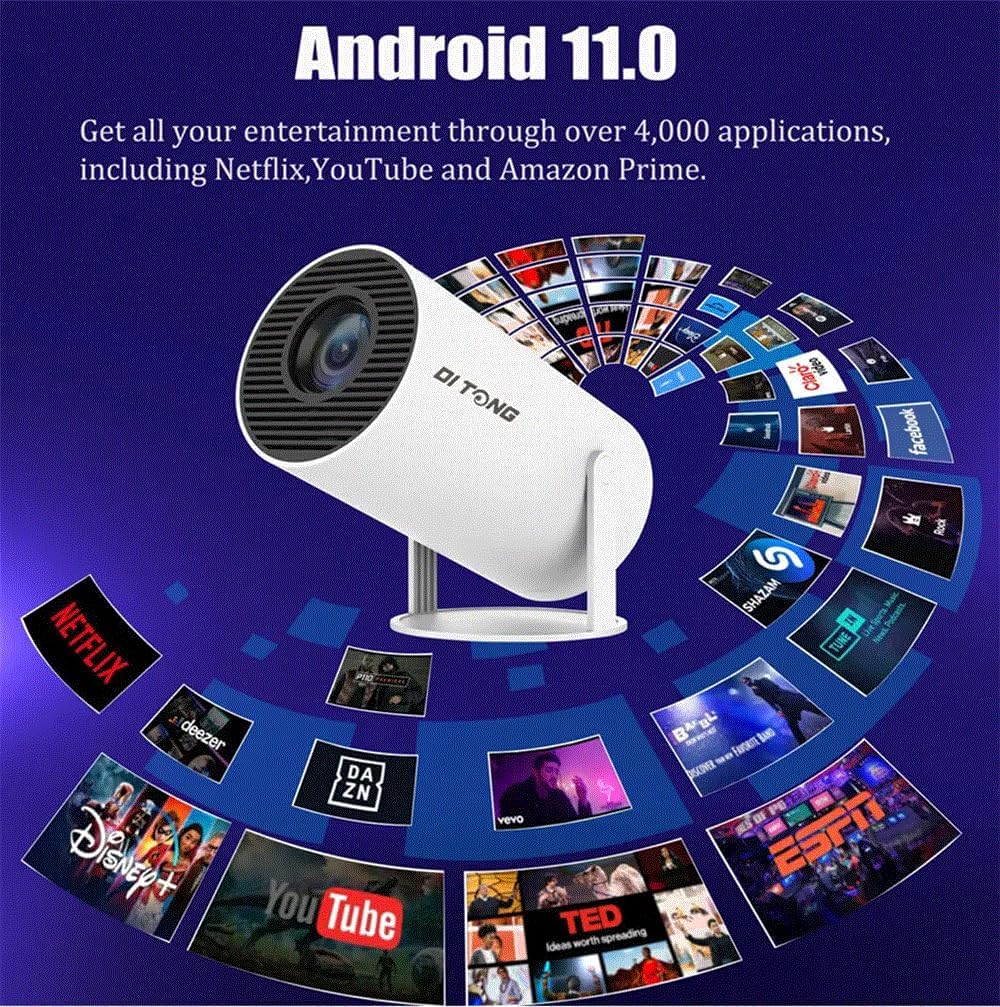
Figure 6: Android 11 Operating System. This image shows the projector with a graphic overlay of numerous application icons, highlighting its built-in Android 11 system for accessing various entertainment apps.
2. Konektipitas
- Wifi: The projector supports dual 2.4G/5G Wifi6, offering a smooth and reliable streaming experience. Connect to your home network via the settings menu.
- Bluetooth: Utilize Bluetooth 5.0 to connect external audio devices such as headphones or speakers for enhanced sound.
- HDMI/USB: Connect external devices like laptops, gaming consoles, or USB drives using the available HDMI and USB ports on the rear of the projector.
3. Pangeunteungan layar
Easily mirror content from your iPhone, Android smartphone, tablet, or laptop via Wi-Fi. This feature allows you to project your device's screen directly onto a larger display.

Figure 7: Convenient Screen Mirroring. This image depicts the projector displaying content on a large screen while a smartphone shows the same content, demonstrating the wireless screen mirroring capability for mobile devices.
4. Média Playback
Proyéktor ieu ngadukung rupa-rupa format média:
- Gambar Files: JPG, BMP, PNG (supports image scaling).
- Video Files: Full-format decoding including HEVC/VP9/AVS2/AVC 4K@60fps and MPEG1/MPEG2/AV1 1080p/60fps decoding. While it supports 4K video decoding, the highest output resolution is 1280x720P.
Video 3: High definition video demonstration. This video showcases the projector's ability to display high-definition video content clearly, with a person walking in front of the projection to demonstrate its brightness and clarity.
5. Kaluaran Audio
The projector has a built-in 5W stereo speaker with a HiFi system for clear sound. For a more immersive audio experience, you can connect external headphones or speakers via Bluetooth or the audio output port (if available).
Pangropéa
1. beberesih
- Lensa: Anggo lawon lemes anu henteu ngaganggu anu khusus dirancang pikeun lensa optik pikeun ngusap lensa proyéktor sacara lembut. Hindarkeun nganggo pembersih anu kasar atanapi tekanan anu kaleuleuwihi.
- Luar: Ngusap bagian luar proyektor ku kaén anu lembut sareng garing. Ulah make cleaners cair langsung dina alat.
- Ventilasi: Ensure the ventilation grilles are free from dust and obstructions to prevent overheating. Use a soft brush or compressed air to clear any debris.
2. Kahirupan Sumber Cahaya
The LED light source in your HY300 Plus projector has a long life of up to 50,000 hours, providing years of reliable use under normal conditions.
3. Panyimpenan
When not in use for extended periods, store the projector in a cool, dry place, away from direct sunlight and extreme temperatures. Use the provided device cover to protect it from dust.
Pamérésan masalah
If you encounter issues with your HY300 Plus projector, please refer to the following common solutions:
| Masalah | Mungkin Cukang lantaranana | Solusi |
|---|---|---|
| Taya gambar projected | Power not connected, projector off, input source incorrect. | Ensure power cord is securely connected and projector is turned on. Verify the correct input source (HDMI, USB, Wi-Fi) is selected. |
| Gambar kabur | Focus not adjusted, projection distance incorrect. | Use the remote control to adjust the electric focus. Ensure the projector is within the recommended projection distance (1.2-4M). |
| Gambar distorsi (bentuk trapesium) | Projector teu jejeg layar. | Utilize the auto horizontal keystone correction or manually adjust trapezoidal correction settings. |
| Taya sora | Volume teuing leutik, alat audio éksternal teu nyambung, kaluaran audio anu dipilih salah. | Increase volume. Check Bluetooth connection for external speakers/headphones. Ensure internal speaker is selected if no external device is used. |
| Masalah sambungan Wi-Fi | Sandi salah, sinyal lemah, masalah router. | Pariksa deui kecap akses Wi-Fi. Pindahkeun proyéktor langkung caket kana router. Pareuman terus hurungkeun deui router sareng proyéktor. |
spésifikasi
| Fitur | Rincian |
|---|---|
| Sistim | Android 11 |
| Wifi | 2.4G/5G Wifi6 |
| Téknologi tampilan | LCD |
| Sumber Cahaya | LED (50,000 hours long life) |
| Caang | 300 ANSI lumén |
| Modeu pangaluyuan | Electric focusing |
| Ceiling Installation Support | Yes (built-in 1/4 screw hole) |
| Babandingan Kontras | 1500:1 |
| Resolusi pribumi | 1280x720P |
| Resolusi Max Didukung | 1080P & 4K (decoding) |
| Rasio Aspék | 16:9 |
| Babandingan proyéksi | 1.2:1 |
| Projection Dimension | 40-130 inci |
| Jarak proyéksi | 1.2-4 méter |
| Sasayogian tanaga | AC90-260V/50-60MHZ, 110-220V |
| Speaker | 3W |
| Bluetooth | BT5 |
| Ukuran produk | 134 * 119 * 218.5 mm |
| CPU | Allwinner H713 Quad-core ARM Cortex-A53 |
| GPU | Mali-G31 (supports OpenGL ES3.2, Vulkan 1.1, OpenCL2.0) |
| Gambar File Ngarojong | JPG, BMP, PNG (ngarojong skala gambar) |
| Video File Ngarojong | HEVC/VP9/AVS2/AVC 4K@60fps, MPEG1/MPEG2/AV1 1080p/60fps |
Garansi sareng Rojongan
For warranty information and technical support, please refer to the contact details provided by the seller or manufacturer at the point of purchase. Keep your proof of purchase for any warranty claims.
Émbaran daur ulang
Please dispose of this product responsibly. For information on recycling lamps and proper disposal of broken or damaged lamps, consult local regulations or visit relevant recycling guidelines provided by your region.