Bubuka
This manual provides comprehensive instructions for the Generic RGB Wired Mechanical Keyboard. Please read this guide thoroughly before using the product to ensure proper setup, operation, and maintenance. This keyboard is designed for use with computers and gaming laptops, offering a responsive mechanical typing experience and customizable RGB backlighting.
Eusi pakét
- Generic RGB Wired Mechanical Keyboard
- Kabel Tipe-C USB
Disetél
- Sambungkeun kibor: Locate the USB Type-C port on the back or side of the keyboard. Insert one end of the provided USB Type-C cable into this port.
- Nyambung ka Komputer: Insert the other end of the USB Type-A connector into an available USB port on your computer or gaming laptop.
- Pamasangan supir: Kiborna tiasa dipasang sareng dianggo. Sistem operasi anjeun kedahna sacara otomatis ngadeteksi sareng masang driver anu diperyogikeun. Biasana henteu peryogi pamasangan parangkat lunak tambahan pikeun fungsi dasar.
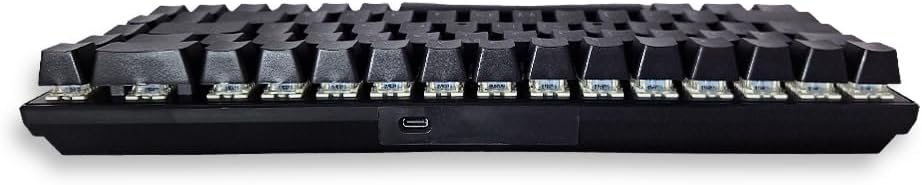
Gambar: Sisi view of the keyboard, highlighting the USB Type-C connection port.
Parentah Operasi
Pamakéan Dasar
Once connected, the keyboard is ready for immediate use. The mechanical switches provide tactile feedback and a responsive typing experience suitable for both general use and gaming.

Gambar: luhur-handap view of the keyboard layout.
RGB Backlighting and Mood Keys
This keyboard features customizable RGB backlighting. The three dedicated 'Mood Keys' allow for quick cycling through preset lighting effects or user-defined lighting profiles. Refer to the keyboard's specific key combinations (often involving the 'Fn' key) for detailed control over brightness, speed, and lighting patterns.

Gambar: Angled view of the keyboard and its cable.
Pangropéa
Pikeun mastikeun umur panjang sareng kinerja optimal keyboard anjeun, turutan tungtunan pangropéa ieu:
- beberesih: Use a soft, dry cloth to wipe the surface of the keyboard. For deeper cleaning, use compressed air to remove dust and debris from between the keycaps. Avoid using liquid cleaners directly on the keyboard.
- Tumpahan: In case of a liquid spill, immediately disconnect the keyboard from your computer. Turn it upside down to drain any liquid and allow it to dry completely for at least 24-48 hours before reconnecting.
- Panyimpenan: Simpen kibor di tempat anu tiis sareng garing jauh tina sinar panonpoé langsung sareng suhu anu ekstrim.
Pamérésan masalah
Upami anjeun ngalaman masalah sareng kibor anjeun, mangga tingali solusi umum ieu:
- Keyboard Teu Ngabales:
- Pastikeun kabel USB Type-C disambungkeun aman ka kibor sareng komputer.
- Coba sambungkeun kibor ka port USB anu béda dina komputer anjeun.
- Test the keyboard on another computer to determine if the issue is with the keyboard or the computer's port.
- Konci Teu Kadaptar:
- Pariksa naha aya halangan fisik handapeun keycaps.
- Ensure no software conflicts are present (e.g., other keyboard utilities).
- Lampu RGB Teu Gawé:
- Pariksa yén kibor parantos nyambung kalayan leres sareng nampi daya.
- Use the dedicated 'Mood Keys' or 'Fn' key combinations to cycle through lighting modes and brightness levels.
spésifikasi
| Fitur | Rincian |
|---|---|
| Ngaran Brand | Generik |
| Alat nu cocog | Computers, Gaming Laptops |
| Téhnologi konektipitas | USB-C (Kabel) |
| Katerangan kibor | Kaulinan |
| Dianjurkeun Mangpaat | Kaulinan |
| Fitur husus | Backlit, 3 Mood Keys |
| Warna | Hideung |
| Rojongan Warna lampu tukang | RGB (Beureum, Héjo, Biru) |
| Gaya | Kaulinan |
| Bahan | palastik |
| Sumber Daya | Dikabel |
| Pindah Tipe | Mékanis |
| Tata perenah kibor | QWERTY |
| Orientasi leungeun | Ambidextrous |
| Komponén Kaasup | Kabel USB |
| Produsén | Foreve |
| Negara asal | Cina |
| Item Beurat | 50 gram |
Garansi sareng Rojongan
Émbaran jaminan
This product is provided without an explicit warranty. Please refer to the retailer's return policy for any issues encountered shortly after purchase.
Rojongan Palanggan
For further assistance or inquiries regarding the Generic RGB Wired Mechanical Keyboard, please contact your point of purchase or refer to the manufacturer's official websitus pikeun sumber rojongan.


