Bubuka
This manual provides instructions for the setup, operation, maintenance, and troubleshooting of your new Generic Replacement Remote Control. This remote is designed to be compatible with Technics SA-GX730, SA-GX500, and SA-GX710 AV Control Stereo Receivers.
No programming is required for this remote control. It is pre-programmed and ready for use once batteries are installed.
Disetél
1. Pamasangan batré
The remote control requires two AAA batteries (not included). Please ensure you purchase new, high-quality batteries for optimal performance.
- Teangan tempat panutup kompartemen batré dina tonggong kadali jauh.
- Geser panutup ka handap atawa pencét kancing jeung angkat pikeun muka kompartemen.
- Selapkeun dua batré AAA, mastikeun terminal positif (+) jeung négatip (-) align bener jeung markings jero kompartemen nu.
- Ganti panutup kompartemen batré ku cara ngageser deui kana tempatna nepi ka klik aman.

Image: Remote control with its battery compartment open, illustrating where to insert the batteries.
Once batteries are correctly installed, the remote control is ready for immediate use with your compatible Technics receiver.
Parentah Operasi
This remote control functions identically to the original remote for your Technics SA-GX730, SA-GX500, or SA-GX710 AV Control Stereo Receiver. Simply point the remote control directly at the infrared sensor on your receiver and press the desired function button.
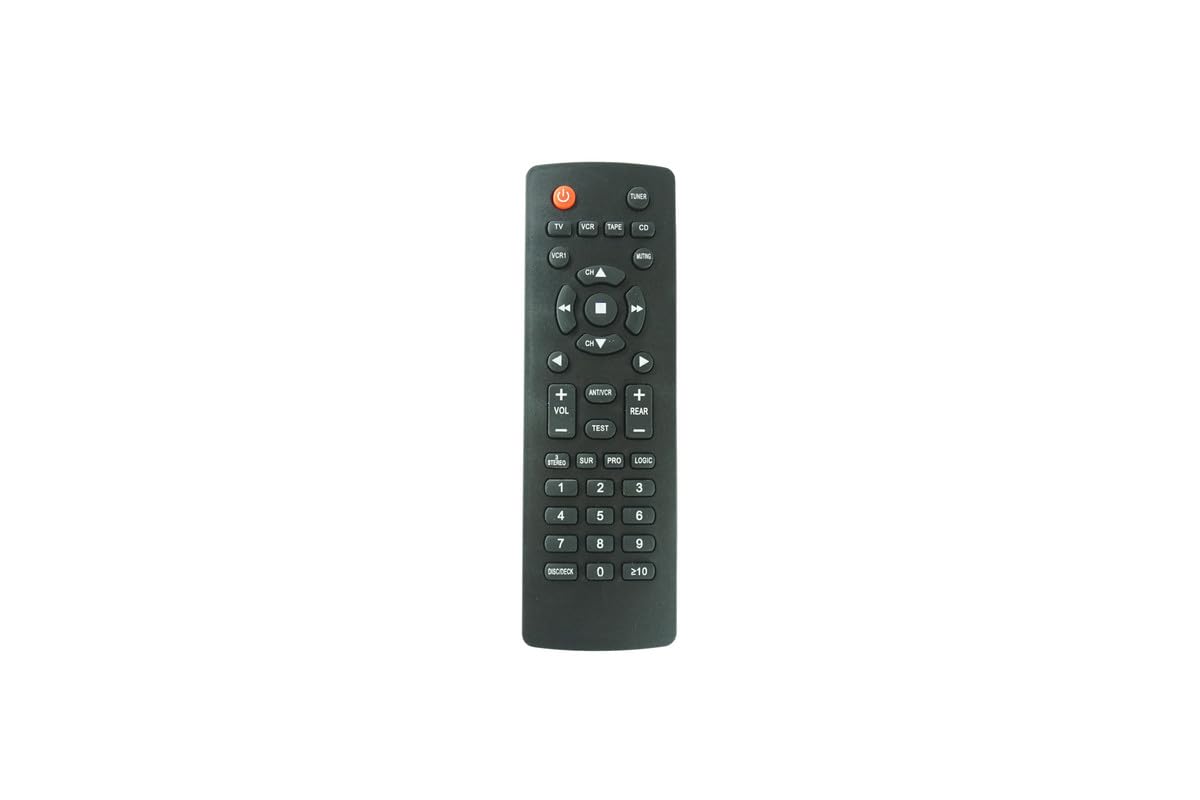
Image: The Generic Replacement Remote Control, showing its overall design.
Fungsi konci:
The remote features standard buttons for controlling your AV receiver, including power, volume up/down, channel/input selection, and other specific functions depending on your receiver model. Refer to your Technics receiver's original manual for detailed descriptions of each function button.
Pangropéa
beberesih:
To clean the remote control, gently wipe it with a soft, dry cloth. Do not use liquid cleaners, abrasive pads, or chemical solvents, as these can damage the remote's surface or internal components.
Ngagantian batré:
Replace batteries when the remote's range decreases or it becomes unresponsive. Always replace both batteries at the same time with new ones. Do not mix old and new batteries, or different types of batteries.
Panyimpenan:
Upami remot kontrol moal dianggo dina waktos anu lami, cabut batréna pikeun nyegah bocor sareng poténsi karusakan kana remot.
Pamérésan masalah
- Jauh teu ngabales:
- Ensure batteries are correctly installed with the correct polarity (+/-).
- Ganti batré heubeul ku nu anyar.
- Check for any obstructions between the remote control and the receiver's infrared sensor.
- Ensure you are within the effective operating range (up to 8 meters).
- Point the remote directly at the receiver's sensor.
- Rentang operasi terbatas:
- Ganti batré ku nu anyar.
- Ensure there are no strong light sources (like direct sunlight or fluorescent lights) interfering with the infrared signal.
spésifikasi
| merek | Generik |
| Kasaluyuan | Technics SA-GX730, SA-GX500, SA-GX710 AV Control Stereo Receivers |
| Fitur husus | Taya Programming Diperlukeun |
| Téhnologi konektipitas | Infrabeureum |
| Rentang maksimum | 8 méter |
| Sumber Daya | 2 x Batré AAA (teu kalebet) |
| Tipe Controller | Tombol Control |
Garansi sareng Rojongan
No specific warranty information is provided with this product. For any support inquiries or issues, please contact the seller directly through your purchase platform. Ensure you have your order details available when contacting support.


