Bubuka
This manual provides essential information for the setup, operation, and maintenance of your new Tucus replacement remote control. This remote is designed to be compatible with various JVC Micro COMPACT COMPONENT Stereo Systems, including models RM-SUXQ30UW, RM-SUXQ30US, UX-Q30S, UX-Q30B, UX-Q30P, and UX-Q30W. While it is a replacement remote and not the original device's remote, common functions are expected to operate normally. Please review this guide thoroughly to ensure proper use and longevity of your remote control.
Disetél
1. Pamasangan batré
The remote control requires two (2) AA batteries (not included) for operation. Follow these steps to install them:
- Panggihan kompartemen batré dina tonggong kadali jauh.
- Geser panutup kompartemen batré ka handap atanapi ka luar pikeun mukakeunana.
- Selapkeun dua batré AA, mastikeun terminal positif (+) jeung négatip (-) align bener jeung markings jero kompartemen nu.
- Geser panutup kompartemen batré deui kana tempatna nepi ka klik aman.

Figure 1: Back of the remote control showing the battery compartment cover.
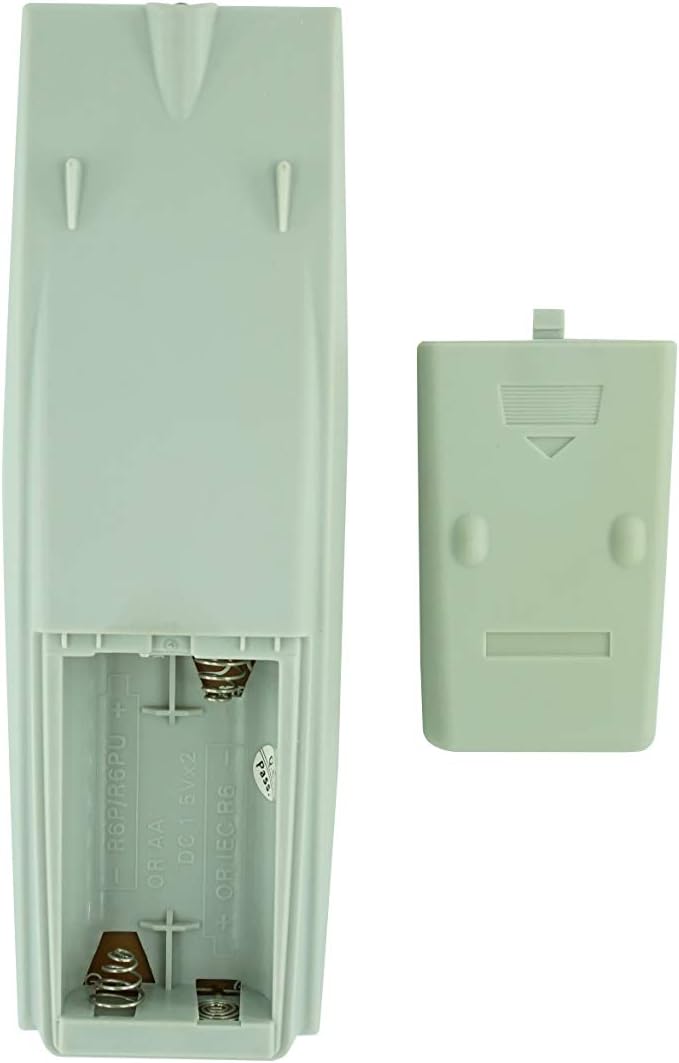
Figure 2: Battery compartment with cover removed, ready for battery insertion.
2. Pamakéan awal
Once batteries are installed, the remote control is ready for use. Point the remote directly at your JVC Micro COMPACT COMPONENT Stereo System. No additional programming is typically required for this replacement remote for the listed compatible models.
Parentah Operasi
This remote control provides access to the primary functions of your JVC stereo system. Below is a general overview of common button functions. Please note that while the functionality is guaranteed, the exact button layout may differ slightly from your original remote.

Gambar 3: Hareupeun view tina kadali jauh jeung perenah tombol.
Fungsi konci:
- SIAGA/HIDUP: Powers the stereo system on or off.
- TAMPILAN: Changes or shows display information.
- JAM/TIMER: Accesses clock and timer settings.
- SARE: Sets a sleep timer for automatic power off.
- Tombol Jumlah (0-9, +10): Direct input for track numbers, radio frequencies, etc.
- BASS / TREBLE: Saluyukeun tingkat bass sareng treble.
- Navigation (UP, DOWN, LEFT, RIGHT, SET): Dipaké pikeun navigasi menu jeung pilihan.
- Playback Controls (PLAY/PAUSE, STOP, FAST FORWARD, REWIND, SKIP): Ngadalikeun putereun média.
- Source Selection (CD, TAPE, FM/AM, AUX/MD): Milih sumber input audio.
- FM MODE / REV.MODE: Toggles FM stereo/mono or tape reverse mode.
- PRESET OTOMATIS: Automatically scans and saves radio stations.
- PRGM / RANDOM / REPEAT: Controls program, random, and repeat playback modes.
- PTY SEARCH / PTY SELECT: For Program Type search and selection on radio.
- DISPLAY / TA/News / Info: Provides additional display information or traffic/news announcements.
- AHB PRO: Activates or deactivates Active Hyper-Bass PRO.
- VOLUME (+/-): Saluyukeun tingkat volume master.
For specific advanced functions, please refer to the original instruction manual of your JVC Micro COMPACT COMPONENT Stereo System.
Pangropéa
Ngabersihan Remote Control
Pikeun ngajaga tampilan sareng fungsi remot kontrol, bersihan sacara rutin:
- Ngusap beungeut ku kaen lemes, garing.
- Keur kokotor bandel, rada dampen lawon ku cai atawa hampang, cleaner non-abrasive. Ulah menyemprot cleaner langsung kana remote.
- Hindarkeun ngagunakeun bahan kimia anu kasar, pangleyur, atanapi bantalan beberesih anu abrasive, sabab ieu tiasa ngarusak résolusi atanapi komponén internal.
Ngagantian batré
Replace batteries when the remote's response becomes sluggish or it stops functioning. Always replace both batteries at the same time with new ones of the same type (AA). Do not mix old and new batteries, or different types of batteries.
Panyimpenan
Upami remot kontrol moal dianggo dina waktos anu lami, cabut batréna pikeun nyegah bocor sareng poténsi karusakan kana remot.
Pamérésan masalah
- Jauh teu ngabales:
- Pariksa naha batréna dipasang kalayan leres sareng polaritas anu leres (+/-).
- Ganti batré heubeul ku nu anyar.
- Ensure there are no obstructions between the remote control and the stereo system's infrared receiver.
- Pastikeun anjeun aya dina jangkauan efektif remot kontrol.
- Some buttons not working or unexpected behavior:
- This remote is a replacement and while common functions are supported, the button layout or specific advanced functions might not perfectly match your original remote. Refer to the button layout image in the Operating Instructions section.
- Ensure the stereo system is powered on and set to the correct input source.
- Remote appears damaged:
- If the remote has been dropped or exposed to liquids, internal damage may have occurred. In such cases, replacement may be necessary.
spésifikasi
| merek | Generik |
| Produsén | TUCUS |
| Nomer modél | DVT-C9F24992D65E215A7DD6011D34514A46 |
| Model cocog | JVC RM-SUXQ30UW, RM-SUXQ30US, UX-Q30S, UX-Q30B, UX-Q30P, UX-Q30W Micro COMPACT COMPONENT Stereo SYSTEM |
| Jenis Bahan | Lain |
| Sumber Daya | 2 x Batré AA (teu kalebet) |
| ASIN | B0D79958PW |
| Tanggal Kahiji Sadia | 17 Juni 2024 |
Émbaran jaminan
This product comes with a 3-month warranty from the date of purchase. This warranty covers manufacturing defects and ensures the remote control functions as intended for compatible models. Please retain your proof of purchase for any warranty claims.
Rojongan Palanggan
If you have any questions regarding the compatibility or functionality of this remote control, or if your specific device model is not listed, please contact the seller directly for assistance. The seller stocks a wide range of remote controls and parts and can confirm suitability for your needs.
For general inquiries or to provide feedback, please refer to the contact information provided by your retailer or the seller.


