1. Bubuka
Thank you for choosing the Dafit ZL02CPRO Smart Watch. This device is designed to enhance your daily life with advanced health monitoring, communication features, and smart assistant capabilities. Please read this manual carefully to ensure proper use and optimal performance of your new smart watch.
2. Naon dina Box
Upon opening your Dafit ZL02CPRO Smart Watch package, you should find the following items:
- Dafit ZL02CPRO Smart Watch
- Wristbands (pre-attached or separate, depending on model)
- Kabel Ngecas
- Manual pangguna (dokumén ieu)
3. Produk Langkungview
The Dafit ZL02CPRO Smart Watch features a 1.28-inch round TFT screen and is available with either a metal or silicone strap. It includes a side button for navigation and interaction.

Image: Dafit ZL02CPRO Smart Watch with a black metal mesh band, displaying time, date, steps, and heart rate data.
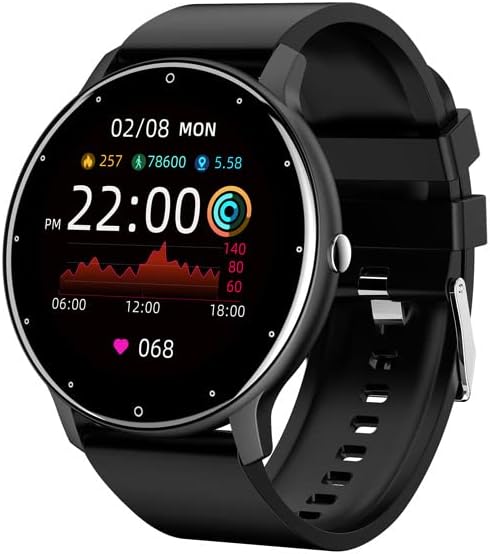
Image: Dafit ZL02CPRO Smart Watch with a black silicone band, showing a similar display with health metrics.

Image: A selection of over 100 stylish digital watch faces available for the Dafit ZL02CPRO Smart Watch, demonstrating customization options.
4. Setup Guide
4.1 Ngecas Alat
Before first use, fully charge your smart watch. Connect the magnetic charging cable to the charging points on the back of the watch and plug the USB end into a standard USB power adapter (not included) or a computer USB port. A full charge typically takes about 2 hours.
4.2 Ngundeur Aplikasi
To unlock the full functionality of your smart watch, download the companion application. Milarian pikeun "Dafit" in your smartphone's app store (Google Play Store for Android or Apple App Store for iOS). The app supports Android 5.0 and above, and Apple iOS 9.0 or later.
4.3 Masangkeun sareng Smartphone Anjeun
- Pastikeun jam tangan pinter anjeun dicas sareng dihurungkeun.
- Aktipkeun Bluetooth dina smartphone Anjeun.
- Open the Dafit app on your smartphone.
- Follow the in-app instructions to search for and connect to your ZL02CPRO watch. The app will guide you through the pairing process.
- Once paired, you can synchronize data, customize settings, and receive notifications.
5. Parentah Operasi
5.1 Napigasi Dasar
- Layar cabak: Gesek ka kenca/katuhu, ka luhur/handap pikeun nganapigasi menu sareng fitur. Ketok pikeun milih.
- Tombol samping: Pencét pikeun mulang ka layar utama atanapi hudangkeun alat. Pencét lila pikeun pilihan kakuatan.
5.2 Fungsi Telepon Bluetooth
After successful pairing, your watch can make and receive calls directly. Ensure the Bluetooth connection is stable and within 10 meters of your phone.
- Nelepon: Aksés dialpad atanapi daptar kontak dina jam tangan pikeun ngamimitian nelepon.
- Narima Telepon: When a call comes in, the watch will display the caller ID. Tap to answer or reject the call.
5.3 Bewara
Receive notifications for calls, SMS messages, and various app alerts directly on your watch. Enable desired app notifications within the Dafit app settings on your smartphone.
5.4 Musik sareng Kontrol Kaméra
- Kontrol Musik: Kadalikeun putereun musik dina telepon pinter anjeun (maénkeun, pause, ngaliwatan lagu) langsung tina jam tangan anjeun.
- Jauh Kaméra: Anggo jam tangan anjeun salaku rana jarak jauh pikeun kaméra smartphone anjeun.
6. Fitur Pangimeutan Kaséhatan
The Dafit ZL02CPRO Smart Watch provides comprehensive health and fitness tracking capabilities:
- Tracker kagiatan: Monitors step number, calories burned, and distance traveled.
- Ngawaskeun Laju haté: Terus ngalacak denyut jantung anjeun sapopoe.
- Pangimeutan Saré: Nganalisis pola bobo anjeun, kalebet sare jero, sare hampang, sareng waktos hudang.
- Modeu Multi-Olahraga: Supports various sport modes to track specific exercise data, including GPS movement track (requires smartphone GPS).
7. Smart Assistant Features
Beyond health tracking, your smart watch offers several convenient smart assistant functions:
- Laporan Cuaca: Kéngingkeun apdet cuaca sacara real-time.
- Panginget Sedentary: Ngageterkeun anjeun nalika anjeun parantos lami teuing.
- Jam alarem: Setel alarm langsung tina jam tangan anjeun.
- Stopwatch: A built-in stopwatch for timing activities.
- Penyesuaian Caang: Saluyukeun kacaangan layar pikeun optimal viewing.
- Modeu Hemat Daya: Extend battery life when needed.
8. Water Resistance and Battery Life
8.1 IP68 Water Resistance
The Dafit ZL02CPRO Smart Watch is IP68 waterproof, meaning it is resistant to dust and can withstand immersion in water up to 1.5 meters for 30 minutes. It can be worn when washing hands or in the rain. penting: Do not use the watch in showers, saunas, hot tubs, or during diving, as steam and hot water can damage the device.
8.2 Kahirupan batré
With a full charge, the watch can be used for approximately 5-7 days, depending on usage patterns and features enabled. Charging time is approximately 2 hours.
9. Pangropéa
To ensure the longevity and proper functioning of your Dafit ZL02CPRO Smart Watch, follow these maintenance guidelines:
- beberesih: Regularly wipe the watch screen and body with a soft, dry cloth. If necessary, use a slightly damp lawon lajeng garing tuntas.
- Perawatan Tali: Clean silicone straps with mild soap and water. For metal straps, use a soft brush to remove debris. Ensure straps are dry before wearing.
- Hindarkeun Bahan Kimia: Ulah nganggo bahan kimia anu keras, pangleyur beberesih, atanapi deterjen anu kuat, sabab éta tiasa ngaruksak lapisan jam tangan atanapi komponén internal.
- Panyimpenan: Lamun teu dipaké pikeun période nambahan, nyimpen arloji dina tiis, tempat garing jauh ti sinar panonpoé langsung.
10. Cara ngungkulan
If you encounter issues with your Dafit ZL02CPRO Smart Watch, please refer to the following common solutions:
| Masalah | Solusi anu mungkin |
|---|---|
| Arloji teu hurung | Pastikeun jam tangan tos dicas pinuh. Sambungkeun kana kabel ngecas teras antosan sababaraha menit sateuacan nyobian hurungkeun deui. |
| Teu tiasa dipasangkeun sareng smartphone | Check that Bluetooth is enabled on your phone. Ensure the watch is within Bluetooth range (10m). Restart both the watch and your phone. Try unpairing and re-pairing through the Dafit app. |
| Bewara teu katarima | Verify that notifications are enabled in the Dafit app settings for specific applications. Ensure the watch is connected via Bluetooth. Check your phone's notification settings. |
| Data kaséhatan teu akurat | Pastikeun arloji dipaké pas dina pigeulang anjeun, ngeunaan rubak hiji ramo luhureun tulang pigeulang. Ngabersihan sénsor dina tonggong arloji. |
| hirup batré pondok | Reduce screen brightness, disable continuous heart rate monitoring if not needed, and use power-saving mode. Limit frequent screen wake-ups. |
Lamun masalah persists, mangga ngahubungan rojongan customer pikeun pitulung salajengna.
11. Spésifikasi
Below are the technical specifications for the Dafit ZL02CPRO Smart Watch:
| Fitur | Rincian |
|---|---|
| Modél | ZL02CPRO |
| Jenis Layar Témbongkeun | Layar TFT |
| Ukuran layar | 1.28 Inches (Round Screen) |
| Téhnologi konektipitas | Bluetooth |
| Standar Komunikasi Nirkabel | Bluetooth |
| Sistem operasi | Wear OS (compatible with Android 5.0+ / iOS 9.0+) |
| Kapasitas batré | 230 Miliamp Jam-jaman |
| Kahirupan batré | 5-7 poé (pamakéan has) |
| Waktu Ngecas | Kira-kira. 2 jam |
| Tahan cai | IP68 |
| Item Beurat | 80 Gram (2.82 ons) |
| GPS | GPS Via Smartphone |
| Basa anu Dirojong | Chinese, English, German, Spanish, French, Russian, Arabic, Ukrainian, Italian, Portuguese |
12. Garansi jeung Rojongan
For warranty information, please refer to the documentation included with your purchase or contact the retailer. If you have any questions or require technical support, please reach out to the manufacturer's customer service. Contact details are typically available on the product packaging or the official brand websitus.