1. Bubuka
Thank you for choosing the Vortex T10M Pro+ Tablet. This manual will guide you through the features and functions of your new device, ensuring a smooth and enjoyable user experience. Please read this manual carefully before using your tablet.
Naon dina Box
Upon unboxing your Vortex T10M Pro+ Tablet, please verify that all the following items are present:
- Vortex T10M Pro+ Tablet
- Charger
- Pelindung layar
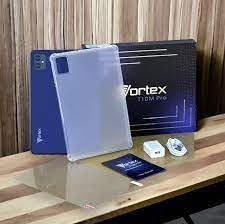
Image: Contents of the Vortex T10M Pro+ Tablet box. This includes the tablet, a clear protective case, the power adapter, and a screen protector, all neatly arranged on a wooden surface.
2. Produk Langkungview
Familiarize yourself with the physical components and key features of your Vortex T10M Pro+ Tablet.
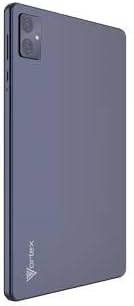
Gambar: Tukangeun view of the Vortex T10M Pro+ Tablet. The tablet has a sleek, dark finish with the 'Vortex' logo subtly placed at the bottom. The camera module is visible in the upper left corner.

Gambar: Detil view of the back of the Vortex T10M Pro+ Tablet, highlighting its specifications. Printed details include '10.1-inch Brilliant Display', '5MP Front Camera', '8MP Rear Camera', 'MTK6766 Processor', 'Quad-Core, 4GB+64GB', '5000mAh Mega Battery', and 'Android 12'.
3. Setélan
3.1. Ngecas Alat
Before first use, fully charge your tablet. Connect the provided charger to the tablet's charging port and plug it into a power outlet. The battery indicator on the screen will show charging progress.
3.2. Inserting SIM/MicroSD Card
The Vortex T10M Pro+ supports 4G LTE connectivity and expandable storage. To insert a SIM card (for mobile data) or a microSD card (for additional storage):
- Panggihan tempat kartu SIM/microSD di sisi tablet.
- Paké alat ejector SIM disadiakeun pikeun muka baki.
- Carefully place the SIM card(s) and/or microSD card into the designated slots, ensuring correct orientation.
- Gently dorong baki deui kana tablet nepi ka ngaklik kana tempatna.
3.3. Daya Awal Hurung
Press and hold the Power button located on the side of the tablet until the Vortex logo appears. Follow the on-screen prompts to complete the initial setup, including language selection, Wi-Fi connection, and Google account setup.
4. Parentah Operasi
4.1. Napigasi Dasar
Your tablet runs on Android 13.0. Use touch gestures for navigation:
- Ketok: Pilih hiji item atawa buka aplikasi.
- Gesek: Gulung ngaliwatan layar atawa daptar.
- Ciwit-pikeun-zum: Ngazum gede atawa leutik dina poto jeung web kaca.
- Pencét panjang: Aksés ménu kontekstual atanapi pindahkeun ikon.
4.2. Nyambungkeun ka Wi-Fi
Pikeun nyambung ka jaringan Wi-Fi:
- Pindah ka Setélan > Jaringan & internét > Internét.
- Hurungkeun Wi-Fi.
- Pilih jaringan anu dipikahoyong tina daptar sareng lebetkeun kecap akses upami dipenta.
4.3. Using Mobile Data (4G LTE)
If you have inserted a valid SIM card with an active data plan:
- Pindah ka Setélan > Jaringan & internét > SIM.
- Ensure Mobile data is enabled for your SIM.
4.4. Operasi kaméra
Tablet ieu dilengkepan kaméra tukang 8MP sareng kaméra hareup 5MP.
- Buka aplikasi kaméra.
- Ketok tombol jepret pikeun moto.
- Pindah antara kaméra hareup sareng pungkur nganggo ikon toggle kaméra.
4.5. Managing Storage
Your tablet comes with 64GB of internal storage. You can expand this using a microSD card up to 128GB. To view storage usage, go to Setélan > Panyimpenan.
5. Pangropéa
5.1. beberesih
Anggo lawon anu lemes sareng henteu lint pikeun ngabersihan layar sareng awak tablet. Ulah make bahan kimia kasar atawa bahan abrasive.
5.2. Apdet parangkat lunak
Pariksa apdet parangkat lunak sacara périodik pikeun mastikeun tablet anjeun ngagaduhan fitur sareng patch kaamanan pangénggalna. Buka Setélan > Sistim > Pembaruan sistem.
5.3. Kaperawatan batré
Pikeun manjangkeun umur batre:
- Hindarkeun suhu anu ekstrim.
- Ulah ngantep batréna sering discharge pinuh.
- Cabut colokan carjer saatos batréna pinuh.
6. Cara ngungkulan
Bagian ieu ngabahas masalah umum anu anjeun tiasa pendak sareng tablet anjeun.
| Masalah | Solusi anu mungkin |
|---|---|
| Tablet teu hurung | Pastikeun batréna tos dicas. Pencét terus tahan tombol Daya sahenteuna 10-15 detik pikeun maksa ngamimitian deui. |
| Masalah sambungan Wi-Fi | Balikan deui tablet sareng router Wi-Fi anjeun. Poho jaringan dina setélan sareng sambungkeun deui. |
| Aplikasi ngalambatkeun atanapi ngadat | Tutup aplikasi latar tukang. Hapus cache aplikasi (Setélan > Aplikasi > [Ngaran Aplikasi] > Panyimpenan > Hapus cache). Pareuman terus hurungkeun deui tablet. |
| Storage full message | Pupus teu perlu files or apps. Move media to a microSD card. |
7. Spésifikasi
Detailed technical specifications for the Vortex T10M Pro+ Tablet.
| Fitur | Spésifikasi |
|---|---|
| Ngaran modél | T10M Pro+ Tablet (Unlocked) Blue 10.1" 64GB 4GB GSM 4G LTE + Wifi 8MP |
| Ukuran tampilan | 10.1 inci |
| Resolusi layar Max | 1280 x 800 piksel |
| Refresh Laju | 120 Hz |
| Prosesor | MediaTek, 2 GHz |
| Ram | 4 GB |
| Panyimpenan internal | 64 GB |
| Panyimpenan Expandable | MicroSD (nepi ka 128GB) |
| Sistem operasi | Android 13.0 |
| Kaméra tukang | 8 MP |
| Kaméra hareup | 5 MP |
| Konektipitas | 4G LTE, Wi-Fi, Bluetooth, GPS |
| Jenis Batré | Litium-Ion |
| Rata Kahirupan Batré | 18 Jam |
| Dimensi produk | 10.1 x 5 x 3 inci |
| Warna | Hideung |
8. Émbaran jaminan
This product is covered by a manufacturer's warranty. Please refer to the warranty card included with your purchase or visit the manufacturer's official websitus kanggo syarat sareng katangtuan anu lengkep ngeunaan panutup garansi, durasi, sareng prosés klaim.
9. Rojongan
For further assistance, technical support, or service inquiries, please contact the manufacturer's customer support. Contact information can typically be found on the product packaging, the manufacturer's websitus, atawa dokuméntasi jaminan.