Bubuka
Hatur nuhun pikeun meuliasing the WS-575 Portable Wireless Speaker. This manual provides essential information for the safe and efficient use of your device. Please read it thoroughly before operating the speaker and retain it for future reference.
Produk Leuwihview
The WS-575 is a versatile portable wireless speaker designed for high-quality audio playback from various sources. It features multiple connectivity options including Bluetooth, USB, TF card, and AUX input, making it compatible with smartphones, tablets, laptops, and desktop computers.
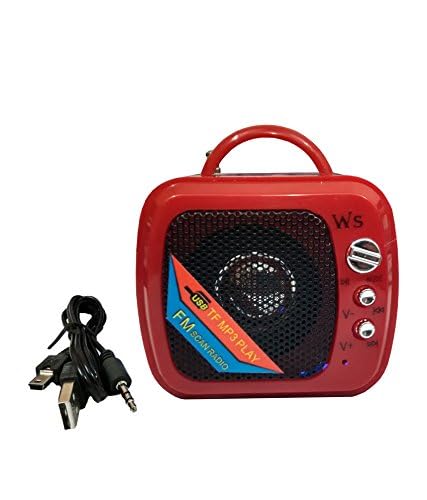
Gambar 1: Hareupeun view of the WS-575 Portable Wireless Speaker. This image shows the speaker grille, control buttons, and the integrated handle.
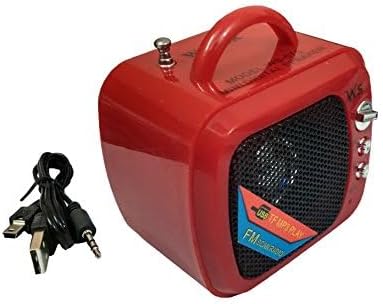
Figure 2: WS-575 Portable Wireless Speaker shown with its included USB charging cable. This illustrates the speaker's compact size and the essential accessory for power.
Fitur konci:
- Konektipitas Bluetooth nirkabel
- Port USB pikeun playback média
- TF (MicroSD) card slot for direct audio playback
- AUX input for wired connections
- Portable design with integrated handle
- Tabletop mounting type
Disetél
Ngecas Speaker:
- Connect the small end of the provided USB charging cable to the charging port on the speaker.
- Sambungkeun tungtung kabel USB anu langkung ageung ka adaptor kakuatan USB standar (teu kalebet) atanapi port USB komputer.
- The charging indicator light will illuminate, typically red, during charging.
- Once fully charged, the indicator light may change color (e.g., turn off or turn blue/green) or remain red. A full charge usually takes 2-3 hours.
Hurungkeun/Pareuman:
- To power on, locate the power switch (usually a toggle switch or a long press button) and switch it to the "ON" position or press and hold for a few seconds.
- To power off, switch it to the "OFF" position or press and hold the power button again.
Parentah Operasi
Mode Bluetooth:
- Power on the speaker. It will typically enter Bluetooth pairing mode automatically, indicated by a flashing LED light and an audible prompt.
- Dina alat anjeun (smartphone, tablet, laptop), aktipkeun Bluetooth sareng milarian alat anu sayogi.
- Select "WS-575" from the list of found devices.
- Sakali dipasangkeun, spéker bakal mastikeun ku sora anu karungu, sareng lampu LED bakal eureun kedip-kedip.
- Anjeun ayeuna bisa muterkeun audio tina alat Anjeun ngaliwatan speaker.
Mode Kartu TF:
- Lebetkeun kartu TF (MicroSD) nganggo audio MP3 files kana slot kartu TF on speaker.
- The speaker should automatically switch to TF card mode and begin playing music. If not, press the "Mode" button to cycle through modes until TF card mode is activated.
- Use the playback control buttons (Play/Pause, Next/Previous Track) on the speaker to manage your music.
Mode USB:
- Selapkeun USB flash drive sareng audio MP3 files kana port USB dina spiker.
- The speaker should automatically switch to USB mode and begin playing music. If not, press the "Mode" button to cycle through modes until USB mode is activated.
- Use the playback control buttons (Play/Pause, Next/Previous Track) on the speaker to manage your music.
Mode AUX:
- Sambungkeun hiji tungtung kabel audio 3.5mm (teu kaasup) kana port input AUX dina spiker.
- Connect the other end of the audio cable to the headphone jack or audio output port of your device (e.g., laptop, desktop computer).
- Press the "Mode" button on the speaker to switch to AUX mode.
- Play audio from your connected device. Volume control may be managed by both the speaker and the connected device.
Kontrol volume:
- Typically, volume is controlled by dedicated volume buttons (+/-) on the speaker.
- Long press the '+' button to increase volume, and long press the '-' button to decrease volume.
- Short press the '+' or '-' buttons to skip tracks in Bluetooth, TF, or USB modes.
Pangropéa
beberesih:
- Wipe the speaker's exterior with a soft, dry, lint-free cloth.
- Ulah make cleaners abrasive, lilin, atawa pangleyur.
- Ulah meunang Uap kana sagala bukaan.
Panyimpenan:
- Simpen spéker dina tempat anu tiis sareng garing jauh tina sinar panonpoé langsung sareng suhu anu ekstrim.
- Upami disimpen kanggo waktos anu lami, ngecas batréna sacara périodik (contona, unggal 3 bulan) pikeun ngajaga kaséhatan batréna.
Perawatan batré:
- Do not expose the battery to excessive heat or direct flame.
- Hindarkeun sering-sering ngeusi batre.
- Use only the provided charging cable or a compatible USB charger.
Pamérésan masalah
| Masalah | Mungkin Cukang lantaranana | Solusi |
|---|---|---|
| Speaker teu hurung. | Batré discharged. | Ngecas spéker sahenteuna 30 menit. |
| Taya sora tina speaker. | Volume teuing low; modeu salah dipilih; alat teu disambungkeun. | Increase speaker and device volume. Ensure correct mode (Bluetooth, TF, USB, AUX) is selected. Re-pair Bluetooth or check cable connection. |
| Teu bisa masangkeun via Bluetooth. | Speaker henteu dina mode papasangan; alat Bluetooth pareum; jauh teuing ti speaker. | Ensure speaker is in Bluetooth pairing mode (flashing LED). Turn Bluetooth on your device. Move device closer to speaker (within 10 meters). |
| TF card/USB playback not working. | Kartu / drive teu diselapkeun leres; teu didukung file format; speaker not in correct mode. | Re-insert TF card/USB drive. Ensure files are in MP3 format. Press "Mode" button to select TF/USB mode. |
spésifikasi
| Ngaran Brand | Generik |
| Nomer modél | WS-575 |
| Téhnologi konektipitas | Bluetooth, USB, AUX, TF Card |
| Tipe Pamasangan | Tabletop |
| Fitur husus | Portabel |
| Alat nu cocog | Tablet, Laptop, Smartphone, Desktop Computer |
| Sumber Daya | Batré Powered (Bisa dicas deui via USB) |
Garansi sareng Rojongan
Specific warranty information for the WS-575 Portable Wireless Speaker is not available in this manual. Please refer to the retailer's return policy or contact the seller directly for details regarding warranty coverage and customer support.
For further assistance or inquiries, please reach out to your point of purchase.


