1. Bubuka
This manual provides comprehensive instructions for the installation, operation, and maintenance of the Uniview IPC672LR-AX4DUPKC 2MP IR WDR 2D/3D DNR LightHunter Active Deterrence Outdoor Network Ultra 265 PoE PTZ Dome Camera. This advanced surveillance camera is designed for outdoor security applications, offering high-resolution imaging, robust night vision capabilities, and intelligent deterrence features.
Key features include LightHunter illumination for superior low-light performance, Wide Dynamic Range (WDR) for clear images in varying light conditions, and advanced noise reduction (2D/3D DNR). It supports Ultra 265 video compression for efficient storage and bandwidth usage, and features a built-in microphone and speaker for two-way audio, along with an alarm light for active deterrence. The camera's motorized zoom lens allows for flexible field of view pangaluyuan.
2. Émbaran Kasalametan
Please read all safety instructions carefully before installation and operation to prevent damage and ensure proper functioning.
- Sasayogian tanaga: Use only the specified Power over Ethernet (PoE) or external power supply. Ensure the power source meets the camera's voltage syarat.
- Lingkungan Instalasi: Install the camera in a stable location that can support its weight. Avoid direct exposure to extreme temperatures, humidity, or corrosive environments. Ensure proper ventilation.
- Cai sareng Uap: The camera is rated IP66 for outdoor use, providing protection against dust and powerful water jets. However, do not immerse the camera in water.
- beberesih: Disconnect power before cleaning. Use a soft, dry cloth. Do not use strong detergents or abrasive cleaners.
- Palayanan: Entong nyobian ngabongkar atanapi ngarobih kaméra. Rujuk sadayana jasa ka tanaga anu mumpuni.
3. Eusi Paket
Pastikeun yén sadaya barang aya sareng dina kaayaan anu saé nalika ngabongkar:
- Uniview IPC672LR-AX4DUPKC PTZ Dome Camera
- Pamasangan Bracket sareng Screws
- Pakakas Konektor Tahan Cai
- Citakan Pangeboran
- Gancang Mimitian Guide
- Kartu Garansi (upami aya)
4. Produk Langkungview
The IPC672LR-AX4DUPKC camera integrates advanced features for reliable surveillance.
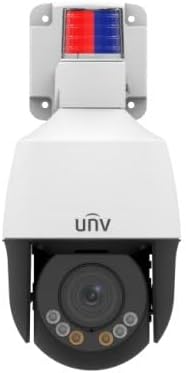
Gambar 4.1: Hareupeun view of the IPC672LR-AX4DUPKC camera, showing the dome lens, IR illuminators, and the active deterrence alarm light at the top.
- Motorized Zoom Lens: 2.8-12mm AF automatic focusing lens for flexible field of view.
- IR Illuminators: Provides infrared light for night vision up to 50m (164 ft).
- Cahaya haneut: Additional illumination for color night vision up to 10m (33 ft).
- Lampu Alarm: Integrated red and blue alarm light for active deterrence.
- Mikropon & Speaker Bawaan: Enables two-way audio communication.
- Port Ethernet (PoE): Pikeun sambungan jaringan sareng catu daya.

Figure 4.2: Feature icons highlighting LightHunter technology, WDR, Ultra H.265 compression, Edge Storage, Built-in Microphone, and Power over Ethernet (PoE).
Fitur canggih:
- LightHunter Illumination: Enhances low-light performance for clear images in challenging conditions.
- Optical WDR (Wide Dynamic Range): Up to 120 dB for balanced exposure in scenes with both bright and dark areas.
- 2D/3D DNR (Digital Noise Reduction): Reduces image noise for cleaner video streams.
- Ultra 265 Compression: Efficient video compression standard, also supporting H.265, H.264, and MJPEG.
- Triple Streams: Allows for multiple video streams at different resolutions and bitrates.
- ROI (Region of Interest): Focuses encoding resources on specific areas for higher quality.
5. Setup jeung Instalasi
Follow these steps for proper installation of your camera.
5.1 Masang kaméra
- Pilih Lokasi: Pilih lokasi luar anu nyayogikeun anu dipikahoyong viewing angle and is within range of your network infrastructure. Consider the camera's IP66 rating for weather resistance.
- Nyiapkeun permukaan: Use the provided drilling template to mark the screw holes on the mounting surface.
- liang bor: Drill pilot holes according to the template. Insert wall anchors if mounting on masonry or drywall.
- Pasang Bracket Pasang: Pasangkeun braket pemasangan kana permukaan nganggo sekrup anu disayogikeun.
- Pasang kaméra: Mount the camera onto the bracket, ensuring it is securely fastened.
5.2 Jaringan sareng Sambungan Daya
The camera supports Power over Ethernet (PoE) for simplified installation, requiring only a single Ethernet cable for both power and data.

Figure 5.1: An Ethernet cable, used for both power and data with PoE-enabled cameras.
- Sambungkeun kabel Ethernet: Connect one end of an Ethernet cable to the camera's Ethernet port. Use the waterproof connector kit to ensure a sealed connection for outdoor use.
- Connect to PoE Switch/NVR: Connect the other end of the Ethernet cable to a PoE-enabled network switch or a Network Video Recorder (NVR) with PoE ports.
- Alternative Power (if not using PoE): If PoE is not available, connect a compatible 12V DC power adapter (not included) to the camera's power input.
- Konfigurasi jaringan: Refer to the camera's Quick Start Guide or the full user manual (available online) for initial network configuration, including setting up IP addresses and accessing the camera's web panganteur.
6. Ngoperasikeun kaméra
Once installed and configured, you can begin operating your Uniview PTZ Dome Camera.
6.1 Ngaksés Langsung View
- Via NVR/DVR: If connected to an NVR, access the live view directly through the NVR's interface or connected monitor.
- Liwat Web Browser: Enter the camera's IP address into a web browser on a computer connected to the same network. Log in using your credentials.
- Ngaliwatan Aplikasi Seluler: Download the official Uniview mobile application (if available) and add your camera for remote viewing.

Gambar 6.1: Kelample of a multi-camera surveillance feed displayed on a monitor.
6.2 PTZ Control and Zoom
The camera features Pan, Tilt, and Zoom (PTZ) capabilities with a 2.8-12mm motorized zoom lens.
- Pan/Dengdekkeun: Use the PTZ controls in your NVR interface, web browser, or mobile app to remotely adjust the camera's horizontal (pan) and vertical (tilt) viewdina sudut.
- Zum: Utilize the zoom controls to optically zoom in or out, adjusting the focal length from 2.8mm (wide) to 12mm (telephoto). The automatic focusing (AF) ensures clear images at all zoom levels.

Figure 6.2: Remote monitoring of camera feeds via a tablet device.
6.3 Night Vision and Active Deterrence
- IR Peuting Visi: The camera automatically switches to IR mode in low light, providing clear black and white images up to 50m (164 ft).
- Cahaya haneut: For enhanced color night vision, the camera can utilize its warm light illuminator up to 10m (33 ft).
- Pencegahan aktip: Configure motion detection or other events to trigger the built-in alarm light and audible warnings via the speaker, deterring intruders.
7. Pangropéa
Pangropéa rutin ngajamin kinerja optimal sareng umur panjang kaméra anjeun.
- Ngabersihan lensa: Gently wipe the lens with a soft, lint-free cloth. For stubborn dirt, use a lens cleaning solution designed for optical surfaces. Do not use abrasive materials.
- Bersihan Perumahan: Bersihkeun perumahan kaméra nganggo iklanamp lawon. Hindarkeun bahan kimia anu kasar.
- Pembaruan firmware: périodik pariksa produsén urang website (Uniview) for firmware updates. Updating firmware can improve performance, add new features, and enhance security.
- Pamariksaan kabel: Regularly inspect all cables and connections for signs of wear or damage, especially for outdoor installations.
8. Cara ngungkulan
Tingali kana bagian ieu pikeun masalah umum sareng solusina.
| Masalah | Mungkin Cukang lantaranana | Solusi |
|---|---|---|
| Taya Daya | No PoE power; faulty power adapter; loose connection. | Verify PoE switch/NVR is supplying power; check power adapter and connections. |
| Taya Feed Video | Network issue; incorrect IP address; camera offline; firewall blocking. | Check network cable; verify camera's IP address; restart camera/NVR/router; check firewall settings. |
| Kualitas Gambar Miskin | Dirty lens; improper focus; low bandwidth; insufficient lighting. | Clean lens; adjust focus/zoom; check network bandwidth; ensure adequate lighting or IR/warm light is active. |
| PTZ Control Not Working | Software issue; camera malfunction; network latency. | Restart camera; update firmware; check network connection stability. |
9. Spésifikasi
Detailed technical specifications for the IPC672LR-AX4DUPKC camera.
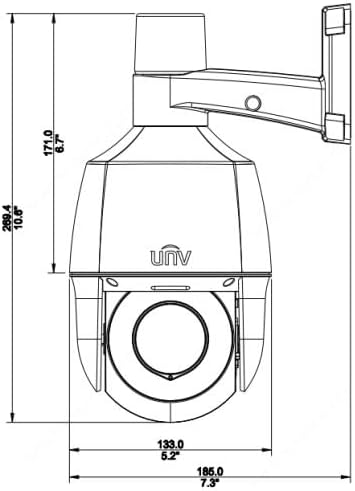
Figure 9.1: Dimensional drawing of the camera, indicating its physical size.
| Fitur | Rincian |
|---|---|
| Nomer modél | IPC672LR-AX4DUPKC |
| Resolusi Capture Video | 2MP |
| Lensa | 2.8-12mm AF Automatic Focusing and Motorized Zoom Lens |
| Wengi Sawangan Sawangan | Up to 50 m (164 ft) IR, 10m (33 ft) warm light |
| Téhnologi konektipitas | Kabel (PoE) |
| Protokol konektipitas | Wi-Fi (for certain functions/setup, primarily wired for operation) |
| Komprési Video | Ultra 265, H.265, H.264, MJPEG |
| Audio | Diwangun-di mikropon & spiker |
| Rentang dinamis | Up to 120 dB Optical WDR |
| Réduksi Noise | 2D/3D DNR |
| Peunteun Protection Ingress | IP66 |
| Faktor Bentuk | Kubah |
| Ukuran (L x W x H) | 5.2 x 5.2 x 10.6 inci |
| Produsén | Uniview |
| Dianjurkeun Mangpaat | Kaamanan outdoor |
| Tipe Siaga | Gerak Ngan |
| Téhnologi Sénsor Poto | CMOS |
10. Garansi jeung Rojongan
For warranty information, please refer to the warranty card included with your product or contact the seller/manufacturer directly. Technical support may be available through the manufacturer's official websitus atanapi saluran layanan palanggan.
Pabrikan: Uniview


