Produk Leuwihview
The Occus K11 is a versatile digital alarm clock speaker designed for home use, featuring Bluetooth 4.2 connectivity, an LED display, FM radio, and two USB charging ports. It also includes a hands-free calling function and a mirror LED display.
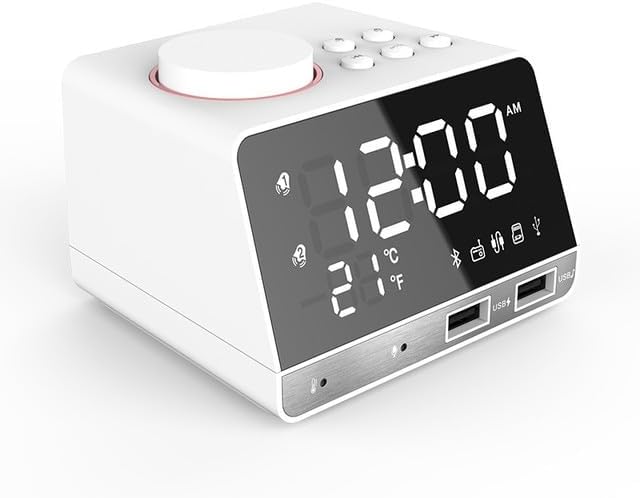
Gambar: Hareupeun view of the white Occus K11 Bluetooth Radio Alarm Clock Speaker, showing the digital time display, temperature, and various icons for Bluetooth, alarm, and USB ports.

Image: Two Occus K11 units, one white and one black, displayed side-by-side, highlighting the available color options.
Guide Setup
Eusi pakét
Punten pastikeun sadaya barang aya dina pakét:
- Occus K11 Alarm Clock Speaker
- Power Adapter (EU Type for this model)
- Manual pangguna (dokumén ieu)
Sambungan Daya
Pikeun mareuman alat:
- Locate the power input port on the back or side of the Occus K11.
- Sambungkeun adaptor kakuatan anu disayogikeun ka alat.
- Colokkeun adaptor daya kana stop kontak listrik standar. Layarna kedah hurung.
Setélan Waktu Awal
Upon first power-on or after a power interruption, you may need to set the current time. Refer to the "Time and Alarm Settings" section for detailed instructions.
Parentah Operasi
Kadali dasar
The Occus K11 features a large rotary button and several smaller buttons on the top panel for various functions. Familiarize yourself with these controls:
- Large Rotary Button: Typically used for volume control, navigating menus, and confirming selections. Pressing it may activate snooze or confirm settings.
- Smaller Buttons: These buttons control functions such as mode selection (FM, Bluetooth), alarm settings, play/pause, track skipping, and hands-free call management. Specific functions are detailed below.
Time and Alarm Settings
The device supports smart dual alarms. You can set alarms with a buzzer, FM radio, or TF card music as the alarm source.

Image: Diagram illustrating the smart dual alarm clock features, including alarm source modes (FM radio, buzzer, Micro SD) and how to turn off the alarm.
- Setélan waktos: Press the "Time Set" button (if available, or refer to specific button labels on your device) to enter time setting mode. Use the rotary button or arrow buttons to adjust hours and minutes. Press the "Time Set" button again to confirm.
- Setélan Alarm: Press the "Alarm Set" button. Select Alarm 1 or Alarm 2. Adjust the alarm time using the rotary button or arrow buttons. Choose your desired alarm source (Buzzer, FM, or TF card music). Confirm the settings.
- Fungsi Tungkul When the alarm sounds, press the large rotary button to activate the snooze function. The alarm will sound again after 5 minutes.
- Turning Off Alarm: Long press the "Alarm Set" button or a dedicated "Alarm Off" button to deactivate the alarm mode.
Fungsi Radio FM
Pikeun nganggo radio FM anu diwangun:
- Press the "Mode" button until "FM" mode is displayed.
- Use the rotary button or dedicated tuning buttons to scan for radio stations.
- Adjust the volume using the rotary button.
Konektipitas Bluetooth
Pair your mobile device with the Occus K11 for audio streaming:
- Press the "Mode" button until "Bluetooth" mode is displayed (indicated by a Bluetooth icon on the screen).
- Dina alat sélulér anjeun, aktipkeun Bluetooth sareng milarian alat anu sayogi.
- Select "Occus K11" (or similar name) from the list of devices.
- Saatos dipasangkeun, anjeun tiasa muterkeun audio tina alat anjeun ngalangkungan speaker.
Port ngecas USB
The Occus K11 is equipped with two USB ports for charging your external devices.
- Connect your device's USB charging cable to one of the USB ports on the front of the alarm clock.
- Ensure the alarm clock is powered on for charging to occur.
Leungeun-Free Telepon
When connected via Bluetooth, you can use the Occus K11 for hands-free calls:
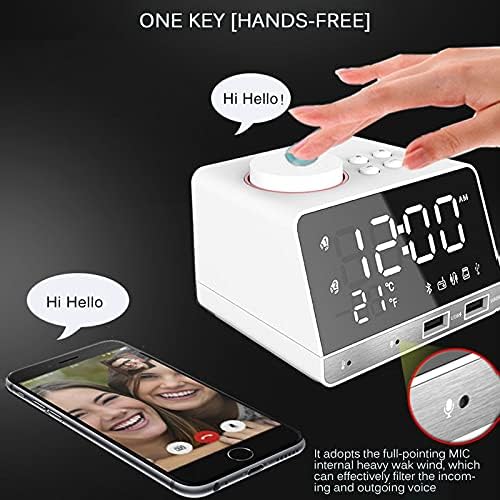
Image: Illustration of the one-key hands-free calling feature, showing a hand pressing the top button and a phone displaying a video call, with a magnified view of the built-in microphone.
- When a call comes in, press the dedicated "Call" button (often the large rotary button or a specific phone icon button) to answer.
- The built-in microphone will pick up your voice, and the speaker will output the caller's voice.
- Press the "Call" button again to end the call.
Pangaturan Pameuntasan Caang
Adjust the LED display brightness to suit your preference, especially for nighttime use.
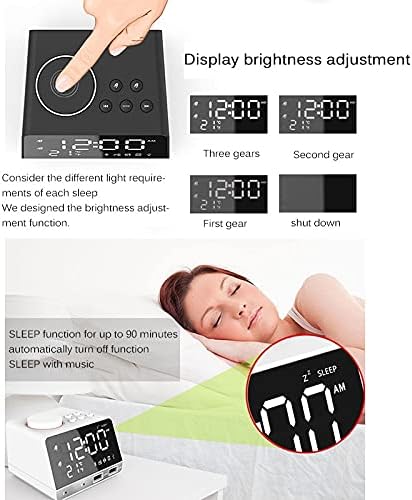
Image: Visual representation of the display brightness adjustment settings (three gears, second gear, first gear, and shut down) and the sleep function with a sleeping person and the clock displaying "SLEEP".
- Locate the "Dimmer" or "Brightness" button.
- Press it repeatedly to cycle through different brightness levels (e.g., Three gears, Second gear, First gear, Shut down).
Fungsi Saré
The sleep function allows the device to automatically turn off after a set period, useful for falling asleep to music.
- Activate the sleep function by pressing the "Sleep" button (if available).
- Cycle through the available sleep timer durations (e.g., up to 90 minutes). The device will automatically turn off after the selected time.
Mirror LED Display
The front LED display surface can also function as a mirror.

Image: A person applying lipstick, reflected in the mirror-like surface of the Occus K11's LED display, demonstrating its dual functionality.
- This feature is integrated into the display design.
- When the display is off or at its lowest brightness setting, the reflective surface becomes more prominent.
Pangropéa
beberesih
- Pegatkeun sambungan adaptor kakuatan saméméh beberesih.
- Anggo kaén anu garing sareng lemes pikeun ngusap bagian luar alat.
- Pikeun tanda nekad, rada dampen the cloth with water. Avoid using abrasive cleaners, solvents, or strong chemicals, as they may damage the surface.
- Ulah neuleumkeun alat dina cai atawa kakeunaan ka beueus kaleuleuwihan.
Panyimpenan
- Simpen alat dina tempat anu tiis sareng garing jauh tina sinar panonpoé langsung sareng suhu anu ekstrim.
- If storing for an extended period, disconnect it from power.
Pamérésan masalah
| Masalah | Mungkin Cukang lantaranana | Solusi |
|---|---|---|
| Alat teu hurung. | Adaptor daya teu nyambung atawa stop kontak faulty. | Pastikeun adaptor daya dipasang pageuh kana alat sareng stop kontak anu tiasa dianggo. Cobi stop kontak anu sanés. |
| Bluetooth teu nyambung. | Device not in pairing mode; mobile device Bluetooth off; too far from device. | Ensure the alarm clock is in Bluetooth pairing mode. Turn off and on Bluetooth on your mobile device. Move closer to the alarm clock. |
| Alarm teu disada. | Alarm not set correctly; volume too low; alarm turned off. | Verify alarm time and source settings. Increase alarm volume. Ensure alarm mode is active. |
| panarimaan radio goréng. | sinyal lemah; gangguan. | Adjust the position of the device. Extend any built-in antenna if available. Move away from other electronic devices that may cause interference. |
spésifikasi
| Fitur | Rincian |
|---|---|
| merek | Generik |
| Nomer modél | OCS-1778E2BEA94999CB7252C4F516D0424C (K11) |
| Warna | White EU Type |
| Bahan | palastik |
| Gaya | Digital |
| Sumber Daya | Kabel Listrik |
| Gaya tampilan | Digital |
| Tipe Pamasangan | Tabletop |
| Fitur husus | Radio, Bluetooth 4.2, 2 USB Charging Ports, Hands-Free Calling, Mirror LED Display, Snooze, Sleep Function |
| Batré Kaasup | No |
| Asalna | Daratan Cina |
Garansi sareng Rojongan
For warranty information and customer support, please refer to the documentation provided at the time of purchase or contact the seller directly. As this product is listed under the "Generic" brand, specific warranty terms may vary by retailer or region.
Punten tahan bukti pameseran anjeun pikeun klaim garansi.


