Bubuka
This manual provides detailed instructions for the operation and maintenance of your Bluetooth 5.3 True Wireless Earbuds M41. Please read this manual thoroughly before using the product to ensure proper function and longevity.
The M41 earbuds feature Bluetooth 5.3 connectivity, environmental noise canceling with 4 built-in microphones, and an IPX7 waterproof rating, making them suitable for various activities.
Eusi pakét
- Bluetooth 5.3 True Wireless Earbuds (Left and Right)
- Ngecas Case
- Kabel Ngecas USB
- Manual pamaké
- Sababaraha Ukuran Eartip (S, M, L)
Produk Leuwihview

Gambar 1: The M41 True Wireless Earbuds with their charging case. The case features a digital display indicating battery levels for both the case and individual earbuds.

Gambar 2: A nutup-up view of the M41 earbuds and charging case, highlighting the metallic accents and LED indicators.
The M41 earbuds are designed for comfort and secure fit, featuring an in-ear form factor. The charging case provides extended battery life and includes a digital display for battery status.
Disetél
1. Ngecas Awal
Before first use, fully charge the earbuds and the charging case. Connect the provided USB cable to the charging port on the case and a compatible USB power source.

Gambar 3: The M41 charging case can also function as a portable power bank to charge mobile phones, as shown with a phone connected via USB cable.
The digital display on the charging case will show the charging progress. Ensure both earbuds are placed correctly in the charging slots within the case.
2. Nyapasangkeun sareng Alat
- Ensure the earbuds are fully charged and placed inside the charging case.
- Open the charging case lid. The earbuds will automatically enter pairing mode, indicated by flashing LED lights on the earbuds.
- Dina alat anjeun (smartphone, tablet, komputer), buka setélan Bluetooth.
- Milarian pikeun alat Bluetooth anu sayogi teras pilih "M41" tina daptar.
- Once connected, the LED lights on the earbuds will stop flashing, and your device will confirm the connection.
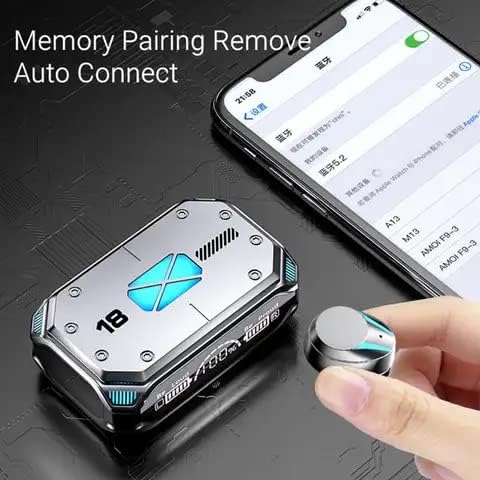
Gambar 4: The M41 earbuds feature memory pairing and auto-connect functionality, simplifying the connection process with previously paired devices.
The earbuds support automatic reconnection to the last paired device once removed from the charging case.
Parentah Operasi
Toél Kontrol
The M41 earbuds feature touch-sensitive controls for various functions:
| Aksi | Fungsi |
|---|---|
| Ketok Sakali (Earbud Kénca/Katuhu) | Puter/Reureuh musik, Jawab/Tungtung telepon |
| Ketok dua kali (Earbud Kénca) | Lagu saméméhna |
| Ketok dua kali (Earbud Katuhu) | Lagu salajengna |
| Ketok Tilu Kali (Earbud Kénca/Katuhu) | Aktipkeun Asisten Sora |
| Pencét Panjang (2 detik) | Nolak Telepon |
| Pencét Panjang (3 detik) | Daya Hurung/Pareuman |
Environmental Noise Canceling (ENC)
The M41 earbuds are equipped with 4 built-in microphones for Environmental Noise Canceling, which helps reduce ambient noise during calls for clearer communication.
Pangalaman kaulinan

Gambar 5: The M41 earbuds utilize an upgraded BT 5.2 chip for lower latency, enhancing the gaming experience by synchronizing audio with visuals.
The advanced Bluetooth 5.3 chip provides low latency audio transmission, which is beneficial for gaming, ensuring sound effects and dialogue are synchronized with on-screen actions.
Pangropéa
- beberesih: Regularly clean the earbuds and charging case with a soft, dry cloth. Do not use abrasive cleaners or solvents.
- Eartips: Remove and clean the eartips periodically to prevent wax buildup, which can affect sound quality.
- Panyimpenan: Nalika henteu dianggo, simpen earbuds dina wadah ngecasna pikeun ngajagi sareng tetep dicas.
- Tahan cai: The earbuds are IPX7 waterproof, meaning they can withstand immersion in water up to 1 meter for 30 minutes. However, the charging case is not waterproof. Avoid exposing the charging case to liquids.
- Suhu: Avoid exposing the product to extreme temperatures (hot or cold) as this can damage the battery and internal components.
Pamérésan masalah
| Masalah | Solusi anu mungkin |
|---|---|
| Earbuds teu dipasangkeun | Ensure earbuds are charged. Turn off and on Bluetooth on your device. Forget "M41" from your device's Bluetooth list and re-pair. |
| Ngan hiji earbud jalan | Teundeun kadua earbuds deui kana wadah ngecas, tutup tutupna, antosan sababaraha detik, teras buka tutupna sareng cobian deui. Pastikeun kadua earbuds dicas. |
| Volume lemah atawa kualitas sora goréng | Adjust volume on your device. Clean eartips and earbud mesh. Try different sized eartips for a better seal. |
| Earbuds teu ngecas | Pastikeun kabel ngecas disambungkeun kalayan pageuh. Pariksa naha wadah ngecas gaduh daya. Bersihkeun kontak ngecas dina earbud sareng wadahna. |
| Sambungan sering turun | Move closer to your device. Avoid obstacles between earbuds and device. Reduce interference from other wireless devices. |
spésifikasi
- model: M41
- Vérsi Bluetooth: 5.3
- Penempatan Ceuli: Dina Ceuli
- Kontrol bising: Environmental Noise Canceling (ENC) with 4 Built-in Mics
- Kahirupan batré (Earbuds): Up to 6-8 hours (approximate, varies with volume and usage)
- Total Playtime kalawan Case Ngecas: Nepi ka 180 jam (kira-kira)
- Ngeusi batre Case: High capacity, can charge mobile phones
- Rating waterproof: IPX7 (Earbuds wungkul)
- warna: Hideung
- Supir Audio: 8mm Moving Coil Unit with 8mm Biological Diaphragm

Gambar 6: The M41 earbuds feature an 8mm moving coil unit and an 8mm biological diaphragm for high-precision audio decoding, aiming for an immersive listening experience with undistorted details.
Garansi sareng Rojongan
For warranty information and customer support, please refer to the contact details provided with your purchase or visit the manufacturer's websitus. Simpen bukti pameseran anjeun pikeun klaim garansi.
Pikeun pitulung salajengna, mangga ngahubungan rojongan customer di rojongan@example.com atawa nelepon 1-800-123-4567.


