Produk Leuwihview
This user manual provides detailed instructions for the Generic Desktop Microphone, Model 080-08-1682. This stylish cardioid condenser microphone offers easy, convenient functionality for various audio recording and communication needs.

Figure 1: Generic Desktop Microphone (Stone White)
Fitur konci:
- Cardioid condenser mic for clear audio capture.
- Integrated volume control and mute function.
- Includes a 6-foot USB-C to USB-A cable for versatile connectivity.
- Compatible with both Mac and PC operating systems.
- Features an aux port for headphone connection, enabling real-time audio monitoring.
- Comes with an adjustable stand for hands-free use and optimal positioning.
- Sensitivity: -33dB +/- 3dB.
Guide Setup
Follow these steps to set up your Desktop Microphone:
- Buka bungkus Mikropon: Carefully remove the microphone, adjustable stand, and USB-C to USB-A cable from the packaging.
- Kumpulkeun Stand: The microphone comes with an adjustable stand. Attach the microphone securely to the stand. The stand allows for hands-free operation and easy positioning on your desk.
- Nyambung ka Komputer: Use the included 6-foot USB-C to USB-A cable.
- Insert the USB-C end of the cable into the port on the microphone.
- Insert the USB-A end of the cable into an available USB port on your Mac or PC.
The microphone is plug-and-play compatible and should be automatically recognized by your operating system.
- Sambungkeun Headphone (Opsional): For real-time audio monitoring, connect your headphones to the aux port located on the microphone.
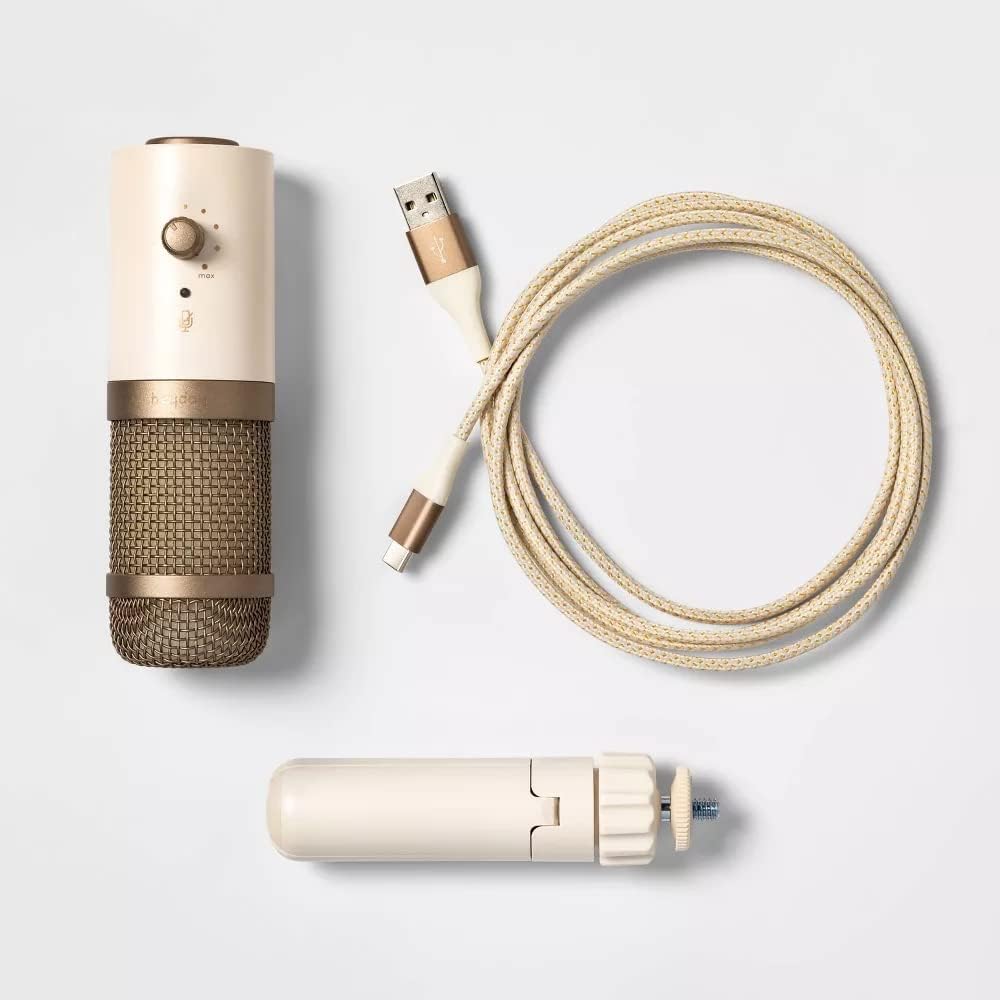
Figure 2: Microphone with included accessories
Parentah Operasi
Once connected, your Desktop Microphone is ready for use. Here are the basic operating functions:
- Kontrol volume: Use the volume knob on the microphone to adjust the output level of your audio. Turn clockwise to increase volume, counter-clockwise to decrease.
- Fungsi mute: Press the mute button to instantly silence the microphone. Press it again to unmute. An indicator light may show the mute status (refer to microphone for specific light behavior).
- Pamakéan: The cardioid pickup pattern primarily captures sound from directly in front of the microphone, reducing background noise. Position the microphone appropriately for your voice or sound source. This microphone is ideal for:
- Audio and video calls
- Online meetings
- Rékam sora
- Podcasting
Pangropéa
To ensure the longevity and optimal performance of your Desktop Microphone, follow these maintenance guidelines:
- beberesih: Use a soft, dry cloth to wipe down the exterior of the microphone. Do not use liquid cleaners or abrasive materials, as they may damage the finish or internal components.
- Panyimpenan: Lamun teu dipake, nyimpen mikropon dina tiis, tempat garing jauh ti sinar panonpoé langsung jeung hawa ekstrim.
- Penanganan: Avoid dropping the microphone or subjecting it to strong impacts, which can damage the internal condenser element.
Pamérésan masalah
If you encounter issues with your Desktop Microphone, refer to the following common troubleshooting steps:
| Masalah | Mungkin Cukang lantaranana | Solusi |
|---|---|---|
| Taya kaluaran sora tina mikropon. | Microphone not properly connected or muted. Incorrect input device selected. |
|
| Audio nu handap atawa distorsi. | Volume too low, microphone too far, or interference. |
|
| Headphones not working with aux port. | Headphones not fully plugged in or faulty. |
|
spésifikasi
| Fitur | Rincian |
|---|---|
| merek | Generik |
| Nomer modél | 080-08-1682 |
| Téhnologi konektipitas | USB |
| Faktor Bentuk Mikropon | Mini, Desktop |
| Pola Polar | Saarah (Cardioid) |
| Sensitipitas | -33dB +/- 3dB |
| Rentang Frékuénsi | 100 Hz - 10 kHz |
| Rasio Signal-to-Noise | 33 dB |
| Platform hardware | PC, Mac |
| Sumber Daya | Kabel Listrik (USB) |
| Komponén Kaasup | Microphone, Adjustable Stand, USB-C to USB-A Cable |
| Item Beurat | 11.6 ons |
| Ukuran Paket | 7.44 x 4.8 x 2.28 inci |
| Warna | Stone White, Metallic Gold |
| UPC | 191907665734 |
Garansi sareng Rojongan
For warranty information and customer support, please refer to the product packaging or contact the manufacturer directly. Keep your purchase receipt for warranty claims.
Pabrikan: Target Brands
For further assistance, you may visit the product's official support page or contact their customer service.