Bubuka
This manual provides comprehensive instructions for the installation, proper use, and maintenance of your new Generic PC + TPU 2-in-1 phone case, which includes a tempered glass screen protector. This product is specifically designed for the Brondi Amico Smartphone 4G, model DJL-XBQ, to offer robust protection and enhanced functionality.
Eusi pakét
Punten parios yén sadaya barang anu didaptarkeun di handap aya dina pakét anjeun:
- 1 x Generic PC + TPU 2-in-1 Phone Case (Model DJL-XBQ)
- 1 x Pelindung Layar Kaca Tempered
- 1 x Adhesive Metal Finger Ring Support
Fitur konci
- Dual-Layer Protection: Combines a durable PC hard back panel with a soft silicone frame for comprehensive impact resistance.
- Shock Airbags: Features four-corner shock airbags to absorb impacts and protect against drops.
- Screen and Camera Protection: The case design is elevated around the camera and screen edges to prevent direct contact with flat surfaces.
- Integrated Finger Ring: Includes an adhesive metal finger ring that provides a secure grip, functions as a multi-angle stand, and is compatible with magnetic car mounts.
- Enhanced Aesthetics: Frosted surface with a delicate feel and a "Golden Reflect Light" pattern.
- High-Definition Pattern Layer: The back panel features a 4-layer combination for durability and clear pattern display.
- Pelindung Layar Kaca Tempered: Offers 9H high hardness, shatterproof design, perfect adhesion, 99.9% super transparency, and anti-fingerprint properties.
Setup sareng Instalasi
1. Masang Casing Telepon
Follow these steps to correctly install the protective case onto your Brondi Amico Smartphone 4G.
- Ensure your phone is clean and free of dust or debris.
- Gently insert the bottom edge of your phone into the soft silicone frame of the case.
- Press the remaining edges of the phone into the case, ensuring all corners are securely fitted.
- Verify that all buttons and ports are accessible and aligned correctly with the case cutouts.

Figure 1: The Generic PC + TPU 2-in-1 phone case.
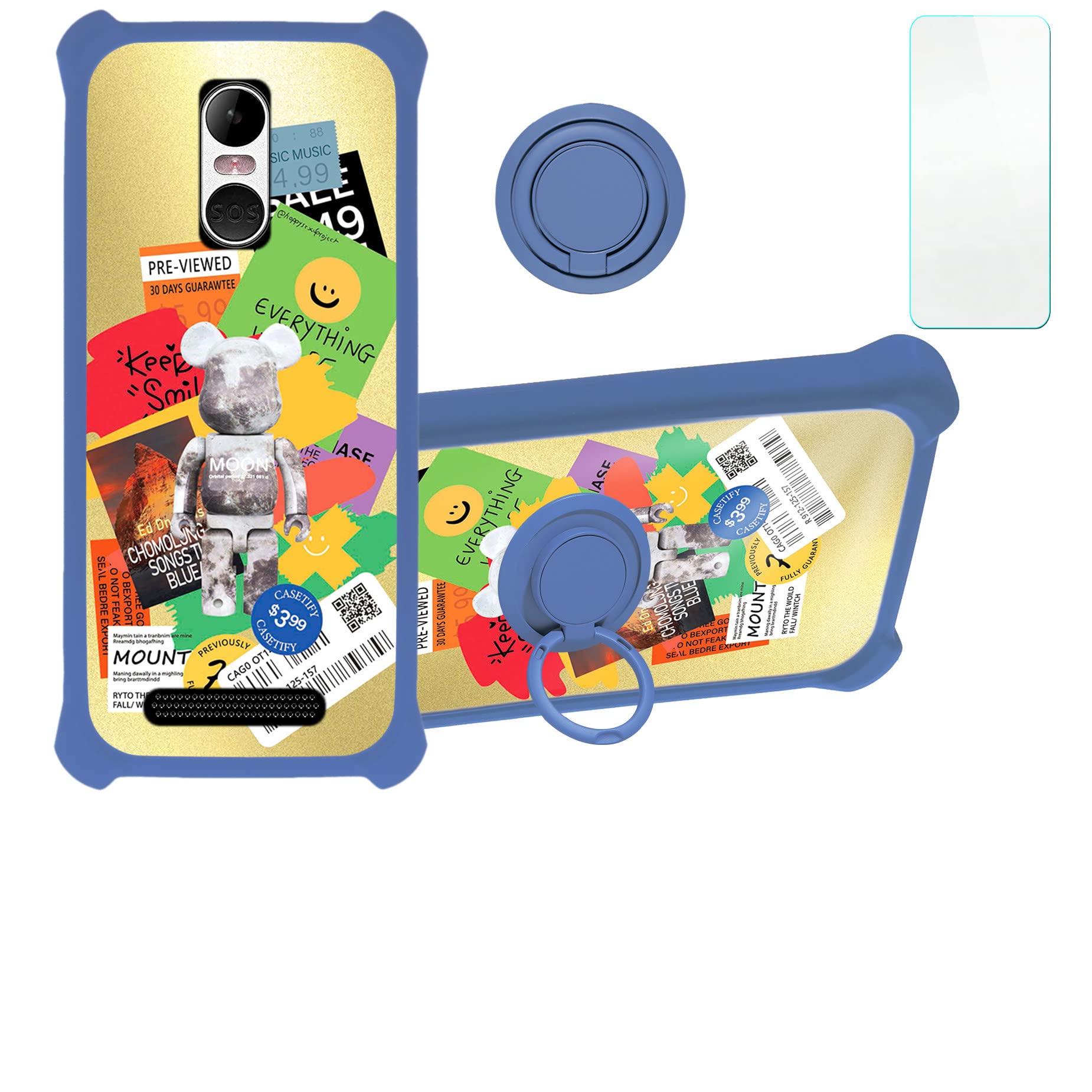
Figure 2: Illustration of the case's shockproof features, including 2-in-1 hard PC and soft silicone construction with four-corner thickening and shock airbags.
2. Masang Pelindung Layar Kaca Tempered
For optimal screen protection, install the tempered glass carefully.
- Clean your phone screen thoroughly with the provided cleaning wipes (if included) to remove all dust, smudges, and fingerprints.
- Use the dust-absorber sticker to pick up any remaining dust particles.
- Carefully peel off the protective film from the adhesive side of the tempered glass.
- Align the screen protector precisely with your phone's screen, ensuring the cutouts for the camera and sensors match.
- Gently lower the screen protector onto the screen. It will adhere automatically.
- If any bubbles appear, gently push them towards the edges using a soft cloth or squeegee.

Figure 3: The tempered glass screen protector.
Figure 4: Key features of the tempered glass screen protector, such as 9H hardness and shatterproof design.
Figure 5: Demonstration of the screen protector's scratch-proof properties, effectively preventing damage from sharp objects.
3. Attaching the Adhesive Metal Finger Ring Support
The finger ring can be attached directly to the case or used separately.
- Clean the desired attachment area on the back of your phone case.
- Peel off the protective film from the adhesive side of the metal finger ring.
- Firmly press the finger ring onto the cleaned area for at least 30 seconds to ensure strong adhesion.
- Allow the adhesive to set for a few hours before heavy use.

Figure 6: The adhesive metal finger ring support.
Parentah Operasi
1. Using the Finger Ring as a Stand
The integrated finger ring can be rotated 360 degrees and used as a convenient stand for your phone, allowing for hands-free viewdina orientasi potret sareng lanskap.
- Pull out the finger ring until it clicks into an open position.
- Rotate the ring to your desired angle to prop up your phone on a flat surface.
Figure 7: The finger ring functioning as a multi-angle stand.
2. Kompatibilitas Dudukan Mobil Magnetik
The metal finger ring is designed to be compatible with magnetic car mounts, allowing for easy and secure attachment in your vehicle. Catetan: This case does not support wireless charging due to the metal ring.
- Ensure your car mount has a magnetic surface.
- Simply place the back of your phone case (where the finger ring is located) onto the magnetic car mount.
- Adjust the phone's position as needed for optimal viewing.

Figure 8: The phone case securely attached to a magnetic car mount.
3. One-Hand Operation
The finger ring enhances grip, making it easier to operate your Brondi Amico Smartphone 4G with one hand, especially when reaching for the top corners of the screen.
Figure 9: The finger ring aids in comfortable one-hand operation, allowing easier access to the entire screen.
Pangropéa
To ensure the longevity and appearance of your phone case and screen protector, follow these maintenance guidelines:
- Ngabersihan Kasus: Lap wadahna sacara rutin nganggo kaén anu lemes,amp lawon. Pikeun kokotor anu bandel, larutan sabun anu hampang tiasa dianggo, dituturkeun ku ngusap nganggo lawon anu bersih sareng garing. Hindarkeun bahan kimia anu keras atanapi pembersih anu abrasif.
- Ngabersihkeun Pelindung Layar: Use a microfiber cloth to gently wipe the screen protector. For smudges, a screen cleaner spray designed for electronics can be applied to the cloth (not directly to the screen) and then wiped.
- Hindarkeun Suhu Ekstrim: Do not expose the case or screen protector to extreme heat or cold, as this can affect the material integrity and adhesive.
- Mariksa sacara teratur: Periodically check the case and screen protector for any signs of wear or damage. Replace if significant damage is observed to maintain optimal protection.
Pamérésan masalah
If you encounter any issues with your phone case or screen protector, refer to the following common solutions:
- Casingna Henteu Pas Kalayan Bener:
- Ensure you have the correct model case for your Brondi Amico Smartphone 4G (Model DJL-XBQ).
- Remove the case and re-install, ensuring all corners are seated correctly.
- Gelembung di handapeun Pelindung Layar:
- Small bubbles often disappear within 24-48 hours.
- For larger bubbles, gently lift the nearest edge of the screen protector and re-apply, pushing the bubble out with a soft cloth. Ensure the screen is dust-free before re-application.
- Finger Ring Losing Adhesion:
- Ensure the surface was clean and dry before initial application.
- Avoid repositioning the ring frequently, as this can weaken the adhesive.
- If the adhesive is compromised, a new adhesive pad may be required (not included).
spésifikasi
| merek | Generik |
| Model Telepon cocog | Brondi AMICO SMARTPHONE 4G |
| Nomer modél | DJL-XBQ |
| Bahan | PC hard back panel + soft silicone frame + metal support finger ring |
| Faktor Bentuk | Solid protection with support |
| Fitur tambahan | Finger ring + stand + car bracket magnetic suction |
| Pola | Golden Reflect Light |
| Ukuran barang (L x W x H) | 0.39 x 0.39 x 0.39 inci (kira-kira) |
Garansi sareng Rojongan
This product is covered by the standard manufacturer's warranty. For specific warranty details, returns, or technical support, please refer to the seller or the platform where the product was purchased. Keep your purchase receipt as proof of purchase.
For further assistance, please contact the customer service department of the retailer.


