1. Bubuka
This manual provides essential information for the safe and effective use of your OTL Technologies Pokemon Pikachu Wireless Bluetooth Kids Headphones, model PK0980. Please read this manual thoroughly before using the product and retain it for future reference.
2. Émbaran Kasalametan
Pikeun mastikeun operasi anu aman sareng nyegah karusakan, perhatikeun pancegahan ieu:
- Kesesuaian Umur: Headphone ieu cocog pikeun murangkalih umur 3 taun ka luhur.
- Kontrol volume: The headphones feature two safe volume settings: 85 dB and 95 dB. Always select the appropriate volume level for the listening environment to protect hearing. Prolonged exposure to loud noise may cause hearing damage.
- Tahan cai: Produk ieu teu tahan cai. Avoid exposure to water or moisture to prevent damage.
- beberesih: Do not use harsh chemicals or strong detergents to clean the headphones. Use a soft, dry cloth.
- Pembongkaran: Do not attempt to disassemble, repair, or modify the headphones. This will void the warranty and may cause damage or injury.
- Kasadaran Lingkungan: Do not use headphones in situations where an inability to hear surrounding noise may present a danger (e.g., while cycling, driving, or near operating machinery).
- Kasalametan batré: The headphones contain a Lithium-ion battery. Do not expose to extreme temperatures or dispose of in fire.
3. Eusi Paket
Pastikeun yén sadaya item aya dina bungkusan:
- 1x OTL Technologies Pokemon Pikachu Wireless Bluetooth Kids Headphones
- 1x Kabel Ngecas USB Tipe-C
- 1x 3.5mm Audio Sharing Cable
- 1x Instruction Leaflet (this manual)

Image: Headphones and accessories neatly packaged in the box.
4. Produk Langkungview
Biasakeun diri sareng komponén sareng kadali headphone anjeun.
4.1 Headphone Structure

Gambar: Hareupeun view tina headphone, nunjukkeunasing the Pikachu design on the earcups and the adjustable headband.

Gambar: Top view of the headphones, showing the foldable design and the headband's cushioning.
4.2 Kontrol jeung palabuhan

Image: Close-up of the right earcup, displaying the power button, volume controls, and charging port.

Gambar: Detil view of the volume limit switch, allowing selection between 85 dB and 95 dB.
- Tombol Daya: Dipaké pikeun ngahurungkeun / mareuman headphone sareng pikeun ngapasangkeun Bluetooth.
- Tombol Volume: Saluyukeun polumeu dengekeun.
- Volume Limit Switch: Toggle between 85 dB and 95 dB maximum volume levels.
- Port USB Tipe-C: Pikeun ngecas headphone.
- 3.5mm Audio Jack: Pikeun sambungan kabel ngagunakeun kabel audio kaasup.
- Mikropon: Terintegrasi pikeun nelepon tanpa nganggo leungeun.
4.3 Headband adjustable

Image: Close-up of the extendable headband, showing numbered adjustment points for a customized fit.
The headband is extendable to provide a flexible and customized fit for various head sizes. Adjust both sides evenly for optimal comfort.
5. Setélan
5.1 Ngecas Headphone
Saméméh dipaké munggaran, eusian pinuh headphone.
- Sambungkeun kabel ngecas USB Tipe-C kana port ngecas dina headphone.
- Sambungkeun tungtung kabel USB anu sanésna kana sumber daya USB anu cocog (contona, port USB komputer, adaptor témbok USB).
- Indikator LED bakal némbongkeun status ngecas. Ngecas pinuh peryogi waktos sakitar 2 jam.
- Once fully charged, the LED indicator will change (refer to the instruction leaflet for specific LED behavior) and the headphones will provide up to 24 hours of playback time.
5.2 Nyapasangkeun Bluetooth
Pikeun nyambungkeun headphone anjeun sacara nirkabel ka alat:
- Pastikeun headphone dicas.
- Pencét jeung tahan tombol Daya nepi ka indikator LED hurung, nunjukkeun mode papasangan.
- On your device (e.g., smartphone, tablet, laptop), enable Bluetooth and search for available devices.
- Select "OTL Pikachu" or a similar name from the list of found devices.
- Once connected, the LED indicator will change (e.g., solid blue) and a confirmation tone may sound.
- The headphones have a working distance of up to 10 meters from the paired device.
5.3 Wired Connection (Optional)
You can use the headphones with the included 3.5mm audio cable for devices without Bluetooth or when the battery is depleted.
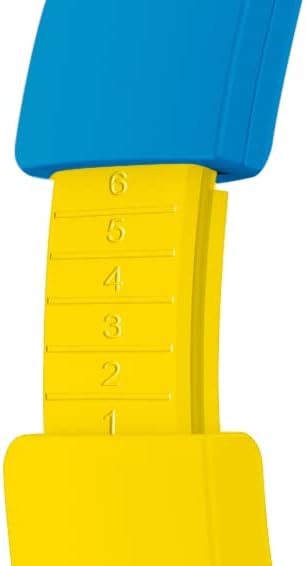
Image: The included 3.5mm audio cable for direct connection to devices.
- Colokkeun hiji tungtung kabel audio 3.5mm kana jack audio dina headphone.
- Colokkeun tungtung nu sejen kana kaluaran audio 3.5mm alat Anjeun.
- Headphone bakal beroperasi dina modeu pasif, sareng fungsi Bluetooth bakal dinonaktipkeun.
6. Ngoperasikeun Headphone
6.1 Daya Hurung/Pareuman
- Pikeun Ngahurungkeun: Press and hold the Power button for approximately 3 seconds. The LED indicator will light up.
- Pikeun mareuman: Press and hold the Power button for approximately 3 seconds. The LED indicator will turn off.
6.2 Nyaluyukeun Volume
- Volume Up: Pencét tombol '+'.
- Volume Turun: Pencét tombol '-'.
- Setting Maximum Volume: Use the volume limit switch (85 dB / 95 dB) located on the earcup to set the desired maximum safe listening level.
6.3 Puteran musik sareng Telepon
- Puter / Reureuh: Press the Power button once during music playback.
- Lagu salajengna: Pencét jeung tahan tombol '+'.
- Lagu Sateuacanna: Pencét jeung tahan tombol '-'.
- Ngajawab / mungkas Telepon: Press the Power button once during an incoming call or to end an active call.
- Nolak Telepon: Press and hold the Power button during an incoming call.
6.4 Using the Sharing Cable
The included sharing cable allows two pairs of headphones to listen to the same audio source simultaneously.
- Connect the main 3.5mm audio cable from your audio source to the first pair of headphones.
- Connect one end of the sharing cable to the available 3.5mm audio jack on the first pair of headphones.
- Connect the other end of the sharing cable to the 3.5mm audio jack on the second pair of headphones.
- Duanana headphone ayeuna bakal nampi audio tina sumber anu sami.
7. Pangropéa
- beberesih: Wipe the headphones with a soft, dry, lint-free cloth. Do not use liquid cleaners or aerosols.
- Panyimpenan: Nalika henteu dianggo, simpen headphone dina tempat anu tiis, garing, jauh tina sinar panonpoé langsung sareng suhu anu ekstrim. Desain foldable ngamungkinkeun pikeun neundeun kompak.
- Perawatan batré: To prolong battery life, avoid fully discharging the battery frequently. Charge the headphones regularly, even if not in constant use.
8. Cara ngungkulan
| Masalah | Mungkin Cukang lantaranana | Solusi |
|---|---|---|
| Headphone teu hurung. | Batré béak. | Charge the headphones using the provided USB Type-C cable. |
| Teu bisa masangkeun via Bluetooth. | Headphone henteu dina mode papasangan; alat Bluetooth pareum; jauh teuing ti alat. | Ensure headphones are in pairing mode (flashing LED). Turn Bluetooth on your device. Move headphones closer to the device (within 10 meters). Try restarting both devices. |
| Teu aya sora nalika disambungkeun. | Volume too low; incorrect audio source selected; wired cable not fully inserted. | Increase headphone and device volume. Check if the correct audio output is selected on your device. Ensure the 3.5mm cable is fully inserted if using wired mode. Check the volume limit switch. |
| Sorana distort atawa pareum. | Batré lemah; gangguan; jauh teuing tina alat. | Charge the headphones. Move away from other wireless devices. Reduce distance to the paired device. |
9. Spésifikasi
| Nomer modél | PK0980 |
| Téhnologi konektipitas | Nirkabel (Bluetooth) |
| Téknologi Komunikasi Nirkabel | Bluetooth |
| Rentang Umur (Deskripsi) | Children (3+ years) |
| Bahan | palastik |
| Waktu Ngecas | Kurang leuwih 2 Jam |
| Dianjurkeun Paké | Audio Pribadi |
| Alat nu cocog | Laptop, Smartphones, Tablets (Bluetooth enabled) |
| Tipe Kontrol | Volume Control, Remote |
| Item Beurat | 160 gram |
| Tingkat Résistansi Cai | Teu Tahan Cai |
| Fitur tambahan | Microphone included, Foldable design |
| Rata Kahirupan Batré | 24 Jam |
| Komposisi sél batré | Litium-ion |
| Warna | Konéng |
| Panempatan Ceuli | Dina ceuli |
| Faktor Bentuk | Leuwih-ceuli |
| Impedansi | 32 ohm |
| Kontrol bising | Isolasi Sora |
| Réspon Frékuénsi | 20000 Hz |
| Sensitipitas | 85 dB |
| Jack headphone | 3.5mm Jack |
| Dimensi produk | 16 x 7 x 17 cm |