Selelekela
Thank you for choosing the Macap MI40 Touch Instant Burr Coffee Grinder. This manual provides essential information for the safe and efficient operation, maintenance, and troubleshooting of your new coffee grinder. Please read this manual thoroughly before using the appliance and retain it for future reference.
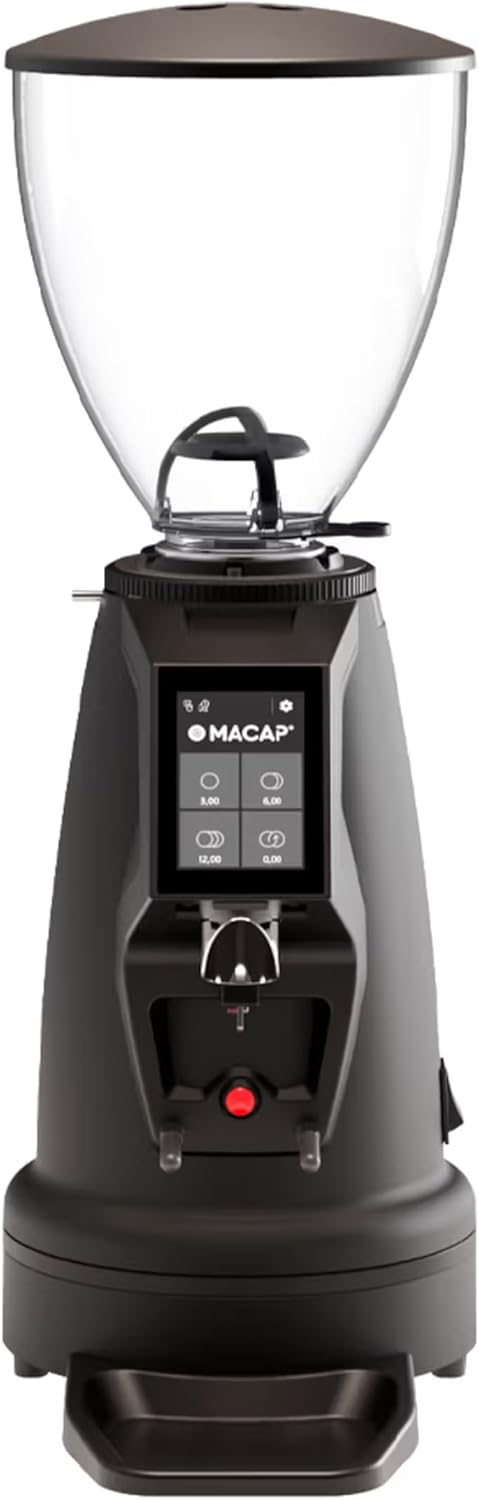
Setšoantšo sa 1: Pele view of the Macap MI40 Touch Instant Burr Coffee Grinder, showcasing its compact design and touchscreen interface.
Litaelo tsa Bohlokoa tsa Tšireletso
Kamehla latela mehato ea ts'ireletso ea mantlha ha u sebelisa lisebelisoa tsa motlakase ho fokotsa kotsi ea mollo, ts'okelo ea motlakase, le/kapa kotsi ho batho, ho kenyelletsa le tse latelang:
- Bala litaelo tsohle.
- Se ke oa qoelisa sesebelisoa, thapo, kapa polaka ka metsing kapa maro a mang.
- Tlhokomelo e haufi ea hlokahala ha sesebelisoa leha e le sefe se sebelisoa ke bana kapa haufi le bona.
- Tlosa plug ha e sa sebelisoe, pele u kenya kapa u tlosa likarolo tse ling, le pele u hloekisa.
- Qoba ho kopana le likarolo tse tsamaeang.
- Se ke oa sebelisa sesebelisoa leha e le sefe ka thapo kapa polaka e senyehileng kapa kamora hore sesebelisoa se sebetse hampe, kapa se oele kapa se senyehile ka tsela efe kapa efe.
- Tšebeliso ea li-attachments tse sa khothaletsoang kapa tse rekisoang ke moetsi li ka baka mollo, motlakase, kapa kotsi.
- Se sebelise kantle.
- Se ke oa lumella mohala o leketla moeling oa tafole kapa k'haontareng, kapa oa ama libaka tse chesang.
- Sheba hopper bakeng sa boteng ba lintho tse tsoang kantle ho naha pele u e sebelisa.
- Sesebelisoa sena ke sa ts'ebeliso ea lapeng feela.
Lisebelisoa tsa Sehlahisoa
Familiarize yourself with the main components of your MI40 Touch coffee grinder:
- Bean Hopper: Transparent container for whole coffee beans (1.2 kg capacity).
- Sekoaelo sa Hopper: Covers the bean hopper to keep beans fresh.
- Grind Adjustment Collar: Stepless micrometric adjustment for precise grind size control.
- 3.5'' Touchscreen Display: User interface with programmable doses and built-in LED light.
- Grind Outlet: Where ground coffee is dispensed.
- Portafilter Fork: Adjustable support for holding portafilters during grinding, with anti-vibration coating.
- Drip Tray: Removable tray to catch excess coffee grounds.
- Power switjha: Located on the side/rear of the unit.
- 65mm Flat Burrs: High-efficiency burrs for consistent grinding.

Setšoantšo sa 2: Lehlakore view illustrating the hopper, grind adjustment collar, and portafilter fork.

Figure 3: Close-up of the bean hopper interior, showing the bean flow mechanism.
Seta le Tšebeliso ea Pele
- Ho phutha: Tlosa ka hloko likarolo tsohle tsa sephutheloana. Boloka sephutheloana bakeng sa lipalangoang kapa polokelo ea nako e tlang.
- Sebaka: Place the grinder on a stable, flat, and dry surface. Ensure adequate ventilation around the unit.
- Kopanya Hopper: Securely place the bean hopper onto the grinder body. Ensure it clicks into place if applicable.
- Khokelo ea Matla: Hokela thapo ea motlakase sebakeng sa motlakase se theohileng fatše.
- Tlhoekiso ea Pele: Before first use, wipe down the exterior with a damp cloth. The burrs and grind path are typically clean from the factory, but a small amount of sacrificial coffee can be ground through to season the burrs.
Litaelo tsa Ts'ebetso
The MI40 Touch offers intuitive operation through its 3.5'' touchscreen and multiple grinding modes.
1. Filling the Hopper
Lift the hopper lid and pour whole coffee beans into the hopper. Replace the lid securely.
2. Adjusting Grind Size
The MI40 Touch features stepless micrometric grind adjustment. To adjust, rotate the grind adjustment collar located below the hopper. Rotate clockwise for finer grinds and counter-clockwise for coarser grinds. Make small adjustments and test the grind to achieve the desired consistency for your brewing method (e.g., espresso, drip, moka pot, cold brew).

Figure 4: Grind adjustment collar for stepless precision control, allowing fine-tuning of particle size.
3. Using the Touchscreen Interface
The 3.5'' touchscreen allows for programming up to 4 doses and selecting operating modes. The built-in LED light improves visibility in low-light conditions.

Figure 5: Close-up of the 3.5'' touchscreen display, showing programmable dose options.
Dose Programming:
- From the home screen, tap on a dose button (e.g., single shot, double shot) to select it.
- To program a dose, press and hold the desired dose button until the programming interface appears.
- Adjust the grinding time using the '+' and '-' buttons.
- Press the checkmark or save icon to confirm and save the new dose setting.
4. Mekhoa ea ho sebetsa
The MI40 Touch supports three primary operating modes, automating workflow for various needs:
- Mokhoa o Tloaelehileng: Select a pre-programmed dose, place your portafilter on the fork, and press the corresponding dose button to start grinding. The grinder will stop automatically after the set time.
- Push and Grind Mode: Place your portafilter on the fork. The grinder will start grinding when the portafilter activates the switch and will continue as long as the portafilter is held in place. Release the portafilter to stop grinding.
- Barista Hands-Free Mode: Designed for continuous grinding without holding the portafilter. The grinder will start when the portafilter is inserted and stop when removed. This mode is ideal for high-volume use in cafes or busy home settings.
Refer to the video below for a visual guide on the interface and operating modes:
Video 1: MACAP MI Series Interface Specifications. This video demonstrates the touchscreen interface, dose customization, and different operating modes (Standard, Push and Grind, Barista) for the MI series grinders, providing a comprehensive overview of user interaction.
Tlhokomelo le Tlhoekiso
Regular cleaning and maintenance ensure optimal performance, consistent grind quality, and longevity of your grinder.
Ho Hloekisa Letsatsi le Letsatsi
- Drip Tray: Empty and wipe the drip tray daily to remove accumulated coffee grounds and maintain cleanliness.
- Kantle: Hlakola bokantle ba grinder ka bonolo, damp cloth. Do not use abrasive cleaners or immerse the unit in water, as this can damage electronic components.
- Grind Outlet: Use a brush or vacuum to clear any visible coffee grounds from the grind outlet to prevent blockages.
Weekly / Bi-Weekly Cleaning (Burr Cleaning)
To maintain grind consistency and prevent clogging, clean the burrs regularly. Frequency depends on usage and coffee bean oiliness.
- Tlosa: Always unplug the grinder from the power outlet before performing any cleaning or maintenance on the burrs.
- Remove Hopper: Empty the bean hopper and remove it from the grinder body.
- Remove Upper Burr: Carefully unscrew or unlock the upper burr assembly according to the grinder's design. Refer to specific diagrams in the full product manual if available.
- Hloekisa Brush: Use a stiff brush (a dedicated grinder brush is recommended) to brush away all coffee grounds and oils from both the upper and lower burrs, as well as the burr chamber.
- Kopanya hape: Reassemble the burr components and hopper, ensuring all parts are securely in place. Test the grind adjustment after reassembly.
- Grinder Cleaning Tablets (Optional): For a deeper clean, you can use specialized grinder cleaning tablets (e.g., Grindz). Follow the product instructions for these tablets, typically by grinding them through the machine.
Ho batle phoso
This section addresses common issues you might encounter with your MI40 Touch grinder and provides potential solutions.
| Bothata | Lebaka le ka khonehang | Tharollo |
|---|---|---|
| Grinder ha e bulele. | Not plugged in; Power switch off; Circuit breaker tripped; Internal fuse. | Ensure power cord is securely plugged in; Turn power switch to ON; Reset circuit breaker; If problem persists, contact support. |
| No coffee grounds dispensed. | Hopper empty; Grind chute clogged; Burrs jammed by foreign object (e.g., stone). | Fill hopper with beans; Clean grind chute thoroughly; Unplug and inspect burrs for obstructions, then carefully remove. |
| Inconsistent grind size. | Burrs are dirty or worn; Grind setting too coarse/fine for desired brew method; Beans are stale or oily. | Clean burrs thoroughly; Adjust grind setting incrementally; Use fresh, quality beans. Consider burr replacement if wear is evident. |
| Grinder is unusually loud or makes grinding noise without beans. | Foreign object in burrs; Loose components; Burrs misaligned. | Unplug and inspect burrs for foreign objects; Ensure all components are securely fastened; Contact customer support if noise persists or burrs seem misaligned. |
| Touchscreen unresponsive or displaying errors. | Temporary software glitch; Power fluctuation. | Unplug the grinder for 30 seconds, then plug back in and restart. If the issue persists, contact customer support. |
If the problem persists after attempting these solutions, please contact Macap customer support for further assistance.
Litlhaloso
| Sebopeho | Lintlha |
|---|---|
| Mohlala | MI40 Touch |
| Brand | Macap |
| Mofuta oa Burr | 65mm Flat Burrs |
| Sila Phetoho | Stepless Micrometric |
| Bokhoni ba Hopper | 1.2 lik'hilograma |
| Pontšo | 3.5'' Touchscreen with LED Light |
| Mekhoa ea ho sebetsa | Standard, Push and Grind, Barista Hands-Free |
| Litekanyo tsa Sehlahisoa (L x W x H) | 12"L x 7.63"W x 22"H |
| Boima ba Ntho | 19.58 liponto |
| Mmala | Ntsho |
| Moetsi | MACAP |
| Letsatsi la Pele la ho Fumana | La 19 Hlakubele 2025 |
Warranty le Tšehetso
For detailed warranty information and customer support, please refer to the official documentation included with your purchase or visit the official Macap website. Ensure you have your product's model number (MI40 Touch) and purchase date available when contacting support for efficient service.
Moetsi: MACAP
Official U.S. Branch: Pro Coffee Gear LLC


