Selelekela
This manual provides detailed instructions for the setup, operation, and maintenance of your Denon DP-3000NE Fully Automatic Analog Turntable. This turntable features a robust base construction designed to minimize vibration, a direct drive motor, and a rigid die-cast aluminum platter for stable rotation at 33 1/3, 45, or 78 rpm. The S-shaped tonearm includes a removable headshell, allowing for various MM or MC turntable cartridges. An automatic start/stop system ensures gentle handling of your records, and a built-in phono equalizer offers flexible connectivity options.

Figure 1: Denon DP-3000NE Turntable with dust cover.
Litaba tsa Sephutheloana
Pele o tsoela pele ka setup, ka kopo etsa bonnete ba hore likarolo tsohle li teng:
- Denon DP-3000NE Turntable Unit
- Adapter ea 45 RPM
- Counterweight & Sub Counterweight
- Headshell and Dummy Headshell (for calibration)
- Cable ea RCA
- Tataiso ea ho Qala ka Potlako
- Screwdriver
Litaelo tsa ho seta
- Ho phutha: Tlosa ka hloko likarolo tsohle tsa sephutheloana. Boloka sephutheloana bakeng sa lipalangoang kapa polokelo ea nako e tlang.
- Sebaka: Place the turntable on a stable, level surface away from direct sunlight, heat sources, and excessive vibration. The heavier base construction and sound-insulating feet are designed to minimize external vibrations.
- Ho Kenya Platter: Gently place the die-cast aluminum platter onto the spindle.
- Tonearm Assembly:
- Attach the headshell (with the pre-installed MM cartridge) to the S-shaped tonearm.
- Hokela counterweight karolong e ka morao ea tonearm.
- Adjust the counterweight to balance the tonearm horizontally. Refer to the Quick Start Guide for detailed instructions on setting tracking force and anti-skate.
- Khokahano:
- Connect the RCA cable from the turntable's "PHONO OUTPUT" to your ampsefepi kapa moamoheli.
- Haeba oa hau amplifier has a dedicated phono input, connect directly. If not, utilize the turntable's built-in phono equalizer. This can be bypassed if your amplifier has its own phono stage.
- Connect the ground wire (SIGNAL GND) to your amplifier's ground terminal to minimize hum.
- Connect the power cable (AC IN) to an appropriate power outlet.

Figure 2: Rear panel connections for the Denon DP-3000NE.

Figure 3: Denon DP-3000NE integrated into a home audio setup.
Litaelo tsa Ts'ebetso
- Matlafatsa: Ensure the turntable is connected to power.
- Rekoto ea Sebaka: Carefully place a vinyl record on the platter. For 45 RPM records with a large center hole, use the provided 45 RPM adapter.
- Khetha Lebelo: Use the speed selector to choose the appropriate rotation speed (33 1/3, 45, or 78 rpm) for your record.
- Start Playback (Automatic): Press the "START" button. The tonearm will automatically move to the beginning of the record and gently lower the stylus onto the groove.
- Start Playback (Manual): Alternatively, you can manually lift the tonearm using the cueing lever, position it over the desired track, and then lower the lever to gently drop the stylus.
- Emisa Playback: Press the "STOP" button. The tonearm will automatically lift and return to its rest position, and the platter will stop rotating.
- Manuals Stop: You can also manually lift the tonearm using the cueing lever and return it to its rest.

Figure 4: Placing a record on the turntable.

Setšoantšo sa 5: Ho fetaview of the turntable controls and components.
Official Product Video: Denon DP-3000NE Premium Direct-Drive Turntable
Video 1: This video provides a visual overview of the Denon DP-3000NE turntable, highlighting its design, features, and operation in a home audio environment.
Likarolo tsa Bohlokoa
- Direct Drive Motor: Ensures stable and accurate platter rotation at 33 1/3, 45, and 78 RPM, minimizing speed fluctuations regardless of load.
- S-Shaped Tonearm: Designed to suppress vibration and optimize tracking for precise audio reproduction. It features a removable headshell for easy cartridge changes.
- Heavy Base Construction: Minimizes external vibrations, contributing to a clear and detailed sound output. The sound-insulating feet further enhance this stability.
- Automatic Start/Stop System: Provides gentle cueing and return of the tonearm, protecting your records from accidental scratches or damage.
- Built-in Phono Equalizer: Allows direct connection to amplifiers or receivers without a dedicated phono input. This equalizer can be bypassed if desired.
- Adjustable Insulator Feet: Sturdy, adjustable feet provide strength and further isolate the turntable from vibrations.
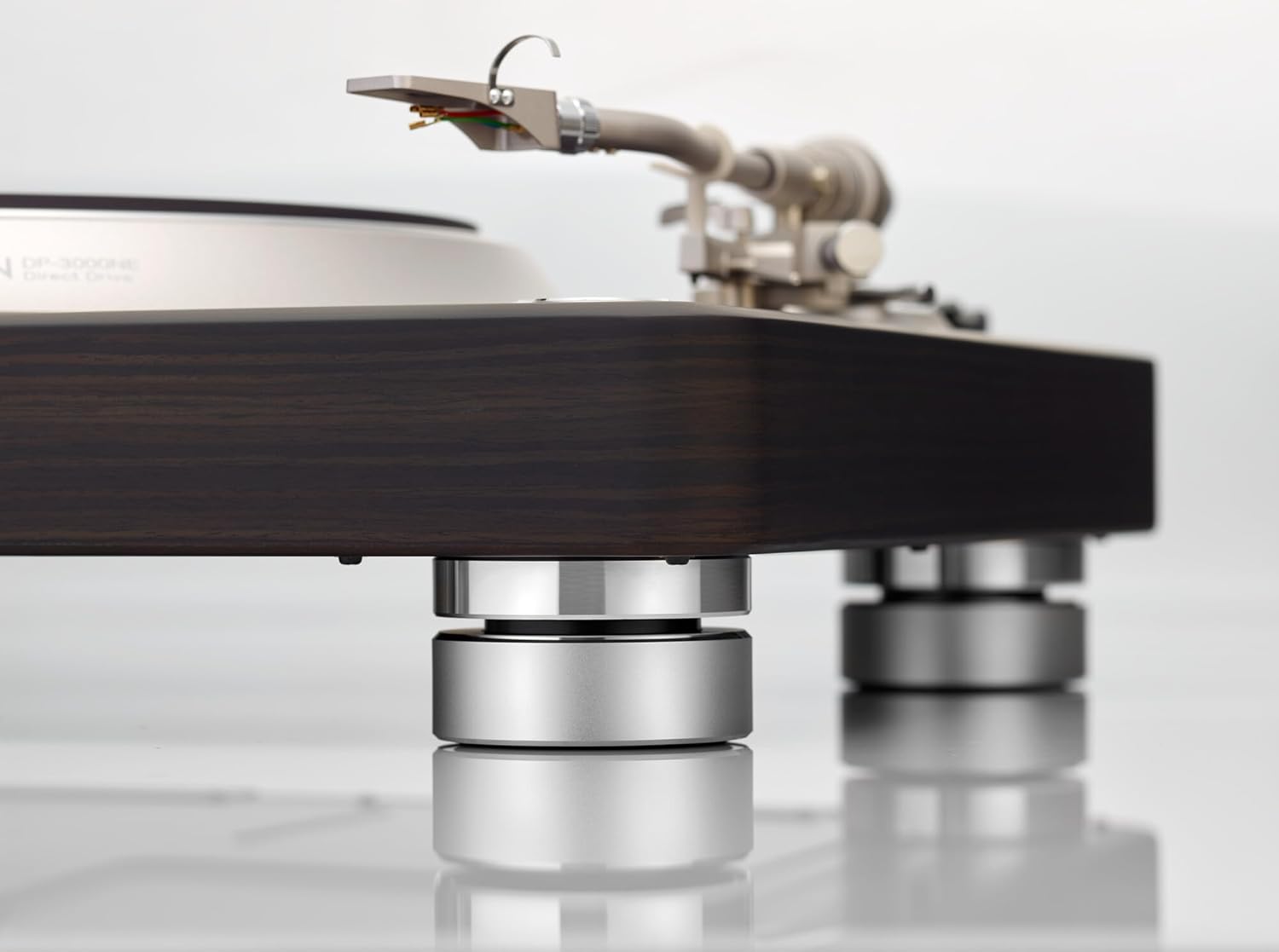
Figure 6: Detail of the turntable's sound-insulating feet.

Figure 7: The S-shaped tonearm with removable headshell.
Litlhaloso
| Litekanyo tsa Sehlahisoa | 15.5 x 19.7 x 7.3 lisenthimithara |
| Boima ba Ntho | 40.8 liponto |
| Nomoro ea Mohlala | DP3000NE |
| Brand | Denon |
| Lebelo le Leholo la Potoloho | 78 RPM |
| Lintho tse bonahalang | Lehong |
| Mmala | Dark Ebony |
| Lisebelisoa tse lumellanang | Speaker, Personal Computer, Laptop, Receiver |
Tlhokomelo
Regular maintenance ensures optimal performance and longevity of your turntable.
- Ho hloekisa: Use a soft, dry cloth to wipe the turntable chassis and dust cover. Avoid abrasive cleaners or solvents. For the stylus, use a specialized stylus brush and cleaning fluid, brushing gently from back to front.
- Sekoahelo sa Lerōle: Keep the dust cover closed when not in use to protect the platter and tonearm from dust and debris.
- Ho Nkela Stylus Sebaka: The stylus is a delicate component and will wear over time. Consult your cartridge manufacturer's recommendations for replacement intervals. A worn stylus can damage your records and degrade sound quality.
- Tlhokomelo ea Lirekoto: Always handle records by their edges. Store them vertically in protective sleeves to prevent warping and dust accumulation. Clean records regularly with a carbon fiber brush or a record cleaning system.
Ho batle phoso
Haeba u na le mathata, sheba mehato e latelang e tloaelehileng ea ho rarolla mathata:
- Ha ho Molumo:
- Check all cable connections (RCA, ground, power).
- Netefatsa ea hau amplifier/receiver is set to the correct input (Phono or Line, depending on phono equalizer setting).
- Verify the stylus is properly seated in the cartridge and not damaged.
- Distorted Sound or Skipping:
- Check tracking force and anti-skate settings. Incorrect settings can cause skipping or distortion.
- Ensure the record is clean and free of dust or debris.
- Verify the turntable is on a stable, level surface.
- Inspect the stylus for wear or damage.
- Lerata le Humming:
- Ensure the ground wire is securely connected to both the turntable and your ampmoqhobi.
- Check for interference from other electronic devices. Try moving the turntable or other components.
- Platter Not Spinning:
- Confirm the power cable is securely connected and the power outlet is active.
- Ensure the "START" button has been pressed.
For further assistance, please contact Denon customer support.
Warranty le Tšehetso
Your Denon DP-3000NE Turntable is manufactured by Denon. For warranty information, product registration, and technical support, please refer to the official Denon websaete kapa karete ea tiisetso e kenyellelitsoeng sehlahisoa sa hau.
Optional protection plans may be available from your retailer. For example, a 3-Year Protection Plan or a Complete Protect plan (monthly subscription) might be offered to cover eligible purchases.
Moetsi: Denon


