1. Selelekela
Thank you for choosing the Hama TH-130 Thermo/Hygrometer. This device provides accurate measurements of indoor temperature and humidity, helping you maintain a comfortable and healthy environment. Please read this instruction manual carefully before using the device to ensure proper operation and to prevent damage.
2. Litaelo tsa Tšireletso
- Keep the device away from moisture, direct sunlight, and extreme temperatures.
- Do not open the device. Repairs should only be performed by qualified personnel.
- Keep packaging materials away from children due to choking hazards.
- Use only the specified battery type. Incorrect battery usage can lead to leakage or explosion.
- Tlosa libeteri haeba sesebelisoa se ke ke sa sebelisoa nako e telele.
3. Likahare tsa Sephutheloana
- Hama TH-130 Thermo/Hygrometer
- Betri ea tšepe ea 1 x CR2025 Lithium (e kenyelelitsoe)
- Bukana ena ea Litaelo
4. Sesebelisoa Overview
The Hama TH-130 features a clear digital display for temperature and humidity readings. It is designed for tabletop placement.
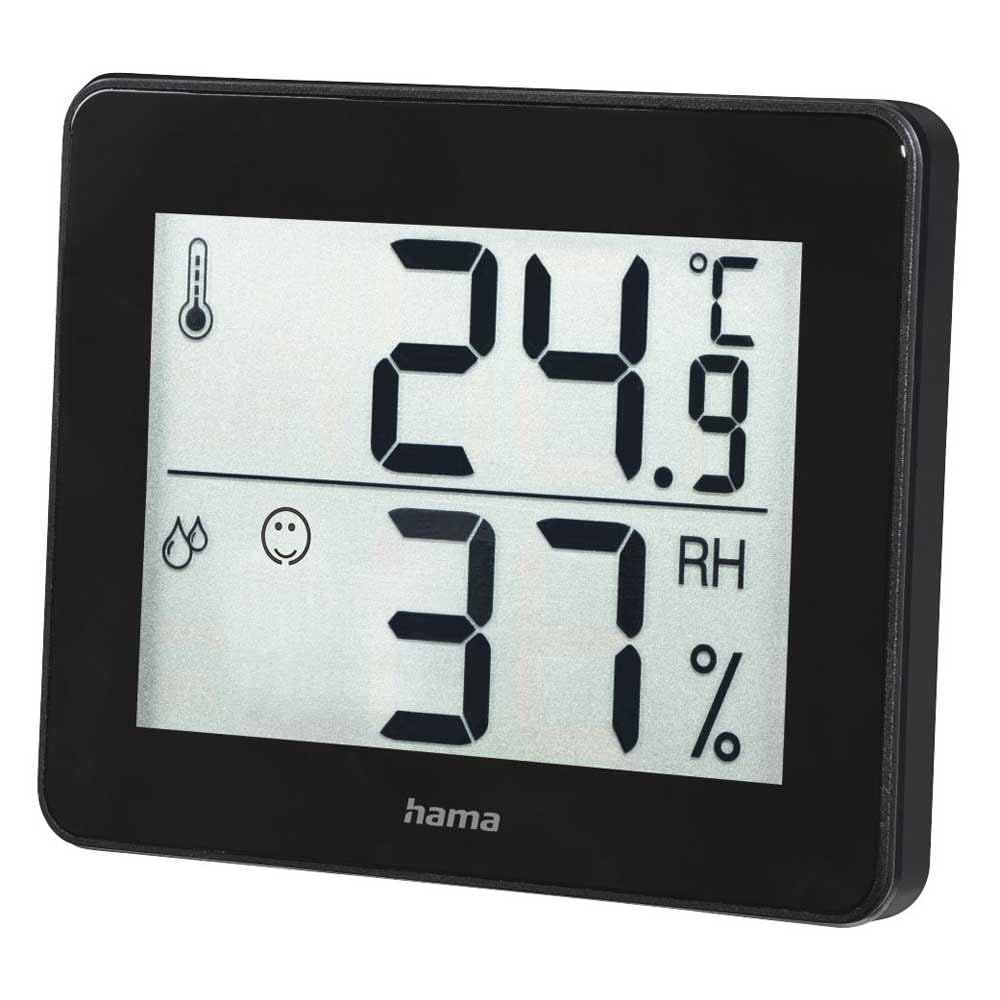
Setšoantšo sa 1: Pele view of the Hama TH-130 Thermo/Hygrometer. The display shows temperature in Celsius (24.9°C) at the top and relative humidity (37% RH) at the bottom. A thermometer icon indicates temperature, and a droplet icon with a smiley face indicates humidity levels.
4.1 Lintlha tsa Pontšo
- Pontšo ea Mocheso: Shows current temperature in degrees Celsius (°C).
- Pontšo ea Mongobo: Shows current relative humidity in percentage (RH%).
- Letšoao la Matšeliso: A smiley face icon indicates comfort levels based on humidity and temperature.
- Kamore ea Battery: E fumaneha kamorao ho sesebelisoa.
5. Seta
5.1 Ho kenya Betri
- Fumana sebaka sa betri ka morao ho sesebelisoa.
- Bula sekwahelo sa karolo ya betri.
- Insert one CR2025 Lithium Metal battery, ensuring correct polarity (+/-). The positive (+) side should face upwards.
- Koala sekoaelo sa karolo ea betri ka mokhoa o sireletsehileng.
- The display should now activate, showing current temperature and humidity readings.
5.2 Ho bea
- Place the thermo/hygrometer on a flat, stable surface, such as a tabletop.
- For accurate readings, avoid placing the device near heat sources (e.g., radiators, direct sunlight), air conditioning vents, or in areas with high drafts.
- Ensure the device is placed in the area where you wish to monitor temperature and humidity.
6. Ho sebetsa Sesebediswa
The Hama TH-130 is designed for straightforward operation. Once batteries are installed, it automatically begins displaying current temperature and humidity.
6.1 Ho bala Pontšo
- The upper large digits indicate the current temperature in degrees Celsius (°C).
- The lower large digits indicate the current relative humidity in percentage (RH%).
- The comfort indicator (smiley face) provides a quick visual reference for indoor climate comfort.
6.2 Comfort Level Interpretation
The comfort indicator typically changes based on the humidity level, sometimes also considering temperature. Refer to the following general guidelines:
- Sefahleho se Thabileng: Indicates optimal comfort (e.g., 20-25°C and 40-70% RH).
- Sefahleho se sa nke lehlakore: Indicates acceptable but not optimal conditions.
- Sefahleho se Hlonameng: Indicates uncomfortable conditions (e.g., too dry or too humid).
7. Tlhokomelo le Tlhokomelo
- Hloekisa sesebelisoa feela ka d hanyenyaneamp, lint-free cloth. Do not use abrasive cleaning agents.
- Netefatsa hore ha ho mongobo o kenang sesebedisweng.
- Replace the battery when the display becomes dim or stops functioning.
8. Ho rarolla mathata
| Bothata | Lebaka le ka khonehang | Tharollo |
|---|---|---|
| Ha ho pontsho kapa pontsho e lefifi | Betri e felile kapa e kentsoe ka nepo. | Replace the battery (CR2025) and ensure correct polarity. |
| Litemana tse sa nepahalang | Device placed near heat/cold sources or in a drafty area. | Relocate the device to a more stable environment. Allow 15-30 minutes for readings to stabilize. |
| Display shows "---" | Temperature or humidity is outside the measurable range. | Move the device to an environment within the specified operating range. |
9. Litlhaloso
- Mohlala: Hama TH-130 (00186361)
- Boholo ba Sehlahisoa: 11.5 x 10.5 x 2 cm,
- Boima ba Ntho: 92 g
- Phepelo ea motlakase: Betri ea tšepe ea 1 x CR2025 Lithium (e kenyelelitsoe)
- Mofuta oa ho Beha: Letlapa la letlapa
- Optimal Operating Humidity: 30-70% RH (for comfort indication)
- Mmala: Ntsho
10. Boitsebiso ba ho Lahla
Do not dispose of the device or batteries with household waste. Electronic devices and batteries must be collected separately and recycled in an environmentally sound manner. Contact your local authorities for information on proper disposal facilities.
11. Tiisetso le Tšehetso
Hama GmbH & Co KG assumes no liability and provides no warranty for damage resulting from improper installation/mounting, improper use of the product, or failure to observe the operating instructions and/or safety notes. For technical support or warranty claims, please contact your retailer or Hama customer service. Please retain your proof of purchase.
Tlhokomeliso: Lipehelo tse khethehileng tsa tiisetso li ka fapana ho ea ka libaka.


