1. Selelekela le Ho Fetaview
This manual provides essential instructions for the safe and efficient use of your Samsung EC-SH100 Wi-Fi Digital Camera. The EC-SH100 is a 14.2-megapixel digital camera featuring a 5x optical zoom, a 3-inch touchscreen, and integrated Wi-Fi capabilities for easy sharing and connectivity.
Lintlha tsa bohlokoa li kenyelletsa:
- Wi-Fi technology for direct photo and video uploads to social media (Facebook, YouTube) or email.
- Intuitive 3-inch LCD touchscreen with drag-and-scroll functionality.
- 14.2-megapixel resolution and 5x optical zoom for high-quality images.
- Face, smile, and blink detection for optimal portrait shots.
- Wireless, automatic file backup to your personal computer.

Setšoantšo sa 1.1: Pele view of the Samsung EC-SH100 Wi-Fi Digital Camera, showcasing lense le khanya.
2. Se ka Lebokoseng
Please check that all the following items are included in your product package:
- Samsung EC-SH100 Digital Camera
- AC Adapter/USB Cable
- Betri ea Lithium-Ion e ka nchafatsoang hape
- Leqhoele
- Tšoara Pene
- User Manual CD-ROM
- Buka ea Qalo e Potlakileng
3. Seta
3.1. Ho tjhaja Betri
- Insert the rechargeable lithium-ion battery into the camera's battery compartment.
- Connect the camera to the AC adapter using the provided USB cable.
- Kenya adaptara ea AC ka har'a sokete ea motlakase. Sesupo sa ho tjhaja se tla bonesa.
- Dumella betri ho tjhaja ka botlalo pele o e sebedisa.
3.2. Ho kenya karete ea memori
The camera requires a microSD card (up to 8 GB supported) to store photos and videos. A memory card is not included in the box and must be purchased separately.
- Bula sekoaelo sa karete ea memori.
- Kenya karete ea microSD moo likhokahano tsa khauta li shebileng tlase ho fihlela e tobetsa sebakeng.
- Koala sekoaelo sa karete ea memori ka mokhoa o sireletsehileng.
3.3. Ho tima/Ho tima
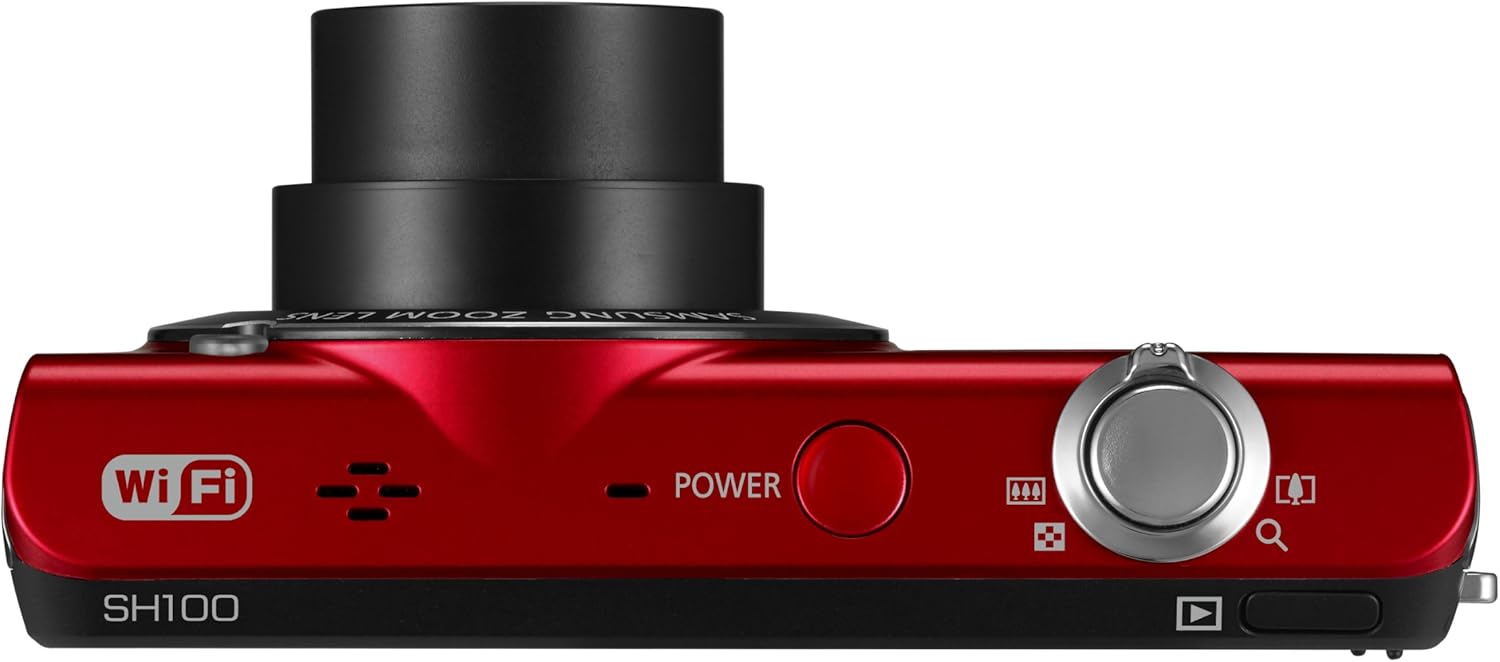
Setšoantšo sa 3.1: Holimo view of the camera, highlighting the power button.
Tobetsa ea MATLA konopo e ka hodimo ho khamera ho e bulela kapa ho e tima.
4. Ho sebetsa Khamera
4.1. Litšoantšo tsa motheo
- Bulela khamera.
- Frame your shot using the 3-inch LCD touchscreen.
- Tobetsa konopo ea shutter bohareng hore u tsepamise maikutlo, ebe u nka setšoantšo ka botlalo.
4.2. Using the Smart Touch Interface

Setšoantšo sa 4.1: Ka morao view of the camera, showing the Smart Touch interface.
The 3-inch LCD touchscreen allows for intuitive navigation similar to a smartphone. Use the included touch pen or your finger to tap icons, drag, and scroll through menus and images. The "Home" icon provides quick access to the main menu.
4.3. Smart Auto 2.0
The Smart Auto 2.0 feature automatically analyzes the scene and selects the most appropriate shooting mode from 17 photo modes and 4 movie modes to ensure optimal image quality.
4.4. Face, Smile, and Blink Detection
This feature detects up to nine faces in a frame, adjusting lighting for optimal results. The camera can be set to automatically capture a photo when subjects smile or laugh, and prevent a shot if anyone's eyes are closed.
4.5. Digital Image Stabilization
Digital Image Stabilization (DIS) helps reduce blur caused by camera shake, especially in low light conditions or when using the zoom. This feature digitally corrects image data before it is recorded.
4.6. Wi-Fi Connectivity and Sharing
The EC-SH100's integrated Wi-Fi allows for direct sharing:
- Ho arolelana sechabeng: Upload photos and videos directly to Facebook, Picasa, or YouTube.
- Lengolo-tsoibila: Send photos directly from the camera via email.
- Kaofela ho Abelana: Wirelessly connect to a compatible Samsung TV to view linepe le livideo.
- PC Auto Backup: Automatically transfer photos and videos to your PC when within range of a configured Wi-Fi network. The camera will power off after backup to conserve energy.
4.7. Magic Frame
Use Magic Frame to combine two photos using predefined templates, creating unique visual effects and poster-quality images.
4.8. Hole Viewmohlahisi
When paired with a compatible Samsung Galaxy Phone, the Remote Viewfinder feature allows you to preview images and control the camera's zoom remotely using your smartphone. This also enables geo-tagging of images if your smartphone has GPS.
5. Tlhokomelo
5.1. Ho hloekisa Khamera
- Sebelisa lesela le bonolo, le omeletseng ho hloekisa 'mele oa khamera.
- For the lens and LCD screen, use a specialized lens cleaning cloth and solution. Avoid harsh chemicals.
5.2. Tlhokomelo ea Battery
- Boloka betri sebakeng se phodileng, se omileng ha e sa sebelisoe.
- Qoba ho beha betri ka har'a mocheso o feteletseng.
- Charge the battery regularly, even if the camera is not used frequently, to maintain its lifespan.
5.3. Lintlafatso tsa Firmware
Periodically check the Samsung support website for available firmware updates for your camera. Firmware updates can improve performance and add new features. Follow the instructions provided by Samsung carefully when performing an update, typically involving connecting the camera to a computer.
6. Ho rarolla mathata
- Khamera ha e bule: Netefatsa hore betri e tjhajilwe ka botlalo mme e kentswe ka nepo.
- Cannot take photos/videos: Verify that a microSD card is inserted and has sufficient free space.
- Litšoantšo tse lerootho: Ensure Digital Image Stabilization is active. Hold the camera steady. In low light, use a tripod if possible.
- Poor video audio: Ensure the microphone is not obstructed. Note that some users have reported limited audio quality in video recordings.
- Mathata a khokahano ea Wi-Fi: Check your Wi-Fi network settings and ensure the camera is within range. Re-enter network passwords if necessary.
- Camera turns on by itself: The power button may be accidentally pressed if the camera is stored in a tight space like a purse. Ensure the camera is stored in a way that prevents accidental button presses.
7. Litlhaloso
| Litekanyo tsa Sehlahisoa | 3.66 x 0.75 x 2.13 inch (W x D x H) |
| Boima ba Ntho | 3.84 lik'hilograma |
| Sensor sa setšoantšo | 14.2 Megapixels CCD |
| Optical Zoom | 5x |
| Lense | 26mm Samsung lens, 4.7-23.5mm (35mm equivalent: 26-130mm) |
| Maximum Aperture | f/3.3-5.9 |
| Pontšo | 3-inch LCD Touchscreen |
| Ho tsitsisa setšoantšo | Digital, Optical |
| Sehopotso sa ka Hare | 6.9 MB |
| Mehopolo ea kantle | karete ea microSD ho fihlela ho 8 GB |
| Betri | Rechargeable Lithium-Ion (e kenyelelitsoe) |
| E tšehelitsoe File Sebopeho | MP4 (Video) |
| Khokahano | Wi-Fi, USB |
| Tšebelisano ea Tsamaiso ea Ts'ebetso | Windows 2000, XP, Vista, 7; Mac OS X 10.3 or higher |
8. Tiisetso le Tšehetso
8.1. Tiisetso e fokolang
The Samsung EC-SH100 Wi-Fi Digital Camera is backed by a one-year limited warranty on parts and labor. Please refer to the warranty card included in your product package for full terms and conditions.
8.2. Tšehetso ea Bareki
For further assistance, technical support, or to download the latest drivers and firmware, please visit the official Samsung support website. You may also refer to the User Manual CD-ROM and Quick Start Manual provided with your camera.


